1. บทนำ
This manual provides detailed instructions for the setup, operation, and maintenance of your Ipega PG-9076 Wireless Game Controller. Please read this manual carefully before use to ensure proper functionality and to maximize your gaming experience. This controller is designed for compatibility with Android, iOS, and Windows devices.
2. สินค้าหมดview
The Ipega PG-9076 controller features a design similar to an Xbox controller, incorporating standard gaming buttons along with additional multimedia controls. It includes a retractable phone holder for mobile gaming.
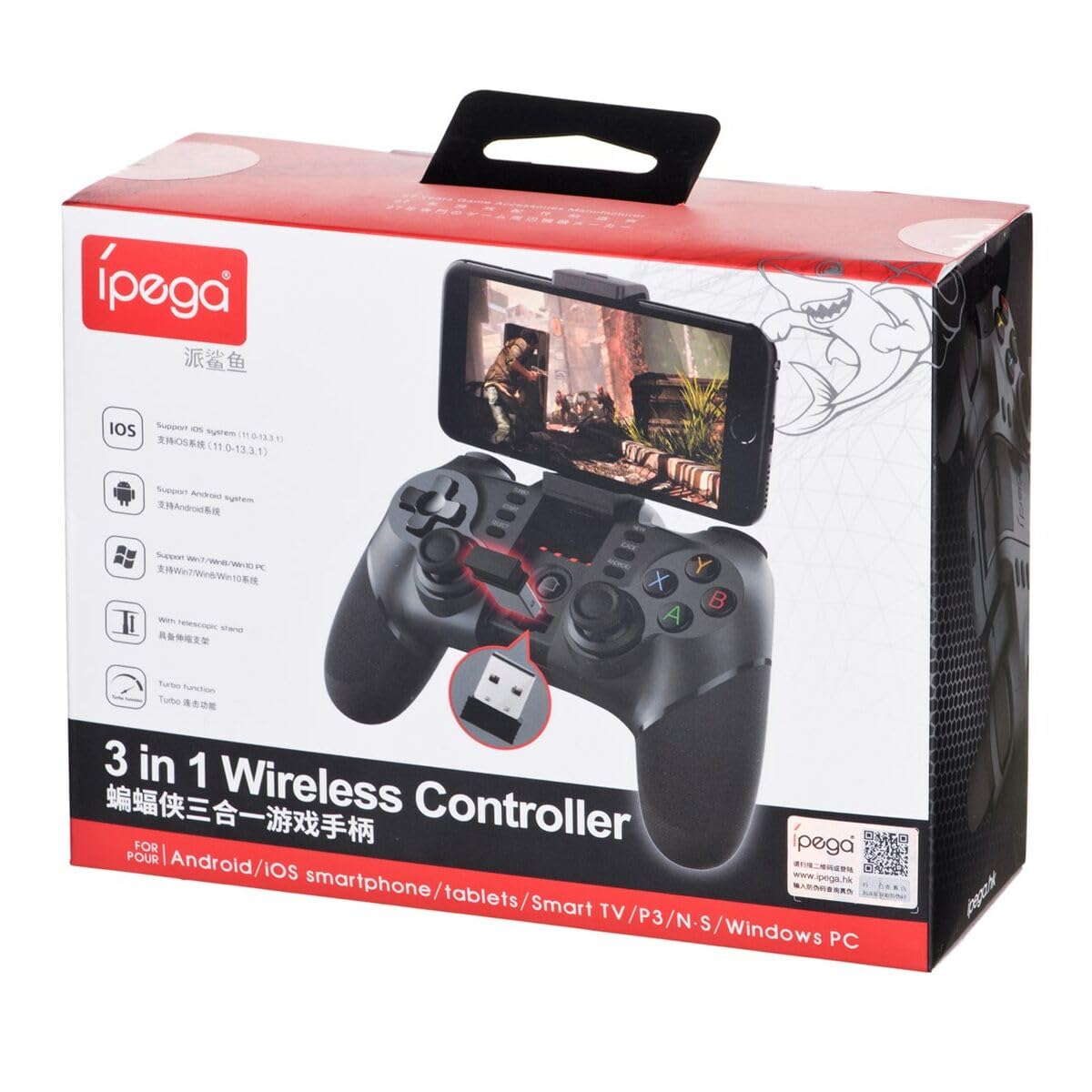
Figure 2.1: Ipega PG-9076 controller with a smartphone mounted, showcasing its mobile gaming capability.

รูปที่ 2.2 : ด้านหน้า view of the controller, highlighting the dual analog sticks, D-pad, action buttons (A, B, X, Y), and mode selection buttons (SELECT, START, ANDROID, IOS, TURBO, CLEAR).

รูปที่ 2.3: ด้านหลัง view of the controller, displaying the product label with model number, input specifications, and a QR code for additional information or support.
คุณสมบัติหลัก:
- Bluetooth 3.0 connectivity for wireless operation.
- Integrated multimedia buttons (volume, play/pause, track control).
- Retractable phone holder, accommodating devices up to 9 cm wide.
- Compatible with Android (3.2+), iOS (4.3+), and Windows.
- Built-in 380 mAh rechargeable battery.
3. การตั้งค่าและการเชื่อมต่อ
Before first use, ensure the controller is fully charged. Refer to Section 5 for charging instructions.
3.1. Pairing with Android Devices
- โปรดตรวจสอบให้แน่ใจว่าได้เปิดใช้งานบลูทูธบนอุปกรณ์ Android ของคุณแล้ว
- บนตัวควบคุม ให้กด . ค้างไว้ แอนดรอยด์ กดปุ่มพร้อมกัน บ้าน button until the indicator light flashes rapidly.
- On your Android device, search for Bluetooth devices and select "PG-9076" to pair.
- Once paired, the indicator light on the controller will remain solid.
3.2 การจับคู่กับอุปกรณ์ iOS
- ตรวจสอบให้แน่ใจว่าอุปกรณ์ iOS ของคุณเปิดใช้งานบลูทูธแล้ว
- บนตัวควบคุม ให้กด . ค้างไว้ ระบบปฏิบัติการ iOS กดปุ่มพร้อมกัน บ้าน button until the indicator light flashes rapidly.
- On your iOS device, search for Bluetooth devices and select "PG-9076" to pair.
- Once paired, the indicator light on the controller will remain solid.
3.3. การเชื่อมต่อกับพีซี Windows
The controller can be connected to a Windows PC via Bluetooth or USB cable.
3.3.1. การเชื่อมต่อบลูทูธ (พีซี)
- ตรวจสอบให้แน่ใจว่าพีซีของคุณเปิดใช้งานบลูทูธแล้ว
- บนตัวควบคุม ให้กด . ค้างไว้ เริ่ม กดปุ่มพร้อมกัน บ้าน button until the indicator light flashes rapidly.
- On your PC, go to Bluetooth settings, search for devices, and select "PG-9076" to pair.
- Once paired, the indicator light on the controller will remain solid.
3.3.2. USB Cable Connection (PC)
- เชื่อมต่อตัวควบคุมเข้ากับคอมพิวเตอร์ของคุณโดยใช้สาย USB ที่ให้มา
- คอมพิวเตอร์ควรตรวจจับและติดตั้งไดรเวอร์ที่จำเป็นโดยอัตโนมัติ
- Configuration within the operating system and individual games may be required for optimal performance.

Figure 3.1: The USB dongle (if included with your model) can be inserted into the controller for wireless connection to devices that do not have built-in Bluetooth, such as some PCs or Smart TVs.

Figure 3.2: The included USB cable is used for charging the controller and can also be used for a wired connection to a PC.
4. โหมดการทำงาน
The PG-9076 supports various gaming modes depending on the connected device and game type.
4.1. Android Gaming
- Supports most games with 'Arcade Mode' (often indicated by a controller symbol).
- Compatible with various simulator games.
- Ensure your Android OS is version 3.2 or newer.
4.2. iOS Gaming
- Compatible with games that support 'iCade' mode.
- Ensure your iOS is version 4.3 or newer.
4.3. Windows PC Gaming
- Can be used via Bluetooth or USB cable.
- System and in-game configuration may be necessary for full compatibility and optimal control mapping.
4.4. ฟังก์ชั่นมัลติมีเดีย
The controller includes dedicated multimedia buttons for:
- Volume control (up/down)
- เล่น/หยุดชั่วคราว
- Fast forward/Rewind
5. การชาร์จและแบตเตอรี่
The controller is equipped with a rechargeable internal battery.
5.1. คำแนะนำในการชาร์จ
- Connect the provided USB cable to the micro-USB port on the controller.
- Connect the other end of the USB cable to a USB power source (e.g., PC, USB wall adapter).
- ไฟแสดงสถานะการชาร์จจะสว่างขึ้นในระหว่างการชาร์จ และดับลงเมื่อชาร์จเต็ม
5.2. ข้อมูลจำเพาะของแบตเตอรี่
- ความจุแบตเตอรี่ : 380 mAh
- Charging Time: Approximately 2 to 5 hours (may vary based on charger output).
- Operating Autonomy: Up to 12 hours of continuous gameplay.
- Standby Time: Up to 30 days when fully charged.
6. การบำรุงรักษา
เพื่อให้มั่นใจถึงอายุการใช้งานที่ยาวนานและประสิทธิภาพสูงสุดของคอนโทรลเลอร์ของคุณ โปรดปฏิบัติตามแนวทางการบำรุงรักษาดังต่อไปนี้:
- ควรเก็บตัวควบคุมให้แห้งและห่างจากความชื้น
- ควรหลีกเลี่ยงการวางตัวควบคุมไว้ในที่ที่มีอุณหภูมิสูงหรือต่ำเกินไป
- ทำความสะอาดคอนโทรลเลอร์ด้วยผ้านุ่มและแห้ง ห้ามใช้สารเคมีรุนแรงหรือน้ำยาทำความสะอาดที่มีฤทธิ์กัดกร่อน
- ควรเก็บตัวควบคุมไว้ในที่ปลอดภัยเมื่อไม่ได้ใช้งาน เพื่อป้องกันความเสียหายทางกายภาพ
7 การแก้ไขปัญหา
If you encounter issues with your Ipega PG-9076 controller, refer to the following common problems and solutions:
7.1. Controller Does Not Turn On
- Ensure the battery is charged. Connect the controller to a power source and allow it to charge for at least 30 minutes.
- Press and hold the HOME button for a few seconds to attempt to power on.
7.2. ไม่สามารถจับคู่ผ่านบลูทูธได้
- ตรวจสอบให้แน่ใจว่าตัวควบคุมอยู่ในโหมดจับคู่ที่ถูกต้องสำหรับอุปกรณ์ของคุณ (Android, iOS หรือพีซี)
- โปรดตรวจสอบให้แน่ใจว่าได้เปิดใช้งานบลูทูธบนอุปกรณ์ของคุณแล้ว และอุปกรณ์ของคุณสามารถค้นหาได้
- Move the controller closer to your device (within 8 meters).
- ปิดและเปิดบลูทูธของอุปกรณ์ของคุณ จากนั้นลองจับคู่ใหม่อีกครั้ง
- Clear any previous pairings of the controller from your device's Bluetooth list.
7.3. ปุ่มหรือจอยสติ๊กไม่ตอบสนองอย่างถูกต้อง
- ตรวจสอบให้แน่ใจว่าตัวควบคุมชาร์จแบตเตอรี่เต็มแล้ว แบตเตอรี่เหลือน้อยอาจส่งผลต่อประสิทธิภาพการทำงาน
- รีสตาร์ทคอนโทรลเลอร์และอุปกรณ์ของคุณ
- For PC, check in-game settings and system controller configurations.
- Some games, especially those designed for touchscreens, may not fully support external controllers.
8. ข้อมูลจำเพาะ
| คุณสมบัติ | ข้อมูลจำเพาะ |
|---|---|
| แบบอย่าง | พีจี-9076 |
| ยี่ห้อ | อิเปก้า |
| เทคโนโลยีการเชื่อมต่อ | บลูทูธ 3.0 |
| ระยะการทำงาน | สูงสุด 8 เมตร (ไม่มีสิ่งกีดขวาง) |
| กำลังไฟเข้า | กระแสตรง 5V 500 mAh |
| ปฏิบัติการฉบับที่tage | กระแสตรง 3.7 โวลต์ |
| กระแสไฟฟ้าที่ใช้งาน | 30 มิลลิแอมป์ |
| ความจุของแบตเตอรี่ | 380 มิลลิแอมป์ |
| เวลาในการชาร์จ | 2-5 ชั่วโมง |
| Battery Autonomy (Gameplay) | นานถึง 12 ชั่วโมง |
| เวลาสแตนด์บาย | นานถึง 30 วัน |
| คลาสอุปกรณ์amp ความกว้าง | สูงถึง 9 ซม. |
| ขนาดสินค้า | 19.1 x 7.5 x 7.4 ซม. |
| น้ำหนักผลิตภัณฑ์ | 304 กรัม |
| แพลตฟอร์มที่เข้ากันได้ | แอนดรอยด์, ไอโอเอส, วินโดวส์ |
9. การรับประกันและการสนับสนุน
For warranty information, please refer to the terms provided by your retailer at the time of purchase. Extended warranty options may be available from third-party providers.
For technical support or further inquiries, you may scan the QR code located on the back of your controller or visit the official Ipega support channels. The QR code on the product label links to http://weixin.qq.com/r/uUUHHyPERX46rWd89xCr.


