การแนะนำ
This manual provides instructions for the safe and effective use of your T&G TG504 Portable Bluetooth Speaker. Please read it thoroughly before use and retain it for future reference. This speaker is designed for portable audio playback with wireless Bluetooth connectivity and water resistance.
สินค้าเกินview
The T&G TG504 is a cylindrical, portable Bluetooth speaker featuring a robust design and a built-in microphone for hands-free calling. It offers high-definition sound with bass boost and multiple connectivity options.
คุณสมบัติหลัก:
- Portable and Cylindrical Design
- Water Resistant Construction
- Built-in Microphone for Calls
- การเชื่อมต่อไร้สาย Bluetooth
- AUX and USB Port for versatile playback
- Bass Boost and High Definition Sound
- Battery Powered for on-the-go use
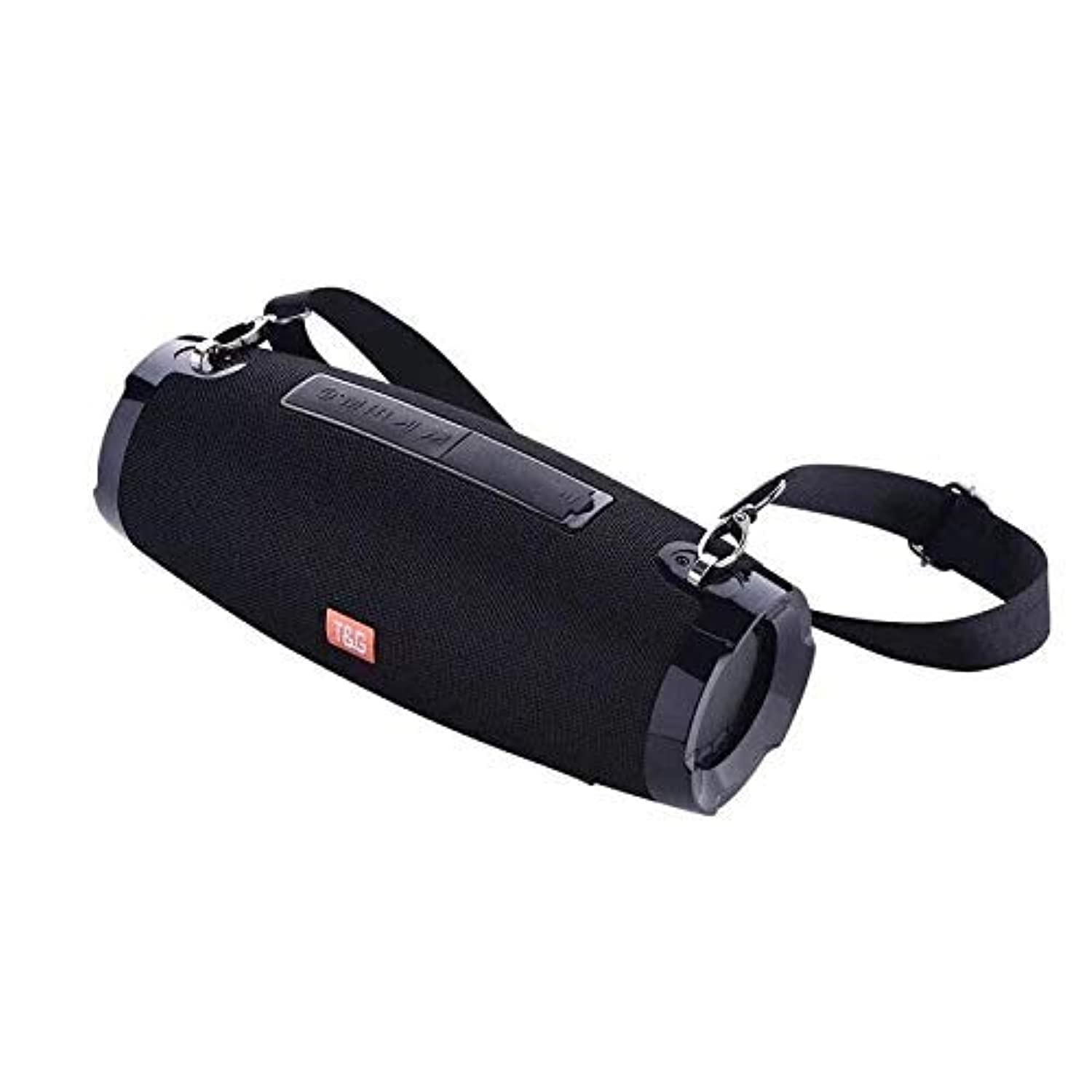
This image shows the T&G TG504 Portable Bluetooth Speaker. It features a black cylindrical design with a mesh grille covering the speaker. The T&G brand logo is visible in orange on the front. The speaker has attachment points on the sides, suggesting portability.
เนื้อหาแพ็คเกจ
- T&G TG504 Portable Bluetooth Speaker
- สาย AUX
- สายชาร์จ USB
- คู่มือการใช้งาน
การควบคุมและตัวบ่งชี้
Familiarize yourself with the speaker's controls and ports for optimal operation.
- ปุ่มเปิด/ปิด: กดค้างไว้เพื่อเปิดหรือปิดลำโพง
- ปุ่มเล่น/หยุดชั่วคราว: กดเพื่อเล่นหรือหยุดเสียงชั่วคราว
- เพิ่มระดับเสียง (+): กดเพื่อเพิ่มระดับเสียง กดค้างไว้เพื่อข้ามไปยังเพลงถัดไป
- ลดเสียงลง (-): กดเพื่อลดระดับเสียง กดค้างไว้เพื่อไปยังเพลงก่อนหน้า
- ปุ่มโหมด (M): กดเพื่อสลับระหว่างโหมด Bluetooth, AUX และ USB
- ปุ่มโทรออก: Press to answer or end a phone call. Hold to reject a call.
- พอร์ต AUX: สำหรับเชื่อมต่อกับอุปกรณ์เสียงแบบใช้สาย
- พอร์ต USB: For playing music from a USB drive or charging other devices (if supported).
- พอร์ตชาร์จ: สำหรับเชื่อมต่อสายชาร์จ USB
- ไฟแสดงสถานะ LED: แสดงสถานะพลังงาน สถานะการชาร์จ และสถานะการจับคู่บลูทูธ
การตั้งค่า
1. ชาร์จลำโพง
- เชื่อมต่อปลายด้านเล็กของสายชาร์จ USB เข้ากับพอร์ตชาร์จของลำโพง
- ต่อปลายด้านใหญ่ของสายชาร์จ USB เข้ากับอะแดปเตอร์แปลงไฟ USB (ไม่ได้รวมอยู่ในชุด) หรือพอร์ต USB ของคอมพิวเตอร์
- ไฟแสดงสถานะ LED จะแสดงสถานะการชาร์จ (เช่น สีแดงขณะชาร์จ ปิดเมื่อชาร์จเต็ม)
- ควรชาร์จแบตเตอรี่จนเต็มประมาณ 3-4 ชั่วโมงก่อนใช้งานครั้งแรก
2. การเปิด/ปิดเครื่อง
- To power on, press and hold the Power button until the LED indicator lights up and you hear an audible prompt.
- To power off, press and hold the Power button again until the LED indicator turns off and you hear an audible prompt.
3. การจับคู่บลูทู ธ
- Ensure the speaker is powered on and in Bluetooth pairing mode (LED indicator will typically flash blue). If not, press the Mode button to switch to Bluetooth mode.
- บนอุปกรณ์เคลื่อนที่ของคุณ (สมาร์ทโฟน แท็บเล็ต แล็ปท็อป) ให้เปิดใช้งาน Bluetooth
- ค้นหา available Bluetooth devices. The speaker will appear as "TG504" or similar.
- Select "TG504" to connect. Once paired, the LED indicator will turn solid blue, and you will hear a confirmation sound.
- ลำโพงจะเชื่อมต่อกับอุปกรณ์ที่จับคู่ไว้ล่าสุดโดยอัตโนมัติเมื่อเปิดเครื่อง หากอุปกรณ์อยู่ในระยะและเปิดใช้งาน Bluetooth ไว้
4. การเชื่อมต่อผ่านช่อง AUX
- Connect one end of the provided AUX cable to the speaker's AUX port.
- Connect the other end of the AUX cable to the headphone jack of your audio device.
- ลำโพงจะเปลี่ยนไปใช้โหมด AUX โดยอัตโนมัติ หรือคุณอาจต้องกดปุ่ม Mode เพื่อเลือก AUX
คำแนะนำการใช้งาน
การเล่นดนตรี
- โหมดบลูทู ธ : Once paired, start playing music on your connected device. Audio will stream through the speaker.
- โหมด AUX: Start playing music on your connected audio device.
- โหมด USB: ใส่แฟลชไดรฟ์ USB พร้อม MP3 files into the USB port. The speaker will automatically detect and play music. Press the Mode button to switch to USB mode if needed.
- ใช้ปุ่มเล่น/หยุดชั่วคราวบนลำโพงหรืออุปกรณ์ของคุณเพื่อควบคุมการเล่น
การปรับระดับเสียง
- กดปุ่มเพิ่มระดับเสียง (+) เพื่อเพิ่มระดับเสียง
- กดปุ่มลดระดับเสียง (-) เพื่อลดระดับเสียง
- Volume can also be adjusted from your connected device.
Handling Calls (Bluetooth Mode)
- รับสาย: When a call comes in, press the Call button once to answer.
- วางสาย: During a call, press the Call button once to end the call.
- ปฏิเสธสาย: When a call comes in, press and hold the Call button to reject it.
- โทรซ้ำหมายเลขล่าสุด: In standby mode, double-press the Call button to redial the last number.
การควบคุมด้วยเสียง
The speaker supports voice control. Depending on your connected device, you may be able to activate your device's voice assistant (e.g., Siri, Google Assistant) by pressing and holding the Play/Pause button (or a dedicated voice button if available) for a few seconds.
การซ่อมบำรุง
การทำความสะอาด
- เช็ดลำโพงด้วยผ้าแห้งนุ่มๆ
- ห้ามใช้สารทำความสะอาดที่มีฤทธิ์กัดกร่อน แอลกอฮอล์ หรือตัวทำละลายเคมี
พื้นที่จัดเก็บ
- เก็บลำโพงไว้ในที่แห้งและเย็น หลีกเลี่ยงแสงแดดโดยตรงและอุณหภูมิที่สูงหรือต่ำเกินไป
- หากจัดเก็บเป็นเวลานาน ควรชาร์จแบตเตอรี่เป็นระยะๆ เพื่อรักษาอายุการใช้งาน
การดูแลความต้านทานต่อน้ำ
- ตรวจสอบให้แน่ใจว่าฝาปิดพอร์ตทั้งหมดปิดอย่างแน่นหนา ก่อนที่จะนำลำโพงไปสัมผัสน้ำ
- Do not submerge the speaker in water. Water resistance protects against splashes and light rain, not full immersion.
- After exposure to water, wipe the speaker dry before charging or opening port covers.
การแก้ไขปัญหา
หากคุณพบปัญหาเกี่ยวกับลำโพง โปรดดูตารางต่อไปนี้สำหรับปัญหาและวิธีแก้ไขที่พบบ่อย
| ปัญหา | สาเหตุที่เป็นไปได้ | สารละลาย |
|---|---|---|
| ลำโพงไม่เปิด | แบตเตอรี่อ่อน; กดปุ่มเปิด/ปิดไม่ถูกต้อง | ชาร์จลำโพง กดปุ่มเปิด/ปิดค้างไว้ 3-5 วินาที |
| ไม่สามารถจับคู่ผ่านบลูทูธได้ | ลำโพงไม่ได้อยู่ในโหมดจับคู่ อุปกรณ์ Bluetooth ปิดอยู่ ลำโพงอยู่ห่างจากอุปกรณ์มากเกินไป | Ensure speaker LED is flashing blue; Turn on Bluetooth on your device; Move speaker closer to device (within 10 meters). |
| ไม่มีเสียง | ระดับเสียงต่ำเกินไป; เลือกโหมดไม่ถูกต้อง; อุปกรณ์ไม่เล่นเสียง | เพิ่มระดับเสียงของลำโพงและอุปกรณ์ กดปุ่มโหมดเพื่อเลือกอินพุตที่ถูกต้อง ตรวจสอบให้แน่ใจว่าเสียงกำลังเล่นบนอุปกรณ์ของคุณ |
| การบิดเบือนเสียง | เสียงดังเกินไป, แบตเตอรี่อ่อน, สัญญาณรบกวน | Reduce volume; Charge the speaker; Move away from other wireless devices. |
| ไมโครโฟนไม่ทำงาน | Not in call mode; Microphone blocked | Ensure you are on a call; Check for obstructions around the microphone. |
ข้อมูลจำเพาะ
| ชื่อรุ่น | TG504 |
| ยี่ห้อ | ทีแอนด์จี |
| สี | สีดำ |
| รูปร่าง | รูปทรงกระบอก |
| น้ำหนักสินค้า | 735 grams (approx. 1 kg / 2.2 pounds) |
| กำลังขับสูงสุดของลำโพง | 10 วัตต์ |
| เทคโนโลยีการเชื่อมต่อ | Bluetooth, Auxiliary (AUX) |
| เทคโนโลยีการสื่อสารไร้สาย | บลูทูธ |
| ทนน้ำ | ใช่ |
| แหล่งพลังงาน | ใช้พลังงานจากแบตเตอรี่ |
| วิธีการควบคุม | เสียง |
| โหมดเอาต์พุตเสียง | ล้อมรอบ |
| ประเภทการติดตั้ง | โต๊ะวางของ |
| อุปกรณ์ที่รองรับ | แท็บเล็ต แล็ปท็อป สมาร์ทโฟน |
| คุณสมบัติพิเศษ | Bass Boost, High Definition Sound, Water Resistant, USB Port |
| ส่วนประกอบที่รวมอยู่ | สาย AUX |
ข้อมูลด้านความปลอดภัย
- ห้ามให้ลำโพงสัมผัสกับอุณหภูมิที่สูงหรือต่ำเกินไป แสงแดดโดยตรง หรือความชื้นสูง
- หลีกเลี่ยงการทำตกหรือให้ลำโพงได้รับแรงกระแทกรุนแรง
- เก็บลำโพงให้ห่างจากเด็กและสัตว์เลี้ยง
- ห้ามถอดประกอบ ซ่อมแซม หรือดัดแปลงลำโพงด้วยตนเอง การกระทำดังกล่าวจะทำให้การรับประกันเป็นโมฆะ และอาจก่อให้เกิดความเสียหายหรืออันตรายได้
- ใช้เฉพาะสายชาร์จที่ระบุไว้และอะแดปเตอร์แปลงไฟที่ใช้งานร่วมกันได้เท่านั้น
- Do not use the speaker near water sources if port covers are not securely closed.
- การฟังที่ระดับเสียงสูงเป็นเวลานานอาจทำให้สูญเสียการได้ยิน
การรับประกันและการสนับสนุน
Specific warranty details are not provided in the product information. For warranty claims or technical support, please refer to the retailer or manufacturer's official website where you purchased the product. Keep your proof of purchase for any warranty-related inquiries.


