1. บทนำ
Thank you for choosing the Bewinner Power Failure Alarm. This device is designed to alert you immediately in the event of a power outage or failure, ensuring you are aware of any interruptions to your electrical supply. Its loud siren and LED indicator provide clear warnings, making it ideal for monitoring critical appliances or areas where continuous power is essential.
2. ข้อมูลด้านความปลอดภัย
- เล่มที่tagความเข้ากันได้: This alarm is designed for 220V power systems. Ensure your power outlet matches this voltage to prevent damage to the device or electrical hazards.
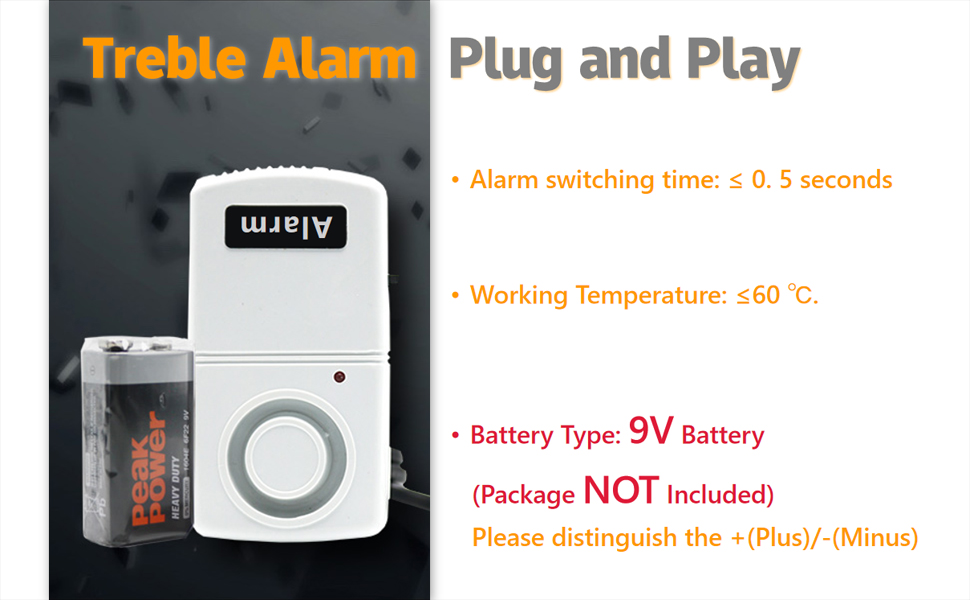
- การติดตั้งแบตเตอรี่: Always install the 9V battery with correct polarity (+/-). Incorrect installation can damage the device.
- สำหรับใช้ภายในอาคารเท่านั้น: This device is intended for indoor use in dry environments. Do not expose it to water, moisture, or extreme temperatures.
- เก็บให้พ้นมือเด็ก: The alarm produces a loud sound which may be harmful to young children's hearing if they are too close.
- การซ่อมบำรุง: Do not attempt to open or repair the device yourself. Refer to qualified personnel for any servicing needs.
- การกำจัด: กำจัดแบตเตอรี่และอุปกรณ์ตามกฎระเบียบท้องถิ่น
3. เนื้อหาบรรจุภัณฑ์
กรุณาตรวจสอบแพ็คเกจสำหรับรายการต่อไปนี้:
- Bewinner Power Failure Alarm Unit (1)
- คู่มือการใช้งาน (1)
Note: A 9V battery is required for operation and is ไม่รวมอยู่ ในแพ็คเกจ
4. สินค้าหมดview
Familiarize yourself with the components of your Bewinner Power Failure Alarm:
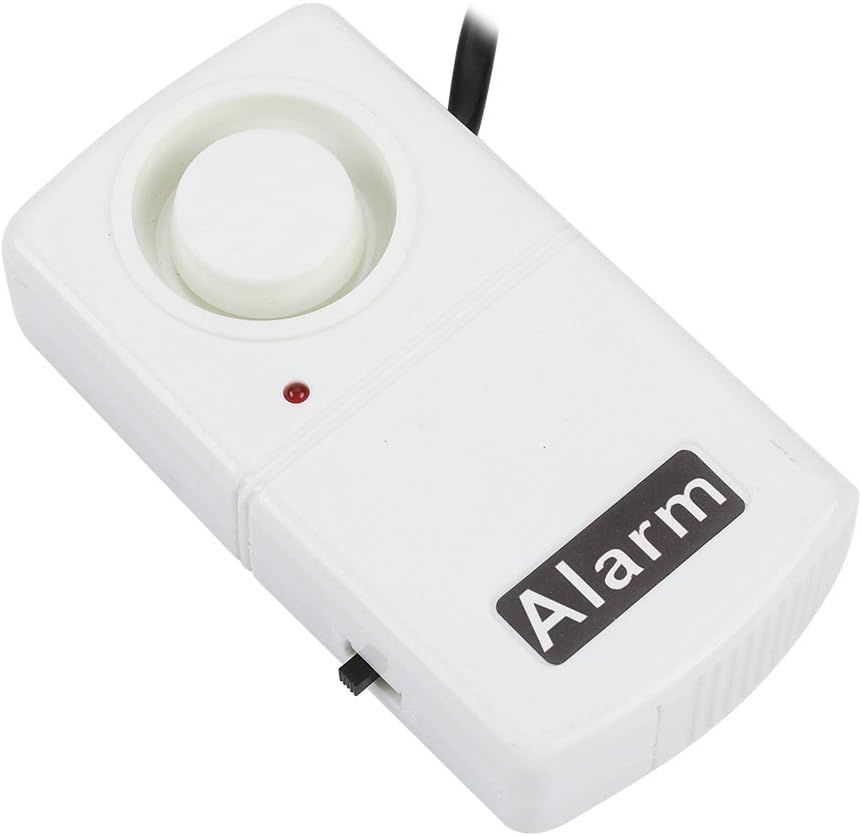
- ไซเรน: Emits a loud audible alarm during a power failure.
- ไฟแสดงสถานะ LED: A small light that indicates the power status.
- ปลั๊กไฟ: Integrated plug for connecting to a 220V power outlet.
- สวิตช์เปิด/ปิด: Located on the side, this switch manually mutes or activates the alarm.
- ช่องใส่แบตเตอรี่: Located at the bottom, accessible via a drawer-type cover for 9V battery installation.


5. การตั้งค่า
5.1. การติดตั้งแบตเตอรี่
- Locate the drawer-type battery cover on the bottom of the alarm unit (refer to Figure 4.3).
- เลื่อนเปิดฝาครอบแบตเตอรี่
- Insert a new 9V battery, ensuring the correct polarity (+ and - terminals match the markings inside the compartment).
- ปิดฝาครอบแบตเตอรี่ให้แน่น
5.2. กำลังเชื่อมต่อกับพลังงาน
- Ensure the ON/OFF switch on the side of the alarm is in the "OFF" position to prevent immediate alarming.
- Plug the alarm's integrated power plug directly into a standard 220V CN power outlet.
- Note: While the product is specified for 220V CN plugs, some models or regional versions may feature different plug types (e.g., US standard). Always verify the plug type and voltage compatibility with your local electrical system before plugging in. An adapter or converter may be required for international use.

6. คู่มือการใช้งาน
6.1. การเปิดใช้งานสัญญาณเตือนภัย
- After installing the battery and plugging the unit into a live power outlet, slide the ON/OFF switch to the "ON" position.
- The LED indicator should light up, signifying that the alarm is active and monitoring the power supply.

6.2. Power Failure Detection
When the power supply to the outlet is interrupted (e.g., due to a power outage, tripped breaker, or accidental unplugging), the alarm will immediately sound a loud siren (approximately 120dB) and the LED indicator may flash or change state, depending on the specific model.

6.3. การปิดเสียงนาฬิกาปลุก
To silence the alarm after a power failure, simply slide the ON/OFF switch to the "OFF" position. The alarm will cease sounding. Once power is restored, you can slide the switch back to "ON" to reactivate monitoring.
7. การบำรุงรักษา
7.1. การเปลี่ยนแบตเตอรี่
The 9V battery provides backup power for the alarm function during an outage. It is recommended to replace the battery annually or if you notice the alarm's volume decreasing during tests. To replace:
- Unplug the alarm from the power outlet.
- เลื่อนสวิตช์เปิด/ปิดไปที่ตำแหน่ง "ปิด"
- Open the battery compartment (refer to Section 5.1).
- Remove the old 9V battery and insert a new one, observing correct polarity.
- Close the battery compartment, plug the alarm back in, and switch it to "ON".
7.2. การทำความสะอาด
Wipe the exterior of the alarm with a soft, dry cloth. Do not use liquid cleaners or abrasive materials.
8 การแก้ไขปัญหา
| ปัญหา | สาเหตุที่เป็นไปได้ | สารละลาย |
|---|---|---|
| Alarm does not sound during power failure. |
|
|
| LED indicator does not light up when plugged in and switched "ON". |
|
|
| Alarm sounds continuously even with power. |
|
|
9. ข้อมูลจำเพาะ
| คุณสมบัติ | รายละเอียด |
|---|---|
| หมายเลขรุ่น | Bewinner1iv0ts4hg5 |
| ยี่ห้อ | บีวินเนอร์ |
| เล่มที่tage | 220 โวลต์ |
| ระดับเสียง | 120 เดซิเบล |
| แหล่งพลังงาน | Battery Powered (9V battery, not included) |
| วิธีการควบคุม | Touch (ON/OFF switch) |
| ประเภทการติดตั้ง | ติดผนัง |
| เทคโนโลยีเซ็นเซอร์ | เล่มที่tage เซนเซอร์ |
| ขนาดสินค้า | ขนาด 2.1 นิ้ว (ยาว) x 1 นิ้ว (กว้าง) x 3.9 นิ้ว (สูง) (5.3 ซม. x 1 ซม. x 10 ซม.) |
| น้ำหนักสินค้า | 3.2 ออนซ์ |
| สี | สีขาว |

10. การรับประกันและการสนับสนุน
For warranty information, technical support, or customer service inquiries, please refer to the product packaging or contact the manufacturer directly through their official webหรือร้านค้าที่ซื้อสินค้า โปรดเก็บใบเสร็จรับเงินไว้เป็นหลักฐานการซื้อ
