1. บทนำ
The Edifier S3000Pro Audiophile Active Speakers are designed to deliver high-fidelity audio with versatile connectivity options. Featuring Bluetooth 5.0 with aptX HD, USB audio, planar diaphragm tweeters, and 6.5-inch woofers, these speakers offer a premium listening experience. The innovative KleerNet wireless technology allows for a wire-free connection between the left and right speakers, providing flexible placement without compromising sound quality.
2. เนื้อหาบรรจุภัณฑ์
โปรดตรวจสอบให้แน่ใจว่ามีสินค้าทั้งหมดอยู่ในแพ็คเกจ:
- Edifier S3000Pro Speakers (1 pair)
- รีโมทคอนโทรล
- สายไฟ
- สาย USB
- สายใยแก้วนำแสง
- สายสัญญาณเสียง RCA ถึง RCA
- สายสัญญาณเสียง 3.5 มม. ถึง RCA
- คู่มือการใช้งาน
3. การตั้งค่าและการเชื่อมต่อ
The Edifier S3000Pro speakers are designed for easy setup. The left and right speakers connect wirelessly to each other, eliminating the need for a speaker cable between them. Each speaker requires its own power connection.
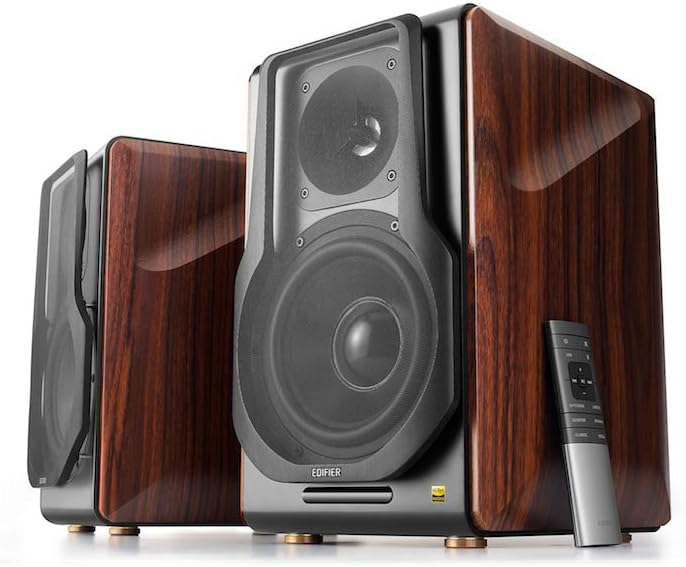
Figure 3.1: Edifier S3000Pro Speakers and Remote Control.
3.1 การจัดวางลำโพง
Place the speakers in your desired listening area. Due to their wireless inter-speaker connection, you have flexibility in positioning them. Ensure each speaker is near a power outlet.

รูปที่ 3.2: อดีตample placement of Edifier S3000Pro speakers in a room.
3.2 การเชื่อมต่อสายไฟ
Connect the included power cables to each speaker and then to a wall outlet. The speakers will automatically attempt to pair with each other upon power-on.
3.3 การเชื่อมต่ออินพุตเสียง
The active (right) speaker features a variety of input ports:
- Bluetooth 5.0 with aptX HD: สำหรับการสตรีมเสียงแบบไร้สายจากอุปกรณ์ที่รองรับ
- ยูเอสบีเสียง: Connect directly to a computer for high-resolution audio playback.
- ออปติคอล: For digital audio connection from TVs, game consoles, etc.
- โคแอกเซียล: อีกหนึ่งตัวเลือกสำหรับรับสัญญาณเสียงดิจิทัล
- สายต่อเข้า (RCA): Standard analog input for various audio sources.
- สมดุล (XLR): Professional-grade input for balanced audio signals.

Figure 3.3: Rear panel of the active speaker with various input options.
3.4 Wireless Inter-Speaker Connection
The S3000Pro utilizes KleerNet wireless technology for lossless audio transmission between the left and right speakers. This connection is established automatically. If re-pairing is ever needed, refer to the troubleshooting section.
Video 3.1: Official Edifier S3000Pro Audiophile Active Speakers overviewโดยแสดงให้เห็นถึงคุณสมบัติหลักและการเชื่อมต่อต่างๆ
4. คู่มือการใช้งาน
Control your S3000Pro speakers using the included wireless remote or the controls located on the active (right) speaker.
4.1 ฟังก์ชั่นการควบคุมระยะไกล

Figure 4.1: The wireless remote control for Edifier S3000Pro speakers.
- ปุ่มเปิด/ปิด: เปิดหรือปิดลำโพง
- การควบคุมระดับเสียง: ปรับระดับเสียงโดยรวม
- ปิดเสียง: ปิดเสียงหรือเปิดเสียงเอาต์พุตเสียง
- การเลือกอินพุต: Dedicated buttons for USB, Bluetooth, Optical/Coaxial, and Line/Balanced inputs.
- การควบคุมการเล่น: Play/Pause, Skip Forward, Skip Backward (for Bluetooth and USB modes).
- โหมดเสียง: Buttons for Monitor, Dynamic, Classic, and Vocal sound profiles.
4.2 ปุ่มควบคุมบนลำโพง
The active speaker features rotary knobs for direct control:
- Volume/Input Selection: Rotate to adjust volume; press to cycle through inputs.
- การควบคุมเสียงแหลม: ปรับเอาท์พุตความถี่สูง
- การควบคุมเสียงเบส: ปรับเอาท์พุตความถี่ต่ำ
5. คุณสมบัติและการออกแบบ
The S3000Pro speakers are crafted with both acoustic performance and aesthetic appeal in mind.
5.1 การออกแบบด้านเสียง
- ทวีตเตอร์แบบไดอะแฟรมระนาบ: Deliver clear, detailed high frequencies.
- 6.5-inch Aluminum Alloy Woofers: Provide powerful and accurate bass response.
- ในตัว Ampเครื่องฟอก: Each speaker features a 78 watts amplifier, eliminating the need for external ampการทำให้เป็นกรด
- เสียงความละเอียดสูง: Supports higher bit depth and sample rates (96 kHz or higher) for superior sound quality.
5.2 Construction and Aesthetics
The speaker cabinets are constructed from high-quality MDF (Medium-Density Fiberboard) with a brown wood finish, offering both durability and a classic aesthetic. The front features a matt black finish with removable cloth grilles.

รูปที่ 5.1 : ด้านหน้า view highlighting the drivers and finish.

รูปที่ 5.2: ด้านข้าง view แสดงasing the wood finish.
6. การบำรุงรักษา
To ensure the longevity and optimal performance of your Edifier S3000Pro speakers, follow these maintenance guidelines:
- การทำความสะอาด: Use a soft, dry cloth to wipe down the speaker cabinets. Avoid using abrasive cleaners, waxes, or solvents.
- ปัดฝุ่น: ควรปัดฝุ่นตะแกรงลำโพงและตัวขับเสียงเป็นประจำด้วยแปรงขนนุ่มหรือเครื่องดูดฝุ่นที่มีหัวแปรง
- การจัดวาง: ควรหลีกเลี่ยงการวางลำโพงในที่ที่มีแสงแดดส่องโดยตรง ใกล้แหล่งความร้อน หรือในบริเวณที่มีความชื้นสูง ควรจัดให้มีการระบายอากาศที่ดีรอบๆ ลำโพง
- การจัดการ: Handle the speakers with care. Avoid pressing on the speaker cones or tweeters.
7 การแก้ไขปัญหา
If you encounter issues with your S3000Pro speakers, refer to the following common solutions:
- ไม่มีเสียง:
- Ensure both speakers are powered on and connected to an electrical outlet.
- Verify the correct input source is selected on the active speaker or remote.
- ตรวจสอบสายสัญญาณเสียงทั้งหมดว่าเชื่อมต่อแน่นดีแล้วหรือไม่
- เพิ่มระดับเสียงทั้งจากลำโพงและแหล่งกำเนิดเสียง
- Speakers Not Pairing Wirelessly:
- Ensure both speakers are powered on. The wireless connection between them is factory-paired and should resume automatically.
- If the wireless connection fails, locate the small "Pair" button on the back panel of both the active (R) and passive (L) speakers. Press and hold the "Pair" button on the active speaker first, then on the passive speaker. The LED indicator on the passive speaker will blink rapidly during pairing.
- ปัญหาการเชื่อมต่อบลูทูธ:
- Ensure the speakers are in Bluetooth input mode.
- Delete the "Edifier S3000Pro" from your device's Bluetooth list and attempt to re-pair.
- Move your Bluetooth device closer to the speakers to reduce interference.
- เสียงผิดเพี้ยน:
- ลดระดับเสียงทั้งลำโพงและแหล่งกำเนิดเสียง
- ตรวจสอบสายสัญญาณเสียงว่ามีการชำรุดหรือมีการเชื่อมต่อหลวมหรือไม่
- ตรวจสอบให้แน่ใจว่าแหล่งกำเนิดเสียงไม่ได้ส่งสัญญาณเกินกำลังอินพุต
8. ข้อมูลจำเพาะ
| คุณสมบัติ | ข้อมูลจำเพาะ |
|---|---|
| ยี่ห้อ | เครื่องช่วยสอน |
| ชื่อรุ่น | S3000PRO |
| ประเภทลำโพง | ชั้นวางหนังสือ |
| วัสดุ | เอ็มดีเอฟ |
| เทคโนโลยีการเชื่อมต่อ | บลูทูธ, ยูเอสบี |
| เทคโนโลยีการสื่อสารไร้สาย | บลูทูธ |
| เวอร์ชันบลูทูธ | 5.0 พร้อม aptX HD |
| เส้นผ่านศูนย์กลางวูฟเฟอร์ | 6.5 นิ้ว |
| ประเภททวีตเตอร์ | Planar Diaphragm |
| กำลังขับสูงสุดของลำโพง | 256 วัตต์ |
| อัตราส่วนสัญญาณต่อเสียงรบกวน | 85 เดซิเบล |
| ขนาดสินค้า | ลึก 21.6 นิ้ว x กว้าง 13.4 นิ้ว x สูง 17.3 นิ้ว |
| น้ำหนักสินค้า | 3.3 ปอนด์ (1.5 กิโลกรัม) |
| ส่วนประกอบที่รวมอยู่ | สินค้า คู่มือ |
9. การรับประกันและการสนับสนุน
The Edifier S3000Pro speakers come with a full warranty. For detailed warranty information, product registration, or technical support, please visit the official Edifier webหรือติดต่อฝ่ายบริการลูกค้า เก็บใบเสร็จรับเงินไว้เพื่อใช้ในการเคลมประกัน
หากต้องการความช่วยเหลือเพิ่มเติม คุณสามารถไปที่ ร้าน Edifier บน Amazon.


