การแนะนำ
This manual provides essential instructions for the safe and effective use of your Turtlebox Speaker Replacement Charger (Gen 1). Please read this manual thoroughly before use and retain it for future reference.
ข้อมูลด้านความปลอดภัย
- Use only the specified charger for your Turtlebox Gen 1 speaker.
- อย่าให้ที่ชาร์จสัมผัสกับอุณหภูมิที่สูงเกินไปหรือถูกแสงแดดโดยตรง
- Keep the charger away from water or liquids. Ensure the speaker's charging port cover is securely closed when not charging to maintain its waterproof integrity.
- อย่าพยายามถอดประกอบหรือดัดแปลงเครื่องชาร์จ
- ถอดปลั๊กเครื่องชาร์จออกจากเต้าเสียบไฟฟ้าเมื่อไม่ได้ใช้งานหรือในช่วงที่มีพายุฝนฟ้าคะนอง
เนื้อหาแพ็คเกจ
- 1 x Turtlebox Replacement Charger (Gen 1)
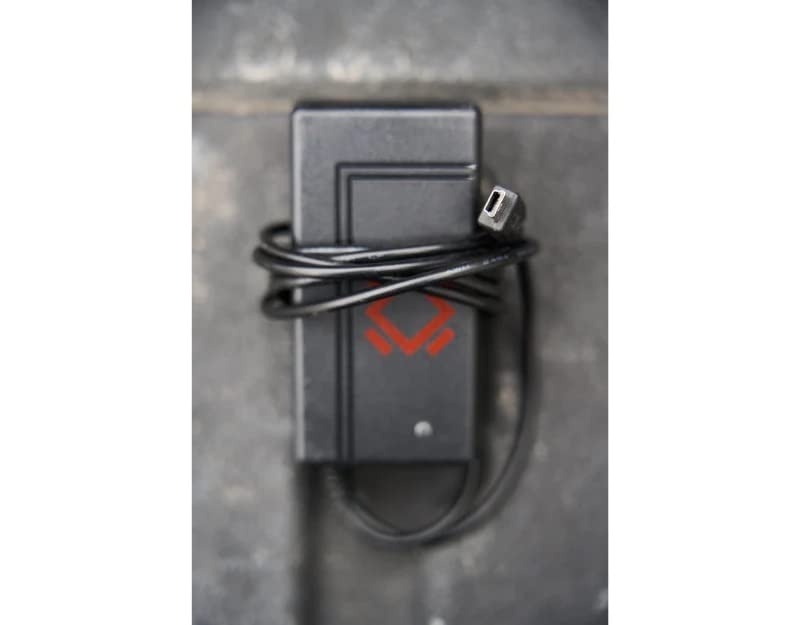
This image displays the Turtlebox Gen 1 Replacement Charger, a compact black power adapter with an attached cable ending in a barrel connector. The charger features the Turtlebox logo.
การตั้งค่า
- ค้นหาพอร์ตการชาร์จ: On your Turtlebox Gen 1 speaker, find the waterproof cover on the side or back panel. Open this cover to reveal the charging port.
- เชื่อมต่อเครื่องชาร์จ: Insert the barrel connector of the replacement charger into the charging input port on your Turtlebox speaker.
- เสียบปลั๊กไฟ: Plug the charger's power adapter into a standard 110V AC wall outlet.
This video demonstrates the physical characteristics of the charger and how it connects to the speaker. It highlights the barrel connector and the power adapter, showing the process of plugging it into a wall outlet.
การดำเนินงาน
Once connected to power, the charging indicator lights on your Turtlebox speaker will illuminate, typically showing green LEDs to indicate the battery level and charging status. Allow the speaker to charge until all indicator lights are solid green, signifying a full charge.
After charging, disconnect the charger from the speaker and the wall outlet. Ensure the waterproof cover on the speaker's charging port is securely closed to maintain its IP67 rating.
การซ่อมบำรุง
- รักษาความสะอาดของที่ชาร์จให้ปราศจากฝุ่นและสิ่งสกปรก ใช้ผ้าแห้งนุ่มๆ ในการทำความสะอาด
- เก็บที่ชาร์จไว้ในที่เย็นและแห้งเมื่อไม่ได้ใช้งาน
- Regularly inspect the charger cable and connector for any signs of damage. If damaged, discontinue use and replace with an official Turtlebox charger.
การแก้ไขปัญหา
| ปัญหา | สาเหตุที่เป็นไปได้ | สารละลาย |
|---|---|---|
| ลำโพงไม่ชาร์จ | Charger not properly connected; Power outlet issue; Damaged charger. | Ensure the charger is fully inserted into the speaker and wall outlet. Test the outlet with another device. Inspect the charger for damage and replace if necessary. |
| ชาร์จช้า | Using a non-standard charger; Power fluctuations. | Ensure you are using the official Turtlebox Gen 1 Replacement Charger. Try a different power outlet. |
ข้อมูลจำเพาะ
- ยี่ห้อ: Turtlebox
- แบบอย่าง: Gen 1 Replacement Charger
- เอาท์พุทเครื่องชาร์จ Voltage: 14 โวลต์
- อินพุตเครื่องชาร์จ: Standard AC Wall Outlet
- วัสดุ: พลาสติก
- น้ำหนักสินค้า: 6.7 ounces (Note: This weight is likely for the speaker, not the charger itself.)
- ขนาดสินค้า : 11.5 x 6.5 x 8.75 inches (Note: These dimensions are likely for the speaker, not the charger itself.)
- ยูพีซี: 861053002621
- ผู้ผลิต: Turtlebox Audio, LLC
การรับประกันและการสนับสนุน
The Turtlebox Speaker Replacement Charger (Gen 1) comes with a Limited Warranty. For specific warranty details, claims, or technical support, please refer to the official Turtlebox Audio, LLC webหรือติดต่อฝ่ายบริการลูกค้าโดยตรง
หากต้องการความช่วยเหลือเพิ่มเติม โปรดไปที่ Turtlebox Store on Amazon.