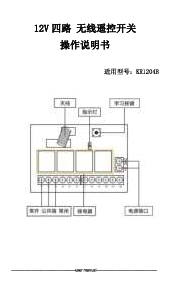
การแนะนำ
This manual provides detailed instructions for the installation, operation, and maintenance of your QIACHIP DC 12V 4-Channel Wireless RF Remote Control Relay Switch Kit. This kit is designed for various remote control applications, offering flexibility and convenience for controlling lights, fans, garage doors, gates, and other DC 12V powered devices.

Image: The QIACHIP 4-channel relay receiver module and two 4-button remote control transmitters.
คุณสมบัติผลิตภัณฑ์
- การควบคุมแบบไร้สาย: Operates on a 433Mhz RF frequency for reliable signal transmission.
- เอาต์พุต 4 ช่อง: Independently control up to four different devices.
- โหมดการทำงานหลายแบบ: Supports Momentary, Toggle, and Latched modes for versatile application.
- ระยะขยาย: Up to 164ft (50m) transmission distance in open areas.
- ความเข้ากันได้สูง: Suitable for various DC 12V applications including lights, fans, garage doors, and gate openers.
- ขยายได้: The receiver can store up to 20 remote controllers.
ข้อมูลจำเพาะ
| ผู้ผลิต | qiachip Electronic Technology |
| น้ำหนักสินค้า | 5.6 ออนซ์ |
| ขนาดแพ็คเกจ | 5.28 x 4.72 x 1.3 นิ้ว |
| รับอินพุตVoltage | กระแสตรง 12 โวลต์ |
| ความถี่ RF | 433เมกะเฮิรตซ์ |
| แบตเตอรี่รีโมทคอนโทรล | 2 CR2032 batteries (required, not included) |
| วัสดุ | เอบีเอส |

Image: Dimensions of the QIACHIP 4-button remote control transmitter (6.8cm x 3.6cm x 1.6cm).

Image: Dimensions of the QIACHIP 4-channel relay receiver module (75mm x 54mm x 25mm).
เนื้อหาแพ็คเกจ
- 1 x QIACHIP 4-Channel Relay Receiver Module
- 2 x QIACHIP 4-Button Remote Control Transmitters
การติดตั้งและการตั้งค่า
แผนผังสายไฟ
Before connecting any wires, ensure the power supply is disconnected to prevent electrical shock. The receiver module operates on DC 12V. The relay outputs can control both DC and AC loads, depending on your application.

Image: General wiring diagrams for DC and AC loads, including DC motor control.

Image: Wiring diagrams for controlling lights with the relay module (DC 12V and AC 85V-250V).
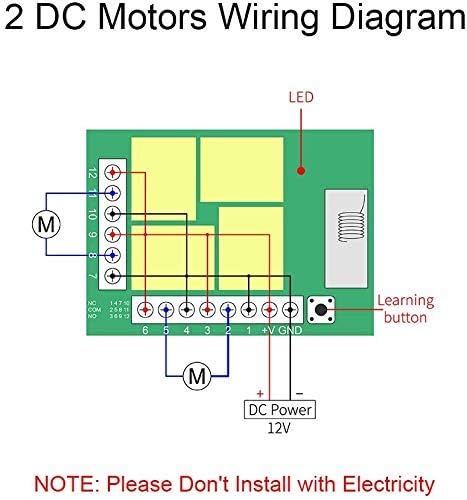
Image: Wiring diagram for controlling two DC motors using the relay module.
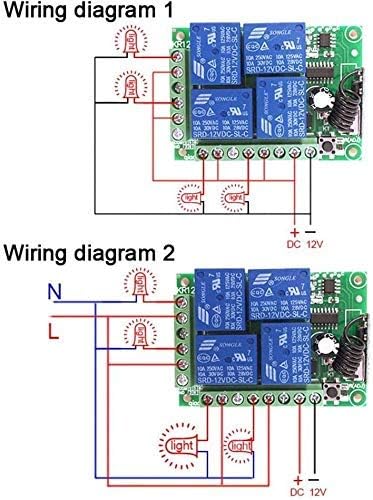
Image: Wiring diagram for connecting DC bulbs to the relay module.
NOTE: Always ensure power is OFF before performing any wiring. Incorrect wiring can damage the device or cause electrical hazards.
Learning Mode / Pairing Transmitters
The receiver module supports three working modes: Momentary, Toggle, and Latched. All four channels on the receiver will operate in the same selected mode.
- ล้างรหัสที่มีอยู่: Press the learning button on the receiver module 8 times. The LED indicator will flash 8 times and then clear all stored remote codes. This is recommended before pairing new remotes or changing modes.
- Pairing in Momentary Mode (Default):
- Press the learning button on the receiver module once. The LED indicator will turn on.
- Press any button on the remote control (e.g., button A). The LED indicator on the receiver will flash once and then turn off, indicating successful pairing in Momentary mode.
- In Momentary mode, the relay activates only while the remote button is pressed.
- Pairing in Toggle Mode:
- Press the learning button on the receiver module twice. The LED indicator will turn on.
- Press any button on the remote control (e.g., button A). The LED indicator on the receiver will flash once and then turn off, indicating successful pairing in Toggle mode.
- In Toggle mode, one press of the remote button activates the relay, and a second press deactivates it.
- Pairing in Latched Mode:
- Press the learning button on the receiver module three times. The LED indicator will turn on.
- Press button A on the remote control. The LED indicator will flash once.
- Then, press button B on the remote control. The LED indicator will flash once and then turn off, indicating successful pairing in Latched mode.
- In Latched mode, pressing button A activates the corresponding relay and deactivates any previously active relay. Pressing button B deactivates all relays.
คำแนะนำการใช้งาน
Once the remote control transmitters are paired with the receiver module in your desired mode, operation is straightforward:
- โหมดชั่วขณะ: Press and hold the corresponding button (A, B, C, or D) on the remote to activate the relay. Release the button to deactivate.
- โหมดสลับ: Press the corresponding button (A, B, C, or D) once to activate the relay. Press the same button again to deactivate the relay.
- โหมดสลัก: Press button A, B, C, or D to activate its respective relay. Only one relay can be active at a time in this mode. Pressing another button will deactivate the currently active relay and activate the new one.

ภาพ: อดีตamples of applications for the remote control system, such as garage doors, car sunroofs, and gate doors.

Image: A remote control being used to operate a truck liftgate, demonstrating practical application.
การซ่อมบำรุง
- การเปลี่ยนแบตเตอรี่: The remote control transmitters use CR2032 batteries. If the remote's range decreases or it becomes unresponsive, replace the batteries. To replace, carefully open the remote casing and insert new batteries with the correct polarity.
- การทำความสะอาด: Use a soft, dry cloth to clean the receiver module and remote controls. Avoid using harsh chemicals or abrasive materials.
- สิ่งแวดล้อม: Keep the receiver module and remotes away from excessive moisture, extreme temperatures, and strong electromagnetic interference.
การแก้ไขปัญหา
- รีโมตไม่ตอบสนอง:
- ตรวจสอบแบตเตอรี่ของรีโมทคอนโทรลและเปลี่ยนใหม่หากจำเป็น
- Ensure the remote is within the effective operating range of the receiver.
- Re-pair the remote control with the receiver module following the 'Learning Mode' instructions.
- ลดระยะ:
- เปลี่ยนแบตเตอรี่รีโมทคอนโทรล
- Ensure there are no significant obstructions (e.g., thick walls, metal structures) between the remote and the receiver.
- Check for sources of RF interference near the receiver.
- รีเลย์ไม่ทำงาน:
- Verify all wiring connections to the receiver and the load are secure and correct.
- Confirm the receiver is receiving proper DC 12V power.
- Ensure the remote is correctly paired and in the desired working mode.
สนับสนุน
For any issues or questions regarding your QIACHIP DC 12V 4-Channel Wireless RF Remote Control Relay Switch Kit, please contact QIACHIP customer support. We are committed to providing assistance and ensuring your satisfaction.
อีเมล: Refer to your product packaging or the QIACHIP official webเว็บไซต์สำหรับรายละเอียดการติดต่อ