1. บทนำ
The Roland GO:PIANO 88 is a full-size 88-key digital piano designed for portability and ease of use. It offers a premium piano playing experience with onboard Bluetooth speakers, making it suitable for various environments. This manual provides essential information for setting up, operating, and maintaining your instrument.

รูปที่ 1 : ด้านหน้า view of the Roland GO:PIANO 88-Key Digital Portable Piano Keyboard.
2. อะไรอยู่ในกล่อง
เมื่อแกะกล่องแล้วโปรดตรวจสอบให้แน่ใจว่ามีสิ่งของต่อไปนี้ครบถ้วน:
- Roland GO:PIANO 88-Key Digital Portable Piano Keyboard
- ซัสเทนเพดัล
- อะแดปเตอร์แปลงไฟ
- เพลงพักผ่อน
- Batteries (for optional wireless operation)
3. การตั้งค่า
Follow these steps to set up your Roland GO:PIANO 88:
- การเชื่อมต่อไฟฟ้า: Connect the power adaptor to the DC 12V input on the rear panel of the keyboard and plug it into a wall outlet. Alternatively, for portable use, insert the specified batteries into the battery compartment.
- เหยียบคันเร่ง: Connect the included sustain pedal to the dedicated sustain pedal jack on the rear panel.
- หูฟัง: For private practice, connect 3.5mm headphones to the headphone jack on the rear panel.
- การจับคู่บลูทู ธ : To connect to a smartphone or tablet for audio streaming or MIDI functionality, activate Bluetooth on your device and follow the pairing instructions in your device's manual. The GO:PIANO 88 supports Bluetooth audio and MIDI.

Figure 2: Rear panel connections for power, sustain pedal, and headphones.
4. คู่มือการใช้งาน
The Roland GO:PIANO 88 offers various features to enhance your playing and learning experience.
4.1 การเล่นขั้นพื้นฐาน
Press the power button to turn on the instrument. The default sound is a grand piano. Adjust the master volume knob to your desired listening level.

Figure 3: User playing the Roland GO:PIANO 88.
4.2 การเลือกเสียง
The GO:PIANO 88 includes various instrument sounds. Use the dedicated buttons or function keys to select between different piano tones, electric pianos, organs, and other sounds.
4.3 เครื่องเมตรอนอม
Activate the built-in metronome to assist with timing and rhythm practice. Adjust the tempo as needed using the dedicated controls.
4.4 การเปลี่ยนตำแหน่ง
The transpose function allows you to shift the pitch of the entire keyboard up or down in semitone steps, which is useful for playing in different keys without changing your fingering.
4.5 การบันทึก
The instrument features recording capabilities to capture your performances. Refer to the detailed instructions in the full user manual for specific recording procedures.
4.6 Online Lessons Integration
The Roland GO:PIANO 88 supports advanced music lessons via Bluetooth MIDI with your smartphone or tablet. Many online piano lesson platforms are compatible, offering step-by-step lessons and tutorial videos.

Figure 4: Roland GO:PIANO 88 integrating with online piano lessons via a tablet.
4.7 ผลิตภัณฑ์เกินview วีดีโอ
วิดีโอ 1: การประชุมอย่างเป็นทางการview of the Roland GO:PIANO 88, demonstrating its features and portability.
5. การบำรุงรักษา
To ensure the longevity and optimal performance of your Roland GO:PIANO 88, follow these maintenance guidelines:
- การทำความสะอาด: Wipe the surface of the instrument with a soft, dry cloth. Avoid using abrasive cleaners, waxes, or solvents.
- พื้นที่จัดเก็บ: When not in use, store the piano in a dry, dust-free environment. Avoid extreme temperatures or direct sunlight.
- การจัดการ: Handle the instrument with care. Avoid dropping it or subjecting it to strong impacts.
6 การแก้ไขปัญหา
If you encounter any issues with your Roland GO:PIANO 88, consider the following basic troubleshooting steps:
- ไม่มีไฟฟ้า: Ensure the power adaptor is securely connected to both the instrument and a working power outlet. If using batteries, check if they are correctly inserted and have sufficient charge.
- ไม่มีเสียง: Check the master volume level. Ensure headphones are not plugged in if you intend to use the built-in speakers. Verify that the correct instrument sound is selected.
- ปัญหาการเชื่อมต่อบลูทูธ: Ensure Bluetooth is enabled on both the piano and your external device. Try restarting both devices and re-attempting the pairing process.
For more complex issues, please refer to the comprehensive troubleshooting section in the full user manual or contact Roland customer support.
7. ข้อมูลจำเพาะ
Below are the key specifications for the Roland GO:PIANO 88:
- จำนวนคีย์: 88 (Full-size)
- โพลีโฟนี: 128 เสียง
- การเชื่อมต่อ: Bluetooth (Audio and MIDI), 3.5mm Audio Jack, Micro USB 2.0 Type B
- แหล่งพลังงาน: Battery Powered (optional) or AC Adaptor
- ลำโพงในตัว: ใช่
- ขนาด (กว้าง x ลึก x สูง): 55" x 15" x 7" (139.7 ซม. x 38.1 ซม. x 17.8 ซม.)
- น้ำหนักสินค้า: 15.4 ปอนด์ (ประมาณ 7 กก.)
- วัสดุตัวเครื่อง: พลาสติก
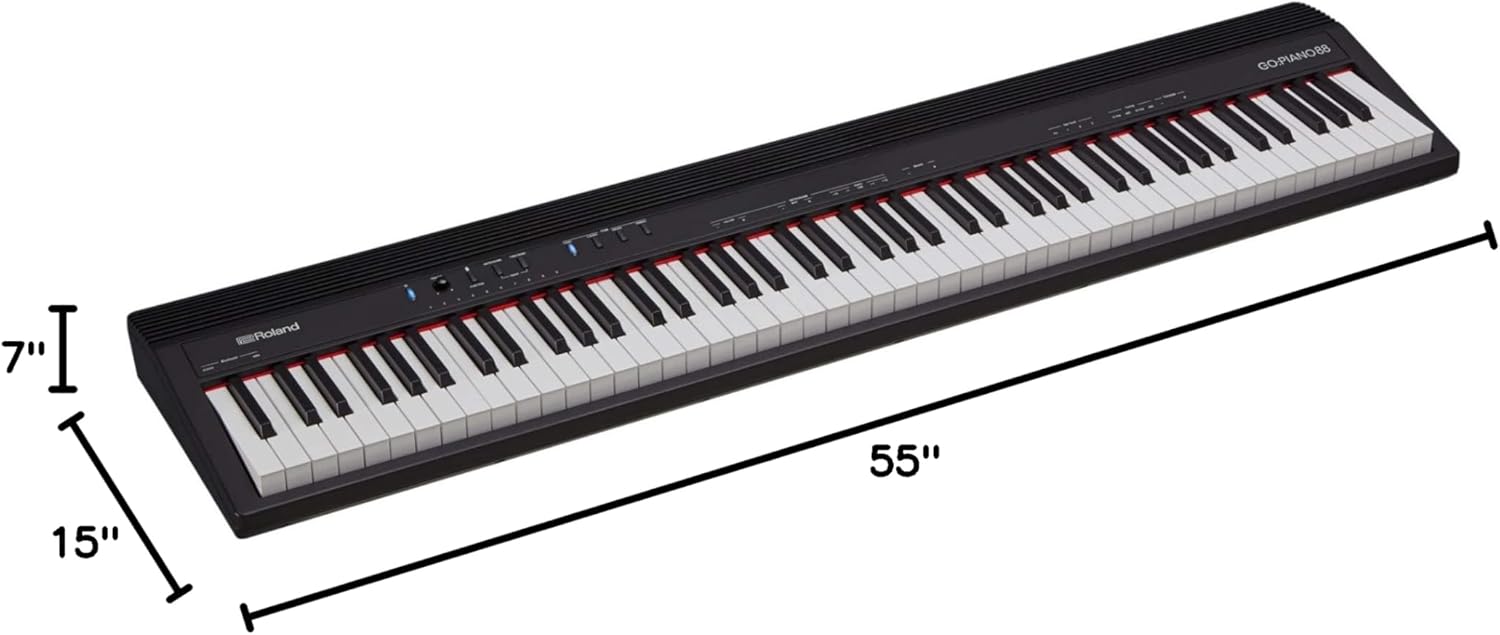
Figure 5: Dimensions of the Roland GO:PIANO 88.
8. การรับประกันและการสนับสนุน
The Roland GO:PIANO 88 comes with a manufacturer's warranty. Please refer to the warranty card included in your product packaging for specific terms and conditions. For technical support, service, or additional inquiries, visit the official Roland webเว็บไซต์หรือติดต่อฝ่ายบริการลูกค้าของพวกเขา


