1. บทนำ
This user manual provides comprehensive instructions for the setup, operation, and maintenance of your SHARP LC-32HI5012E HD Ready Smart LED TV. Please read this manual thoroughly before using your television to ensure proper functionality and safety.
The SHARP LC-32HI5012E is an 81 cm (32-inch) HD Ready Smart LED TV featuring Active Motion 200 technology for enhanced picture quality and a Triple Tuner for versatile reception options. It includes integrated Wi-Fi and a Harman/Kardon sound system for a complete entertainment experience.
2. เนื้อหาบรรจุภัณฑ์
เมื่อเปิดบรรจุภัณฑ์ โปรดตรวจสอบว่าประกอบด้วยสิ่งของต่อไปนี้ทั้งหมด:
- SHARP LC-32HI5012E Main Unit
- รีโมทคอนโทรล (พร้อมแบตเตอรี่)
- คู่มือการใช้งาน (เอกสารนี้)

ภาพ: ด้านหน้า view of the SHARP LC-32HI5012E television, displaying a vibrant city skyline on its screen. This image shows the slim bezel design and the central SHARP logo.
3. การตั้งค่า
3.1 การประกอบขาตั้ง
Carefully place the TV screen-down on a soft, flat surface to prevent damage. Attach the two stand feet to the designated slots at the bottom of the TV, securing them with the provided screws. Ensure the stand is firmly attached before proceeding.
3.2 การเชื่อมต่ออุปกรณ์ต่อพ่วง
ทีวีของคุณมีตัวเลือกการเชื่อมต่อต่างๆ สำหรับอุปกรณ์ภายนอก:
- พอร์ต HDMI (x3): เชื่อมต่อเครื่องเล่น Blu-ray, คอนโซลเกม หรือกล่องรับสัญญาณทีวี
- พอร์ต USB (x2): สำหรับการเล่นสื่อจากไดรฟ์ USB
- Antenna In (RF): Connect your terrestrial antenna for DVB-T/T2HD reception.
- Sat In: เชื่อมต่อจานรับสัญญาณดาวเทียมของคุณเพื่อรับสัญญาณ DVB-S/S2
- RJ45 (แลน): สำหรับการเชื่อมต่ออินเตอร์เน็ตแบบใช้สาย
- CI+ Port: For conditional access modules (CAM) to view ช่องที่เข้ารหัส
- Mini Component/YPbPr, Mini AV Composite: สำหรับอุปกรณ์อนาล็อกรุ่นเก่า
- เอาต์พุตเสียงออปติคัลดิจิตอล: สำหรับเชื่อมต่อกับระบบเสียงภายนอก
- Audio out / Headphone: สำหรับหูฟังหรือลำโพงภายนอก

ภาพ: ด้านหลัง view of the SHARP LC-32HI5012E television, highlighting the arrangement of various input and output ports for connecting external devices.
3.3 การเปิดเครื่องครั้งแรกและการตั้งค่าครั้งแรก
After connecting all necessary cables, plug the power cord into an electrical outlet. Press the power button on the remote control or the TV. The first-time setup wizard will guide you through:
- การเลือกภาษา
- การเชื่อมต่อเครือข่าย (Wi-Fi หรือ LAN แบบมีสาย)
- Channel scanning for DVB-C, DVB-S/S2, or DVB-T/T2HD.
- Time zone and other basic settings.
4. คู่มือการใช้งาน
4.1 ฟังก์ชั่นทีวีพื้นฐาน
- เปิด/ปิดเครื่อง: ใช้ปุ่มเปิด/ปิดบนรีโมทหรือทีวี
- การควบคุมระดับเสียง: ใช้ปุ่มปรับระดับเสียง +/-
- การเลือกช่อง: Use CH +/- or number buttons.
- แหล่งสัญญาณเข้า: Press the SOURCE button to switch between HDMI, AV, TV, etc.
- การนำทางเมนู: Use arrow keys and OK button to navigate menus.
4.2 คุณสมบัติของสมาร์ททีวี
Your SHARP LC-32HI5012E is equipped with integrated Wi-Fi and offers access to various smart features:
- แอพที่ติดตั้งล่วงหน้า: Access popular streaming services like Netflix and YouTube directly.
- Web เบราว์เซอร์: ท่องอินเทอร์เน็ตโดยตรงจากทีวีของคุณ
- Aquos Net+: Access additional online content and services provided by Sharp.
โปรดตรวจสอบให้แน่ใจว่าทีวีของคุณเชื่อมต่อกับอินเทอร์เน็ตแล้ว เพื่อใช้งานฟังก์ชัน Smart TV อย่างเต็มรูปแบบ
4.3 ระบบเสียง
The integrated Harman/Kardon sound system provides a high-quality audio experience with excellent dynamics and clarity. Adjust audio settings in the TV menu to customize your sound preferences.
5. การบำรุงรักษา
5.1 การทำความสะอาดหน้าจอ
ในการทำความสะอาดหน้าจอ ให้เช็ดเบาๆ ด้วยผ้านุ่มที่ไม่เป็นขุย สำหรับรอยฝังแน่น ให้เช็ดเบาๆampชุบผ้าด้วยน้ำหรือผลิตภัณฑ์ทำความสะอาดหน้าจอโดยเฉพาะ อย่าทำ ฉีดของเหลวลงบนหน้าจอโดยตรง
5.2 การดูแลทั่วไป
- เก็บทีวีให้ห่างจากแสงแดดโดยตรงและแหล่งความร้อน
- ตรวจสอบให้แน่ใจว่ามีการระบายอากาศเพียงพอรอบ ๆ ทีวี
- ถอดปลั๊กทีวีออกจากเต้าเสียบไฟฟ้าในระหว่างที่มีพายุฝนฟ้าคะนองหรือเมื่อปล่อยทิ้งไว้โดยไม่มีใครดูแลเป็นเวลานาน
6 การแก้ไขปัญหา
If you encounter any issues with your TV, please refer to the following common problems and solutions before contacting support.
| ปัญหา | สาเหตุที่เป็นไปได้ | สารละลาย |
|---|---|---|
| ไม่มีไฟฟ้า | Power cord unplugged, power outlet issue. | Check power cord connection. Try a different outlet. |
| ไม่มีภาพแต่มีเสียง | แหล่งสัญญาณเข้าไม่ถูกต้อง สายเคเบิลชำรุด | ตรวจสอบแหล่งสัญญาณเข้าที่ถูกต้อง ตรวจสอบการเชื่อมต่อสาย HDMI/AV |
| ไม่มีเสียง | Volume muted or too low, external audio system issue. | Unmute volume, increase volume. Check external audio connections. |
| ไม่สามารถเชื่อมต่อ Wi-Fi ได้ | Incorrect password, router issue, TV too far from router. | ป้อนรหัสผ่านอีกครั้ง รีสตาร์ทเราเตอร์ เลื่อนทีวีเข้ามาใกล้ขึ้น หรือใช้การเชื่อมต่อแบบใช้สาย |
7. ข้อมูลจำเพาะ
| คุณสมบัติ | รายละเอียด |
|---|---|
| ยี่ห้อ | คม |
| หมายเลขรุ่น | LC-32HI5012E |
| เทคโนโลยีหน้าจอ | นำ |
| ปณิธาน | รองรับ HD (1366 x 768 พิกเซล) |
| หน้าจอแนวทแยง | 81.3 ซม. (32 นิ้ว) |
| อัตราการรีเฟรช | 60 เฮิรตซ์ |
| คุณสมบัติพิเศษ | Internet (Smart TV) |
| บริการอินเทอร์เน็ตที่รองรับ | Netflix, YouTube, Browser |
| เทคโนโลยีการเชื่อมต่อ | USB, HDMI, LAN, Wi-Fi |
| จูนเนอร์ | DVB-C, DVB-S/S2, DVB-T/T2HD |
| ระบบเสียง | ฮาร์แมน/คาร์ดอน |
| ขนาดผลิตภัณฑ์ (กว้าง x สูง x ลึก) | 74 x 49.1 x 18 ซม. (พร้อมขาตั้ง) |
| น้ำหนัก | 4.8 กิโลกรัม |
| ประเภทการติดตั้ง | ติดตั้งบนโต๊ะ |
7.1 ประสิทธิภาพการใช้พลังงาน
The SHARP LC-32HI5012E has an energy efficiency rating of F. For detailed energy consumption information, please refer to the energy label and product information sheet.

Image: Energy efficiency label for the SHARP LC-32HI5012E television, showing its energy class F and power consumption details.
For more details, visit the official EPREL database: https://eprel.ec.europa.eu/qr/402565
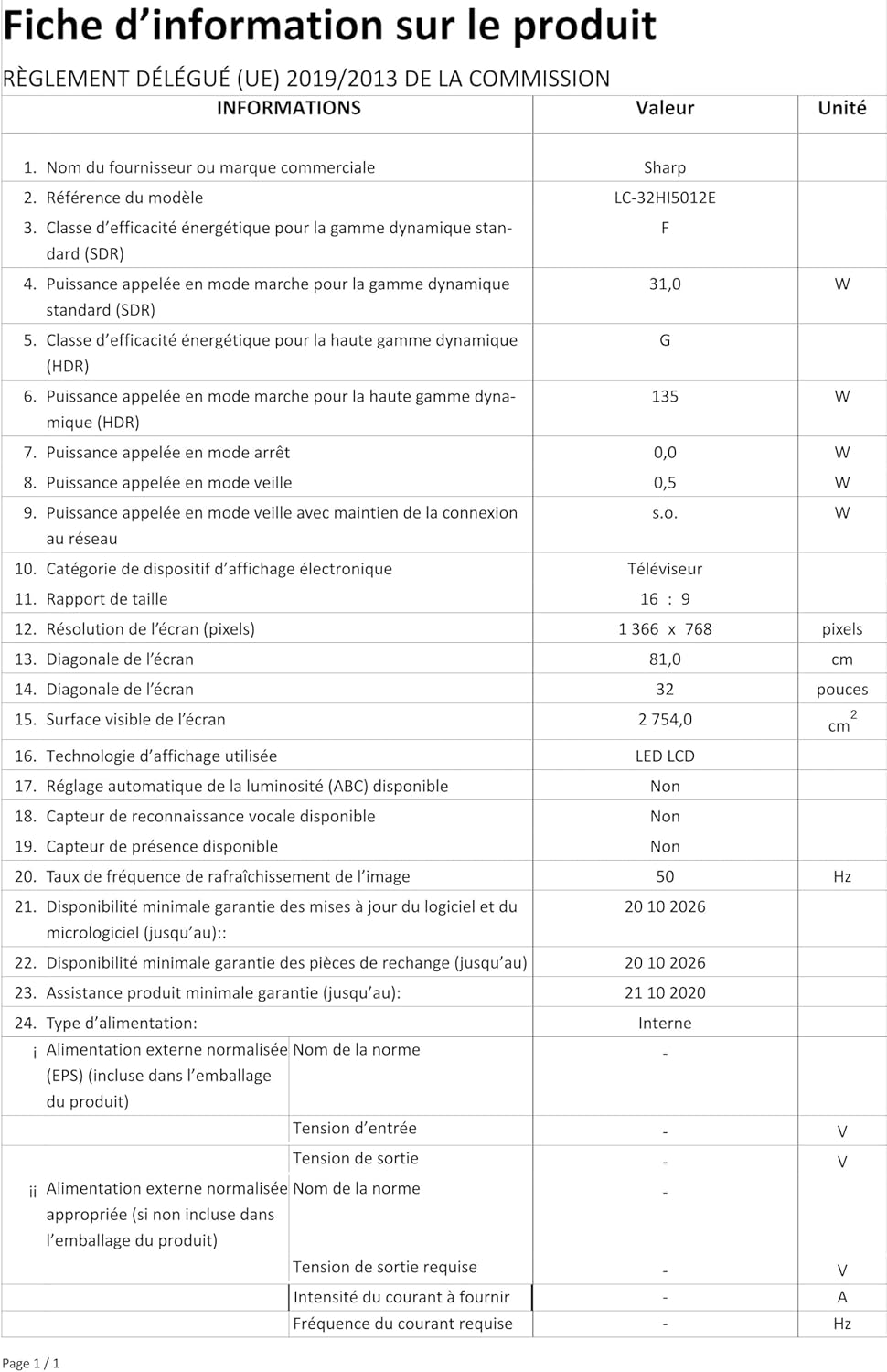
Image: Product information sheet detailing technical specifications and compliance information for the SHARP LC-32HI5012E television.
8. การรับประกันและการสนับสนุน
For warranty information, please refer to the warranty card included with your product or visit the official SHARP webไซต์ โปรดเก็บใบเสร็จรับเงินของคุณไว้เป็นหลักฐานการซื้อสำหรับการเรียกร้องการรับประกันใดๆ
For technical support or service inquiries, please contact SHARP customer service. Contact details can typically be found on the SHARP official webเว็บไซต์หรือในบรรจุภัณฑ์ของผลิตภัณฑ์


