การแนะนำ
Welcome to the user manual for your new Kindle Oasis. This guide provides essential information on setting up, operating, maintaining, and troubleshooting your device. The Kindle Oasis is designed for an optimal reading experience, featuring a high-resolution display, adjustable warm light, and a waterproof design.

Image: Kindle Oasis in a bathtub, highlighting its sleek design and page turn buttons, demonstrating its waterproof capability.
การตั้งค่า
1. ค่าธรรมเนียมเริ่มต้น
Before first use, fully charge your Kindle Oasis. Connect the included USB 2.0 charging cable to the device and a 5W power adapter or a computer's USB port. A full charge takes approximately 3 hours.
2. เปิดเครื่อง
กดปุ่มเปิด/ปิดเครื่องที่อยู่บนขอบด้านบนของอุปกรณ์ค้างไว้จนกว่าหน้าจอจะสว่างขึ้น
3. Language and Wi-Fi Setup
Follow the on-screen prompts to select your preferred language. The device will then guide you through connecting to a Wi-Fi network. The Kindle Oasis supports 802.11b, g, or n standards with WEP, WPA, and WPA2 security.
4. Register Your Device
Register your Kindle Oasis to your Amazon account to access your content library and the Kindle Store. If you do not have an Amazon account, you will be prompted to create one.
การใช้งาน Kindle Oasis ของคุณ
การอ่าน
To open a book, tap its cover on the home screen. Use the physical page turn buttons on the side of the device or tap the left/right side of the screen to navigate through pages.
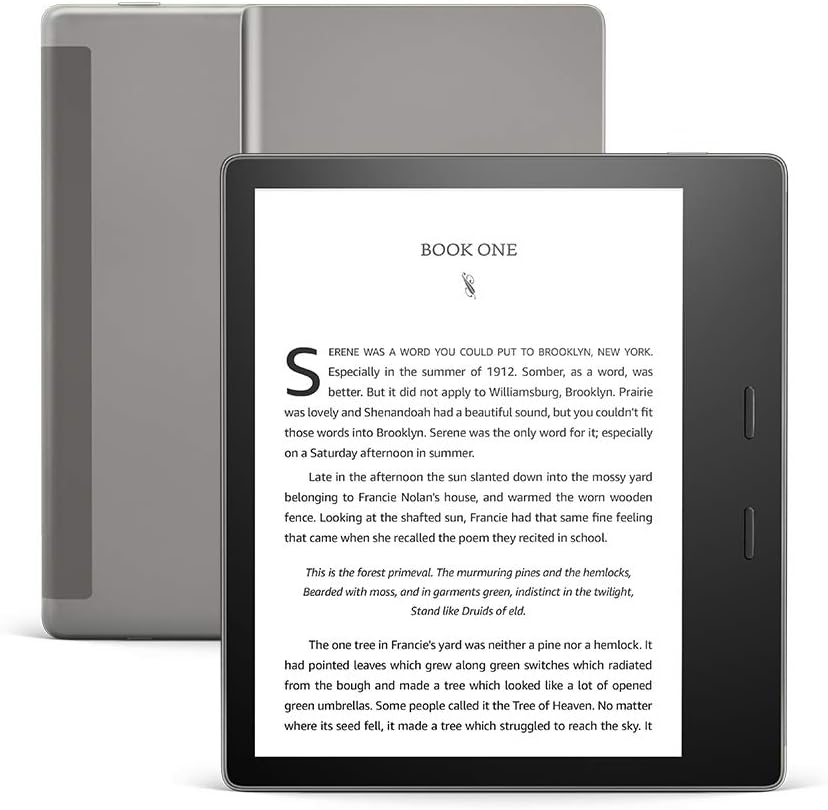
ภาพ: ด้านหน้า view of the Kindle Oasis displaying a book, with its gray cover visible behind it.
การปรับแต่งการตั้งค่าการแสดงผล
Tap the top of the screen to bring up the toolbar. From here, you can adjust:
- ความสว่าง: Drag the slider to increase or decrease screen illumination.
- ความอบอุ่น: Adjust the warm light to shift the screen shade from white to amber, reducing eye strain, especially in low light.
- Font Size and Style: Select from various font sizes and styles to customize your reading experience.

Image: Close-up of the Kindle Oasis screen demonstrating the adjustable warm light feature, showing a warmer tone.
การกันน้ำ (IPX8)
The Kindle Oasis is waterproof (IPX8 rated), meaning it can withstand accidental immersion in 2 meters of fresh water for up to 60 minutes. This allows for reading in environments like the bath or by the pool.

Image: A woman reading her Kindle Oasis while relaxing by a swimming pool, illustrating the device's waterproof capability.
การบูรณาการเสียง
Your Kindle Oasis supports Audible audiobooks. Connect Bluetooth headphones or speakers to listen to audiobooks. You can seamlessly switch between reading and listening to a book.

Image: A man wearing headphones and a backpack on a beach, presumably listening to an Audible audiobook on his Kindle Oasis, demonstrating the seamless switch between reading and listening.
การซ่อมบำรุง
ทำความสะอาดอุปกรณ์ของคุณ
Use a soft, lint-free cloth to clean the screen and body of your Kindle Oasis. Do not use abrasive cleaners or solvents.
การดูแลแบตเตอรี่
To maximize battery life, avoid exposing the device to extreme temperatures. A single charge can last up to six weeks with wireless and Bluetooth off and light setting at 13. Frequent wireless usage and Audible streaming will reduce battery life.
การอัพเดตซอฟต์แวร์
Your Kindle Oasis receives automatic software security updates. Ensure your device is connected to Wi-Fi periodically to receive these updates, which improve performance and add new features.
การแก้ไขปัญหา
อุปกรณ์ไม่ตอบสนอง
If your Kindle Oasis is unresponsive, try a forced restart. Press and hold the power button for 40 seconds until the device restarts.
ไม่สามารถเชื่อมต่อ Wi-Fi ได้
- ตรวจสอบให้แน่ใจว่าเครือข่าย Wi-Fi ของคุณเปิดใช้งานอยู่และอยู่ในระยะ
- ตรวจสอบรหัสผ่าน Wi-Fi
- รีสตาร์ทเราเตอร์ Wi-Fi ของคุณ
- Restart your Kindle Oasis.
แบตเตอรี่หมดเร็ว
- Reduce screen brightness and warmth settings.
- ปิด Wi-Fi และ Bluetooth เมื่อไม่ได้ใช้งาน
- Avoid streaming Audible audiobooks for extended periods without charging.
- ตรวจสอบให้แน่ใจว่าไม่มีกระบวนการพื้นหลังใดที่กินพลังงานมากเกินไป
ปัญหาเกี่ยวกับหน้าจอ
If you notice persistent lines or artifacts on the screen, try restarting the device. If the issue persists, contact customer support.
ข้อมูลจำเพาะ
| คุณสมบัติ | รายละเอียด |
|---|---|
| แสดง | เทคโนโลยีจอภาพ Paperwhite ขนาด 7 นิ้วของ Amazon พร้อม e-paper รุ่นใหม่และไฟในตัว 300 ppi เทคโนโลยีฟอนต์ที่ปรับให้เหมาะสม ระดับสีเทา 16 ระดับ |
| ขนาด | 6.3” x 5.6” x 0.13-.33” (159 x 141 x 3.4-8.4 มม.) |
| น้ำหนัก | 6.6 ออนซ์ (188ก.) |
| การจัดเก็บข้อมูลบนอุปกรณ์ | 32 GB (holds thousands of books or over 160 Audible audiobooks). |
| อายุการใช้งานแบตเตอรี่ | Up to six (6) weeks (based on 30 mins reading/day, wireless/Bluetooth off, light at 13). |
| เวลาในการชาร์จ | Approx. 3 hours from 5W power adapter via USB cable. |
| การเชื่อมต่อ Wi-Fi | 802.11b, g, or n standards with WEP, WPA and WPA2 security. |
| การกันซึม | IPX8 (2 meters fresh water for 60 minutes). |
| รูปแบบเนื้อหาที่รองรับ | รูปแบบ Kindle 8 (AZW3), Kindle (AZW), TXT, PDF, MOBI ที่ไม่ได้รับการป้องกัน, PRC โดยกำเนิด; HTML DOC, DOCX, JPEG, GIF, PNG, PMP ผ่านการแปลง; รูปแบบเสียง Audible (AAX) |
| รุ่น | Kindle Oasis รุ่นที่ 10 - เปิดตัวในปี 2019 |
การรับประกันและการสนับสนุน
ข้อมูลการรับประกัน
Your Kindle Oasis comes with a 1-year limited warranty and service. Optional extended warranties may be available for purchase in some regions.
การสนับสนุนลูกค้า
หากต้องการความช่วยเหลือเพิ่มเติม โปรดไปที่เว็บไซต์ฝ่ายสนับสนุนอย่างเป็นทางการของ Amazon website or contact Amazon customer service. You can find more information about Kindle devices and user guides on the Amazon webเว็บไซต์.
Use of Kindle is subject to Amazon's Conditions of Use.


