1. บทนำ
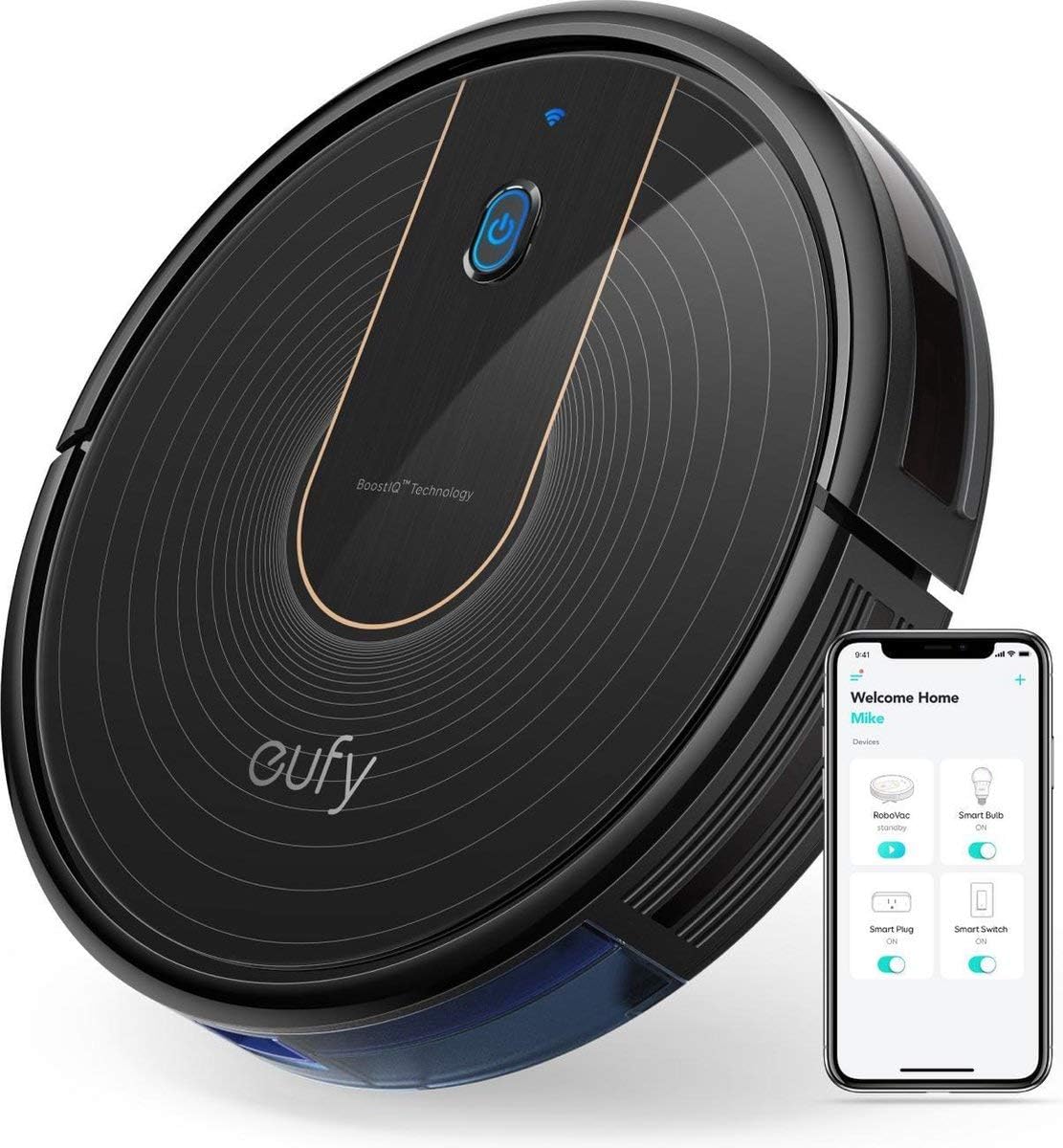
Thank you for choosing the eufy RoboVac 15C. This robot vacuum cleaner is designed to provide efficient and convenient automated cleaning for your home. Featuring BoostIQ technology, Wi-Fi connectivity, and a slim design, the RoboVac 15C offers powerful suction and quiet operation to maintain clean floors with minimal effort. This manual provides essential information for setup, operation, maintenance, and troubleshooting to ensure optimal performance of your device.
2. คำแนะนำด้านความปลอดภัยที่สำคัญ
Before using this product, please read all safety instructions. Failure to follow these instructions may result in electric shock, fire, or serious injury.
- This appliance is for indoor use only. Do not use outdoors or on commercial surfaces.
- Do not allow children to operate the RoboVac. Supervise children and pets when the RoboVac is operating.
- Use only the original power adapter and charging base provided by the manufacturer.
- Do not handle the power adapter or RoboVac with wet hands.
- เก็บผม เสื้อผ้าที่หลวม นิ้ว และส่วนต่างๆ ของร่างกายให้ห่างจากช่องเปิดและชิ้นส่วนที่เคลื่อนไหว
- ห้ามหยิบจับสิ่งของที่กำลังเผาไหม้หรือมีควัน เช่น บุหรี่ ไม้ขีดไฟ หรือขี้เถ้าร้อน
- Do not use the RoboVac to pick up large objects, sharp objects, or liquids.
- Ensure the cleaning area is clear of loose cables, small objects, and fragile items that could be tangled or knocked over.
- Do not sit on the RoboVac or place heavy objects on it.
- Store the RoboVac in a cool, dry place when not in use.
3. เนื้อหาบรรจุภัณฑ์
ตรวจสอบว่ามีส่วนประกอบทั้งหมดรวมอยู่ในแพ็คเกจของคุณ:
- eufy RoboVac 15C
- รีโมทคอนโทรล (รวมแบตเตอรี่ AAA 2 ก้อน)
- ฐานชาร์จ
- อะแดปเตอร์ AC
- เครื่องมือทำความสะอาด
- Additional Set of Filters
- แปรงด้านข้าง 4 อัน
- 5 ผูกสาย
- คู่มือการใช้งาน
4. สินค้าหมดview
The RoboVac 15C features a sleek, low-profile design allowing it to clean under most furniture. Key components include the main power button, Wi-Fi indicator, dust collector, and various sensors for navigation.
สูงสุด View
- ปุ่มเปิด/ปิด: Press to start/pause cleaning. Hold to power on/off.
- ตัวบ่งชี้ Wi-Fi: แสดงสถานะการเชื่อมต่อ Wi-Fi
- BoostIQ Technology Logo: Indicates the presence of automatic suction power adjustment.
ด้านล่าง View
- แปรงด้านข้าง: แปรงหมุน 2 อันเพื่อกวาดเศษขยะเข้าไปในเส้นทางดูด
- Rolling Brush: Main brush for deep cleaning carpets and hard floors.
- เซ็นเซอร์ตรวจจับการตกหล่น: Detects edges and prevents falls.
- หน้าสัมผัสการชาร์จ: Connects with the charging base for automatic recharging.
- ล้อสากล: รองรับการเคลื่อนไหว 360 องศา
5. การตั้งค่า
5.1 การเตรียมพื้นที่ทำความสะอาด
- Remove any power cords, small objects, or fragile items from the floor that could obstruct the RoboVac's path or cause it to get stuck. Five cable ties are provided to help organize cables.
- Ensure furniture has sufficient clearance for the RoboVac to pass underneath without getting trapped.
- The RoboVac is suitable for low and medium pile carpets, tiles, laminates, or hard floors. It is not recommended for very high pile carpets.
5.2 การติดตั้งแปรงด้านข้าง
Attach the side brushes to the posts on the bottom of the RoboVac until they click into place.
5.3 การวางแท่นชาร์จ
- วางแท่นชาร์จบนพื้นผิวเรียบแข็งชิดผนัง
- Ensure there is at least 1 meter (3 feet) of clear space to the front and 0.5 meters (1.5 feet) to each side of the charging base.
- Connect the AC power adapter to the charging base and plug it into a wall outlet.
5.4 การชาร์จเริ่มต้น
Place the RoboVac onto the charging base, ensuring the charging contacts align. The indicator light on the RoboVac will pulse orange during charging and turn solid blue when fully charged. For first-time use, charge the RoboVac for at least 6 hours.
5.5 Wi-Fi Connection (eufyHome App)
- Download the 'eufyHome' app from the App Store (iOS devices) or Google Play (Android devices).
- Follow the in-app instructions to connect your RoboVac to your home Wi-Fi network. This enables remote control, scheduling, and mode selection via your smartphone.
6. Operating Your RoboVac
6.1 เปิด/ปิดเครื่อง
Press and hold the power button on the RoboVac for 3 seconds to power it on or off. A short press will start or pause cleaning.
โหมดทำความสะอาด 6.2 โหมด
- ทำความสะอาดอัตโนมัติ: The RoboVac cleans automatically using a semi-random path. It will return to the charging base when the battery is low or cleaning is complete.
- เทคโนโลยี BoostIQ: In Auto Cleaning mode, the RoboVac automatically increases suction power within 1.5 seconds when it detects heavily soiled areas or transitions to carpets.
- การทำความสะอาดเฉพาะจุด: The RoboVac intensely cleans a specific area in a spiral pattern. Useful for concentrated dirt.
- การทำความสะอาดขอบ: The RoboVac cleans along walls and furniture edges to ensure thorough coverage.
6.3 การใช้รีโมทคอนโทรล
The remote control allows you to start/pause cleaning, select cleaning modes, manually control the RoboVac's direction, and send it back to the charging base.
6.4 Using the eufyHome App
The eufyHome app provides advanced control features, including:
- Starting and stopping cleaning remotely.
- Scheduling cleaning times for specific days.
- Selecting cleaning modes.
- Monitoring cleaning status.
6.5 การควบคุมด้วยเสียง (Alexa)
The RoboVac 15C is compatible with Amazon Alexa. Once connected through the eufyHome app and Alexa app, you can use voice commands such as, "Alexa, tell RoboVac to start cleaning." (Alexa devices are sold separately).
7. การบำรุงรักษา
Regular maintenance ensures your RoboVac operates at peak performance. Perform these steps regularly:
7.1 การล้างถังขยะ
Press the dustbin release button and pull out the dustbin. Open the dustbin cover and empty its contents into a trash can. The 0.6-liter dustbin is designed for extended cleaning sessions.
7.2 การทำความสะอาดตัวกรอง
Remove the primary filter and high-performance filter from the dustbin. Tap them to remove dust. Do not wash the high-performance filter. The primary filter can be rinsed with water; ensure it is completely dry before reinstallation. Replace filters every 2-3 months, or as needed.
7.3 Cleaning the Rolling Brush
Remove the brush guard and then the rolling brush. Use the provided cleaning tool to cut and remove any hair or debris wrapped around the brush.
7.4 การทำความสะอาดแปรงด้านข้าง
Periodically remove the side brushes and clean any hair or debris. If brushes are worn or damaged, replace them with the spare brushes provided.
7.5 การทำความสะอาดเซ็นเซอร์และจุดเชื่อมต่อการชาร์จ
Wipe the drop sensors, infrared sensors, and charging contacts on both the RoboVac and the charging base with a dry cloth to ensure proper function.
8 การแก้ไขปัญหา
If your RoboVac encounters issues, refer to the following common problems and solutions:
| ปัญหา | สาเหตุที่เป็นไปได้ | สารละลาย |
|---|---|---|
| RoboVac does not turn on or charge. | Battery is completely drained; charging contacts are dirty; power adapter not connected. | Ensure RoboVac is properly seated on the charging base. Clean charging contacts. Verify power adapter is plugged in. |
| RoboVac มักติดขัดบ่อยครั้ง | Loose cables, low furniture, or obstacles in the cleaning path. | Clear the cleaning area of obstacles. Use cable ties to manage cords. Ensure furniture has adequate clearance. |
| RoboVac does not return to charging base. | Charging base is obstructed or too far; RoboVac is stuck. | Ensure charging base has clear space around it. Manually place RoboVac on base if stuck. |
| ประสิทธิภาพการทำความสะอาดไม่ดี | Dustbin full; brushes tangled; filters clogged; sensors dirty. | Empty dustbin. Clean rolling brush and side brushes. Clean or replace filters. Wipe all sensors. |
| RoboVac makes unusual noises. | Debris caught in brushes or wheels. | Inspect and clean the rolling brush, side brushes, and universal wheel for any trapped debris. |
9. ข้อมูลจำเพาะ
| คุณสมบัติ | รายละเอียด |
|---|---|
| ยี่ห้อ | ยูฟี่ |
| หมายเลขรุ่น | เอเค-ที2120311 |
| สี | สีดำ |
| ขนาด | 32.5 x 32.5 x 7.2 ซม. |
| น้ำหนัก | 2.6 กก. |
| พลัง | 25 วัตต์ |
| ระดับเสียง | 55 เดซิเบล |
| พลังดูด | 1300 ปา |
| ความจุของถังขยะ | 0.6 ลิตร |
| อายุการใช้งานแบตเตอรี่ | Up to 100 minutes (Standard mode on hard floors) |
| คุณสมบัติพิเศษ | BoostIQ with Wi-Fi, advanced sensor technology, three-filter system, ultra-slim design, self-charging |
| ASIN | B07KXR92NJ |
| วันที่เริ่มวางจำหน่ายครั้งแรก | 14 มกราคม 2019 |
10. การรับประกันและการสนับสนุน
10.1 ข้อมูลการรับประกัน
The eufy RoboVac 15C comes with a 12-month manufacturer's warranty from the date of purchase. This warranty covers manufacturing defects and workmanship under normal use. Please retain your proof of purchase for warranty claims.
10.2 การสนับสนุนลูกค้า
For technical support, warranty inquiries, or other assistance, please contact eufy customer service. You can find contact details on the official eufy website or through the eufyHome app. Please have your model number (RoboVac 15C) and purchase information ready when contacting support.


