1. บทนำ
The Echo Glow is a multicolor smart lamp designed to enhance your smart home experience. It pairs with any compatible Alexa device, allowing you to control its color and brightness using voice commands. This device is ideal for creating colorful routines, setting visual timers, and adding dynamic lighting for various activities like gaming, watching videos, or listening to music. Its simple setup ensures a hassle-free experience.

Figure 1.1: The Echo Glow smart lamp ในการตั้งค่าบ้าน
2. ข้อมูลด้านความปลอดภัย
Please read and follow all safety instructions carefully to prevent injury or damage to your device.
- อย่าให้เครื่องโดนน้ำหรือความชื้น
- ใช้เฉพาะอะแดปเตอร์จ่ายไฟที่มาพร้อมกับอุปกรณ์เท่านั้น
- ห้ามพยายามถอดประกอบ ซ่อมแซม หรือปรับเปลี่ยนอุปกรณ์
- เก็บอุปกรณ์ให้ห่างจากแสงแดดและแหล่งความร้อนโดยตรง
- ตรวจสอบให้แน่ใจว่ามีการระบายอากาศที่เหมาะสมรอบๆ อุปกรณ์
3. อะไรอยู่ในกล่อง
ตรวจสอบว่ามีสินค้าทั้งหมดอยู่ในบรรจุภัณฑ์:
- Echo Glow device
- อะแดปเตอร์แปลงไฟ (5W)
- คู่มือเริ่มต้นอย่างรวดเร็ว
4. การตั้งค่า
Setting up your Echo Glow is designed to be quick and straightforward.
4.1. เปิดเครื่อง
- Plug the provided power adapter into the Echo Glow.
- Plug the other end of the power adapter into a wall outlet. The Echo Glow will power on automatically.
4.2. Connecting to Wi-Fi and Alexa
The Echo Glow connects to your Wi-Fi network and is controlled via an Alexa-enabled device or the Alexa app.
- Download and open the Amazon Alexa app on your Fire OS, Android, or iOS device.
- Ensure your Alexa-enabled device (e.g., Echo Dot, Echo Plus) is set up and connected to the same Wi-Fi network.
- In the Alexa app, navigate to the 'Devices' section.
- แตะไอคอน '+' เพื่อเพิ่มอุปกรณ์ใหม่
- Select 'Light' and then 'Amazon Echo Glow'.
- Follow the on-screen instructions to complete the setup. The Echo Glow supports 2.4 GHz Wi-Fi only (802.11 b/g/n).
Amazon Wi-Fi simple setup can also be used to connect the device to your Wi-Fi network with minimal steps.
5. คู่มือการใช้งาน
The Echo Glow offers various functionalities controlled primarily through Alexa voice commands or the Alexa app.
5.1. การควบคุมด้วยเสียง
Once paired with an Alexa-enabled device, you can control the Echo Glow using your voice. Ensure your Echo Glow has a recognizable name in the Alexa app (e.g., 'Glow Lamp', 'Charlie's Lamp-
- เปลี่ยนสี: "Alexa, set [Glow Lamp name] to blue."
- ปรับความสว่าง: "Alexa, dim [Glow Lamp name] to 50%." or "Alexa, brighten [Glow Lamp name]."
- เปิด/ปิด: "Alexa, turn on [Glow Lamp name]." / "Alexa, turn off [Glow Lamp name]."

Figure 5.1: The Echo Glow can display a wide spectrum of colors.
5.2. Routines and Timers
Integrate the Echo Glow into your daily routines or use it for visual timers.
- Color-Changing Timer: Use the Echo Glow as a visual reminder for activities. For example, "Alexa, set a Rainbow Timer for 30 minutes on Charlie's Lamp." The colors will change as time progresses.
- Wake-up Light Alarm: Create routines in the Alexa app to have the Echo Glow gradually brighten or change color to help with waking up. For example, "Alexa, set a wakeup light alarm for 7 AM on My Light."
- Bedtime Routines: Set the Echo Glow to dim or change to a calming color as part of a bedtime routine.
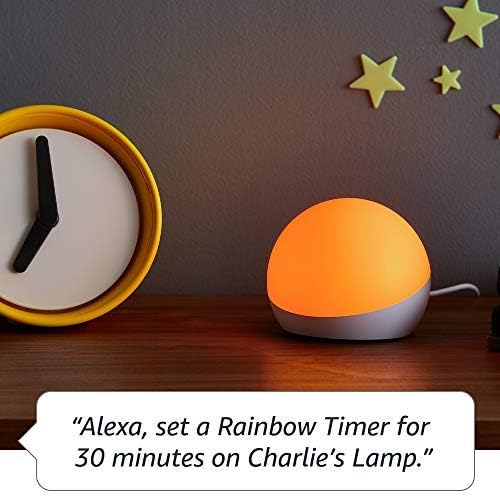
Figure 5.2: Using Echo Glow for a Rainbow Timer.
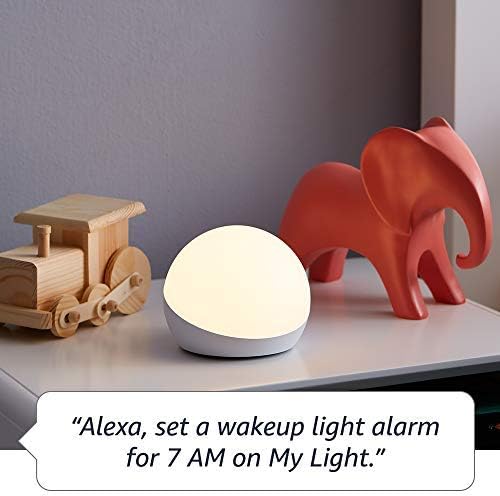
Figure 5.3: Echo Glow as a wake-up light alarm.
5.3. Creating and Choosing Lighting
The Echo Glow can add ambiance to various activities:
- การเล่นเกม: Set dynamic colors to match your gaming environment.
- การชมวิดีโอ: Create a cozy or immersive viewการสร้างประสบการณ์
- ฟังเพลง: Sync the lighting to the mood of your music (requires specific Alexa routines or skills).

Figure 5.4: Echo Glow adding color to a child's play space.
6. การบำรุงรักษา
The Echo Glow requires minimal maintenance.
- การทำความสะอาด: Unplug the device before cleaning. Use a soft, dry, lint-free cloth to wipe the exterior. Do not use abrasive cleaners or sprays.
- พื้นที่จัดเก็บ: If storing the device for an extended period, unplug it and keep it in a cool, dry place.
7 การแก้ไขปัญหา
If you encounter issues with your Echo Glow, try the following steps:
- อุปกรณ์ไม่ตอบสนอง:
- Ensure the power adapter is securely plugged into both the Echo Glow and the wall outlet.
- Unplug the Echo Glow, wait 30 seconds, and plug it back in.
- Verify that your Alexa-enabled device is online and functioning correctly.
- ไม่สามารถเชื่อมต่อกับ Wi-Fi ได้:
- Confirm your Wi-Fi network is 2.4 GHz. The Echo Glow does not support 5GHz networks.
- Ensure your Wi-Fi password is entered correctly in the Alexa app.
- Move the Echo Glow closer to your Wi-Fi router.
- รีสตาร์ทเราเตอร์ Wi-Fi ของคุณ
- คำสั่งเสียงไม่ทำงาน:
- Ensure your Alexa-enabled device can hear you clearly.
- Verify the Echo Glow is correctly named in the Alexa app and use that name in your commands.
- Check the Alexa app for any pending updates for your Echo Glow or Alexa-enabled device.
8. ข้อมูลจำเพาะ
| คุณสมบัติ | รายละเอียด |
|---|---|
| ขนาด | 100 x 100 x 81 มม. (3.9” x 3.9” x 3.2”) |
| น้ำหนัก | 245 กรัม (8.6 ออนซ์) |
| การเชื่อมต่อ Wi-Fi | 2.4 GHz only, 802.11 b/g/n. Does not support 5GHz networks or ad-hoc networks. |
| ประเภทไฟ | 100 ลูเมนวอร์มไวท์ (2600K) และไฟ LED สี RGB |
| ความเข้ากันได้ | Works exclusively with Alexa-enabled devices (Echo Dot, Echo Plus, Alexa app). Compatible with Fire OS, Android, and iOS devices. Does not contain microphones or speakers. |
| ช่วงอายุ | อายุ 3 ปีขึ้นไป |
9. การรับประกันและการสนับสนุน
Your Echo Glow is covered by a limited warranty.
- ระยะเวลารับประกัน: 90-day limited warranty and service.
- เงื่อนไขการใช้งาน: Use of Echo Glow is subject to the terms found on the official Amazon webเว็บไซต์.
- การสนับสนุนลูกค้า: For further assistance, troubleshooting, or warranty claims, please visit the Amazon customer support webไซต์หรือติดต่อทีมสนับสนุนของพวกเขาโดยตรง


