1. บทนำ
The VEROVAL Duo Control Digital Arm Blood Pressure Monitor is designed for accurate and reliable blood pressure measurement. It is particularly suitable for individuals who require daily monitoring, including those with cardiac arrhythmias. This device utilizes advanced DUO SENSOR technology, which combines two professional measurement methods: the oscillometric method and the Korotkoff method, ensuring high precision even in the presence of irregular heart rhythms.
This manual provides essential information for the safe and effective use of your VEROVAL Duo Control monitor. Please read it thoroughly before first use and keep it for future reference.
2. ข้อมูลด้านความปลอดภัย
- Consult your physician before using this device if you have any medical conditions, especially cardiac arrhythmias.
- อย่าวินิจฉัยโรคหรือรักษาตัวเองโดยอาศัยผลการตรวจวัดเพียงอย่างเดียว ควรปรึกษาผู้เชี่ยวชาญด้านสุขภาพเสมอ
- เก็บอุปกรณ์ให้พ้นจากมือเด็ก
- Use only the original cuff provided with the device.
- Avoid taking measurements in stressful environments or immediately after physical activity.
3. เนื้อหาบรรจุภัณฑ์
ตรวจสอบว่ามีรายการทั้งหมดอยู่ในแพ็คเกจ:
- VEROVAL Duo Control Blood Pressure Monitor
- Medium Arm Cuff (22-32 cm)
- กระเป๋าเก็บของ
- แบตเตอรี่ AA 1.5V จำนวน 4 ก้อน
- คู่มือการใช้งาน

Image: VEROVAL Duo Control Blood Pressure Monitor, arm cuff, and storage bag.
4. ส่วนประกอบของอุปกรณ์
ทำความคุ้นเคยกับส่วนหลักของเครื่องวัดความดันโลหิตของคุณ:
- แสดง: Large, illuminated screen for easy reading of values.
- ปุ่มเริ่ม/หยุด: Initiates and ends measurements.
- User 1 Button: Selects user profile 1.
- User 2 Button: Selects user profile 2.
- Cuff Connector: ช่องสำหรับเชื่อมต่อสายรัดแขน
- ข้อมือ: Ergonomically designed for correct and secure application.

Image: Close-up of the VEROVAL Duo Control monitor, showing the display and control buttons.
5. การตั้งค่า
5.1. การติดตั้งแบตเตอรี่
- เปิดฝาปิดช่องใส่แบตเตอรี่ที่ด้านหลังของอุปกรณ์
- Insert the four AA 1.5V batteries, ensuring correct polarity (+/-).
- ปิดฝาช่องใส่แบตเตอรี่ให้แน่น
5.2. การตั้งวันที่และเวลา
Upon first use or after battery replacement, the device will prompt you to set the date and time. Follow the on-screen instructions using the user buttons to adjust values and the Start/Stop button to confirm.
5.3. ผู้ใช้มืออาชีพfile การเลือก
The device supports two user profiles, each with 100 memory slots, plus a guest mode. Select your desired user profile (User 1 or User 2) before taking a measurement to ensure results are stored correctly.
6. คู่มือการใช้งาน
6.1. การติดข้อมือ
- Ensure the cuff size is appropriate for your arm circumference (Medium: 22-32 cm).
- Sit comfortably with your arm resting on a flat surface, palm facing up.
- สอดแขนของคุณเข้าไปในห่วงของปลอกแขน ท่ออากาศควรอยู่ด้านในของแขนของคุณ
- Position the cuff so its lower edge is approximately 2 cm above your elbow joint.
- Tighten the cuff securely but not too tightly. The ergonomic design and pull-up system facilitate correct placement.
- Connect the cuff tube to the monitor's cuff connector.

Image: Correct application of the VEROVAL Duo Control arm cuff, highlighting its ergonomic design.
6.2. ขั้นตอนการวัด
Before measuring, rest for at least 5 minutes. Avoid talking or moving during the measurement.
- เลือกผู้ใช้มืออาชีพของคุณfile (User 1 or User 2).
- กดปุ่ม เริ่ม/หยุด button to begin the measurement. The cuff will inflate automatically.
- The device will perform the measurement using DUO SENSOR technology.
- Once complete, your systolic, diastolic, and pulse values will be displayed.

Image: A user performing a blood pressure measurement with the VEROVAL Duo Control monitor, illustrating the DUO SENSOR technology.
6.3. Understanding Results
The large, illuminated display shows your measurement values. A color traffic light system on the side of the display provides an immediate categorization of your blood pressure reading according to WHO guidelines.
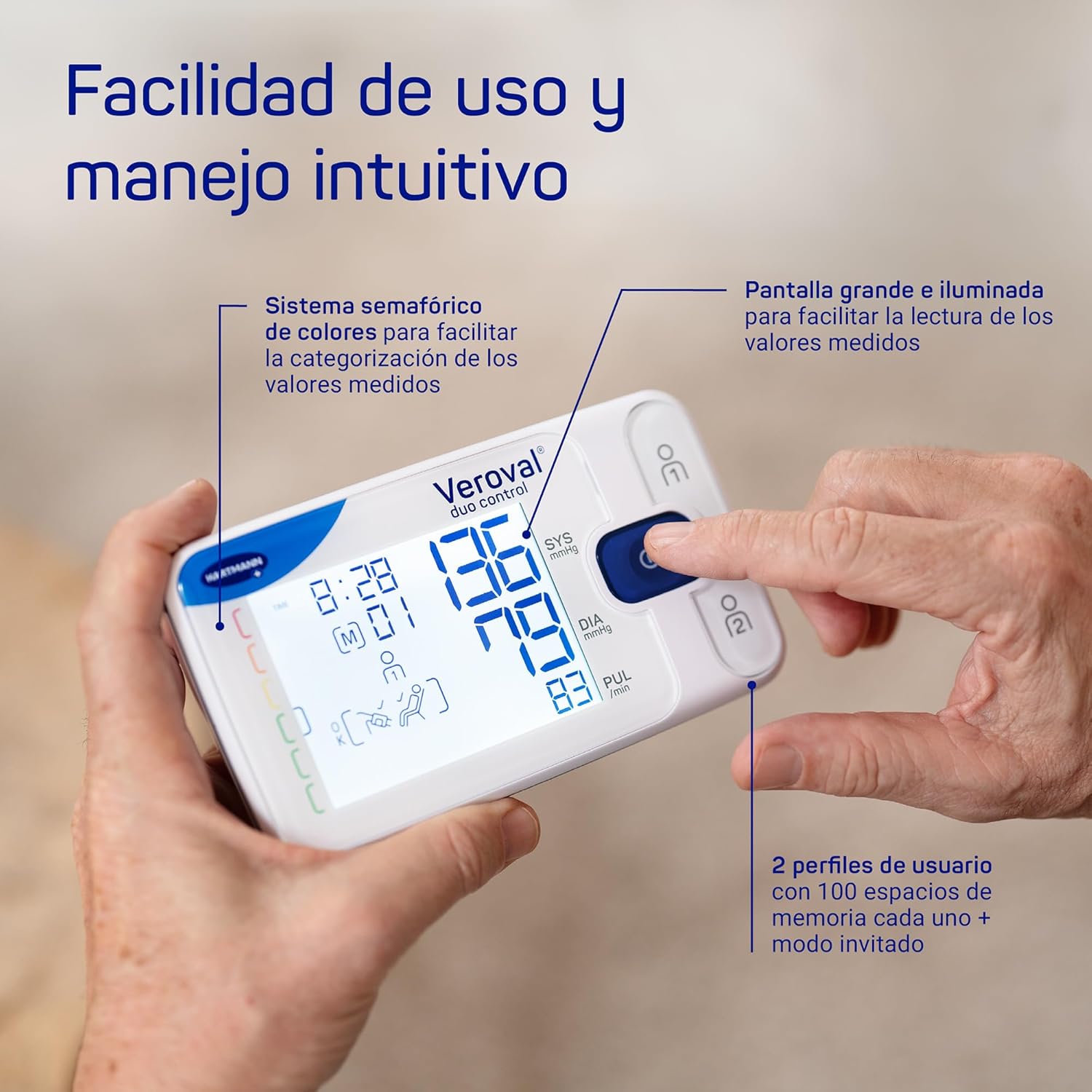
ภาพ: รายละเอียด view of the VEROVAL Duo Control display, showing measurement values and the color-coded indicator for easy interpretation.
7. การจัดการข้อมูล
7.1. Veroval medi.connect App
The VEROVAL Duo Control monitor features simple Bluetooth connectivity for transferring your measurement data to the Veroval medi.connect application. This app is available for Android and iOS devices, including tablets, and allows for long-term data storage and analysis.
- Download the Veroval medi.connect app from your device's app store.
- Follow the in-app instructions to pair your monitor via Bluetooth.
- Once connected, your measurement data will be transferred for storage and analysis.

Image: A user interacting with the Veroval medi.connect application on a smartphone, demonstrating Bluetooth data transfer from the monitor.
8. การบำรุงรักษาและการดูแล
- ทำความสะอาดอุปกรณ์และสายรัดข้อมือด้วยผ้าแห้งนุ่มๆ ห้ามใช้สารทำความสะอาดที่มีฤทธิ์กัดกร่อนหรือแช่ในน้ำ
- เก็บอุปกรณ์และปลอกแขนไว้ในกระเป๋าจัดเก็บที่ให้มาในที่แห้งและเย็น หลีกเลี่ยงแสงแดดโดยตรงและอุณหภูมิที่สูงหรือต่ำเกินไป
- เปลี่ยนแบตเตอรี่เมื่อไฟแสดงสถานะแบตเตอรี่อ่อนปรากฏบนจอแสดงผล
9 การแก้ไขปัญหา
หากคุณพบปัญหาเกี่ยวกับอุปกรณ์ของคุณ โปรดดูวิธีแก้ไขทั่วไปต่อไปนี้:
- อุปกรณ์ไม่เปิด: ตรวจสอบการติดตั้งแบตเตอรี่และให้แน่ใจว่าแบตเตอรี่ไม่หมด เปลี่ยนแบตเตอรี่หากจำเป็น
- ข้อความแสดงข้อผิดพลาดบนจอแสดงผล: Refer to the specific error code in the full user manual for detailed instructions. Often, this indicates incorrect cuff placement or movement during measurement.
- ค่าที่วัดได้ไม่สอดคล้องกัน: Ensure proper cuff placement, rest adequately before measurement, and avoid talking or moving. Consult a physician if readings remain inconsistent.
- ปัญหาการเชื่อมต่อบลูทูธ: Ensure Bluetooth is enabled on your smartphone/tablet and the device is within range. Restart both the monitor and your mobile device.
10. ข้อมูลจำเพาะทางเทคนิค
| คุณสมบัติ | ข้อมูลจำเพาะ |
|---|---|
| หมายเลขรุ่น | 1622044 |
| วิธีการวัด | DUO SENSOR Technology (Oscillometric and Korotkoff) |
| ขนาดข้อมือ | Medium (22-32 cm) |
| ความจุหน่วยความจำ | 200 readings (100 for each of 2 users) |
| แหล่งพลังงาน | แบตเตอรี่ AA 1.5V จำนวน 4 ก้อน |
| ประเภทจอภาพ | Digital, Illuminated LCD |
| การเชื่อมต่อ | บลูทูธ |
| น้ำหนักผลิตภัณฑ์ | 1 Grams (device only, approximate) |
| ขนาด (แพ็คเกจ) | 24.2 x 17.3 x 8.3 ซม. |
11. การรับประกันและการสนับสนุน
The VEROVAL Duo Control Blood Pressure Monitor comes with a รับประกัน 5 ปี นับจากวันที่ซื้อ โปรดเก็บหลักฐานการซื้อไว้เพื่อใช้ในการเคลมประกัน
For technical support, warranty service, or further inquiries, please contact VEROVAL customer service through the official HARTMANN website or your local distributor. Contact information can typically be found in the full user manual or on the product packaging.


