การแนะนำ
This manual provides detailed instructions for the installation, operation, and maintenance of your Defiant Electronic Deadbolt Door Lock. Please read this manual thoroughly before installation and use to ensure proper function and safety.
The Defiant Electronic Deadbolt offers convenient keyless access with a touch keypad, along with the security of a traditional mechanical key. It is designed for use on garage, entry, home office, computer room, or utility room doors.
ข้อมูลด้านความปลอดภัย
Always follow basic safety precautions when installing and operating this product to reduce the risk of injury or damage.
- ห้ามถอดประกอบหรือดัดแปลงตัวล็อคเกินกว่าคำแนะนำที่ระบุไว้ในคู่มือนี้
- Use only the specified battery type (not included).
- เก็บกุญแจไว้ในที่ปลอดภัย ห่างจากตัวล็อกประตู
- Ensure all components are securely fastened during installation.
เนื้อหาแพ็คเกจ
ตรวจสอบให้แน่ใจว่ามีชิ้นส่วนครบทุกชิ้นก่อนเริ่มการติดตั้ง:
- ชุดแผงปุ่มกดภายนอก
- Interior Assembly with Thumb Turn
- สลัก Deadbolt
- จานตี
- สกรูยึด
- กุญแจ (2)
- เทมเพลตการติดตั้ง (ถ้ามี)

Image: Included components such as keys, strike plate, and the cylinder housing.
คู่มือการติดตั้ง
เครื่องมือที่จำเป็น: Philips screwdriver (included), measuring tape, pencil.
- เตรียมประตู: Ensure your door has the standard bore holes for a deadbolt. If not, use the provided template (if applicable) to drill necessary holes.
- ติดตั้งสลัก: Insert the deadbolt latch into the edge of the door. Ensure the "UP" arrow on the latch is pointing upwards. Secure with screws.
- ติดตั้งแผงปุ่มกดภายนอก: Feed the cable from the exterior keypad through the cross bore hole. Align the keypad with the latch and press it firmly against the door.
- ติดตั้งชุดประกอบภายใน: Connect the cable from the exterior keypad to the interior assembly. Align the interior assembly with the mounting posts from the exterior keypad and secure with screws. Ensure the thumb turn operates smoothly.
- ติดตั้งแผ่นปิดช่องลม: Install the strike plate on the door frame, aligning it with the deadbolt latch. Secure with screws.
- ใส่แบตเตอรี่: Open the battery cover on the interior assembly and insert 4 AA batteries (not included), observing polarity.
- การดำเนินการทดสอบ: Test the lock with the mechanical key and by entering a default code (if any) or a newly programmed code.
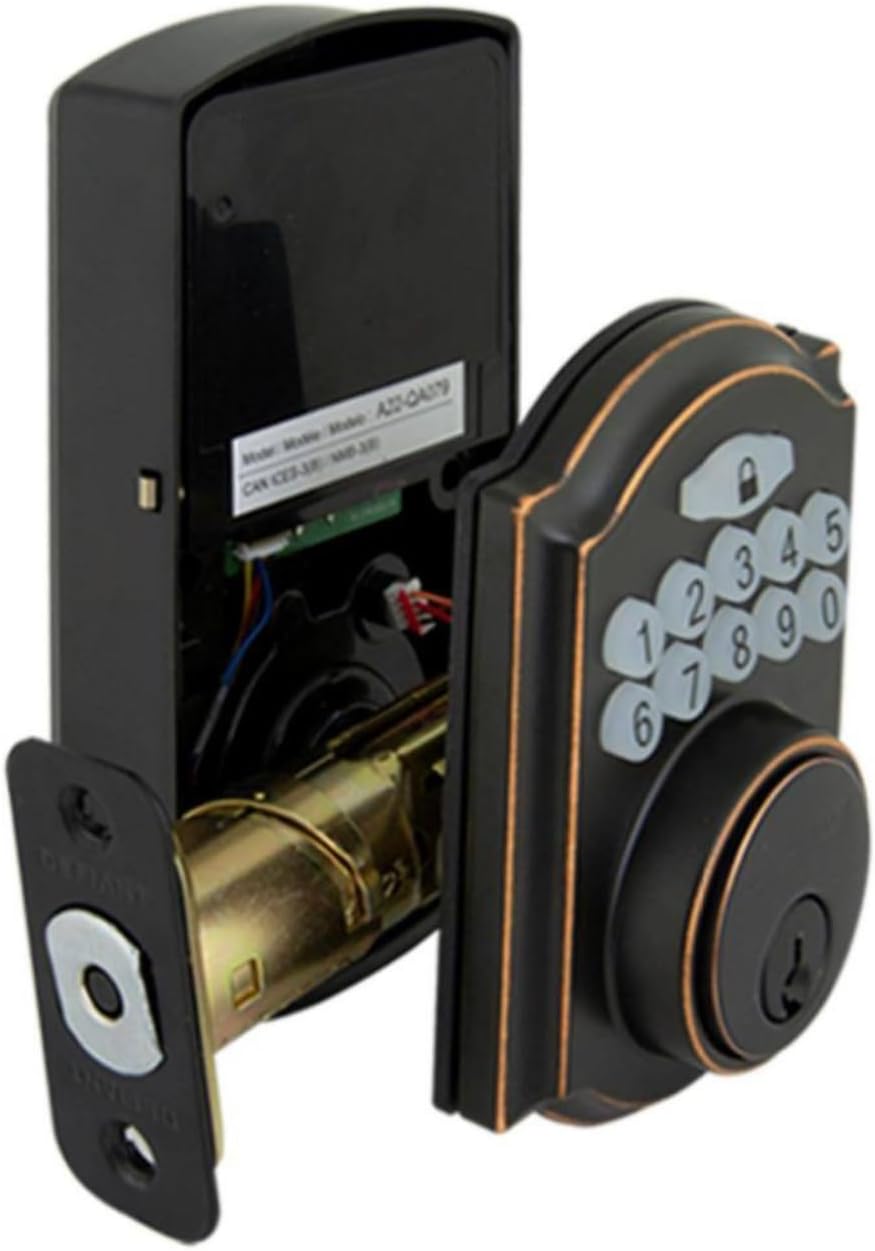
Image: The electronic deadbolt assembly, showing the interior mechanism and exterior keypad.

Image: Exterior view of the electronic deadbolt installed on a door, showcasing the keypad.
คำแนะนำการใช้งาน
โค้ดผู้ใช้การเขียนโปรแกรม
The lock can hold up to 10 user codes and 5 single-entry codes.
- เข้าสู่โหมดการเขียนโปรแกรม: Locate the program button on the interior assembly (usually on the battery cover or near the battery compartment). Press it once. The keypad will illuminate.
- เพิ่มรหัสผู้ใช้ใหม่: Enter your desired 4-digit user code. Press the Lock button (padlock icon) to confirm. The lock will beep to confirm successful programming.
- ลบรหัสผู้ใช้: Enter programming mode. Enter the 4-digit user code you wish to delete. Press the Lock button. The lock will beep to confirm deletion.
การล็อกและการปลดล็อก
- การปลดล็อค: Enter your 4-digit user code on the keypad. The keypad will illuminate, and the deadbolt will retract after a few seconds.
- To Lock (from outside): Press the Lock button (padlock icon) on the keypad. The deadbolt will extend after a few seconds.
- To Lock (from inside): หมุนตัวล็อคแบบหมุนด้วยนิ้วโป้งที่ส่วนประกอบภายในไปที่ตำแหน่งล็อค
คุณสมบัติล็อคอัตโนมัติ
The lock features an auto-lock function with an adjustable delay from 10 to 99 seconds. Refer to the full programming guide (usually a separate sheet or detailed section in the manual) for instructions on enabling and adjusting this feature.

Image: Close-up of the electronic keypad for code entry.
การซ่อมบำรุง
- การทำความสะอาด: ทำความสะอาดตัวล็อคด้วยผ้าเนื้อนุ่มและแห้งamp ผ้า หลีกเลี่ยงน้ำยาทำความสะอาดหรือตัวทำละลายที่มีฤทธิ์กัดกร่อนซึ่งอาจทำลายพื้นผิวหรือส่วนประกอบอิเล็กทรอนิกส์ได้
- การเปลี่ยนแบตเตอรี่: When the battery indicator light flashes or the lock makes a low battery warning sound, replace all four AA batteries. Use only new, high-quality alkaline batteries.
- การหล่อลื่น: Periodically lubricate the deadbolt mechanism with a silicone-based lubricant to ensure smooth operation. Do not lubricate the keypad.
การแก้ไขปัญหา
| ปัญหา | สาเหตุที่เป็นไปได้ | สารละลาย |
|---|---|---|
| ปุ่มกดไม่สว่างขึ้น | แบตเตอรี่หมด หรือติดตั้งแบตเตอรี่ไม่ถูกต้อง | เปลี่ยนแบตเตอรี่โดยตรวจสอบให้แน่ใจว่าใส่ขั้วถูกต้อง |
| Lock does not respond to code. | Incorrect code entered, code not programmed, or lock is jammed. | Verify code, reprogram code, check for obstructions in door frame or latch. |
| เดดโบลต์ไม่ยืด/หดได้เต็มที่ | Misalignment of strike plate or latch, low battery. | Adjust strike plate, replace batteries. |
| ล็อคส่งเสียงบี๊บอย่างต่อเนื่อง | เตือนแบตเตอรี่ต่ำ | เปลี่ยนแบตเตอรี่ทันที |
ข้อมูลจำเพาะ
- ยี่ห้อ: ท้าทาย
- หมายเลขรุ่น: 9a843b7d-eaac-472e-b6d2-4b1006f6f6a5
- ชนิดล็อค : Deadbolt อิเล็กทรอนิกส์
- วัสดุ: บรอนซ์
- สไตล์: ทันสมัย
- คุณสมบัติพิเศษ: Keyless Entry, Back-up Mechanical Key
- รหัสผู้ใช้: สูงถึง 10
- Single Entry Codes: สูงถึง 5
- การหน่วงเวลาการล็อคอัตโนมัติ: 10-99 วินาที (ปรับได้)
- แหล่งพลังงาน: แบตเตอรี่ AA 4 ก้อน (ไม่รวม)
- น้ำหนักสินค้า: 2.26 ปอนด์
- ขนาดแพ็คเกจ: 7.48 x 5.51 x 4.61 นิ้ว
- ยูพีซี: 050134991163
การรับประกันและการสนับสนุน
For warranty information or technical support, please refer to the official Defiant webหรือติดต่อฝ่ายบริการลูกค้า เก็บใบเสร็จรับเงินไว้เพื่อใช้ในการเคลมประกัน
แหล่งข้อมูลออนไลน์: Visit the Defiant website for FAQs, additional guides, and product registration.
บริการลูกค้า: Contact Defiant customer support for assistance with installation, programming, or troubleshooting issues.


