1. บทนำและเรื่องอื่นๆview
This manual provides essential information for the proper setup, operation, and maintenance of your LG 32UK50T-W 32-inch 4K UHD VA Monitor. This monitor features a 3840 x 2160 resolution VA display, DCI-P3 95% color gamut for accurate color reproduction, and Radeon FreeSync technology for smooth visuals. It also includes On Screen Control and multiple input options for versatile connectivity.
2. การตั้งค่า
2.1 การแกะกล่อง
Carefully remove all components from the packaging. Ensure all parts listed in the packing list are present and undamaged. Retain the original packaging for future transport or service needs.
2.2 ชุดขาตั้ง
Attach the stand base to the stand neck, then secure the assembled stand to the monitor panel. Ensure all screws are tightened appropriately. Refer to the diagram below for visual guidance.
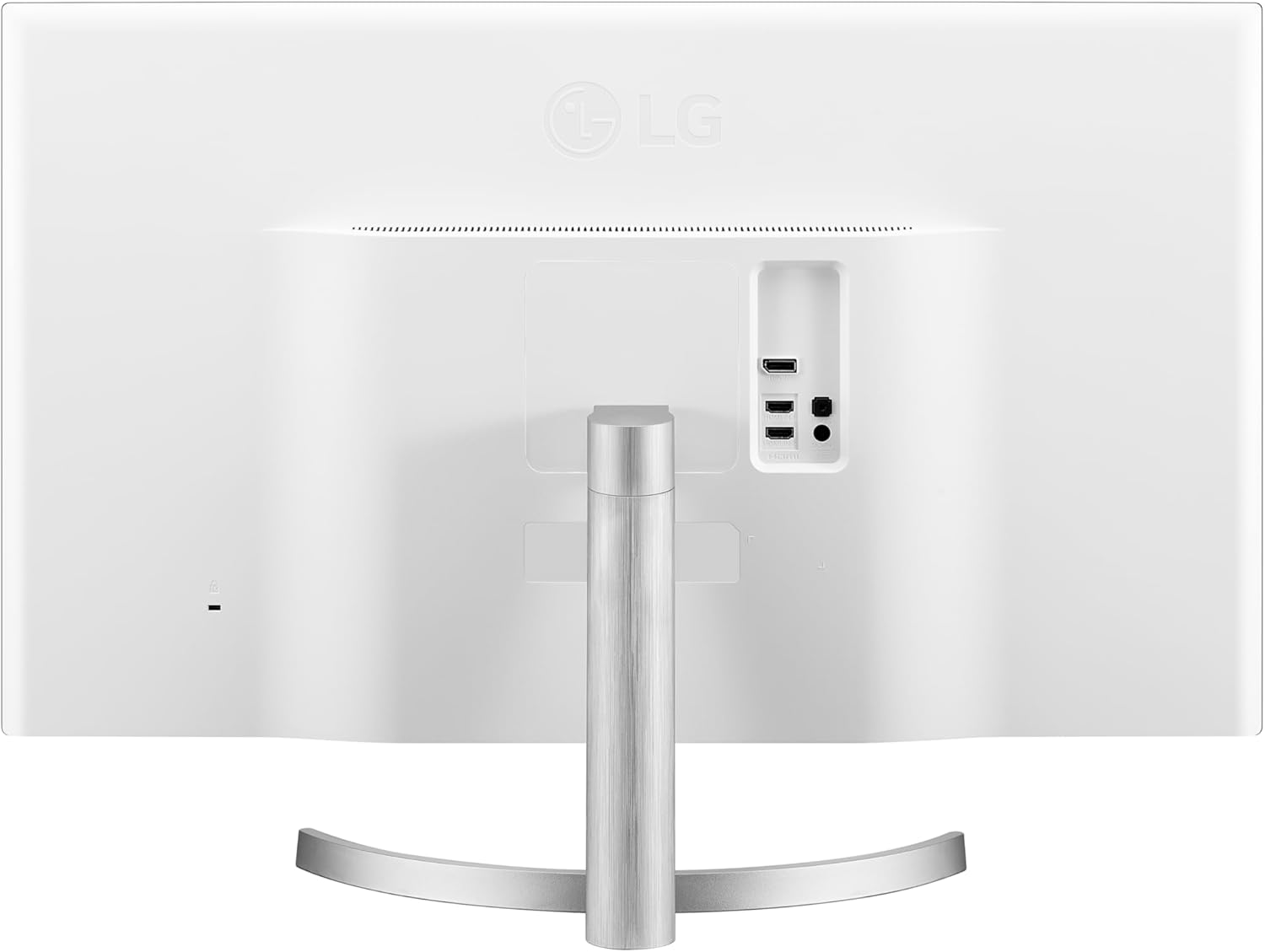
รูปที่ 2.2.1: ด้านหลัง view of the LG 32UK50T-W monitor with the stand attached, highlighting the connection ports.
2.3 การเชื่อมต่อกับอุปกรณ์
The monitor supports multiple input options. Connect your computer or other devices using the appropriate cables.
- ช่องต่อ HDMI: Use an HDMI cable to connect to devices with HDMI output. The monitor has two HDMI ports.
- ดิสเพลย์พอร์ต: Use a DisplayPort cable for devices supporting DisplayPort output.
- หูฟังออก: Connect headphones or external speakers to the headphone out port.

รูปที่ 2.3.1: รายละเอียด view ของพอร์ตอินพุตของจอภาพ
2.4 การเชื่อมต่อสายไฟ
Connect the power adapter to the monitor's DC-in port, then plug the power cord into a wall outlet.
3. คู่มือการใช้งาน
3.1 เปิด/ปิดเครื่อง
Press the power button (usually a joystick-like control located at the bottom center of the monitor) to turn the monitor on or off.
3.2 On Screen Control (OSC)
The On Screen Control feature allows you to easily adjust monitor settings using the joystick button. Push the joystick in any direction to access the main menu. Navigate through options by moving the joystick and confirm selections by pressing it.
3.3 การตั้งค่าภาพ
Adjust display settings such as brightness, contrast, sharpness, and color temperature through the On Screen Control menu. The monitor supports DCI-P3 95% color gamut for enhanced color accuracy.
3.4 เทคโนโลยี Radeon FreeSync
This monitor supports Radeon FreeSync, which synchronizes the refresh rate of your monitor with your graphics card's frame rate to reduce screen tearing and stuttering during gaming. Ensure your graphics card supports Radeon FreeSync and enable the feature in both your graphics card settings and the monitor's On Screen Control menu.
3.5 Screen Split
Utilize the Screen Split feature, accessible via On Screen Control, to efficiently arrange multiple windows on your display for improved multitasking.
3.6 การเลือกอินพุต
To switch between connected devices (e.g., HDMI 1, HDMI 2, DisplayPort), use the On Screen Control menu to select the desired input source.
4. ข้อมูลจำเพาะ

Figure 4.1: LG 32UK50T-W Monitor Dimensions.
| คุณสมบัติ | คำอธิบาย |
|---|---|
| หมายเลขรุ่น | 32UK50T-W |
| ขนาดหน้าจอ | 32 นิ้ว |
| ประเภทแผง | จอแสดงผล VA |
| ปณิธาน | 4K UHD (3840 x 2160) |
| อัตราส่วนภาพ | 16:9 น. |
| ช่วงสี | DCI-P3 95% |
| การซิงค์แบบปรับตัว | Radeon FreeSync Technology |
| ข้อมูลอินพุต | HDMI x 2, Display Port x 1, Headphone Out x 1 |
| พื้นผิวหน้าจอ | ป้องกันแสงสะท้อน เคลือบแข็ง (3H) |
| ขนาด (กxยxส) | 28.7 x 8.2 x 20.4 นิ้ว |
| น้ำหนัก | 13.7 ปอนด์ |
| สี | เงิน |
5. การบำรุงรักษา
5.1 การทำความสะอาดจอภาพ
ในการทำความสะอาดหน้าจอ ให้เช็ดเบาๆ ด้วยผ้านุ่มที่ไม่เป็นขุย สำหรับรอยฝังแน่น ให้เช็ดเบาๆampชุบผ้าด้วยน้ำหรือน้ำยาทำความสะอาดหน้าจอชนิดอ่อนที่ไม่ทำให้เกิดรอยขีดข่วน หลีกเลี่ยงการใช้สารเคมีรุนแรงหรือวัสดุที่มีฤทธิ์กัดกร่อนซึ่งอาจทำให้พื้นผิวหน้าจอเสียหายได้
5.2 การดูแลทั่วไป
- หลีกเลี่ยงการวางวัตถุหนักบนจอภาพหรือสายเคเบิล
- อย่าวางจอภาพไว้ในที่ที่มีแสงแดดส่องโดยตรง ความร้อนสูง หรือความเย็นจัด
- ควรเก็บจอภาพให้ห่างจากของเหลวและความชื้นสูง
6 การแก้ไขปัญหา
หากคุณพบปัญหาเกี่ยวกับจอภาพของคุณ โปรดดูขั้นตอนการแก้ไขปัญหาทั่วไปต่อไปนี้:
- ไม่มีไฟฟ้า: ตรวจสอบให้แน่ใจว่าสายไฟเชื่อมต่อกับทั้งจอภาพและเต้ารับไฟฟ้าอย่างแน่นหนา ตรวจสอบว่าเต้ารับไฟฟ้าใช้งานได้หรือไม่
- ไม่มีสัญญาณ: Verify that the video cable (HDMI or DisplayPort) is correctly connected to both the monitor and your device. Ensure the correct input source is selected on the monitor.
- ปัญหาการแสดงผล (เช่น ภาพกระพริบ ภาพบิดเบี้ยว): Check the video cable for damage. Try adjusting the resolution or refresh rate settings on your computer. If using Radeon FreeSync, ensure it is properly configured.
- ปัญหาเรื่องเสียง: Confirm that external speakers or headphones are properly connected to the headphone out port. Check volume settings on both the monitor and your connected device.
For more detailed troubleshooting or persistent issues, consult the full user manual available on the LG support webไซต์หรือติดต่อฝ่ายบริการลูกค้าของ LG
7. การรับประกันและการสนับสนุน
Your LG 32UK50T-W monitor is covered by a manufacturer's warranty. For specific warranty terms, conditions, and registration information, please refer to the warranty card included with your product or visit the official LG website. For technical support, service requests, or further assistance, please contact LG customer service through their official channels.