1. บทนำ
Thank you for choosing the GANA Bi-Directional HDMI Switch. This device allows you to connect multiple HDMI sources to a single display or a single HDMI source to multiple displays, providing flexibility for your home entertainment or professional setup. Its compact design and plug-and-play functionality make it an ideal solution for managing your HDMI connections.
2. คุณสมบัติของผลิตภัณฑ์
- การทำงานแบบสองทิศทาง: Operates as a 2-input, 1-output HDMI switch or a 1-input, 2-output HDMI splitter.
- การสนับสนุนความละเอียดสูง: Supports 4K@60Hz, 1080P@60Hz, and 3D display.
- ความเข้ากันได้กว้าง: Works with a broad range of HDMI-enabled devices including gaming consoles, Blu-Ray players, monitors, and projectors.
- ปลั๊กแอนด์เพลย์: No external power adapter or drivers required.
- การสลับการทำงานด้วยปุ่มเดียว: Easily switch between connected sources or displays with a single button press.
- ไฟ LED แสดงสถานะ: Clear LED lights indicate the active port.
- Fast & Stable Transmission: Ensures high bandwidth 3.4Gbps data transmission for stable audio and video.
- การออกแบบที่ทนทาน: Features an aluminum shell for better heat dissipation and durability.

Image: The GANA Bi-Directional HDMI Switch, a compact grey device with HDMI ports and a central button, shown with connected HDMI cables.

ภาพ: ระยะใกล้ view of the GANA HDMI Switch highlighting the one-button switch for easy signal swapping and the LED indicators for real-time monitoring of active ports.
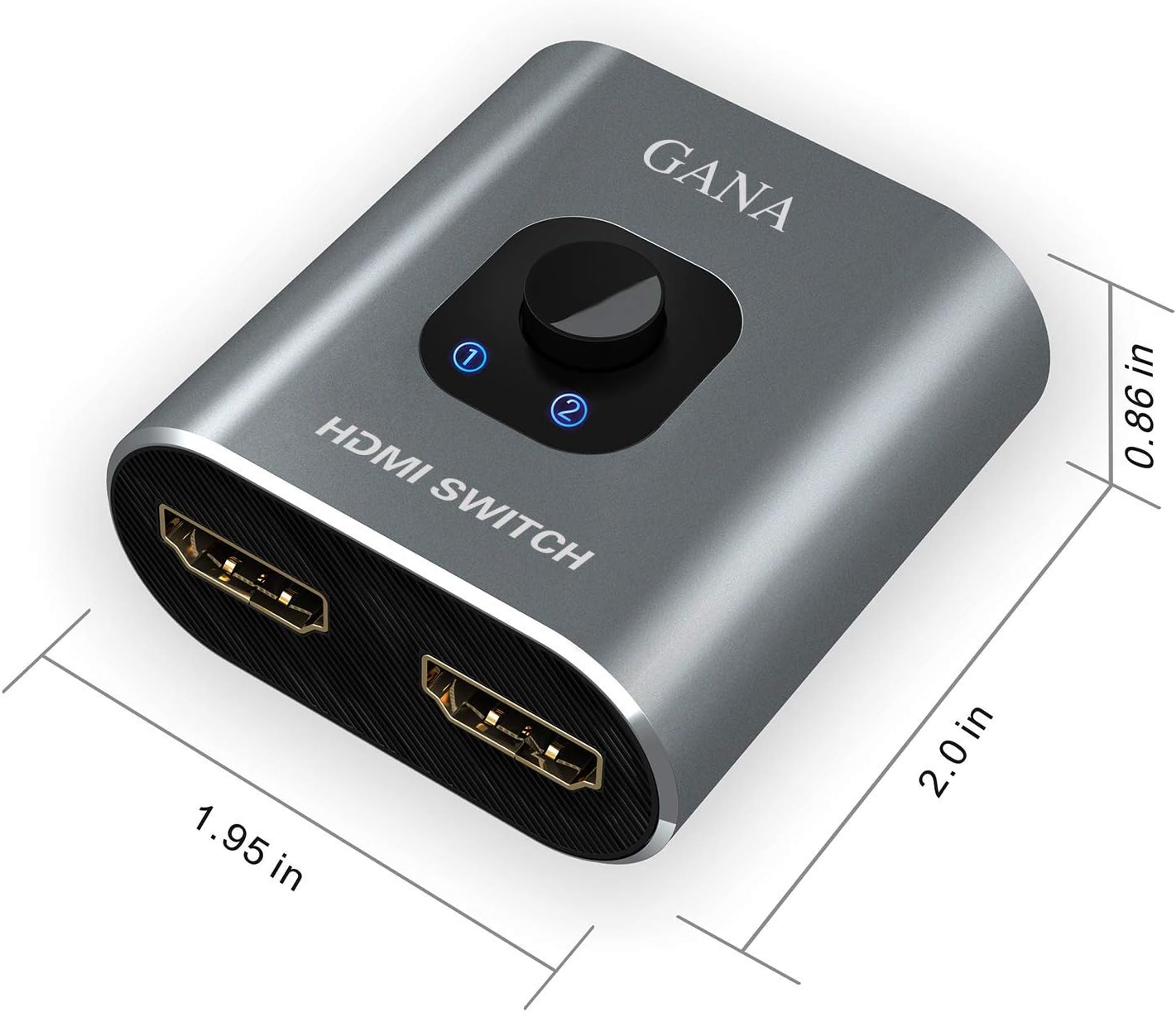
Image: Diagram showing the compact dimensions of the GANA HDMI Switch: approximately 1.95 inches (width), 2.0 inches (depth), and 0.86 inches (height).
3. การตั้งค่าและการเชื่อมต่อ
The GANA Bi-Directional HDMI Switch is designed for simple plug-and-play operation. No external power supply is typically needed as it draws power from the connected HDMI devices. For optimal performance, ensure you use high-quality HDMI 2.0 cables.

Image: Illustration showing the GANA HDMI Switch connected without an external power adapter, emphasizing its plug-and-play nature.
3.1. Mode 1: 2 Inputs to 1 Output (HDMI Switch)
In this mode, you can connect two HDMI source devices (e.g., a gaming console and a Blu-Ray player) to one HDMI display (e.g., a TV or monitor). Use the button on the switch to select which source is displayed.
- Connect HDMI cable from Source 1 (e.g., PS5) to one input port on the GANA HDMI Switch.
- Connect HDMI cable from Source 2 (e.g., Laptop) to the other input port on the GANA HDMI Switch.
- Connect an HDMI cable from the output port of the GANA HDMI Switch to your display (e.g., TV or Monitor).

Image: Diagram illustrating the 2-input, 1-output configuration, showing two input devices (laptop and PS4) connected to the GANA HDMI Switch, which then connects to a single monitor.

Image: A detailed connection diagram for Mode 1 (2 IN 1 OUT), showing a laptop and a computer connected to the HDMI switch, which outputs to a single display.
3.2. Mode 2: 1 Input to 2 Outputs (HDMI Splitter)
In this mode, you can connect one HDMI source device (e.g., a Blu-Ray player) to two HDMI displays (e.g., two TVs). Important: Only one display will work at a time in this mode. You must manually switch between the displays using the button on the device.
- Connect an HDMI cable from your source device (e.g., Laptop) to the input port on the GANA HDMI Switch.
- Connect HDMI cables from the two output ports of the GANA HDMI Switch to your two displays (e.g., Monitor 1 and Monitor 2).

Image: Diagram illustrating the 1-input, 2-output configuration, showing a laptop connected to the GANA HDMI Switch, which then connects to two monitors. A note indicates that only one display can be active at a time.

Image: A detailed connection diagram for Mode 2 (1 IN 2 OUT), showing a computer connected to the HDMI switch, which outputs to two displays. A clear warning states that only one monitor is displayed at a time and both monitors cannot be displayed together.

Image: The back of the product packaging displaying simplified connection diagrams for both 2 Host to 1 Device (Switch) and 1 Host to 2 Device (Splitter) modes, along with basic operating instructions.
4. คู่มือการใช้งาน
Once all HDMI cables are connected, the GANA Bi-Directional HDMI Switch is ready for use. The device operates with a simple push-button mechanism.
- Switching Signal: Press the central button on the top of the switch to toggle between the connected HDMI sources (in 2-in-1-out mode) or between the connected displays (in 1-in-2-out mode).
- ไฟ LED แสดงสถานะ: The blue LED light(s) next to the button will illuminate to indicate which port is currently active. This provides real-time monitoring of your active connection.
5. Compatibility and Performance
The GANA Bi-Directional HDMI Switch is designed for broad compatibility and high-performance video and audio transmission.
5.1. อุปกรณ์ที่รองรับ
This switch works with most devices equipped with an HDMI port, including but not limited to:
- อุปกรณ์อินพุต: Nintendo Switch, PlayStation (PS3, PS4, PS5), Xbox (Xbox One, Xbox 360), Blu-Ray Players, DVD Players, Roku, TV Boxes/Sticks, Laptops, Desktop Computers.
- อุปกรณ์ส่งออก: HDTVs, HD-Ready TVs, DVB Receivers, Monitors, Projectors.

Image: Visual representation of the broad compatibility of the GANA HDMI Switch, showing various input devices like laptops, HD players, gaming consoles, and output devices such as monitors, TVs, and projectors.

Image: Another illustration of wide compatibility, featuring modern gaming consoles (PS5, Xbox, Switch), PCs, laptops, and TV boxes as input devices, connecting to the HDMI switch which outputs to monitors, TVs, and projectors.
5.2. Resolution and Display Quality
The switch supports high-definition video and audio, ensuring a quality viewการสร้างประสบการณ์
- มติ: รองรับความละเอียด 4K@60Hz, 2K@144Hz และ 1080P@240Hz
- การรองรับ 3D: Compatible with 3D display formats.
- รองรับ HDR: Enhances dynamic range for more realistic visuals.
- การปฏิบัติตาม HDCP: Supports HDCP 2.2 and 2.3 for protected content.

Image: A family watching a sports game on a large screen, demonstrating the clear 4K@60Hz video quality supported by the GANA HDMI Switch.

Image: An illustration highlighting the supported resolutions: 4K@60Hz, 2K@144Hz, and 1080P@240Hz, with a high-definition image of a sports car on a large display.

Image: A side-by-side comparison of Standard Dynamic Range (SDR) and High Dynamic Range (HDR) displays, showing how HDR provides more lifelike visuals, supported by the HDMI switch.

Image: An illustration showing the GANA HDMI Switch's compatibility with various streaming services like YouTube, Disney+, Netflix, HBO Max, Hulu, and Prime Video, indicating seamless content playback.
6. การดูแลรักษา
To ensure the longevity and optimal performance of your GANA Bi-Directional HDMI Switch, follow these simple care guidelines:
- การทำความสะอาด: ใช้ผ้านุ่มและแห้งเช็ดทำความสะอาดภายนอกอุปกรณ์ ห้ามใช้น้ำยาทำความสะอาดหรือสเปรย์
- พื้นที่จัดเก็บ: เก็บอุปกรณ์ไว้ในที่แห้งและเย็น หลีกเลี่ยงแสงแดดโดยตรงและอุณหภูมิที่สูงหรือต่ำเกินไป
- การจัดการ: หลีกเลี่ยงการทำอุปกรณ์ตกหรือกระแทกแรงๆ ห้ามพยายามถอดประกอบอุปกรณ์
- การจัดการสายเคเบิล: Ensure HDMI cables are not excessively bent or strained at the connection points to prevent damage to the ports.
7 การแก้ไขปัญหา
If you encounter issues with your GANA Bi-Directional HDMI Switch, please refer to the following common problems and solutions:
| ปัญหา | สาเหตุที่เป็นไปได้ | สารละลาย |
|---|---|---|
| No signal or flickering display. | Loose cable connections, incompatible resolution/refresh rate, faulty HDMI cable, insufficient power from source. |
|
| Only one display works in 1-in-2-out mode. | This is expected behavior for this bi-directional switch. | The GANA Bi-Directional HDMI Switch is designed to output to only one display at a time in splitter mode. Use the button to switch between the two connected displays. It is not a simultaneous splitter. |
| Switch button unresponsive or LED not changing. | Temporary glitch, power issue. |
|
| Audio issues (no sound or distorted audio). | Audio settings on source/display, cable issue. |
|
| Unstable connection / signal drops. | Loose physical connection, cable quality, interference. |
|
8. ข้อมูลจำเพาะทางเทคนิค
| คุณสมบัติ | ข้อมูลจำเพาะ |
|---|---|
| หมายเลขรุ่น | grey001 |
| ขนาดสินค้า | 1.57 x 6.2 x 7.49 ซม. (0.62 x 2.44 x 2.95 นิ้ว) |
| น้ำหนัก | 41 กรัม (1.45 ออนซ์) |
| จำนวนพอร์ต | 3 (2 HDMI In / 1 HDMI Out OR 1 HDMI In / 2 HDMI Out) |
| ความละเอียดที่รองรับ | 4K@60Hz, 2K@144Hz, 1080P@240Hz, and lower resolutions |
| รองรับ 3D | ใช่ |
| รองรับ HDR | ใช่ |
| การปฏิบัติตาม HDCP | HDCP 2.2 และ 2.3 |
| แบนด์วิดท์การส่งข้อมูล | 3.4Gbps |
| แหล่งพลังงาน | No external power needed (powered via HDMI) |
| วัสดุที่ใช้ทำตัวเรือน | อลูมิเนียม |
| ประเภทขั้วต่อ | HDMI |
9. ข้อมูลการรับประกัน
GANA products are manufactured to high-quality standards. For specific warranty terms and conditions, please refer to the documentation included with your purchase or contact GANA customer support. Keep your purchase receipt as proof of purchase for warranty claims.
10. การสนับสนุนลูกค้า
If you require further assistance or have questions not covered in this manual, please contact GANA customer support through the following channels:
- ออนไลน์: Visit the official GANA webไซต์สำหรับคำถามที่พบบ่อยและทรัพยากรสนับสนุน
- อีเมล: Refer to your product packaging or purchase confirmation for support email addresses.
When contacting support, please provide your product model number (grey001) and a detailed description of the issue.


