1. บทนำ
This manual provides essential information for setting up, operating, maintaining, and troubleshooting your HP LaserJet 600 M603N M603 monochrome laser printer. Please read this manual thoroughly before using the printer to ensure proper operation and to prevent damage.
The HP LaserJet M603n is designed for high-volume monochrome printing in office environments, offering fast print speeds and professional-quality output.
2. ข้อมูลด้านความปลอดภัย
- ควรเสียบปลั๊กเครื่องพิมพ์เข้ากับเต้ารับไฟฟ้าที่มีสายดินเสมอ
- อย่าปิดกั้นช่องระบายอากาศ
- ควรเก็บเครื่องพิมพ์ให้ห่างจากน้ำหรือความชื้นสูง
- Use only the specified power cord and toner cartridges.
- Avoid touching the fuser area, as it can be hot.
- Unplug the printer before cleaning or servicing.
3. เนื้อหาบรรจุภัณฑ์
ตรวจสอบว่ามีรายการทั้งหมดอยู่ในแพ็คเกจ:
- HP LaserJet 600 M603N M603 Printer
- Toner Cartridge (CE390A compatible)
- สายไฟ
- Network/USB Cable (where applicable)

ภาพที่ 1: ด้านหน้า view of the HP LaserJet 600 M603N M603 printer, showing the control panel on the right side and the HP logo on the front panel.
4. คำแนะนำในการตั้งค่า
4.1 การแกะกล่องเครื่องพิมพ์
- นำเครื่องพิมพ์ออกจากบรรจุภัณฑ์อย่างระมัดระวัง
- Remove all packing materials, tapes, and protective films from the printer's exterior and interior.
- วางเครื่องพิมพ์บนพื้นผิวที่มั่นคงและเรียบเสมอกัน โดยมีอากาศถ่ายเทสะดวก
4.2 การต่อสายไฟ
- ต่อสายไฟเข้ากับช่องเสียบสายไฟของเครื่องพิมพ์
- เสียบปลายสายไฟอีกด้านหนึ่งเข้ากับเต้ารับไฟฟ้าที่มีสายดิน
- กดปุ่มเปิดปิดเพื่อเปิดเครื่องพิมพ์
4.3 การเชื่อมต่อกับคอมพิวเตอร์หรือเครือข่าย
- การเชื่อมต่อ USB: Connect one end of a USB 2.0 cable to the printer's USB port and the other end to your computer.
- การเชื่อมต่อเครือข่าย (อีเธอร์เน็ต): Connect an Ethernet cable to the printer's Gigabit Ethernet port and the other end to your network router or switch.
4.4 การติดตั้งตลับหมึก
- เปิดฝาด้านหน้าของเครื่องพิมพ์
- นำตลับหมึกใหม่ออกจากบรรจุภัณฑ์แล้วเขย่าเบาๆ เพื่อกระจายผงหมึกให้ทั่ว
- ใส่ตลับหมึกเข้าไปในช่องที่กำหนดจนกระทั่งได้ยินเสียงคลิกเข้าที่
- ปิดประตูทางเข้าด้านหน้า
4.5 กำลังโหลดกระดาษ
- Pull out the paper tray (Tray 2 is standard).
- Adjust the paper guides to the correct paper size.
- Load the paper stack into the tray, ensuring it is flat and below the maximum fill line.
- ดันถาดกระดาษกลับเข้าไปในเครื่องพิมพ์
- Confirm paper type and size on the printer's control panel if prompted.
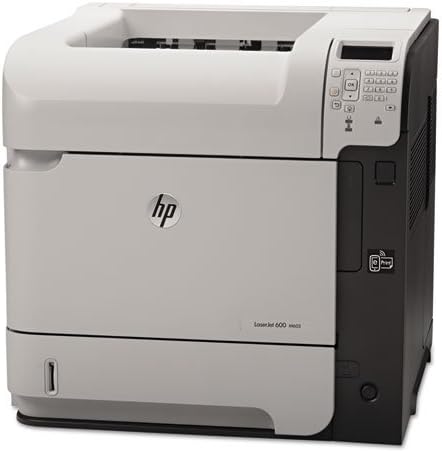
ภาพที่ 2: มุม view of the HP LaserJet 600 M603N M603 printer, highlighting its compact design and connectivity ports on the side.
5. คู่มือการใช้งาน
5.1 การพิมพ์ขั้นพื้นฐาน
- ตรวจสอบให้แน่ใจว่าเครื่องพิมพ์เปิดอยู่และเชื่อมต่อกับคอมพิวเตอร์หรือเครือข่ายของคุณแล้ว
- เปิดเอกสารที่คุณต้องการพิมพ์บนคอมพิวเตอร์ของคุณ
- เลือก พิมพ์ จากเมนูของแอปพลิเคชัน (เช่น File > พิมพ์).
- Choose the "HP LaserJet 600 M603N" from the list of available printers.
- Adjust print settings (e.g., number of copies, paper source) as needed.
- คลิก พิมพ์.
5.2 Printer Control Panel
The control panel on the printer allows you to monitor printer status, configure settings, and perform various tasks. Refer to the on-screen menus for navigation and options such as:
- Viewing printer status and error messages.
- Configuring network settings.
- Managing paper trays.
- Accessing maintenance options.
5.3 การติดตั้งไดรเวอร์
For optimal performance, install the latest printer drivers. Drivers can typically be downloaded from the official HP support website by searching for your specific printer model (HP LaserJet 600 M603N).
6. การบำรุงรักษา
6.1 การเปลี่ยนตลับหมึก
When the toner level is low or the print quality degrades, replace the toner cartridge:
- Open the front access door.
- Remove the old toner cartridge by pulling it straight out.
- Unpack the new CE390A compatible toner cartridge and shake it gently.
- ใส่ตลับหมึกใหม่จนกระทั่งล็อคเข้าที่
- ปิดประตูทางเข้าด้านหน้า
6.2 การทำความสะอาดเครื่องพิมพ์
- ภายนอก: เช็ดพื้นผิวด้านนอกด้วยผ้าเนื้อนุ่มที่ไม่เป็นขุยampล้างด้วยน้ำสะอาด ห้ามใช้สารทำความสะอาดที่มีฤทธิ์กัดกร่อน
- ภายใน: Periodically open the front access door and gently remove any loose paper dust or debris using a dry, lint-free cloth. Avoid touching sensitive components.
7 การแก้ไขปัญหา
| ปัญหา | สาเหตุที่เป็นไปได้ | สารละลาย |
|---|---|---|
| เครื่องพิมพ์ไม่เปิด | สายไฟหลุด ปลั๊กไฟมีปัญหา | ตรวจสอบการเชื่อมต่อสายไฟ ลองเสียบปลั๊กกับเต้ารับอื่นดู |
| ไม่มีผลลัพธ์การพิมพ์ | Printer offline, incorrect driver, empty toner, paper jam | Ensure printer is online, check toner level, clear paper path, reinstall drivers. |
| คุณภาพการพิมพ์ไม่ดี | Low toner, fuser issue, dirty printer components | Replace toner, clean printer, contact support if fuser issue suspected. |
| กระดาษติด | Incorrect paper loading, damaged paper, foreign objects | Remove jammed paper carefully, ensure paper is loaded correctly, check for obstructions. |
8. ข้อมูลจำเพาะ
| คุณสมบัติ | รายละเอียด |
|---|---|
| ชื่อรุ่น | HP LaserJet Enterprise 600 M603n |
| ประเภทเครื่องพิมพ์ | เครื่องพิมพ์เลเซอร์ขาวดำ |
| ความเร็วในการพิมพ์ (ขาวดำ) | สูงสุด 62 หน้าต่อนาที (ppm) |
| ความละเอียดในการพิมพ์ | สูงสุด 1200 x 1200 dpi |
| การเชื่อมต่อ | USB 2.0, กิกะบิตอีเธอร์เน็ต |
| การพิมพ์สองหน้า | Simplex (No automatic dual-sided printing) |
| ความจุแผ่นอินพุตสูงสุด | 600 sheets (standard) |
| ตลับหมึกที่รองรับ | CE390A |
| น้ำหนักสินค้า | ประมาณ 80 ปอนด์ (36.3 กก.) |
| ขนาดสินค้า (กว้าง x ลึก x สูง) | 19.65 x 21.26 x 23.15 นิ้ว (49.9 x 54 x 58.8 ซม.) |
| การใช้พลังงาน | (Typical values, refer to HP documentation for specifics) |
9. การรับประกันและการสนับสนุน
This HP LaserJet 600 M603N M603 printer comes with a รับประกันจำกัด 90 วันโปรดเก็บหลักฐานการซื้อไว้เพื่อใช้เรียกร้องการรับประกัน
หากต้องการความช่วยเหลือด้านเทคนิค การดาวน์โหลดไดรเวอร์ หรือความช่วยเหลือเพิ่มเติม โปรดไปที่เว็บไซต์สนับสนุนอย่างเป็นทางการของ HP website and search for your specific printer model.
ฝ่ายสนับสนุน HP Webเว็บไซต์: www.hp.com/support