1. บทนำ
This manual provides essential information for the safe and efficient operation of your Xerox VersaLink C8000/DT Color Printer. It covers setup, daily use, maintenance, and troubleshooting. Please read this manual thoroughly before using the printer and retain it for future reference.
2. อะไรอยู่ในกล่อง
Verify that all items are present in the packaging.
- Xerox VersaLink C8000/DT Color Printer
- สายไฟ
- เอกสารประกอบ (คู่มือนี้ ข้อมูลด้านความปลอดภัย)
- Initial Toner Cartridges (Black, Cyan, Magenta, Yellow)
3. การตั้งค่า
3.1 การแกะกล่อง
- นำเครื่องพิมพ์ออกจากบรรจุภัณฑ์อย่างระมัดระวัง
- นำเทปกาวป้องกันและวัสดุบรรจุภัณฑ์ทั้งหมดออกจากภายนอกและภายในเครื่องพิมพ์ โปรดดูคู่มือการตั้งค่าอย่างรวดเร็วสำหรับตำแหน่งที่เฉพาะเจาะจง
3.2 การจัดวางทางกายภาพ
Place the printer on a sturdy, level surface capable of supporting its weight (approximately 178 pounds). Ensure adequate ventilation around the printer.

รูปที่ 3.2.1: ด้านหน้า view of the Xerox VersaLink C8000/DT Color Printer, showing its overall design and paper trays.
3.3 การเชื่อมต่อสายไฟ
- Connect the power cord to the printer's power inlet.
- เสียบปลายอีกด้านของสายไฟเข้ากับเต้ารับไฟฟ้าที่มีสายดิน
- กดปุ่มเปิดปิดเพื่อเปิดเครื่องพิมพ์
3.4 การกำหนดค่าเริ่มต้นและการตั้งค่าเครือข่าย
Upon first power-on, the printer's user interface will guide you through initial setup steps, including language selection, date/time, and network configuration. The printer supports Ethernet connectivity.

รูปที่ 3.4.1: Close-up of the printer's control panel, displaying the touch screen interface with various application icons.
For network connection, connect an Ethernet cable from your network router or switch to the Ethernet port on the printer. Follow the on-screen prompts to complete network settings.
4. คู่มือการใช้งาน
4.1 การพิมพ์ขั้นพื้นฐาน
- Ensure the printer is powered on and connected to your network.
- Load paper into the paper trays. The printer supports standard paper sizes up to 8.5 x 14 inches.
- From your computer or mobile device, select the Xerox VersaLink C8000/DT as your printer.
- Adjust print settings (e.g., color, duplex, paper type) as needed.
- เริ่มงานพิมพ์
4.2 Mobile and Cloud Connectivity
The VersaLink C8000/DT offers instant connectivity to cloud services and mobile devices directly from its user interface. Access pre-loaded, cloud-hosted services to manage documents and print from various platforms. Compatible with smartphones and controlled via an app.
การพิมพ์สองหน้า 4.3 หน้า
The printer supports automatic dual-sided (duplex) printing. This feature can be enabled through the print settings on your computer or directly from the printer's control panel for supported functions.
5. การบำรุงรักษา
5.1 การเปลี่ยนตลับหมึก
When a toner cartridge is low or empty, the printer's control panel will display a notification.
- เปิดฝาครอบด้านหน้าของเครื่องพิมพ์
- Locate the toner cartridge that needs replacement (Black, Cyan, Magenta, or Yellow).
- Grasp the handle of the cartridge and pull it straight out.
- แกะตลับหมึกใหม่ออกจากบรรจุภัณฑ์แล้วเขย่าเบาๆ เพื่อกระจายผงหมึกให้ทั่ว
- Insert the new cartridge into the corresponding slot until it clicks into place.
- ปิดฝาครอบด้านหน้า
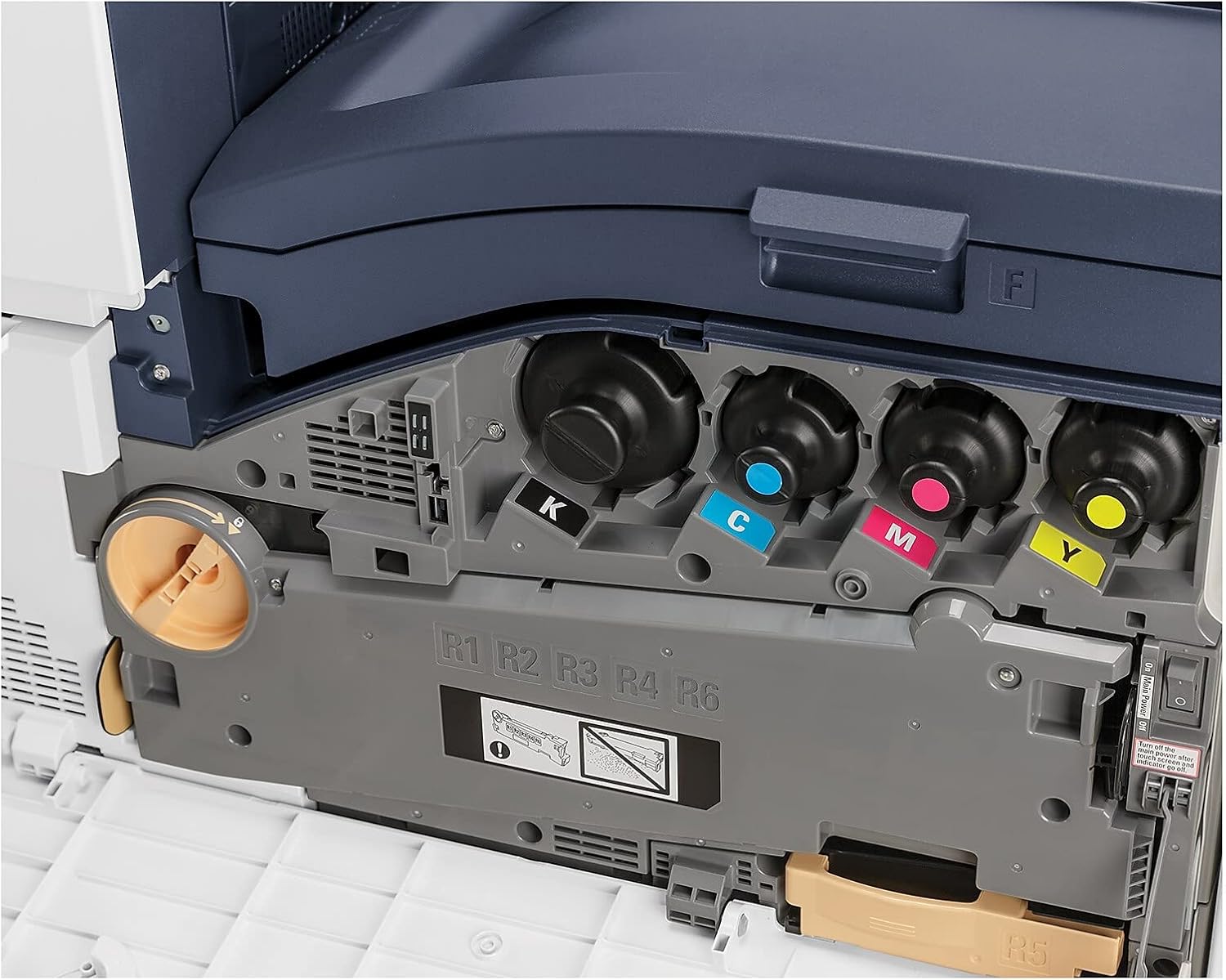
รูปที่ 5.1.1: View of the toner cartridge compartment, showing the slots for Black (K), Cyan (C), Magenta (M), and Yellow (Y) toner.
5.2 การทำความสะอาด
Regularly clean the exterior of the printer with a soft, lint-free cloth. Do not use abrasive cleaners or solvents. Refer to the printer's internal cleaning procedures via the control panel for specific instructions on cleaning internal components.
6 การแก้ไขปัญหา
This section provides solutions to common issues. For more complex problems, refer to the online support resources or contact Xerox customer service.
- เครื่องพิมพ์ไม่ตอบสนอง: Check power connection, network cable, and ensure the printer is powered on. Restart the printer and the connected device.
- ปัญหาคุณภาพการพิมพ์: Check toner levels. Perform a print quality calibration from the printer's control panel. Ensure correct paper type settings.
- กระดาษติด: Follow the on-screen instructions or refer to the printer's internal guides for clearing paper jams from specific areas.
- ปัญหาการเชื่อมต่อเครือข่าย: Verify Ethernet cable connection. Check network settings on the printer and your computer. Restart network devices.
7. ข้อมูลจำเพาะ
| คุณสมบัติ | รายละเอียด |
|---|---|
| ยี่ห้อ | เครื่องถ่ายเอกสาร |
| หมายเลขรุ่น | C8000/DT |
| เทคโนโลยีการพิมพ์ | เลเซอร์ |
| เอาท์พุตเครื่องพิมพ์ | สี |
| ความเร็วในการพิมพ์สูงสุด (สี) | 42 หน้าต่อนาที |
| ความเร็วในการพิมพ์สูงสุด (ขาวดำ) | 42 หน้าต่อนาที |
| ความละเอียดการพิมพ์สีสูงสุด | 1200 x 2400 จุดต่อนิ้ว |
| ความละเอียดการพิมพ์ขาวดำสูงสุด | 1200 x 2400 จุดต่อนิ้ว |
| การพิมพ์สองหน้า | อัตโนมัติ |
| เทคโนโลยีการเชื่อมต่อ | อีเธอร์เน็ต |
| ฮาร์ดแวร์อินเตอร์เฟซ | อีเธอร์เน็ต |
| อุปกรณ์ที่รองรับ | สมาร์ทโฟน |
| วิธีการควบคุม | แอป |
| ขนาดสื่อสูงสุด | 8.5 x 14 นิ้ว |
| ประเภทของสื่อสิ่งพิมพ์ | ซองจดหมาย กระดาษ (ธรรมดา) |
| ความจุแผ่นอินพุตสูงสุด | 45 |
| จำนวนถาด | 2 |
| น้ำหนักสินค้า | 178 ปอนด์ |
| ขนาดสินค้า | 28.5 x 24.4 x 31.9 นิ้ว |
| ความจุของหน่วยความจำ | 4096MB |
| วัดtage | 2300 วัตต์ |
| ประเภทสแกนเนอร์ | รถบรรทุกพื้นเรียบ |
| ฟังก์ชันเครื่องพิมพ์เพิ่มเติม | ทั้งหมดในหนึ่งเดียว |
8. การรับประกันและการสนับสนุน
8.1 การรับประกันสินค้า
The Xerox VersaLink C8000/DT Color Printer comes with a standard one-year warranty. For detailed terms and conditions, please refer to the warranty documentation included with your product or visit the official Xerox support webเว็บไซต์.
8.2 การสนับสนุนลูกค้า
For technical assistance, troubleshooting, or service requests, please contact Xerox customer support. Support contact information can typically be found on the Xerox webตรวจสอบได้จากเว็บไซต์หรือเอกสารประกอบที่มาพร้อมกับเครื่องพิมพ์ของคุณ


