การแนะนำ
This manual provides essential information for the safe and effective operation of your VOLTCRAFT IR 2201-50D USB Infrared Thermometer. Please read these instructions thoroughly before using the device and retain them for future reference. This device is designed for non-contact temperature measurement across a wide range, featuring a dual laser for precise targeting and a USB interface for data transfer.
คำแนะนำเพื่อความปลอดภัย
- ความปลอดภัยของเลเซอร์: Do not look directly into the laser beam or point it at people or animals. The laser is used for targeting only.
- การปกป้องดวงตา: Always wear appropriate eye protection when operating the device in environments where laser exposure is a concern.
- ขีดจำกัดอุณหภูมิ: อย่าวางอุปกรณ์ไว้ในที่ที่มีอุณหภูมิสูงเกินช่วงการทำงานที่กำหนด
- การจัดการแบตเตอรี่: Ensure correct battery polarity. Remove batteries if the device will not be used for an extended period. Dispose of batteries according to local regulations.
- การซ่อมบำรุง: ดำเนินการบำรุงรักษาตามที่อธิบายไว้ในคู่มือนี้เท่านั้น ส่งต่องานซ่อมบำรุงอื่นๆ ทั้งหมดให้กับช่างผู้ชำนาญการ
- สภาพแวดล้อม : Avoid using the device in high humidity, dusty, or explosive environments.
เนื้อหาแพ็คเกจ
Verify that all items listed below are present and in good condition upon unpacking.
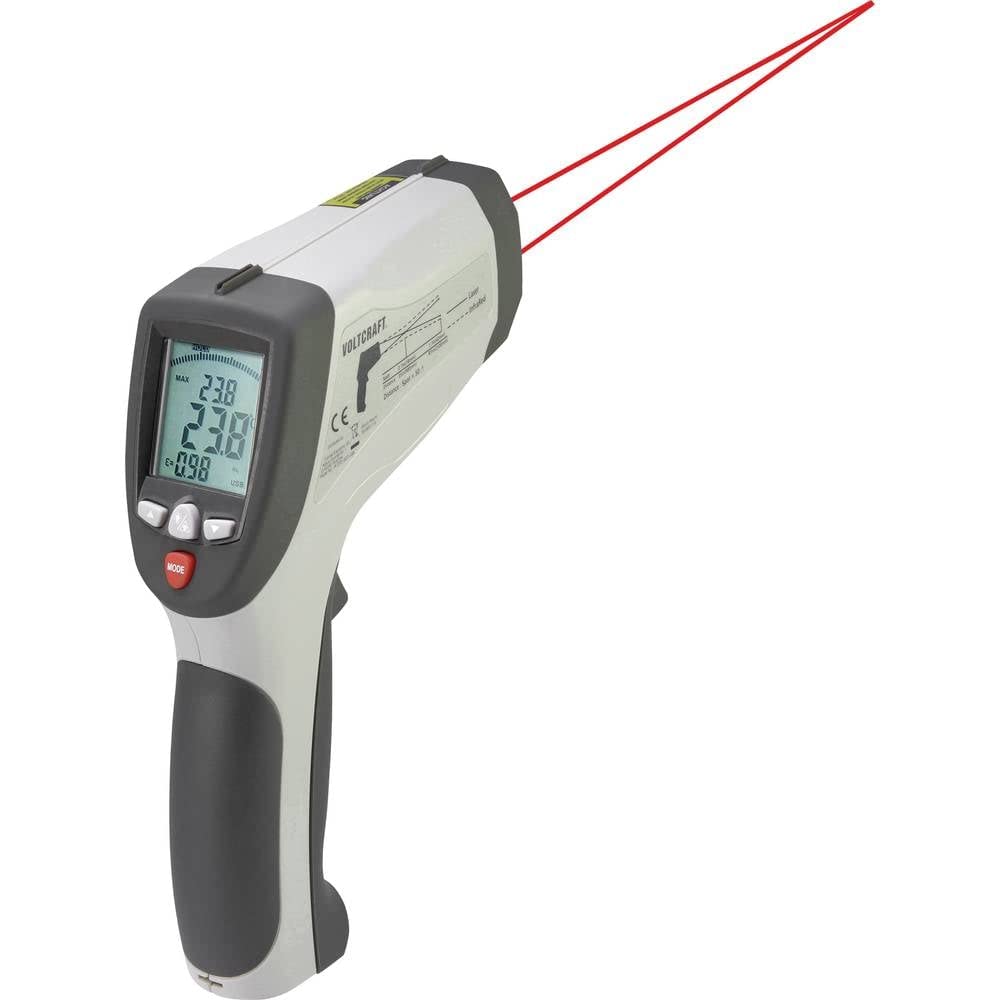
Image: Complete kit for the VOLTCRAFT IR 2201-50D Infrared Thermometer.
- VOLTCRAFT IR 2201-50D Infrared Thermometer
- ซองใส่ยาก
- ขาตั้งกล้องขนาดเล็ก
- สายเชื่อมต่อ USB
- K-Type Temperature Probe
- ซีดีซอฟแวร์
- คู่มือการใช้งาน (เอกสารนี้)
สินค้าเกินview
The VOLTCRAFT IR 2201-50D is a high-precision infrared thermometer designed for non-contact temperature measurements. Key features include:
- การกำหนดเป้าหมายด้วยเลเซอร์แบบคู่: Provides accurate aiming for precise measurement areas.
- ช่วงอุณหภูมิที่กว้าง: Measures from -50 °C to 2200 °C (-58 °F to 3992 °F).
- High Optical Resolution (D:S): 50:1 distance-to-spot ratio for measuring small targets from a distance.
- เวลาตอบสนองรวดเร็ว: 150 ms for quick readings.
- ปรับ Emissivity: Range from 0.1 to 1.0, allowing for accurate measurements on various surfaces.
- อินเทอร์เฟซ USB: For data logging and connection to a computer (software included).
- K-Type Input: Supports external K-type thermocouples for contact temperature measurements.

ภาพ: ด้านหน้า view of the thermometer, highlighting the measurement lens and laser emitters.

ภาพ: ด้านข้าง view of the thermometer, showing the display and controls.
การตั้งค่า
- การติดตั้งแบตเตอรี่: Open the battery compartment (usually located in the handle). Insert one 9V battery, ensuring correct polarity. Close the compartment securely.
- เปิดเครื่อง: Press the trigger to power on the device. The display will illuminate.
- การเลือกหน่วย: If necessary, use the 'MODE' button to cycle through settings and select your preferred temperature unit (°C or °F). Refer to the on-screen indicators.
- การปรับค่าการปล่อยก๊าซเรือนกระจก: For accurate readings, adjust the emissivity setting (E) to match the surface being measured. Consult a standard emissivity table for common materials. Use the up/down arrow buttons to change the value.
- K-Type Probe Connection (Optional): If using the K-type probe, insert its connector into the designated K-type input port on the side of the thermometer.
- การเชื่อมต่อ USB (ทางเลือก): To connect to a computer for data logging, use the provided USB cable. Install the software from the included CD before connecting the device.
คำแนะนำการใช้งาน
- การวัดแบบไม่สัมผัส:
- หันเทอร์โมมิเตอร์ไปที่พื้นผิวเป้าหมาย
- กดไกปืนค้างไว้ เลเซอร์คู่จะแสดงตำแหน่งพื้นที่ที่ต้องการวัด
- The temperature reading will appear on the display. Release the trigger to hold the reading.
- Maintain the specified distance-to-spot ratio (50:1) for optimal accuracy. For example, at 50 inches distance, the measurement spot diameter is 1 inch.
- K-Type Probe Measurement:
- Ensure the K-type probe is securely connected.
- Select the K-type measurement mode using the 'MODE' button.
- Place the tip of the K-type probe in contact with the surface or substance to be measured.
- The temperature reading from the probe will be displayed.
- Data Logging (via USB):
- Connect the thermometer to your computer using the USB cable.
- Launch the installed software.
- Follow the software instructions to configure data logging parameters and start/stop recording measurements.
- ฟังก์ชั่นการแสดงผล: The display may show various indicators such as MAX/MIN temperature, average temperature, differential temperature, and emissivity settings. Use the 'MODE' button to navigate these functions.
การซ่อมบำรุง
- การทำความสะอาด:
- ล้างอุปกรณ์ casing กับ d อ่อนamp ผ้า ห้ามใช้สารทำความสะอาดที่มีฤทธิ์กัดกร่อนหรือตัวทำละลาย
- Clean the infrared lens gently with a soft cloth or cotton swab and a small amount of isopropyl alcohol. Avoid scratching the lens.
- พื้นที่จัดเก็บ: Store the thermometer in its hard carrying case in a cool, dry place when not in use. Remove batteries if storing for extended periods.
- การเปลี่ยนแบตเตอรี่: เปลี่ยนแบตเตอรี่ 9V เมื่อไฟแสดงสถานะแบตเตอรี่ต่ำปรากฏขึ้นบนหน้าจอแสดงผล
การแก้ไขปัญหา
| ปัญหา | สาเหตุที่เป็นไปได้ | สารละลาย |
|---|---|---|
| อุปกรณ์ไม่เปิดเครื่อง | แบตเตอรี่เสียหรือติดตั้งไม่ถูกต้อง | Replace the 9V battery or check its polarity. |
| การอ่านอุณหภูมิไม่ถูกต้อง | Incorrect emissivity setting; dirty lens; target too far or too small. | Adjust emissivity for the target material. Clean the lens. Ensure the target fills the measurement spot. |
| ไม่เห็นแสงเลเซอร์ | Laser function disabled; low battery. | Check device settings to enable laser. Replace battery. |
| ไม่พบการเชื่อมต่อ USB | Software not installed; faulty cable; driver issue. | Install the software from the CD. Try a different USB port or cable. Consult software documentation for driver installation. |
ข้อมูลจำเพาะ
| พารามิเตอร์ | ค่า |
|---|---|
| หมายเลขรุ่น | 1599565 |
| Temperature Range (IR) | -50 °C ถึง 2200 °C (-58 °F ถึง 3992 °F) |
| Optical Resolution (D:S) | 50:1 น. |
| เวลาตอบสนอง | 150 มิลลิวินาที |
| emissivity | Adjustable 0.1 to 1.0 |
| ประเภทเลเซอร์ | เลเซอร์คู่ |
| การเชื่อมต่อ | ยูเอสบี |
| แหล่งจ่ายไฟ | แบตเตอรี่ 9V (ไม่รวม) |
| ขนาด (กว้าง x ยาว x สูง) | 15.5 x 5.2 x 20.4 ซม. (6.1 x 2.0 x 8.0 นิ้ว) |
| น้ำหนัก | 320 กรัม (0.7 ปอนด์) |
| วัสดุ | พลาสติก |
การรับประกันและการสนับสนุน
VOLTCRAFT products are designed for reliability and performance. For warranty information, technical support, or service inquiries, please refer to the documentation included with your purchase or visit the official VOLTCRAFT website. Please have your model number (IR 2201-50D) and serial number (if applicable) ready when contacting support.
ผู้ผลิต: VOLTCRAFT
คำแนะนำในการดูแล: ทำความสะอาดอุปกรณ์ตามวิธีที่อธิบายไว้ในส่วนการบำรุงรักษา


