การแนะนำ
The TP-Link TL-PoE4824G is a passive Power over Ethernet (PoE) adapter designed to supply power and transmit data simultaneously to compatible passive PoE devices. This includes devices such as TP-Link's EAP245 3.0, EAP225 3.0, and CPE610. Its design incorporates convenient wall-mounting brackets for easy installation.
คุณสมบัติหลัก:
- 48V passive PoE support for compatible devices.
- Automatic determination of necessary power requirements.
- Convenient wall-mounting design for flexible placement.
- Gigabit speed support for high-speed data transmission.
- ใช้งานง่าย เพียงเสียบปลั๊กก็ใช้งานได้ทันที ไม่ต้องตั้งค่าที่ซับซ้อน
- Ethernet connectivity technology.
เนื้อหาแพ็คเกจ
ตรวจสอบว่าแพ็คเกจของคุณมีรายการต่อไปนี้:
- 48V 24W Passive PoE Adapter (TL-PoE4824G)
- สายไฟ
- ชุดติดตั้งบนผนัง
สินค้าเกินview
The TL-PoE4824G PoE Injector features a compact design with essential ports and indicators for easy operation.

รูปที่ 1: จากบนลงล่าง view of the TP-Link TL-PoE4824G Passive PoE Injector.
พอร์ตและตัวบ่งชี้:
- พอร์ต PoE: Connects to the passive PoE device to deliver both power and data.
- พอร์ต LAN: Connects to your network device (e.g., router, switch) for data input.
- กำลังไฟเข้า: Connects to the provided power cord for electrical supply.
- ไฟแสดงสถานะ LED: Provides status information (e.g., power, connection activity).
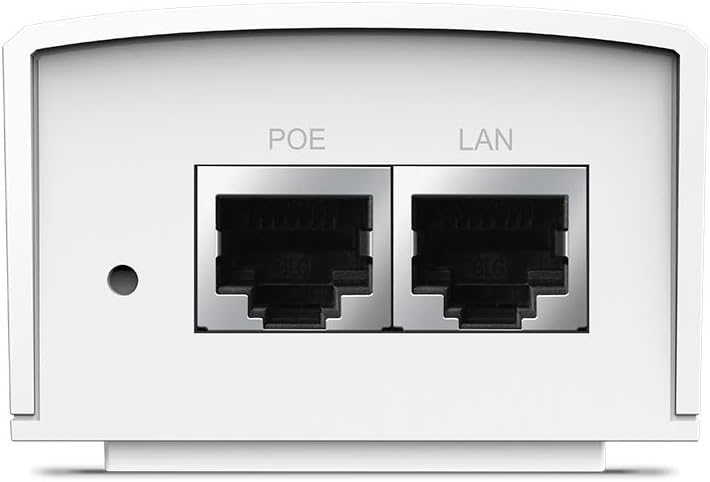
รูปที่ 2: ระยะใกล้ view of the PoE and LAN data ports.

รูปที่ 3: ระยะใกล้ view of the power input port.

รูปที่ 4: ด้านข้าง view showing the LED indicator for device status.
การตั้งค่า
The TL-PoE4824G is designed for simple plug-and-play installation. Follow these steps to set up your PoE injector:
- เชื่อมต่อกับพลังงาน: Plug the provided power cord into the power input port of the TL-PoE4824G and then into a standard electrical outlet.
- เชื่อมต่อกับเครือข่าย: Connect an Ethernet cable from your network device (e.g., router, switch) to the แลน port on the TL-PoE4824G.
- Connect to PoE Device: เชื่อมต่อสายเคเบิลอีเทอร์เน็ตอีกเส้นจาก PoE port on the TL-PoE4824G to your passive PoE-compatible device (e.g., access point, IP camera).
- ตรวจสอบการเชื่อมต่อ: Check the LED indicator on the TL-PoE4824G. A solid light typically indicates a successful power and data connection.

Figure 5: Connection diagram for the TL-PoE4824G, illustrating data and power flow to a passive PoE device.
การติดตั้งบนผนัง:
The TL-PoE4824G includes wall-mounting kits for secure installation. Refer to the diagram below for the mounting process:

Figure 6: Wall-mounting steps for the TL-PoE4824G using the provided brackets.
การดำเนินงาน
Once properly connected, the TL-PoE4824G operates automatically. It provides 48V DC passive PoE to the connected device, eliminating the need for a separate power adapter for the PoE device. Data transmission occurs at Gigabit speeds through the Ethernet connection.
The injector is designed to auto-determine the necessary power requirements for the connected passive PoE device, ensuring efficient and safe operation.
การซ่อมบำรุง
- การทำความสะอาด: ใช้ผ้านุ่มและแห้งเช็ดทำความสะอาดอุปกรณ์ ห้ามใช้น้ำยาทำความสะอาดชนิดน้ำหรือสเปรย์
- การจัดวาง: Ensure the device is placed in a well-ventilated area, away from direct sunlight, heat sources, and moisture.
- การจัดการสายเคเบิล: Keep all cables neatly organized to prevent damage and ensure proper airflow.
- อัพเดตเฟิร์มแวร์: ตรวจสอบเจ้าหน้าที่ TP-Link เป็นระยะ webเข้าชมเว็บไซต์เพื่อตรวจสอบการอัปเดตเฟิร์มแวร์ที่มีให้ใช้งาน เพื่อให้มั่นใจได้ถึงประสิทธิภาพและความปลอดภัยสูงสุด
การแก้ไขปัญหา
No Power/LED Indicator Off:
- Ensure the power cord is securely connected to both the injector and a working electrical outlet.
- Test the electrical outlet with another device to confirm it is supplying power.
ไม่มีการเชื่อมต่อข้อมูล:
- Verify that the Ethernet cables are securely connected to the LAN port (from your network) and the PoE port (to your device).
- Ensure the connected passive PoE device is functioning correctly and is compatible with 48V passive PoE.
- Check the status of your network device (router/switch) to ensure it is providing an active network connection.
- Try using different Ethernet cables to rule out cable defects.
Device Not Receiving Power:
- Confirm that your end device is a passive PoE device and supports 48V DC input. This injector is not compatible with 802.3af/at active PoE standards.
- Ensure the cable length does not exceed 100 meters (325 feet) for optimal power and data delivery.
ข้อมูลจำเพาะ
| แบบอย่าง | TL-PoE4824G |
| ยี่ห้อ | ทีพี ลิงค์ |
| PoE มาตรฐาน | 48V DC Passive PoE |
| อัตราการถ่ายโอนข้อมูล | 1000 Mbps (Gigabit Ethernet) |
| เทคโนโลยีการเชื่อมต่อ | อีเธอร์เน็ต |
| พอร์ต | 1x LAN (Data In), 1x PoE (Data & Power Out) |
| ความยาวสายเคเบิลสูงสุด | สูงถึง 100 เมตร (325 ฟุต) |
| ขนาด (กxยxส) | 4.33 x 2.24 x 1.41 นิ้ว |
| น้ำหนัก | 5.6 ออนซ์ |
การรับประกันและการสนับสนุน
For warranty information, technical support, and product registration, please visit the official TP-Link webหรือติดต่อฝ่ายบริการลูกค้า เก็บใบเสร็จรับเงินไว้เพื่อใช้ในการเคลมประกัน
- รองรับทีพีลิงค์ Webเว็บไซต์: www.tp-link.com/us/support/
- ติดต่อ: อ้างอิงจาก TP-Link webเว็บไซต์สำหรับข้อมูลการติดต่อในแต่ละภูมิภาค


