1. บทนำ
ขอบคุณสำหรับการซื้อasing the SENCOR SSS 3200 Kids Bluetooth Speaker with Karaoke Microphone. This portable speaker is designed to provide entertainment with its Bluetooth connectivity, karaoke function, and vibrant LED lighting. Please read this manual carefully before using the product to ensure proper operation and to maximize its lifespan. Keep this manual for future reference.
2. คำแนะนำด้านความปลอดภัย
- อย่าให้เครื่องสัมผัสกับอุณหภูมิที่สูงหรือต่ำเกินไป แสงแดดโดยตรง หรือความชื้นสูง
- Use only the supplied charger to recharge the product.
- หลีกเลี่ยงการทำตกหรือให้ลำโพงได้รับแรงกระแทกรุนแรง
- ห้ามถอดประกอบหรือพยายามซ่อมแซมอุปกรณ์ด้วยตนเอง แนะนำให้ส่งช่างผู้ชำนาญเข้ารับบริการทั้งหมด
- Keep the speaker away from water or other liquids to prevent electric shock.
- ควรจัดให้มีการระบายอากาศที่เหมาะสมรอบๆ ลำโพงขณะใช้งาน
3. เนื้อหาบรรจุภัณฑ์
Carefully unpack your SENCOR SSS 3200 Kids speaker and check that all items are present and in good condition. The package should include:
- SENCOR SSS 3200 Kids Bluetooth Speaker
- ไมโครโฟนแบบมีสาย
- 3.5mm Audio Cable (AUX cable)
- สายชาร์จ USB
- อะแดปเตอร์แปลงไฟ
- สายสะพายไหล่
- คู่มือการใช้งาน (เอกสารนี้)

Image 3.1: Included accessories for the SENCOR SSS 3200 Kids speaker, including the wired microphone, various cables, power adapter, and shoulder strap.
4. สินค้าหมดview
4.1 แผงด้านหน้า

ภาพที่ 4.1: ด้านหน้า view of the SENCOR SSS 3200 Kids Bluetooth Speaker, showcasing the main speaker grille with LED backlighting and the SENCOR logo.
The front of the speaker features the main speaker grille, which is equipped with multi-color flashing LED backlighting for an enhanced visual experience. The SENCOR brand logo is prominently displayed.
4.2 Rear Panel and Controls

Image 4.2: Rear panel of the SENCOR SSS 3200 Kids Bluetooth Speaker, showing various input ports, control buttons, and adjustment knobs.
The rear panel houses all the essential controls and connectivity ports:
- ไมค์ใน: แจ็คขนาด 6.3 มม. สำหรับเชื่อมต่อไมโครโฟนแบบมีสาย
- GUITAR-IN: 6.3mm jack for connecting a guitar (if applicable).
- LINE IN EAR MIC: ช่องเสียบ AUX ขนาด 3.5 มม.
- พอร์ต USB: สำหรับการเล่นแฟลชไดรฟ์ USB
- ช่องเสียบการ์ด TF: สำหรับการเล่นไฟล์จาก microSD card
- กระแสตรง 9V: ช่องเสียบไฟสำหรับชาร์จไฟ
- สวิตช์ไฟ: เพื่อเปิด/ปิดลำโพง
- แสดง: Digital display for mode and track information.
- ปุ่มควบคุม: Play/Pause, Skip tracks, Mode/Shift, Record/Delete.
- ลูกบิด: VOLUME+, -TREBLE+, -ECHO+, -MIC VOL+ for audio adjustments.
- ไฟแสดงสถานะแบตเตอรี่: แสดงสถานะแบตเตอรี่
5. การตั้งค่า
5.1 การชาร์จแบตเตอรี่
Before first use, fully charge the speaker's built-in rechargeable battery. Connect the supplied power adapter to the DC 9V input on the rear panel and plug it into a power outlet. The battery indicator will show charging status. A full charge typically takes 3-5 hours. Ensure the product is fully charged before initial operation to ensure proper functionality.
5.2 การเชื่อมต่อไมโครโฟน
Insert the plug of the wired microphone into the MIC-IN jack on the rear panel of the speaker. Ensure the microphone's ON/OFF switch is in the 'ON' position when in use.
6. คู่มือการใช้งาน
6.1 เปิด/ปิดเครื่อง
To turn the speaker ON, slide the Power switch on the rear panel to the 'ON' position. To turn it OFF, slide the switch to the 'OFF' position.
6.2 การจับคู่บลูทูธ
- เปิดลำโพง ลำโพงจะเข้าสู่โหมดจับคู่บลูทูธโดยอัตโนมัติ ซึ่งจะแสดงด้วยไอคอนบลูทูธกะพริบที่หน้าจอ
- เปิดใช้งานบลูทูธบนสมาร์ทโฟน แท็บเล็ต หรืออุปกรณ์อื่นที่เข้ากันได้ของคุณ
- ค้นหา available Bluetooth devices and select "SSS 3200 Kids" from the list.
- เมื่อจับคู่สำเร็จแล้ว ลำโพงจะส่งเสียงยืนยัน และไอคอนบลูทูธบนหน้าจอจะหยุดกะพริบ
- ตอนนี้คุณสามารถเล่นเสียงจากอุปกรณ์ของคุณผ่านลำโพงได้
การเล่นการ์ด USB/TF ขนาด 6.3 นิ้ว
Insert a USB flash drive or a TF (microSD) card into the respective port/slot on the rear panel. The speaker will automatically detect the storage device and begin playing audio files. Use the control buttons (Play/Pause, Skip tracks) to manage playback.
อินพุต AUX 6.4 ช่อง
Connect an external audio device (e.g., MP3 player, laptop) to the LINE IN EAR MIC (3.5mm AUX) port using the supplied 3.5mm audio cable. Press the 'MODE/SHIFT' button to switch to AUX input mode. Audio will then play from your connected device.
6.5 Karaoke Function and Recording
With the microphone connected to the MIC-IN port, you can sing along to music playing from any source (Bluetooth, USB, TF, AUX). Adjust the microphone volume using the 'MIC VOL+' knob and add echo effects with the '-ECHO+' knob. The speaker also supports recording your karaoke performance. Refer to the 'REC/DEL' button for recording and deleting functions.
6.6 โหมดไฟ LED
The speaker features multi-color flashing LED backlighting. These lights automatically activate when the speaker is on, enhancing the party atmosphere. There may be a dedicated button or a combination of buttons to cycle through different light modes or turn them off, if available (refer to specific product documentation for details).
6.7 การปรับแต่งเสียง
Use the 'VOLUME+' knob to adjust the overall speaker volume. The '-TREBLE+' knob allows you to fine-tune the treble levels for clearer sound. The '-ECHO+' and '-MIC VOL+' knobs are specifically for microphone effects and volume, respectively.
7. การบำรุงรักษา
7.1 การทำความสะอาด
เช็ดทำความสะอาดภายนอกลำโพงด้วยผ้าแห้งเนื้อนุ่ม ห้ามใช้สารทำความสะอาดที่มีฤทธิ์กัดกร่อน แว็กซ์ หรือตัวทำละลาย ตรวจสอบให้แน่ใจว่าไม่มีของเหลวเข้าไปในช่องเปิดของลำโพง
7.2 พื้นที่จัดเก็บ
When not in use for extended periods, store the speaker in a cool, dry place, away from direct sunlight and extreme temperatures. It is recommended to fully charge the battery every few months to maintain its health.
8 การแก้ไขปัญหา
- ไม่มีไฟฟ้า: Ensure the speaker is charged. Connect the power adapter and allow it to charge for a few hours. Check the power switch is in the 'ON' position.
- ไม่มีเสียง: Check the volume levels on both the speaker and the connected device. Ensure the correct input mode (Bluetooth, USB, AUX) is selected.
- บลูทูธไม่เชื่อมต่อ: Make sure the speaker is in pairing mode. Disable and re-enable Bluetooth on your device. Move your device closer to the speaker.
- ไมโครโฟนไม่ทำงาน: Ensure the microphone is securely plugged into the MIC-IN jack and its ON/OFF switch is in the 'ON' position. Adjust the 'MIC VOL+' knob.
- เสียงผิดเพี้ยน: ลดระดับเสียงทั้งบนลำโพงและอุปกรณ์ที่เชื่อมต่อ ตรวจสอบให้แน่ใจว่าเสียงปกติ fileไม่เสียหาย
9. ข้อมูลจำเพาะ
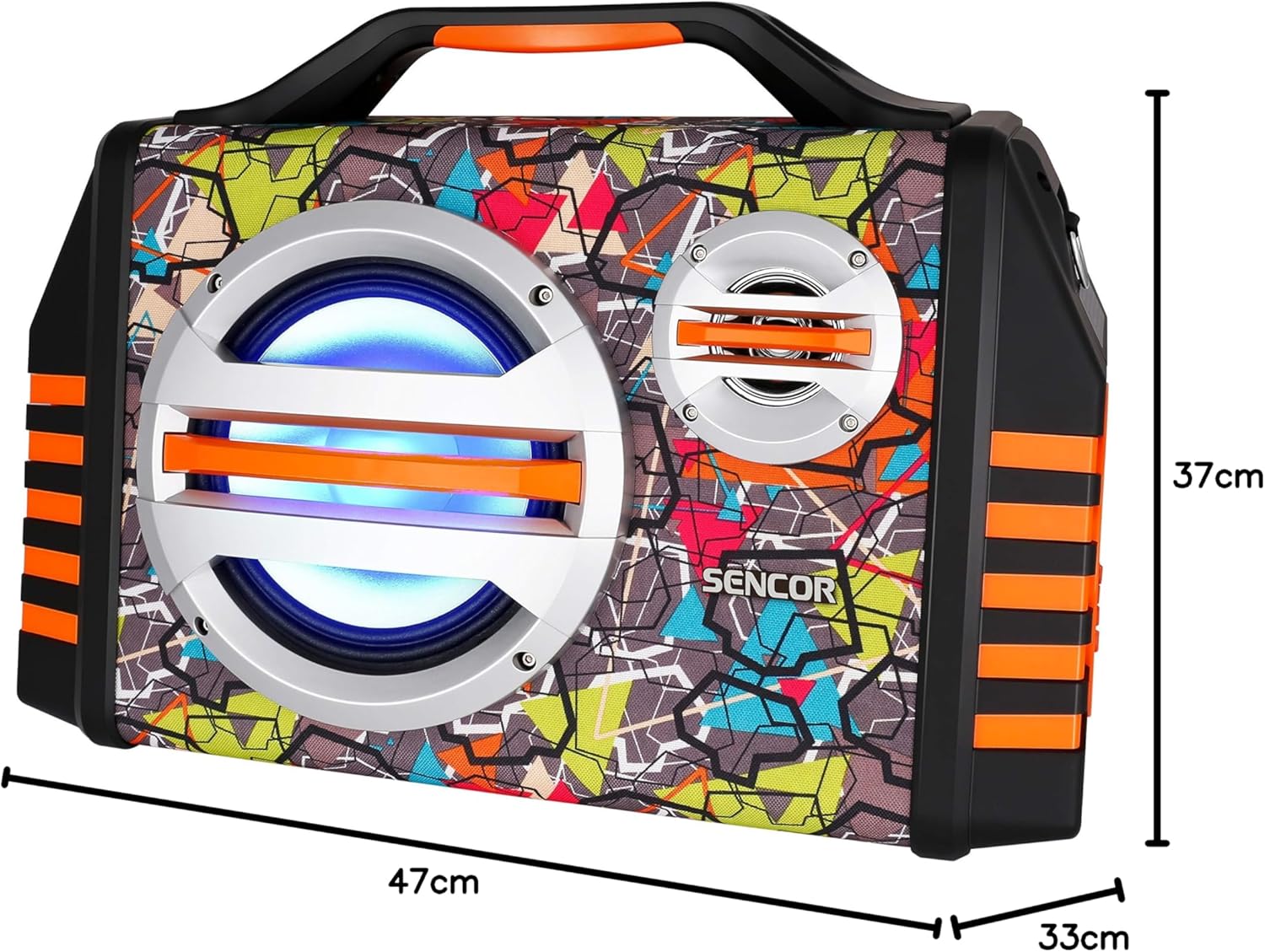
Image 9.1: Dimensions of the SENCOR SSS 3200 Kids Bluetooth Speaker, showing approximate measurements of 47cm (width), 37cm (height), and 33cm (depth).
| คุณสมบัติ | ข้อมูลจำเพาะ |
|---|---|
| ยี่ห้อ | SENCOR |
| หมายเลขรุ่น | SSS3200KIDS |
| สี | หลากสี |
| เทคโนโลยีการเชื่อมต่อ | บลูทูธ |
| พอร์ตเชื่อมต่อ | แจ็ค 3.5 มม. USB |
| คุณสมบัติพิเศษ | Integrated Microphone, Multi-color LED Backlight |
| พอร์ต USB รวม | 1 |
| อิมพีแดนซ์ | 4 โอห์ม |
| อุปกรณ์ที่รองรับ | แล็ปท็อป, สมาร์ทโฟน, แท็บเล็ต |
| การใช้ที่แนะนำ | Children's Entertainment, Music Activities |
| แหล่งพลังงาน | ใช้พลังงานจากแบตเตอรี่ |
| จำนวนของลำโพง | 1 |
10. การรับประกันและการสนับสนุน
SENCOR products are designed and manufactured to the highest quality standards. For warranty information, please refer to the warranty card included with your purchase or contact your local SENCOR distributor. For technical support or service inquiries, please visit the official SENCOR webเว็บไซต์หรือติดต่อฝ่ายบริการลูกค้าของพวกเขา


