1. บทนำ
ขอบคุณสำหรับการซื้อasing the ipega PG-9028 Wireless Gamepad. This high-performance Bluetooth 5.0 controller is designed to enhance your gaming experience across multiple platforms, including Android smartphones, tablets, PS3 consoles, and Nintendo Switch. Please read this manual carefully to ensure proper use and optimal performance of your device.

Figure 1.1: ipega PG-9028 Wireless Gamepad with a smartphone securely mounted in the integrated holder.
2. คุณสมบัติของผลิตภัณฑ์
- ความเข้ากันได้กว้าง: Supports Android 6.0 and higher systems, PS3, N-Switch, and Windows PCs.
- การเชื่อมต่อบลูทูธ 5.0: Provides stable and low-latency wireless connection.
- Direct Play Function: No need for complex activation or downloading redundant game platforms for supported Android devices.
- ปุ่มที่สามารถตั้งโปรแกรมได้: Features four custom buttons (S1, S2, S3, S4) on the back and side for enhanced efficiency and personalized control.
- การสั่นสะเทือนของมอเตอร์คู่: Offers immersive haptic feedback for a more realistic gaming experience.
- Key TURBO Combo Function: Allows for one-click combo attacks and continuous firing, simplifying complex in-game actions.
- Cool Color Backlit Buttons: LED-illuminated action buttons (A/B/X/Y) for improved visibility and aesthetic appeal, especially in low-light conditions.
- ที่วางโทรศัพท์แบบรวม: Securely holds smartphones for mobile gaming.
- การออกแบบตามหลักสรีรศาสตร์: จับถนัดมือ เหมาะสำหรับการเล่นเกมต่อเนื่องเป็นเวลานาน

รูปที่ 2.1: เกินview of the ipega PG-9028 Gamepad's core features, including support for Android and Windows systems, and Bluetooth 5.0 wireless technology.
3. เนื้อหาบรรจุภัณฑ์
กรุณาตรวจสอบสิ่งของภายในกล่องเมื่อแกะกล่อง หากมีสินค้าใดสูญหายหรือเสียหาย โปรดติดต่อตัวแทนจำหน่ายของคุณ
- 1 x ipega PG-9028 Wireless Gamepad
- สายชาร์จ 1 x USB Type-C
- 1 x คู่มือผู้ใช้ (เอกสารนี้)
- 1 x Replacement D-pad cap (if included with your model)

Figure 3.1: The ipega PG-9028 Wireless Gamepad and its retail packaging.
4. การตั้งค่า
4.1 การชาร์จเกมแพด
Before first use, fully charge the gamepad. Connect the supplied USB Type-C cable to the charging port on the gamepad and the other end to a USB power source (e.g., computer USB port, USB wall adapter). The LED indicator will show charging status and turn off or change color when fully charged.
4.2 การจับคู่กับอุปกรณ์
The PG-9028 supports various connection modes. Select the appropriate mode based on your device:
- Android V3 Direct Play Mode (A + HOME):
กดปุ่มค้างไว้ ปุ่ม และ ปุ่ม HOME simultaneously until the indicator light flashes rapidly. On your Android device, search for Bluetooth devices and select "PG-9028" to pair. This mode is ideal for direct play on Android 6.0 and higher without additional mapping.
- Android Standard Game Mode (X + HOME):
กดปุ่มค้างไว้ ปุ่ม X และ ปุ่ม HOME simultaneously until the indicator light flashes. Pair with "PG-9028" on your Android device. This mode is for standard Android games that support gamepad input.
- การเชื่อมต่อ PS3:
Connect the gamepad to the PS3 console using the USB cable. Once connected, press the ปุ่ม HOME. The gamepad will automatically pair and function as a PS3 controller.
- N-Switch Connection:
On your Nintendo Switch, go to "Controllers" -> "Change Grip/Order". Press and hold the ปุ่ม R และ ปุ่ม HOME simultaneously on the gamepad until the indicator light flashes. The Switch will detect and pair with the controller.
- การเชื่อมต่อพีซี (Windows):
Connect the gamepad to your PC using the USB cable. The gamepad will be recognized as a standard XInput or DInput device. For wireless connection, ensure your PC has Bluetooth 5.0. Press and hold the ปุ่ม X และ ปุ่ม HOME simultaneously until the indicator light flashes, then pair via PC Bluetooth settings.
Once successfully paired, the indicator light will remain solid.
5. คู่มือการใช้งาน
5.1 เค้าโครงปุ่มและฟังก์ชั่น
Familiarize yourself with the gamepad's buttons and their primary functions:
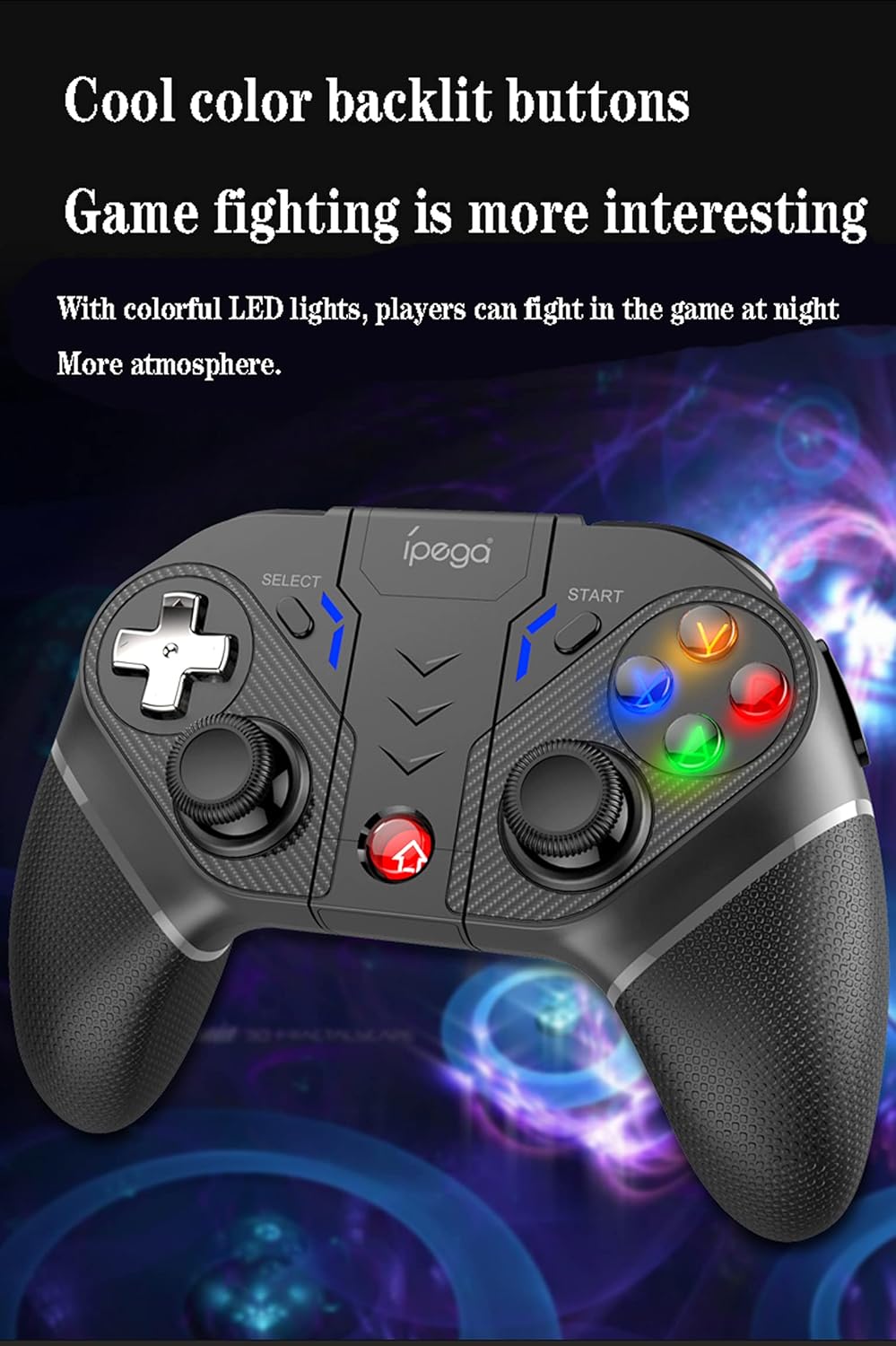
Figure 5.1: Comprehensive diagram illustrating all buttons and their respective labels on the ipega PG-9028 Wireless Gamepad.
- Left Analog Stick (L3): Movement, camera control. Press down for L3 button.
- Right Analog Stick (R3): Camera control, aiming. Press down for R3 button.
- แผ่น D: การป้อนข้อมูลแบบกำหนดทิศทาง (ขึ้น, ลง, ซ้าย, ขวา)
- ปุ่มการกระทำ (A/B/X/Y): Primary game actions. Backlit for visibility.
- ปุ่มหน้าแรก: Power on/off, return to home screen, mode switching.
- ปุ่มเลือก: Game-specific functions, often used for menus.
- ปุ่มเริ่มต้น: Game-specific functions, often used for pausing or starting.
- L1/R1 (ปุ่มไหล่): Quick actions, often for shooting or item use.
- L2/R2 (ปุ่มทริกเกอร์): Analog input for acceleration, braking, or precise actions.
- S1/S2/S3/S4 (Programmable Buttons): Custom mapping for complex actions.
- ปุ่มเทอร์โบ: เปิด/ปิดฟังก์ชันเทอร์โบ
- ปุ่ม CLEAR: Clears Turbo settings.
- พอร์ต Type-C: สำหรับการชาร์จและการเชื่อมต่อแบบมีสาย
5.2 Programmable Buttons (S1-S4)
The PG-9028 features four customizable buttons (S1, S2, S3, S4) located on the back and side of the gamepad. These can be programmed to replicate single or multiple key presses, significantly improving efficiency in competitive gaming.

Figure 5.2: Location of the four programmable buttons (S1, S2, S3, S4) on the ipega PG-9028 gamepad, designed for custom key mapping.
Refer to the specific game or application settings for mapping these buttons, as the programming method may vary. Generally, you will enter a mapping mode on the gamepad (often by holding a combination of buttons) and then assign the desired input to S1-S4.
5.3 ฟังก์ชันเทอร์โบ
The TURBO function allows you to set any action button (A/B/X/Y, L1/R1, L2/R2, etc.) to automatically repeat its input when held down, making rapid actions easier.

Figure 5.3: Visual guide for setting and clearing the TURBO function on the ipega PG-9028 gamepad, simplifying rapid button presses.
- การตั้งค่า TURBO: Press and hold the desired action button (e.g., A) and then lightly press the ปุ่มเทอร์โบ simultaneously. The action button will now have the TURBO function enabled.
- Clearing TURBO: To turn off the TURBO function for a specific button, press and hold the action button and then lightly press the ปุ่มเทอร์โบ again. To clear all TURBO settings, press the ปุ่ม CLEAR.
Note: If the product is disconnected, previously set TURBO functions may be cleared and need to be reset upon reconnection.
5.4 การสั่นสะเทือนของมอเตอร์คู่
The gamepad features dual asymmetrical vibration motors that provide haptic feedback, enhancing immersion by simulating in-game impacts, explosions, and other events.

Figure 5.4: Visual representation of the dual motor vibration function in the ipega PG-9028 gamepad, providing realistic haptic feedback during gameplay.
Vibration intensity and availability depend on the game and platform. Ensure the game supports vibration feedback for this feature to function.
5.5 Backlit Buttons
The A/B/X/Y action buttons are equipped with colorful LED backlighting, improving visibility in dark environments and adding to the gaming atmosphere.

Figure 5.5: The ipega PG-9028 gamepad featuring cool color backlit buttons, enhancing visibility and aesthetic appeal during gameplay.
The backlighting is typically active when the gamepad is powered on. There may not be an option to turn off the lights independently on some models.
6. การบำรุงรักษา
- การทำความสะอาด: ใช้ผ้านุ่มและแห้งเช็ดทำความสะอาดเกมแพด ห้ามใช้สารเคมีรุนแรงหรือวัสดุที่มีฤทธิ์กัดกร่อน
- พื้นที่จัดเก็บ: เก็บเกมแพดไว้ในที่แห้งและเย็น หลีกเลี่ยงแสงแดดโดยตรงและอุณหภูมิที่สูงหรือต่ำเกินไป
- การดูแลแบตเตอรี่ เพื่อยืดอายุการใช้งานแบตเตอรี่ ควรหลีกเลี่ยงการปล่อยให้แบตเตอรี่หมดจนเกลี้ยงบ่อยๆ ควรชาร์จแบตเตอรี่เป็นประจำ แม้ว่าจะไม่ได้ใช้งานเป็นเวลานานก็ตาม
- หลีกเลี่ยงการหยด: ควรปกป้องจอยเกมจากการตกหล่นและการกระแทก เพราะอาจทำให้ชิ้นส่วนภายในเสียหายได้
7 การแก้ไขปัญหา
| ปัญหา | สาเหตุที่เป็นไปได้ / วิธีแก้ไข |
|---|---|
| ไม่สามารถเปิดเกมแพดได้ | Battery may be depleted. Connect the gamepad to a power source using the Type-C cable and charge it for at least 30 minutes before attempting to power on again. |
| ไม่สามารถจับคู่ผ่านบลูทูธได้ |
|
| ปุ่มกดไม่ตอบสนองหรือติดขัด |
|
| Analog sticks have "dead zones" or inaccurate input. | This can sometimes be a characteristic of the controller's design or wear over time. Ensure the gamepad's firmware is up to date if an update tool is provided by ipega. For some games, adjusting in-game dead zone settings might help. |
| เกมแพดหลุดบ่อยมาก |
|
8. ข้อมูลจำเพาะ
- แบบอย่าง: พีจี-9028
- การเชื่อมต่อ: บลูทูธ 5.0, ต่อสาย (USB Type-C)
- ความเข้ากันได้: Android 6.0+ Smartphones/Tablets, PS3, N-Switch, Windows PC
- แบตเตอรี่: แบตเตอรี่ลิเธียมชาร์จในตัว
- พอร์ตชาร์จ: ยูเอสบี ไทป์ ซี
- คุณสมบัติ: Dual Vibration Motors, Programmable Buttons, TURBO Function, Backlit Buttons, Integrated Phone Holder
- ขนาด : ประมาณ 7 x 5.5 x 3 นิ้ว (17.8 x 14 x 7.6 ซม.)
- น้ำหนัก: ประมาณ 10.4 ออนซ์ (295 กรัม)
9. การรับประกันและการสนับสนุน
This ipega product comes with a standard manufacturer's warranty. Please refer to the warranty card included in your package or visit the official ipega webเว็บไซต์สำหรับข้อกำหนดและเงื่อนไขการรับประกันโดยละเอียด
For technical support, troubleshooting assistance, or inquiries about replacement parts, please contact ipega customer service through their official webโปรดตรวจสอบเว็บไซต์หรือข้อมูลติดต่อที่ได้รับพร้อมกับการสั่งซื้อของคุณ เก็บใบเสร็จรับเงินไว้เป็นหลักฐานสำหรับการเคลือบประกัน


