การแนะนำ
This manual provides comprehensive instructions for the setup, operation, maintenance, and troubleshooting of your Listen Technologies LR-5200-IR-P1 Advanced Intelligent DSP IR Receiver Package 1. Please read this manual thoroughly before using the device to ensure proper functionality and to maximize its performance.
The LR-5200-IR-P1 package is designed to expand or establish an IR assistive listening system, offering high-performance signal reception and clarity. It includes the LR-5200-IR receiver, an integrated neck loop/lanyard, and a universal ear speaker.
เนื้อหาแพ็คเกจ
The LR-5200-IR-P1 package includes the following components:
- (1) LR-5200-IR Advanced Intelligent DSP IR Receiver
- (1) LA-430 Intelligent Ear Phone/Neck Loop Lanyard
- (1) LA-401 Universal Ear Speaker
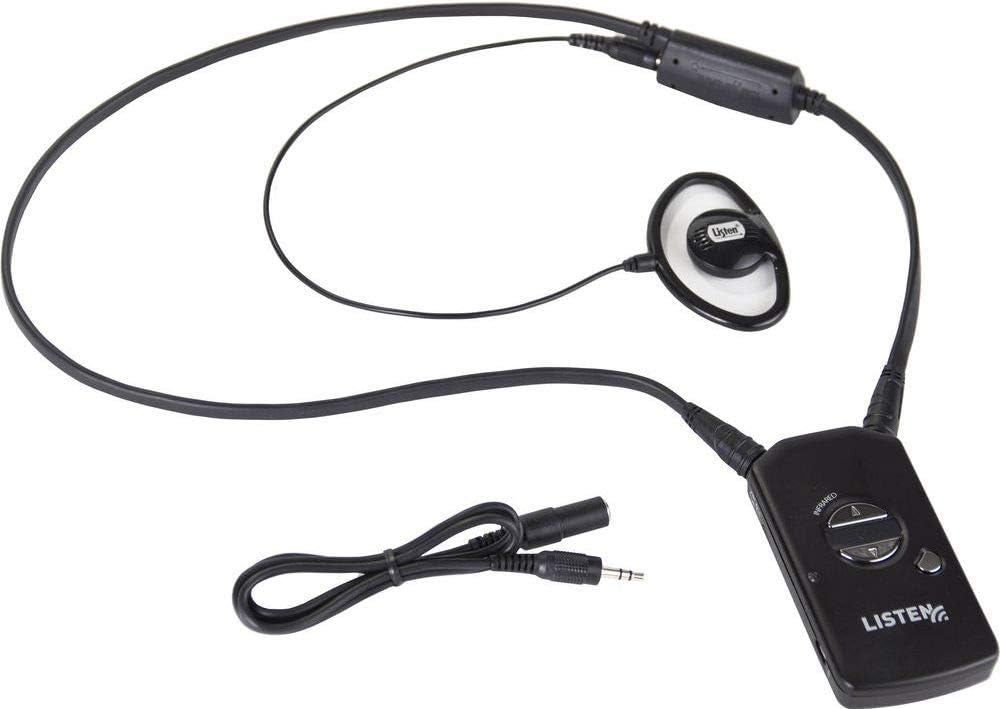
รูปที่ 1: Components of the LR-5200-IR-P1 package. Shown are the LR-5200-IR receiver, the LA-430 neck loop/lanyard, and the LA-401 universal ear speaker, all connected and ready for use.
การตั้งค่า
1. การชาร์จเครื่องรับ
The LR-5200-IR receiver uses advanced green battery technology. Before first use, ensure the receiver is fully charged.
- Connect the receiver to a compatible Listen Technologies charging station (sold separately) or a USB power source using the appropriate cable.
- The charging indicator light on the receiver will illuminate to show charging status.
- Allow sufficient time for a full charge, typically several hours.
2. การเชื่อมต่ออุปกรณ์เสริม
The package includes an integrated neck loop/lanyard and a universal ear speaker.
- Ear Speaker: Plug the 3.5mm jack of the LA-401 Universal Ear Speaker into the audio output port on the LR-5200-IR receiver.
- Neck Loop/Lanyard: The LA-430 Intelligent Ear Phone/Neck Loop Lanyard connects to the receiver via its integrated connector. This accessory is designed for users with T-coil enabled hearing aids.
3. Wearing the Receiver
The LR-5200-IR receiver is designed for discreet and comfortable wear.
- Neck Loop/Lanyard: Place the lanyard around your neck. The receiver will hang comfortably at chest level.
- คลิปหนีบเข็มขัด: Alternatively, the receiver can be attached to a belt or waistband using its integrated belt clip for a more discreet option.
คำแนะนำการใช้งาน
1. การเปิด/ปิดเครื่อง
To power on the LR-5200-IR receiver, press and hold the power button located on the front of the device until the indicator light illuminates. To power off, press and hold the power button again until the light turns off.
2. การเลือกช่อง
The LR-5200-IR receiver supports multi-channel applications, allowing users to select their desired channel.
- Use the channel up/down buttons (typically marked with arrows) on the receiver to cycle through available IR channels.
- The current channel number may be displayed on a small screen or indicated by LED patterns, depending on the receiver's design.
- Ensure the selected channel matches the broadcast channel of the IR transmitter in your listening environment.
3. การปรับระดับเสียง
Adjust the listening volume to a comfortable level using the volume up/down buttons on the receiver.
4. Using with T-Coil Hearing Aids
If you are using a T-coil enabled hearing aid, ensure your hearing aid is set to the "T" or "Telecoil" program. The LA-430 neck loop/lanyard will transmit the audio signal directly to your hearing aid's T-coil, providing a clear listening experience.
การซ่อมบำรุง
1. การทำความสะอาด
- Wipe the receiver and accessories with a soft, dry, lint-free cloth.
- Do not use abrasive cleaners, solvents, or strong chemicals, as these can damage the device.
- For ear speakers, use a mild disinfectant wipe if necessary, ensuring no liquid enters the speaker grille.
2. การดูแลแบตเตอรี่
- Regularly charge the receiver to maintain battery health.
- หลีกเลี่ยงการระบายแบตเตอรี่จนหมดบ่อยครั้ง
- Store the receiver in a cool, dry place when not in use for extended periods.
3. การจัดเก็บ
When not in use, store the LR-5200-IR receiver and its accessories in a protective case or a clean, dry environment to prevent damage from dust, moisture, or physical impact.
การแก้ไขปัญหา
| ปัญหา | สาเหตุที่เป็นไปได้ | สารละลาย |
|---|---|---|
| No audio from receiver | Receiver not powered on; Low battery; Incorrect channel selected; Ear speaker/neck loop not connected; Out of range of IR transmitter; Obstruction blocking IR signal. | Ensure receiver is powered on; Charge the battery; Verify correct channel selection; Check ear speaker/neck loop connection; Move closer to the IR transmitter; Remove any obstructions between receiver and transmitter. |
| Distorted or unclear audio | Weak IR signal; Interference; Volume too high; Damaged ear speaker/neck loop. | Move closer to the IR transmitter; Check for sources of interference; Adjust volume to a lower level; Test with a different ear speaker/neck loop if available. |
| เครื่องรับสัญญาณไม่ชาร์จไฟ | Charging cable/station not connected properly; Faulty charging cable/station; Battery issue. | Ensure secure connection; Try a different charging cable or station; Contact support if battery issues persist. |
ข้อมูลจำเพาะ
- แบบอย่าง: LR-5200-IR-P1
- ผู้ผลิต: ฟังเทคโนโลยี
- เทคโนโลยีการเชื่อมต่อ: Wired (for accessories)
- ประเภทตัวควบคุม: การควบคุมด้วยมือ
- คุณสมบัติพิเศษ: การออกแบบที่กะทัดรัด
- อุปกรณ์ที่รองรับ: ลำโพง
- ประเภทตัวเชื่อมต่อ: แจ็คขนาด 3.5 มม.
- โหมดเอาต์พุตเสียง: โมโน
- จำนวนช่องสัญญาณ: 5
- น้ำหนักสินค้า: 3.8 ออนซ์
- แบตเตอรี่: 1 Lithium Ion battery required (integrated)
- วันที่พร้อมใช้งานครั้งแรก: วันที่ 18 สิงหาคม 2018
การรับประกันและการสนับสนุน
For warranty information and technical support, please refer to the official Listen Technologies webหรือติดต่อฝ่ายบริการลูกค้าโดยตรง โปรดเก็บใบเสร็จรับเงินไว้เป็นหลักฐานการซื้อสำหรับการเรียกร้องการรับประกัน
Listen Technologies Contact Information:
- Webเว็บไซต์: www.listentech.com
- บริการลูกค้า: อ้างถึง website for contact numbers or support forms.


