1. สินค้าหมดview
The Retevis Noise Reduction Walkie Talkie Headset is designed for clear communication in noisy environments. It features foam sound insulation to block external noise, an adjustable head size for comfortable wear, and multiple controls for easy operation.
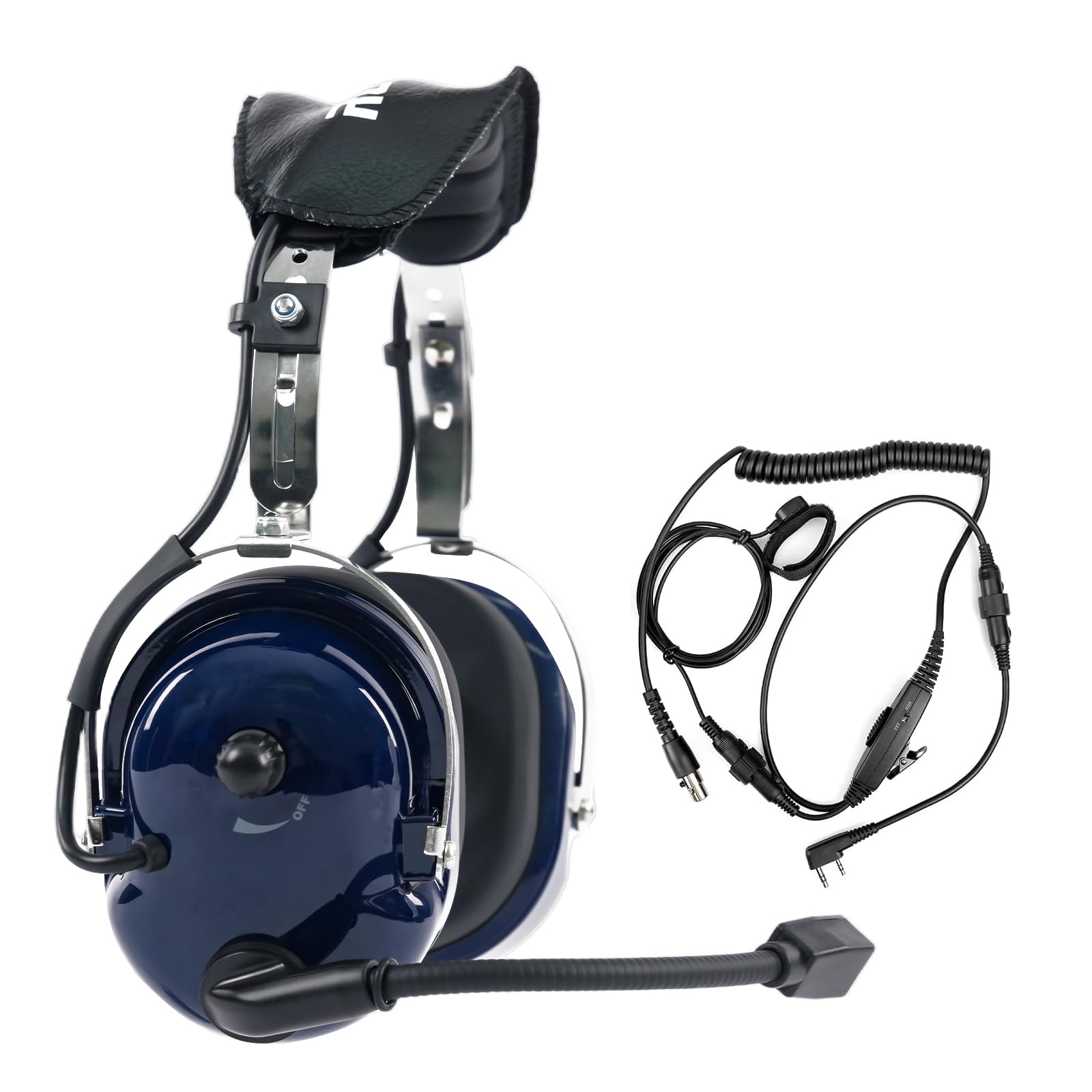
Image 1.1: The Retevis Noise Reduction Walkie Talkie Headset, showcasing การออกแบบที่แข็งแกร่ง

Image 1.2: The adjustable headband mechanism, allowing for a customized and comfortable fit for various head sizes.

Image 1.3: Close-up of the comfortable, noise-isolating earmuffs designed to fit snugly and block external sounds.
2. การตั้งค่า
To set up your Retevis headset, ensure your walkie-talkie is turned off before connecting the headset. Locate the K-head 2-pin connector on your walkie-talkie and firmly insert the headset's connector. Once connected, you can power on your walkie-talkie.

Image 2.1: The K-head 2-pin connector, which ensures compatibility with various two-way radios.
3. คู่มือการใช้งาน
3.1 การปรับระดับเสียง
The headset features two volume adjustment knobs for precise control. One knob is located directly on the earmuff, and another is on the inline cable. Adjust both to your desired listening level. For initial use, turn both up to hear audio, then fine-tune with either knob.

Image 3.1: Illustration of the two volume adjustment knobs, one on the earmuff and one on the cable, for convenient audio control.
3.2 ปุ่มกดเพื่อพูด (PTT)
The headset is equipped with three PTT buttons for flexible communication. These are located in different positions to suit various usage habits:
- Main PTT Button: Typically found on the inline cable unit.
- Headset PTT Button: Located on one of the earmuffs for quick access.
- Finger PTT Button: A smaller, remote button that can be attached to your finger or clothing for discreet activation.
Press and hold any PTT button to transmit your voice, and release to listen.

Image 3.2: Visual representation of the three PTT buttons, highlighting their placement for user convenience.
3.3 ฟังก์ชัน VOX (การแลกเปลี่ยนด้วยเสียง)
The VOX function allows for hands-free transmission. When enabled, the headset automatically detects your voice and begins transmitting without needing to press a PTT button. To activate VOX, locate the PTT/VOX switch on the inline cable unit and slide it to the 'VOX' position. Adjust the VOX sensitivity on your walkie-talkie if available, to prevent accidental transmissions or missed speech.

Image 3.3: Diagram illustrating the VOX function, which automatically identifies voice volume for hands-free operation.
4. ความเข้ากันได้
The Retevis Noise Reduction Walkie Talkie Headset uses a standard K-head 2-pin connector, ensuring broad compatibility with many two-way radio models.
4.1 อุปกรณ์ที่รองรับ
- Retevis: H-777, RT21, RT22, RT-5R, RT-5RV, RT1, RT2, RT5, RT7, RT23, RT26, RT27, H-777S, RT28, RT15, RT46, RT50, RT52, RA79, RA89, RT68, RT68H
- Baofeng: UV-5R, 5RM, 888S, BF-F8HP
- ซัมคอม
- เคนวูด
- อาร์คเชลล์
4.2 อุปกรณ์ที่ไม่รองรับ
ชุดหูฟังนี้เป็น ไม่เข้ากัน with Midland or Motorola walkie talkies.

Image 4.1: Visual guide to the K-head 2-pin connector and compatible brands.
Video 4.1: An official video demonstrating the Retevis Noise Reduction Walkie Talkie Headset, including its features and compatibility.
5. การบำรุงรักษา
การบำรุงรักษาอย่างถูกต้องจะช่วยให้ชุดหูฟังของคุณมีอายุการใช้งานยาวนานและมีประสิทธิภาพเหมาะสมที่สุด
- การทำความสะอาด: เช็ดพื้นผิวของหูฟังด้วยผ้าเนื้อนุ่มและแห้งamp cloth. Avoid using harsh chemicals or abrasive cleaners. Ensure no moisture enters the speaker or microphone areas.
- แผ่นรองหู: Regularly inspect ear pads for wear and tear. Replace them if they become damaged or lose their sound-isolating properties.
- การดูแลสายเคเบิล: Avoid sharp bends or excessive pulling on the cables and connectors to prevent internal damage.
- พื้นที่จัดเก็บ: Store the headset in a dry, cool place away from direct sunlight and extreme temperatures.
6 การแก้ไขปัญหา
หากคุณพบปัญหาเกี่ยวกับชุดหูฟัง โปรดดูปัญหาทั่วไปและวิธีแก้ไขต่อไปนี้:
| ปัญหา | สาเหตุที่เป็นไปได้ | สารละลาย |
|---|---|---|
| ไม่มีเสียงจากหูฟัง | Volume too low; Headset not fully connected; Radio issue | Increase both volume knobs; Re-insert connector firmly; Test radio with another accessory |
| คุณภาพเสียงไม่ดี / สัญญาณรบกวน | Loose connection; Interference; Damaged cable/connector | Check connection; Move away from electronic devices; Inspect cable for damage |
| ไมโครโฟนไม่ส่งสัญญาณ | PTT not pressed; VOX not enabled/sensitive enough; Microphone position | Ensure PTT is pressed; Check VOX switch and sensitivity; Adjust microphone closer to mouth |
| หูฟังไม่สบาย | Improper adjustment; Ear pads worn out | Adjust headband for a better fit; Consider replacing ear pads if they are compressed or damaged |
7. ข้อมูลจำเพาะ
Key technical specifications for the Retevis Noise Reduction Walkie Talkie Headset (Model FC9067A):
| คุณสมบัติ | รายละเอียด |
|---|---|
| หมายเลขรุ่น | FC9067A |
| การควบคุมเสียงรบกวน | การแยกเสียง |
| ความไวต่อความรู้สึก | 121 เดซิเบล |
| แจ็คหูฟัง | เคนวูด 2 พิน |
| เทคโนโลยีการเชื่อมต่อ | มีสาย |
| วัสดุ | Plastic (ABS Shell) |
| น้ำหนักสินค้า | 1.52 ปอนด์ (ประมาณ 0.69 กก.) |
| ขนาดสินค้า | 4.61 x 10.79 x 9.09 นิ้ว |
| การวางตำแหน่งหู | ครอบหู |
| อิมพีแดนซ์ | 8 โอห์ม |
| ส่วนประกอบที่รวมอยู่ | 1 x Retevis Noise Reduction Walkie Talkie Headset |
8. การรับประกันและการสนับสนุน
For warranty information and customer support, please refer to the documentation included with your purchase or visit the official Retevis webนอกจากนี้ คุณยังสามารถติดต่อผู้ขายโดยตรงผ่านแพลตฟอร์มที่คุณซื้อสินค้าเพื่อขอความช่วยเหลือเกี่ยวกับปัญหาหรือข้อสงสัยต่างๆ ได้อีกด้วย