การแนะนำ
This manual provides detailed instructions for the setup, operation, and maintenance of your Denon DNP-800NE Network Audio Player. The DNP-800NE is designed to deliver high-resolution audio playback and versatile music streaming capabilities, integrating seamlessly into your home audio system. Please read this manual thoroughly to ensure proper use and to maximize your listening experience.
มีอะไรอยู่ในกล่อง
แกะส่วนประกอบทั้งหมดออกอย่างระมัดระวังและตรวจสอบให้แน่ใจว่าคุณมีสิ่งของต่อไปนี้:
- Network audio player (Denon DNP-800NE)
- รีโมทคอนโทรล (RC-1224)
- แบตเตอรี่ (แบตเตอรี่ AA 2 ก้อน)
- Bluetooth/WiFi antennas (2 units)
- Stereo RCA cable (42 inches)
- Mono-minijack cables (Two 39-inch units)
การตั้งค่า
1. การเชื่อมต่อทางกายภาพ
Before connecting the unit to power, ensure all audio connections are made correctly. The DNP-800NE can be connected to an amplifier or receiver using the provided stereo RCA cable. For digital audio sources, use the optical or coaxial digital inputs on your ampชีวิต.
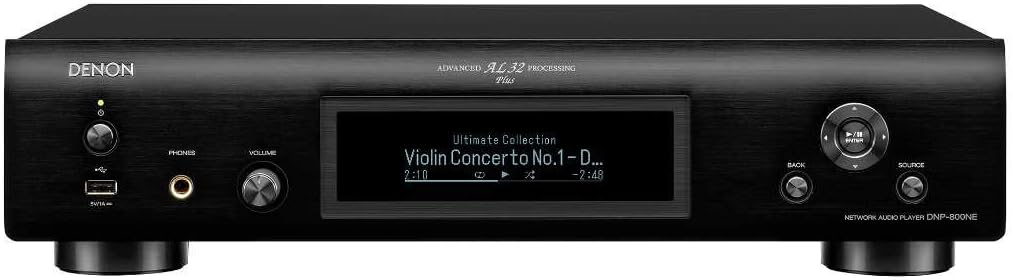
ภาพ: Front panel of the Denon DNP-800NE, showing the display, power button, USB port, headphone jack, and volume knob.
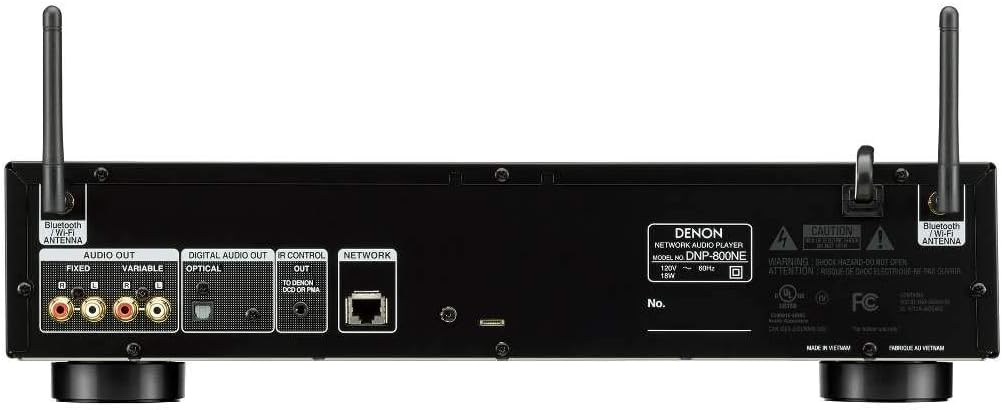
ภาพ: Rear panel of the Denon DNP-800NE, illustrating the audio output (fixed and variable), digital audio inputs (optical, coaxial), network port, and antenna connections.
2. การติดตั้งเสาอากาศ
Attach the two provided Bluetooth/WiFi antennas to the corresponding connectors on the rear panel of the DNP-800NE. Ensure they are securely tightened and positioned vertically for optimal signal reception.
3. การเชื่อมต่อไฟฟ้า
Connect the power cord to the AC inlet on the rear of the unit and then to a wall outlet. The unit is now ready for initial power-on.
4. การกำหนดค่าเครือข่าย
The DNP-800NE supports both wired and wireless network connections. For a wired connection, connect an Ethernet cable from your router to the NETWORK port on the rear panel. For a wireless connection, follow the on-screen prompts after powering on the unit to connect to your Wi-Fi network. The HEOS app (available for iOS and Android) is recommended for simplified network setup and control.
คำแนะนำการใช้งาน
1. เปิด/ปิดเครื่อง
กดปุ่มเปิด/ปิดที่แผงด้านหน้าหรือรีโมทคอนโทรลเพื่อเปิดหรือปิดเครื่อง
2. การเลือกแหล่งที่มา
Use the 'Source' button on the front panel or the remote control to cycle through available input sources such as Network, USB, Bluetooth, and Digital Inputs.
3. Network Audio Streaming (HEOS, Wi-Fi, AirPlay 2, Bluetooth)
The DNP-800NE offers multiple ways to stream music:
- HEOS: Download the HEOS app to your smartphone or tablet. Use the app to access various music services (e.g., Spotify, Pandora, Amazon Music) and control playback. HEOS also enables multi-room audio.
- ออกอากาศ 2: For Apple device users, stream audio directly from your iPhone, iPad, or Mac to the DNP-800NE via AirPlay 2.
- บลูทูธ: Pair your Bluetooth-enabled device with the DNP-800NE to stream audio wirelessly. Select 'Bluetooth' as the source and follow your device's pairing instructions.
- การเล่นที่ไม่มีช่องว่าง: The unit supports gapless playback for high-resolution audio files, ensuring a seamless listening experience for albums with continuous tracks.
4. การเล่นผ่าน USB
Insert a USB storage device (e.g., USB flash drive) into the front USB port. The unit will automatically detect the device, and you can navigate and play high-resolution audio files (FLAC, WAV, AIFF, ALAC, DSD) using the remote control or HEOS app.
5. เอาต์พุตหูฟัง
Connect your headphones to the 6.3mm headphone jack on the front panel. The DNP-800NE features a dedicated headphone amplifier with three gain settings (High/Mid/Low) for optimal performance with various headphone impedances. Adjust the gain setting via the unit's menu to match your headphones.
6. Advanced AL32 Processing Plus
The DNP-800NE incorporates Denon's Advanced AL32 Processing Plus, which up-samples digital audio signals to 32-bit, 384 kHz, restoring lost data during digital recording to reproduce sound closest to the original. This technology enhances clarity, detail, and dynamic range across all digital sources.
7. Remote Control (RC-1224)
The included remote control provides full functionality for operating the DNP-800NE. Insert the two AA batteries into the remote control before use.
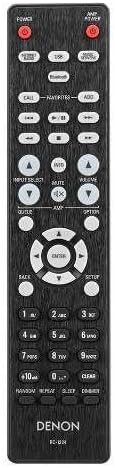
ภาพ: The RC-1224 remote control for the Denon DNP-800NE, showing various buttons for power, source selection, playback, and menu navigation.
8. วิดีโอผลิตภัณฑ์อย่างเป็นทางการ
ชมวิดีโออย่างเป็นทางการนี้เพื่อดูภาพรวมview of the Denon 800NE Series, highlighting key features and connectivity options.
วีดีโอ: Denon 800 Series Overview. This video demonstrates the features and connectivity of the Denon 800NE series, including the DNP-800NE Network Audio Player, highlighting its integration with other Denon components and various audio sources.
การซ่อมบำรุง
To ensure the longevity and optimal performance of your DNP-800NE, follow these maintenance guidelines:
- การทำความสะอาด: Use a soft, dry cloth to wipe the exterior of the unit. Avoid using abrasive cleaners, solvents, or chemical cloths, as they may damage the finish.
- การระบายอากาศ : Ensure adequate ventilation around the unit. Do not block ventilation openings or place the unit in an enclosed space without proper airflow.
- หมดแรง: เมื่อไม่ได้ใช้งานเป็นเวลานาน ให้ถอดสายไฟออกจากเต้ารับที่ผนัง
การแก้ไขปัญหา
If you encounter issues with your DNP-800NE, refer to the following common troubleshooting steps:
| ปัญหา | สารละลาย |
|---|---|
| ไม่มีไฟฟ้า | Check if the power cord is securely connected to the unit and the wall outlet. Ensure the outlet is functional. |
| ไม่มีเสียงออก | Verify that the correct input source is selected. Check all audio cable connections between the DNP-800NE and your amplifier/receiver. Ensure the volume is not muted or set too low. |
| ไม่สามารถเชื่อมต่อกับเครือข่าย (Wi-Fi/Ethernet) ได้ | Confirm your router is powered on and functioning. For Wi-Fi, re-enter your network password. For Ethernet, check the cable connection. Try restarting your router and the DNP-800NE. |
| ปัญหาการจับคู่บลูทูธ | Ensure the DNP-800NE is in Bluetooth pairing mode. Delete previous pairings from your device and try pairing again. Move your device closer to the DNP-800NE. |
| รีโมตคอนโทรลไม่ทำงาน | Check and replace the batteries in the remote control. Ensure there are no obstructions between the remote and the unit's IR sensor. |
For more detailed troubleshooting or persistent issues, please contact Denon customer support.
ข้อมูลจำเพาะ
| คุณสมบัติ | รายละเอียด |
|---|---|
| ขนาดสินค้า | 12.28 x 17.09 x 4.21 นิ้ว |
| น้ำหนักสินค้า | 8.38 ปอนด์ |
| หมายเลขรุ่นสินค้า | ดีเอ็นพี-800เอ็นอี |
| ยี่ห้อ | เดนอน |
| เทคโนโลยีการเชื่อมต่อ | Wi-Fi, Bluetooth, AirPlay 2 |
| ประเภทตัวควบคุม | Voice Control (Amazon Alexa compatible), HEOS App |
| คุณสมบัติพิเศษ | Pandora, Spotify, Amazon Music, TuneIn, Deezer, Tidal, SoundCloud, Gapless Hi-Res Playback, Advanced AL32 Processing Plus |
| อุปกรณ์ที่รองรับ | สมาร์ทโฟน ลำโพง |
| ประเภทขั้วต่อ | ยูเอสบี |
| โหมดเอาต์พุตเสียง | สเตอริโอ |
| สี | สีดำ |
| ผู้ผลิต | Denon Electronics USA LLC |
ข้อมูลการรับประกัน
Denon products are manufactured to the highest quality standards. This product is covered by a limited warranty. For specific warranty terms and conditions, including duration and coverage details, please refer to the warranty card included with your product or visit the official Denon webไซต์ โปรดเก็บหลักฐานการซื้อไว้เพื่อใช้ในการเรียกร้องการรับประกัน
การสนับสนุนลูกค้า
หากต้องการความช่วยเหลือด้านเทคนิค สอบถามข้อมูลผลิตภัณฑ์ หรือขอรับบริการ โปรดติดต่อฝ่ายบริการลูกค้าของ Denon คุณสามารถดูข้อมูลการติดต่อ คำถามที่พบบ่อย และแหล่งข้อมูลเพิ่มเติมได้ที่เว็บไซต์ทางการของ Denon webเว็บไซต์:
Please have your model number (DNP-800NE) and serial number ready when contacting support.