1. บทนำ
This manual provides instructions for the setup, operation, and maintenance of your Acer XF270H Bbmiiprx 27-inch Full HD gaming monitor. This monitor is designed to deliver a responsive visual experience with features such as a 144Hz refresh rate, 1ms response time, and compatibility with AMD FreeSync and NVIDIA G-SYNC technologies. It also features a Zero Frame design and Acer VisionCare for comfortable viewการไอเอ็นจี

ภาพที่ 1.1: ด้านหน้า view of the Acer XF270H Bbmiiprx monitor, showcasing its key performance features.
2. เนื้อหาบรรจุภัณฑ์
Verify that all items listed below are present in your package. If any items are missing or damaged, contact your retailer or Acer support.
- หน่วยแสดงผล
- ขาตั้งจอมอนิเตอร์ (ฐานและคอ)
- สายไฟ
- สายเคเบิล DisplayPort
3. การตั้งค่า
3.1. ชุดประกอบจอภาพ
- ถอดส่วนประกอบของจอภาพและขาตั้งออกจากบรรจุภัณฑ์อย่างระมัดระวัง
- ติดส่วนคอของขาตั้งเข้ากับแผงจอภาพ ตรวจสอบให้แน่ใจว่าล็อคเข้าที่อย่างแน่นหนา หรือยึดด้วยสกรูหากมีให้
- ประกอบฐานขาตั้งเข้ากับส่วนคอของขาตั้ง ขันสกรูหัวแม่มือที่ด้านล่างของฐานให้แน่น
- วางจอภาพที่ประกอบแล้วไว้บนพื้นผิวที่มั่นคงและเรียบ
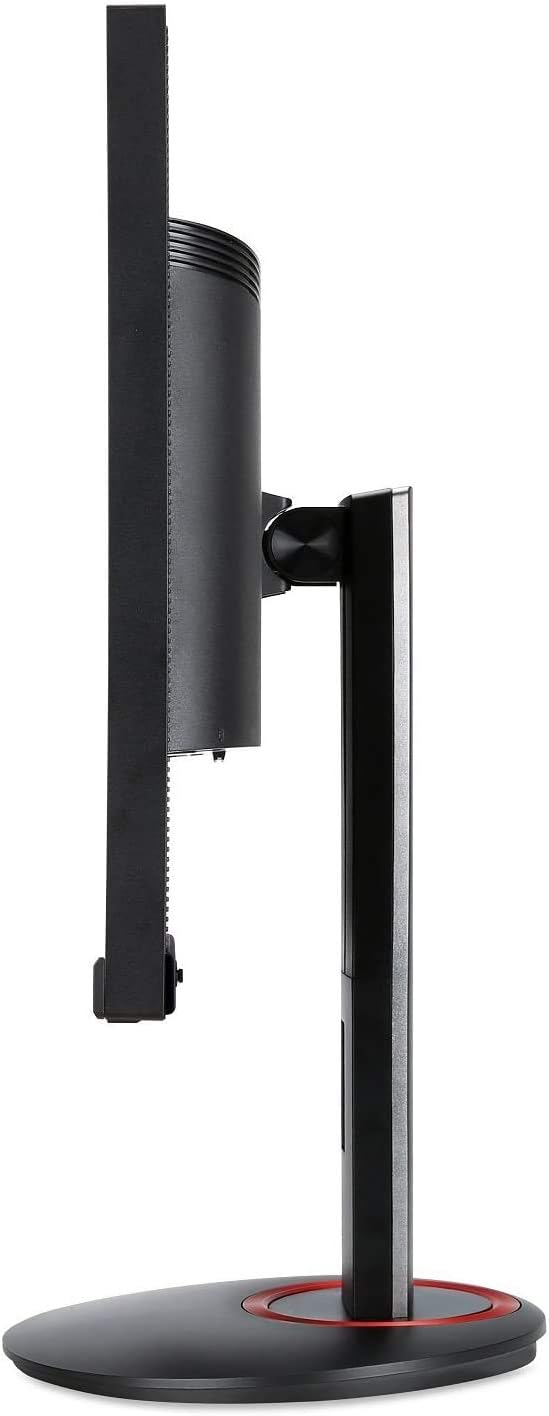
ภาพที่ 3.1: ด้านข้าง view of the monitor, illustrating the stand assembly.
ความเข้ากันได้ของเมาท์ VESA: The monitor supports a 100 x 100 mm VESA mount standard. If you plan to use a wall mount or an alternative monitor arm, remove the stand and attach the VESA-compatible mounting bracket (sold separately) to the monitor's rear panel.

Image 3.2: Monitor in vertical orientation, demonstrating pivot functionality.
3.2. การเชื่อมต่อจอภาพ
- การเชื่อมต่อไฟฟ้า: ต่อสายไฟเข้ากับช่องเสียบสายไฟของจอภาพ แล้วจึงต่อเข้ากับเต้ารับไฟฟ้า
- การเชื่อมต่อวิดีโอ:
- For optimal performance (144Hz refresh rate), connect the included DisplayPort cable from your computer's graphics card to the monitor's DisplayPort 1.2 input.
- Alternatively, connect an HDMI cable (not included) from your computer's graphics card to one of the monitor's two HDMI 2.0 inputs.
- การเชื่อมต่อเสียง (ทางเลือก): If you wish to use external speakers or headphones, connect them to the monitor's audio output jack. The monitor also has built-in speakers.
- เปิดเครื่อง: Press the power button on the monitor to turn it on. Power on your computer.
4. การใช้งานจอภาพ
4.1. เปิด/ปิดเครื่อง
To turn the monitor on or off, press the power button located on the bottom right side of the monitor bezel.
4.2. การนำทางเมนูการแสดงผลบนหน้าจอ (OSD)
The OSD menu allows you to adjust various monitor settings such as brightness, contrast, color, input source, and gaming features. Use the buttons located on the bottom right of the monitor to navigate the OSD menu:
- กดปุ่มใดก็ได้เพื่อเปิดใช้งานเมนู OSD
- ใช้ปุ่มทิศทางเพื่อเลื่อนดูตัวเลือกในเมนู
- Press the select button (usually the middle button) to confirm a selection.
- Press the exit button (often the leftmost button) to go back or exit the menu.
4.3. คุณสมบัติหลัก
- อัตราการรีเฟรช 144Hz: This monitor supports a high refresh rate of 144Hz when connected via DisplayPort, providing smoother motion and reduced input lag compared to standard 60Hz monitors.
- เวลาตอบสนอง 1ms: The 1ms response time (GtG) minimizes motion blur and ghosting, ensuring clear visuals during fast-moving scenes.
- AMD FreeSync & NVIDIA G-SYNC Compatible: This monitor supports adaptive sync technologies to synchronize the monitor's refresh rate with your graphics card's frame rate, eliminating screen tearing and stuttering for a smoother gaming experience. Ensure your graphics card drivers are up to date and FreeSync/G-SYNC is enabled in your graphics card control panel.
- การออกแบบแบบ Zero Frame: The narrow bezels provide a larger viewing area and are ideal for multi-monitor setups.
- เอเซอร์ วิชั่นแคร์: Features like Flicker-less, Blue Light Filter, and Low Dimming are integrated to reduce eye strain during extended use.

Image 4.1: Visual representation of 144Hz refresh rate benefits in fast-paced content.

Image 4.2: Visual representation of 1ms response time reducing blur.
5. การบำรุงรักษา
5.1. การทำความสะอาดจอภาพ
- ปิดเครื่องจอภาพและถอดสายไฟออกทุกครั้งก่อนทำความสะอาด
- ใช้ผ้านุ่มไม่เป็นขุยค่อยๆ งampเคลือบด้วยน้ำหรือน้ำยาทำความสะอาดหน้าจอชนิดอ่อนที่ไม่กัดกร่อน
- อย่าฉีดน้ำยาลงบนหน้าจอโดยตรง ให้ฉีดลงบนผ้าก่อน
- หลีกเลี่ยงการใช้เบนซีน ทินเนอร์ น้ำยาทำความสะอาดที่มีส่วนผสมของแอมโมเนีย หรือวัสดุที่มีฤทธิ์กัดกร่อน เนื่องจากสารเหล่านี้อาจทำให้หน้าจอหรือตัวเครื่องเสียหายได้asing.
5.2. การดูแลทั่วไป
- หลีกเลี่ยงการวางจอภาพให้โดนแสงแดดโดยตรงหรือใกล้แหล่งความร้อน
- ตรวจสอบให้แน่ใจว่ามีการระบายอากาศที่เพียงพอรอบๆ จอภาพ
- ห้ามวางวัตถุหนักบนจอภาพหรือสายเคเบิล
- หากจะไม่ใช้จอภาพเป็นเวลานาน ให้ถอดปลั๊กออกจากเต้าเสียบไฟฟ้า
6 การแก้ไขปัญหา
หากคุณพบปัญหาเกี่ยวกับจอภาพของคุณ โปรดดูขั้นตอนการแก้ไขปัญหาทั่วไปต่อไปนี้:
| ปัญหา | วิธีแก้ปัญหาที่เป็นไปได้ |
|---|---|
| ไม่มีภาพบนหน้าจอ |
|
| ภาพเบลอหรือบิดเบี้ยว |
|
| หน้าจอกระพริบหรือฉีกขาด |
|
| ไม่มีเสียงออกจากลำโพง |
|
7. ข้อมูลจำเพาะ
The following table lists the technical specifications for the Acer XF270H Bbmiiprx monitor:
| คุณสมบัติ | ข้อมูลจำเพาะ |
|---|---|
| ขนาดหน้าจอ | 27 นิ้ว |
| ปณิธาน | 1920 x 1080 (ฟูลเอชดี) |
| ประเภทแผง | TN |
| อัตราการรีเฟรช | 144Hz (ผ่าน DisplayPort) |
| เวลาตอบสนอง | 1มิลลิวินาที |
| การซิงค์แบบปรับตัว | AMD FreeSync, NVIDIA G-SYNC Compatible |
| อัตราส่วนภาพ | 16:9 น. |
| Viewอิงแองเกิลส์ | แนวนอน 170 องศา แนวตั้ง 160 องศา |
| พอร์ต | 1 x DisplayPort 1.2, 2 x HDMI 2.0 |
| ลำโพง | 2 x 2 วัตต์ |
| มาตรฐาน VESA Mount | 100 x 100 มม. |
| ขนาด (กxยxส) | 24.17 x 9.64 x 15.63 นิ้ว |
| น้ำหนัก | 17.68 ปอนด์ |
8. ข้อมูลการรับประกัน
ผลิตภัณฑ์ของ Acer อยู่ภายใต้การรับประกันแบบจำกัด เงื่อนไขและระยะเวลาการรับประกันอาจแตกต่างกันไปตามภูมิภาคและผลิตภัณฑ์ โปรดดูบัตรรับประกันที่มาพร้อมกับผลิตภัณฑ์ของคุณหรือเยี่ยมชมเว็บไซต์อย่างเป็นทางการของ Acer webเว็บไซต์สำหรับข้อมูลการรับประกันและการลงทะเบียนโดยละเอียด
9. การสนับสนุน
For technical assistance, product inquiries, or service requests, please contact Acer customer support. You can find contact information and additional resources on the official Acer support webเว็บไซต์:
ฝ่ายสนับสนุนของเอเซอร์ Webเว็บไซต์: www.acer.com/support
Please have your monitor's model number (XF270H Bbmiiprx) and serial number ready when contacting support.


