1. บทนำ
ขอบคุณสำหรับการซื้อasing the ieGeek Portable DVD Player. This manual provides essential information for the safe and efficient operation of your device. Please read it thoroughly before use and retain it for future reference.
ข้อมูลด้านความปลอดภัย
- อย่าให้อุปกรณ์โดนฝนหรือความชื้น
- ห้ามถอดชิ้นส่วนอุปกรณ์ ควรส่งซ่อมโดยช่างผู้ชำนาญการเท่านั้น
- Use only the specified power adapters and accessories.
- หลีกเลี่ยงอุณหภูมิที่สูงเกินไปและแสงแดดโดยตรง
- เก็บอุปกรณ์ให้ห่างจากสนามแม่เหล็กแรงสูง
2. เนื้อหาบรรจุภัณฑ์
ตรวจสอบว่ามีรายการทั้งหมดอยู่ในแพ็คเกจ:
- ieGeek Portable DVD Player
- รีโมทคอนโทรล
- ที่ชาร์จในรถยนต์
- อะแดปเตอร์ AC
- สาย AV 3-in-1
- คู่มือการใช้งาน

รูปที่ 2.1: อุปกรณ์เสริมที่รวมอยู่
3. สินค้าหมดview
The ieGeek Portable DVD Player features a 10.5-inch HD swivel screen and supports various media formats for versatile entertainment.
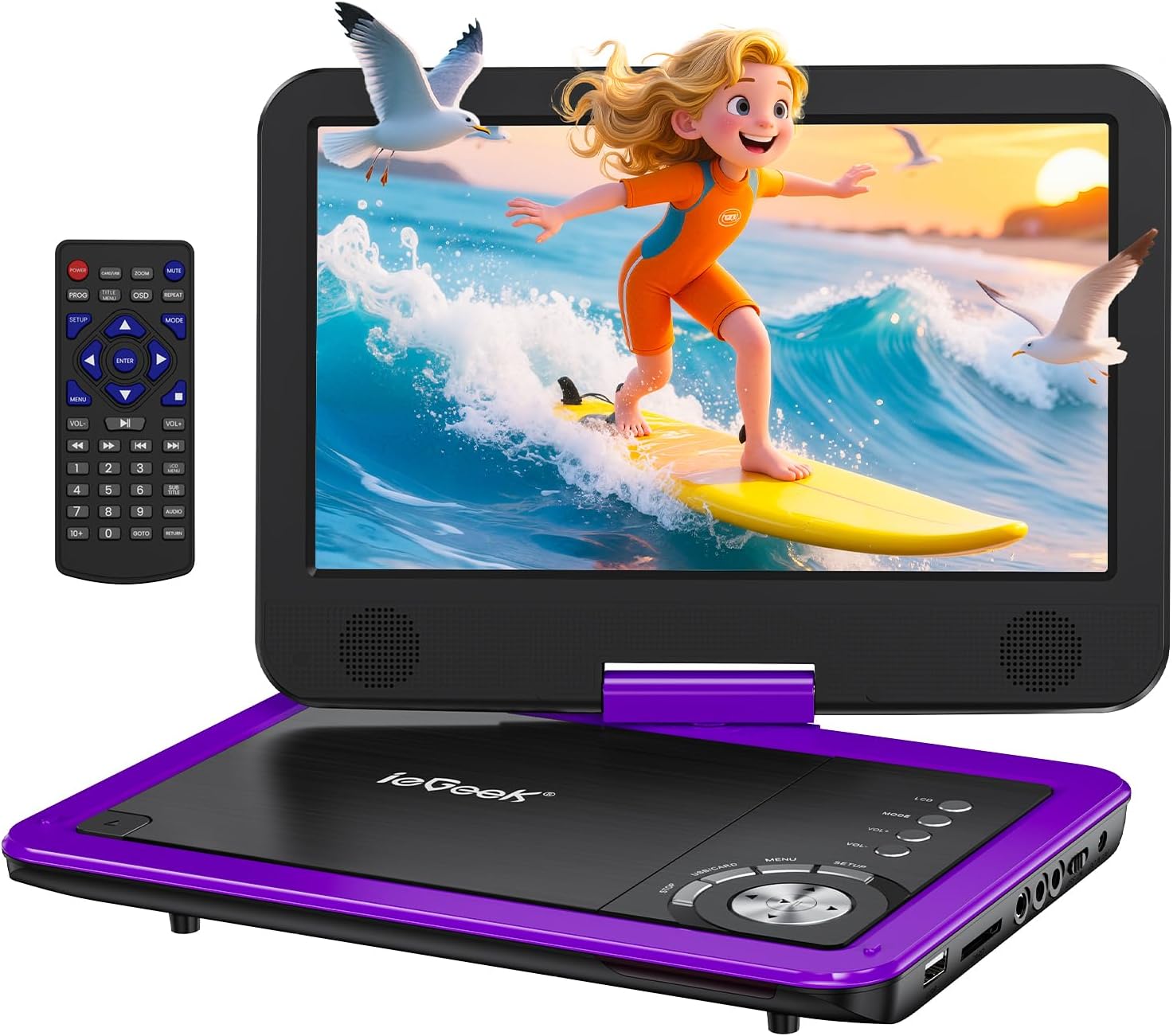
Figure 3.1: ieGeek Portable DVD Player
การควบคุมและพอร์ต

Figure 3.2: Side Ports and Controls
- พอร์ต USB: สำหรับการเชื่อมต่อแฟลชไดรฟ์ USB
- ช่องเสียบการ์ด SD: สำหรับใส่การ์ดหน่วยความจำ SD
- แจ็คหูฟัง: สำหรับเชื่อมต่อหูฟัง.
- AV ออก: Connects to a TV or projector for larger screen viewการไอเอ็นจี
- AV ใน: Connects to another portable DVD player for synchronized viewการไอเอ็นจี
- สวิตช์เปิด/ปิด: เปิดหรือปิดอุปกรณ์
- กระแสตรงใน 12V: อินพุตพลังงานสำหรับอะแดปเตอร์ AC หรือเครื่องชาร์จในรถยนต์
- GAME Port: For connecting a game controller (if supported).
4. การตั้งค่า
4.1 การชาร์จเริ่มต้น
Before first use, fully charge the portable DVD player. The built-in rechargeable battery provides approximately 5 hours of video playback.
- Connect the AC Power Adapter to the DC IN 12V port and a power outlet.
- Alternatively, use the Car Charger to power the device in a vehicle.

รูปที่ 4.1: ตัวเลือกการชาร์จ
4.2 Loading a Disc
- Slide the 'OPEN' latch to open the disc lid.
- Place the DVD or CD onto the spindle, ensuring it clicks into place.
- Close the disc lid firmly. The player will begin loading automatically.
บันทึก: Blu-ray discs are not supported.
4.3 Inserting USB/SD Card
- ใส่แฟลชไดรฟ์ USB เข้ากับพอร์ต USB
- Insert an SD card into the SD Card slot.
The player will detect the media and allow you to select fileสำหรับการเล่น

Figure 4.2: USB and SD Card Insertion
5. คู่มือการใช้งาน
5.1 การเล่นขั้นพื้นฐาน
- เปิด/ปิดเครื่อง: Use the ON/OFF switch on the side of the device.
- เล่น/หยุดชั่วคราว: Press the Play/Pause button on the device or remote to start or pause playback.
- หยุด: กดปุ่ม Stop เพื่อสิ้นสุดการเล่น
- ข้าม: Use the Previous/Next buttons to skip tracks or chapters.
- การควบคุมระดับเสียง: Adjust the volume using the VOL+ and VOL- buttons on the device or remote.
5.2 การหมุนหน้าจอ
The 10.5-inch HD screen can rotate 270° and flip 180°, allowing for multiple viewing angles or folding into a tablet-like form.

Figure 5.1: Screen Rotation Capabilities
5.3 การควบคุมระยะไกล
The included remote control provides full functionality for convenient operation from a distance.
5.4 External Connections (SYNC Screen Playing)
- เชื่อมต่อกับทีวี: Use the AV to RCA cable (3-in-1 AV Cable) to connect the AV OUT port of the DVD player to the AV IN ports of a television. This allows you to view เนื้อหาบนหน้าจอที่ใหญ่ขึ้น
- Connect to Another Player: Use an AV to AV cable (not included) to connect the AV OUT of one player to the AV IN of another, enabling synchronized viewing across two devices.
5.5 คุณสมบัติพิเศษ
- ฟังก์ชั่นหน่วยความจำล่าสุด: The player automatically resumes playback from where it was last stopped, even after powering off.
- การเล่นวนซ้ำ: Enable the repeat function to play files on a continuous loop.
- ฟังก์ชั่นป้องกันภาพสั่น: Designed to minimize disc skip issues during movement, ideal for car travel.
6. Media Compatibility
This portable DVD player supports a wide range of media formats and is region-free for DVD playback.

Figure 6.1: Supported Media Types
6.1 รูปแบบดิสก์ที่รองรับ
- CD, DVD, VCD, DVD±R, DVD±RW, CD-R, CD-RW, CVD, SVCD.
- Not compatible with Blu-ray discs.
6.2 Supported Digital Media (USB/SD Card)
รองรับ USB และการ์ด SD สูงสุด 32GB
- วีดีโอ: AVI, MPG, MPVG4, VOB, FLV, RMVB (resolution within 720*576).
- เสียง: MP3, WMA, OGG, AAC.
7 การแก้ไขปัญหา
If you encounter issues with your ieGeek Portable DVD Player, refer to the following common solutions:
- ไม่มีไฟฟ้า: Ensure the device is fully charged or connected to a power source. Check the ON/OFF switch.
- No Disc Detected: Verify the disc is inserted correctly and is a supported format (not Blu-ray). Clean the disc if necessary.
- ไม่มีภาพ/เสียงบนทีวี: Check the AV cable connections between the DVD player and the TV. Ensure the TV input is set to the correct AV channel.
- คุณภาพภาพไม่ดี: Ensure the disc is clean and free of scratches. Adjust screen settings if available.
- รีโมทคอนโทรลไม่ทำงาน: Check the remote's batteries. Ensure there are no obstructions between the remote and the player's sensor.
Game Functionality
The ieGeek Portable DVD Player supports game playback via the USB port. Connect a compatible game controller to the USB port to access pre-loaded games or games from a USB drive.
Video 7.1: Demonstrating game play on the ieGeek Portable DVD Player by connecting a game controller via USB and playing a classic game.
8. ข้อมูลจำเพาะ
| ขนาดสินค้า | 5.5 x 10.33 x 5.5 นิ้ว |
| น้ำหนักสินค้า | 3.25 ปอนด์ |
| แบตเตอรี่ | ต้องใช้แบตเตอรี่ลิเธียมโพลิเมอร์ 1 ก้อน (รวมอยู่ด้วย) |
| ยี่ห้อ | ieGeek |
| ประเภทสื่อ | DVD, VCD, CD, MP3, MPEG, AVI, VOB, USB, SD |
| สี | สีม่วง |
| ขนาดหน้าจอ | 10.5 นิ้ว |
| ประเภทจอภาพ | จอแอลซีดี |
9. การรับประกันและการสนับสนุน
The ieGeek Portable DVD Player typically comes with a 1-year warranty from the date of purchase. For technical support, warranty claims, or any inquiries, please contact ieGeek customer service.
- อีเมลติดต่อ: vp-service@iegeek.com
- สนับสนุน: Lifetime Technical Support is available.
- การคืนสินค้า/การแลกเปลี่ยน: 24 Months Return and Exchange policy.


