1. บทนำ
This manual provides comprehensive instructions for the installation, operation, and maintenance of the DIGI WR11-M400-DE1-XB Cellular Router. This device is designed to provide reliable 4G LTE cellular connectivity and Ethernet networking for various applications. Please read this manual thoroughly before using the product to ensure proper setup and functionality.
2. ข้อมูลด้านความปลอดภัย
โปรดปฏิบัติตามข้อควรระวังด้านความปลอดภัยต่อไปนี้เพื่อป้องกันความเสียหายต่ออุปกรณ์หรือการบาดเจ็บต่อบุคลากร:
- ตรวจสอบแหล่งจ่ายไฟ voltage ตรงตามข้อกำหนดของอุปกรณ์
- อย่าให้เครื่องโดนน้ำหรือความชื้นมากเกินไป
- หลีกเลี่ยงการวางอุปกรณ์ใกล้แหล่งความร้อนหรือแสงแดดโดยตรง
- อย่าเปิดอุปกรณ์casinง. ส่งต่อการบริการทั้งหมดให้กับบุคลากรที่มีคุณสมบัติ
- Use only approved accessories and antennas with the router.
3. เนื้อหาบรรจุภัณฑ์
ตรวจสอบว่ามีรายการทั้งหมดอยู่ในแพ็คเกจ:
- DIGI WR11-M400-DE1-XB Cellular Router
- อะแดปเตอร์ไฟฟ้า (อาจแตกต่างกันไปตามภูมิภาค)
- คู่มือเริ่มต้นอย่างรวดเร็ว
- ฮาร์ดแวร์สำหรับติดตั้ง (ถ้ามี)
Note: Antennas are not included with this model and must be purchased separately.
4. สินค้าหมดview
The DIGI WR11-M400-DE1-XB is a compact and robust cellular router designed for reliable connectivity. Below is an image of the device with key features highlighted.
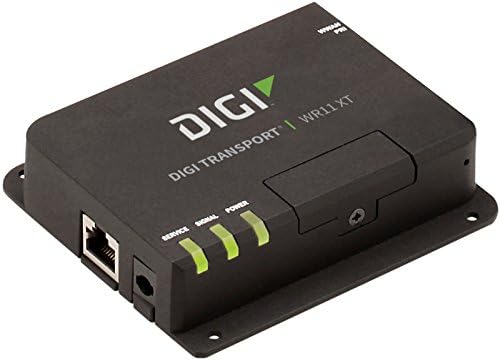
ภาพ: ด้านหน้า view of the DIGI WR11-M400-DE1-XB Cellular Router, showing the Ethernet port, power input, and three LED indicators for Service, Signal, and Power. The device is black with the "DIGI TRANSPORT WR11 XT" logo.
ไฟแสดงสถานะแผงด้านหน้า
- บริการ LED: Indicates cellular service status. (e.g., Solid Green: Connected, Blinking: Attempting connection, Off: No service)
- สัญญาณไฟ LED: Indicates cellular signal strength. (e.g., Green: Strong, Amber: Medium, Red: Weak)
- กำลังไฟ LED: Indicates power status. (e.g., Solid Green: Power on, Off: Power off)
พอร์ตและขั้วต่อ
- พอร์ตอีเธอร์เน็ต (LAN): One RJ45 port for wired network connection.
- กำลังไฟเข้า: Connector for the DC power adapter.
- ขั้วต่อเสาอากาศ: (Not visible in image, but typically present on cellular routers for external antennas, though this model states "NO Antenna" in description, implying internal or separate purchase). Note: This model does not include antennas. External antennas must be connected to the appropriate ports (if available) for cellular connectivity.
5. การตั้งค่า
การตั้งค่าเริ่มต้น
- การวางตำแหน่ง: Place the router in a central location, away from obstructions and other electronic devices that may cause interference. Ensure good cellular signal reception.
- การติดตั้งซิมการ์ด: If applicable, insert your activated 4G LTE SIM card into the designated SIM card slot. Ensure it is inserted correctly according to the diagram on the device or in the Quick Start Guide.
- การเชื่อมต่อเสาอากาศ: If using external antennas (recommended for optimal performance, and necessary for this model as it ships without antennas), connect them securely to the antenna ports.
- การเชื่อมต่อไฟฟ้า: Connect the power adapter to the router's power input port, then plug the adapter into a power outlet. The Power LED should illuminate.
การเชื่อมต่อเครือข่าย
- การเชื่อมต่อแบบมีสาย: Connect an Ethernet cable from the router's LAN port to your computer or network switch.
- ตรวจสอบการเชื่อมต่อ: Once powered on, the router will attempt to establish a cellular connection. Monitor the Service and Signal LEDs. The Service LED should turn solid green, and the Signal LED should indicate good signal strength.
6. คู่มือการใช้งาน
การทำงานพื้นฐาน
Once the router is powered on and has established a cellular connection (indicated by the Service and Signal LEDs), devices connected to its Ethernet port will be able to access the internet via the 4G LTE network.
การเข้าถึง Web อินเทอร์เฟซ
For advanced configuration and monitoring, you can access the router's webอินเทอร์เฟซการจัดการตาม:
- Ensure your computer is connected to the router via Ethernet.
- เปิด web เบราว์เซอร์ (เช่น Chrome, Firefox, Edge)
- ในแถบที่อยู่ ให้พิมพ์ที่อยู่ IP เริ่มต้นของเราเตอร์ (โดยทั่วไป
192.168.1.1or192.168.0.1, refer to the Quick Start Guide or device label for the exact address) and press Enter. - Enter the default username and password when prompted (typically
adminfor both, or as specified in the Quick Start Guide). - You can now configure network settings, security, and monitor device status.
7. การบำรุงรักษา
Regular maintenance helps ensure the longevity and optimal performance of your router:
- การทำความสะอาด: ใช้ผ้านุ่มและแห้งเช็ดทำความสะอาดภายนอกเราเตอร์ ห้ามใช้น้ำยาทำความสะอาดหรือสเปรย์
- อัพเดตเฟิร์มแวร์: ตรวจสอบผู้ผลิตเป็นระยะ website for firmware updates. Keeping the firmware updated can improve performance, add features, and enhance security.
- การระบายอากาศ : ควรวางเราเตอร์ไว้ในบริเวณที่มีอากาศถ่ายเทสะดวกเพื่อป้องกันความร้อนสูงเกินไป อย่าปิดกั้นช่องระบายอากาศ
- วงจรไฟฟ้า: If the router experiences issues, try power cycling it by disconnecting the power adapter for 10 seconds and then reconnecting it.
8 การแก้ไขปัญหา
This section addresses common issues you might encounter with the DIGI WR11-M400-DE1-XB Cellular Router.
| ปัญหา | สาเหตุที่เป็นไปได้ | สารละลาย |
|---|---|---|
| ไม่มีไฟ (ไฟ LED แสดงสถานะดับ) | ไม่ได้เชื่อมต่ออะแดปเตอร์ไฟหรือเต้ารับไฟฟ้าชำรุด | Check power connections. Try a different power outlet. Ensure the power adapter is functioning. |
| No Cellular Service (Service LED Off/Blinking) | No SIM card, inactive SIM, poor signal, or network issue. | Ensure SIM card is correctly inserted and activated. Relocate the router for better signal. Contact your cellular provider. |
| Poor Signal Strength (Signal LED Red/Amber) | Router location, external interference, or antenna issue. | Move the router to an area with better cellular reception. Ensure external antennas (if used) are properly connected and positioned. |
| No Internet Access via Ethernet | No cellular connection, incorrect network settings, or faulty Ethernet cable. | Verify cellular connection status (Service LED). Check Ethernet cable connection. Access web interface to verify network settings. |
| ไม่สามารถเข้าถึง Web อินเทอร์เฟซ | Incorrect IP address, network configuration issue, or router not responding. | Verify the router's IP address. Ensure your computer is set to obtain an IP address automatically (DHCP). Try power cycling the router. |
9. ข้อมูลจำเพาะ
Key technical specifications for the DIGI WR11-M400-DE1-XB Cellular Router:
| คุณสมบัติ | รายละเอียด |
|---|---|
| แบบอย่าง | WR11-M400-DE1-XB |
| ยี่ห้อ | Digi |
| เทคโนโลยีการเชื่อมต่อ | Cellular (4G LTE Sprint), Ethernet |
| จำนวนพอร์ต | 1 (อีเทอร์เน็ต) |
| อุปกรณ์ที่รองรับ | เครื่องคอมพิวเตอร์ส่วนบุคคล |
| วิธีการควบคุม | ระยะไกล |
| ประเภทตัวควบคุม | สวิตช์ |
| คุณสมบัติพิเศษ | ดับบลิวพีเอส |
| ยูพีซี | 665752885062 |
| วันที่พร้อมใช้งานครั้งแรก | 23 กรกฎาคม 2018 |
10. การรับประกันและการสนับสนุน
For information regarding product warranty, technical support, or service, please refer to the warranty card included with your product or visit the official Digi International website. Support resources, including FAQs, documentation, and contact information, are typically available online.
โปรดเก็บหลักฐานการซื้อของคุณไว้เพื่อเรียกร้องการรับประกัน


