1. บทนำ
The Pyle PRJG98.5 is a compact digital multimedia projector designed for versatile projection of images, videos, audio, and text files. It supports Full HD 1080p resolution and features multiple input interfaces, making it suitable for home entertainment, office presentations, and educational use. This manual provides detailed instructions for setting up, operating, and maintaining your projector.
2. ข้อมูลด้านความปลอดภัย
- อย่ามองตรงเข้าไปในเลนส์โปรเจ็กเตอร์เมื่อลamp อยู่บนแล้ว
- ตรวจสอบให้แน่ใจว่ามีการระบายอากาศที่เหมาะสมรอบๆ โปรเจ็กเตอร์เพื่อป้องกันความร้อนสูงเกินไป อย่าปิดกั้นช่องระบายอากาศ
- ใช้เฉพาะอะแดปเตอร์ไฟฟ้าที่มาพร้อมกับเครื่องเท่านั้น
- Avoid placing the projector in direct sunlight, near heat sources, or in environments with high humidity or dust.
- ห้ามถอดประกอบหรือดัดแปลงโปรเจ็กเตอร์ด้วยตนเอง โปรดส่งซ่อมโดยช่างผู้ชำนาญการเท่านั้น
- เก็บโปรเจ็กเตอร์ให้ห่างจากน้ำหรือของเหลวอื่นๆ
3. เนื้อหาบรรจุภัณฑ์
กรุณาตรวจสอบว่าสินค้าทั้งหมดมีอยู่ในแพ็คเกจ:
- Digital Projector (Pyle PRJG98.5)
- รีโมทคอนโทรล
- สายเคเบิล VGA
- สาย AC
- สายไฟ
4. สินค้าหมดview
The Pyle PRJG98.5 projector features a compact design with various input options and controls for an optimal viewการสร้างประสบการณ์

รูปที่ 4.1: Pyle PRJG98.5 Digital Multimedia Projector and included remote control. The projector is black with a lens on the front and control buttons on top. The remote is also black with various function buttons.
4.1 Front and Top Panel
- เลนส์ฉายภาพ: ปล่อยภาพออกสู่จอภาพ
- วงแหวนโฟกัส: ปรับความคมชัดของภาพ
- การปรับแก้ภาพบิดเบี้ยว: Corrects trapezoidal distortion.
- ปุ่มควบคุม: Power, menu navigation, input selection.
4.2 Rear Panel (Connectivity)

รูปที่ 4.2: Rear panel of the Pyle PRJG98.5 Projector, displaying various input ports including AV, USB (x2), HDMI, VGA, and DC power input. This allows connection to multiple devices.
- อินพุต HDMI: Connects to devices like Blu-Ray players, game consoles, laptops.
- พอร์ต USB (x2): For multimedia file playback from USB drives or charging devices.
- VGA (RGB) Input: Connects to computers and laptops.
- AV (RCA) Input: Connects to older video sources.
- อินพุตไฟ DC: เชื่อมต่อกับอะแดปเตอร์ไฟ
- เอาต์พุตเสียง: สำหรับเชื่อมต่อลำโพงภายนอกหรือหูฟัง
5. การตั้งค่า
5.1 การจัดวาง
Position the projector on a stable, flat surface or mount it overhead. Ensure the projector is perpendicular to the projection surface for the best image quality. The adjustable screen size ranges up to 120 inches.
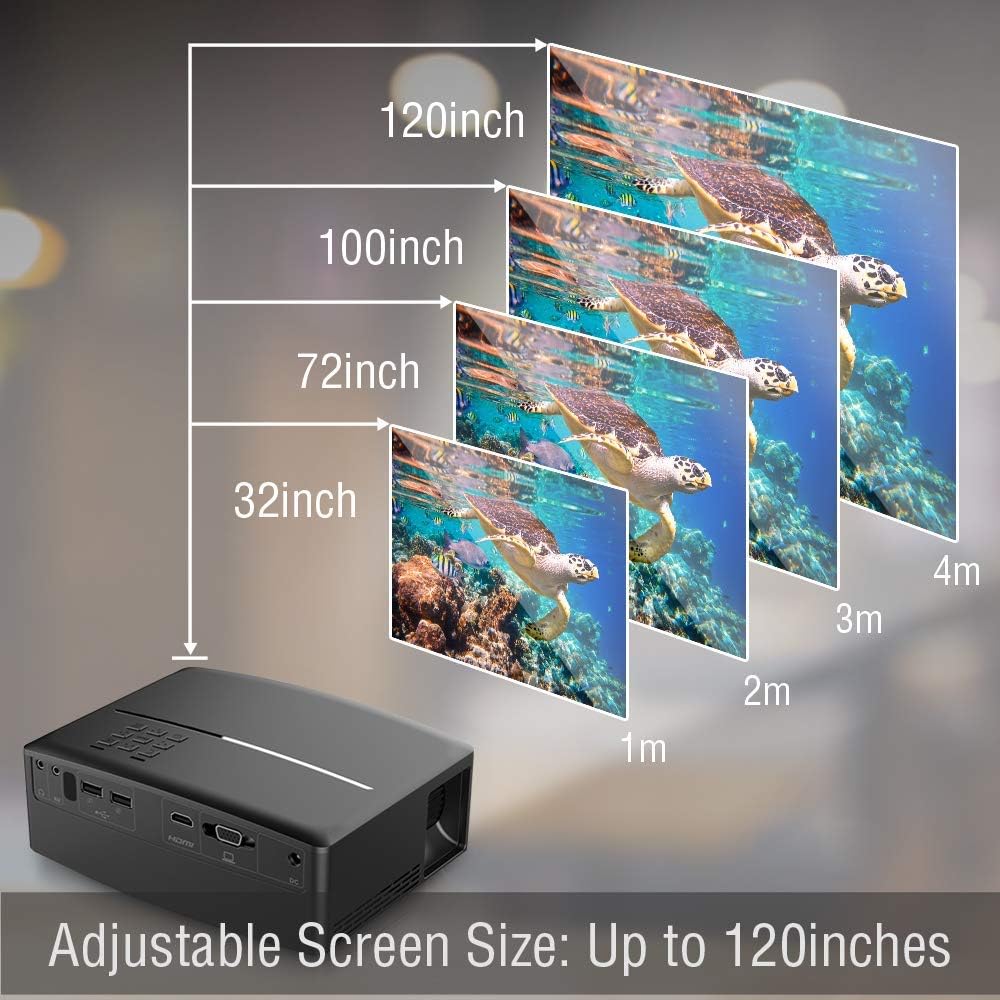
รูปที่ 5.1: Illustration of the adjustable screen size capability of the Pyle PRJG98.5 Projector, showing projection sizes from 32 inches to 120 inches at varying distances from the screen.
5.2 การเชื่อมต่อสายไฟ
- Connect the power cord to the AC cable.
- Plug the AC cable into the DC Power Input port on the projector.
- เสียบปลายสายไฟอีกด้านเข้ากับเต้ารับที่ผนัง
5.3 การเชื่อมต่ออุปกรณ์ป้อนข้อมูล
โปรเจ็กเตอร์รองรับแหล่งสัญญาณเข้าหลายประเภท:
- ช่องต่อ HDMI: Connect an HDMI cable from your device (e.g., laptop, game console, Blu-Ray player) to the HDMI port on the projector.
- ยูเอสบี: Insert a USB flash drive into one of the USB ports for multimedia playback.
- VGA: เชื่อมต่อสาย VGA จากคอมพิวเตอร์ของคุณเข้ากับพอร์ต VGA บนโปรเจ็กเตอร์
- เอวี: Use an RCA cable to connect to devices with AV output.
5.4 การปรับภาพ
After powering on the projector, adjust the image for clarity and proper display.
- การปรับโฟกัส: Rotate the focus ring around the lens until the projected image is sharp and clear.
- การแก้ไขคีย์สโตน: If the image appears trapezoidal (wider at the top or bottom), use the keystone adjustment dial or lever on the projector to correct the distortion. The projector supports a 15-degree keystone angle adjustment.

รูปที่ 5.2: Visual representation of keystone angle adjustment, showing how to correct a distorted rectangular display to a proper rectangular display using the projector's adjustment mechanism. The projector supports a 15-degree keystone adjustment.
6. การดำเนินการ
6.1 การเปิด/ปิดเครื่อง
- การเปิดเครื่อง: กดปุ่มเปิด/ปิดบนโปรเจคเตอร์หรือรีโมทคอนโทรล ไฟแสดงสถานะจะสว่างขึ้น
- วิธีปิดเครื่อง: กดปุ่มเปิด/ปิดเครื่องอีกครั้ง ยืนยันการปิดเครื่องหากได้รับแจ้ง
6.2 การเลือกแหล่งที่มาของอินพุต
After connecting your input device, select the corresponding source:
- Press the "Input" button on the projector or remote control.
- Use the arrow keys to navigate through the input options (HDMI, USB, VGA, AV).
- กด "OK" หรือ "Enter" เพื่อยืนยันการเลือกของคุณ
6.3 Multimedia Playback (USB)
The projector supports various digital media file formats including AVI, MPG, MOV, MP3, WMV, and TXT.
- ใส่แฟลชไดรฟ์ USB เข้ากับพอร์ต USB
- เลือก "USB" เป็นแหล่งสัญญาณเข้า
- นำทางผ่าน file browser to select the desired media file (image, video, audio, text).
- Press "OK" or "Enter" to play the file.
6.4 การนำทางเมนู
Use the "Menu" button on the projector or remote to access settings. Navigate with arrow keys and confirm with "OK" or "Enter". Options include picture adjustment, sound settings, and system settings.
7. การบำรุงรักษา
7.1 การทำความสะอาดเลนส์
ใช้ผ้าเนื้อนุ่ม ปราศจากขน ที่ออกแบบมาสำหรับเลนส์โดยเฉพาะ เช็ดเลนส์โปรเจคเตอร์เบาๆ อย่าใช้สารทำความสะอาดที่มีฤทธิ์กัดกร่อนหรือออกแรงมากเกินไป
7.2 การทำความสะอาดตัวโปรเจ็กเตอร์
เช็ดทำความสะอาดภายนอกของโปรเจคเตอร์ด้วยผ้าแห้งนุ่มๆ สำหรับคราบสกปรกที่ติดแน่น ให้ใช้ผ้าชุบน้ำหมาดๆ เช็ดเบาๆampชุบผ้าด้วยน้ำแล้วเช็ดให้แห้งทันที
7.3 ลิตรamp ชีวิต
ไฟ LED ลamp in your projector has an estimated life of 30,000+ hours. No user-replaceable lamp จำเป็นต้องมีการบำรุงรักษา
8 การแก้ไขปัญหา
| ปัญหา | สาเหตุที่เป็นไปได้ | สารละลาย |
|---|---|---|
| ไม่มีภาพแสดง | Power not connected; Incorrect input source; Device not connected properly. | Check power connection; Select correct input source; Ensure cables are securely connected. |
| ภาพเบลอ | ไม่ได้ปรับโฟกัส โปรเจ็กเตอร์อยู่ไกล/ใกล้หน้าจอมากเกินไป | ปรับวงแหวนปรับโฟกัส; จัดตำแหน่งโปรเจคเตอร์ใหม่ |
| รูปภาพเป็นรูปสี่เหลี่ยมคางหมู | โปรเจ็กเตอร์ไม่ตั้งฉากกับจอ | ปรับการแก้ไขคีย์สโตน |
| ไม่มีเสียง | Volume too low; Muted; External speakers not connected. | Increase volume; Unmute; Connect external speakers if desired. |
| รีโมตคอนโทรลไม่ทำงาน | แบตเตอรี่อ่อน/หมด; มีสิ่งกีดขวางระหว่างรีโมทและโปรเจ็กเตอร์ | Replace batteries; Ensure clear line of sight to IR receiver. |
9. ข้อมูลจำเพาะ
| เทคโนโลยีการถ่ายภาพ | 4.0'' LCD + LED Lamp |
| Adjustable Screen Size | Up to 120'' -inches |
| ความละเอียดดั้งเดิม | 800 x 480 SVGA, 1080p Support |
| อุณหภูมิสี | Full Color, 16.7K |
| อัตราส่วนคอนทราสต์ | 2,200:1 (Dynamic: 10,000:1) |
| ความสว่าง | 1,800 ลูเมน |
| Lamp ชีวิต | มากกว่า 30,000 ชั่วโมง |
| อัตราส่วนมาตราส่วน | 16:9, 4:3 |
| อัตราการรีเฟรช | 60เฮิรตซ์ |
| Keystone Angle Adjustment | 15 องศา |
| ดิจิตอล File สนับสนุน | AVI, MPG, MOV, MP3, WMV, TXT & More |
| กำลังขับของลำโพง | 2 x 5 วัตต์ |
| แหล่งจ่ายไฟ | 120V (12V Power Adapter) |
| ขนาด (กว้าง x ยาว x สูง) | 7.5 นิ้ว x 6.3 นิ้ว x 2.7 นิ้ว |
| น้ำหนักสินค้า | 1.99 ปอนด์ |
10. การรับประกันและการสนับสนุน
สำหรับข้อมูลการรับประกันหรือการสนับสนุนทางเทคนิค โปรดดูบัตรรับประกันที่แนบมากับผลิตภัณฑ์ของคุณ หรือเยี่ยมชมเว็บไซต์อย่างเป็นทางการของ Pyle webไซต์ โปรดเก็บใบเสร็จรับเงินไว้เป็นหลักฐานการซื้อ


