1. บทนำ
This manual provides instructions for the setup, operation, maintenance, and troubleshooting of your iKBC CD87BT mechanical keyboard. Please read this manual thoroughly to ensure proper use and to maximize the lifespan of your device.
2. สินค้าหมดview
The iKBC CD87BT is an 87-key mechanical keyboard offering both wired USB Type-C and wireless Bluetooth 3.0 connectivity. It features Cherry MX Brown switches, known for their tactile feedback, and durable PBT OEM profile keycaps. The keyboard is compatible with iOS, Android, Windows, and Mac operating systems.
คุณสมบัติที่สำคัญ ได้แก่:
- Cherry MX Brown Switches: Tactile feedback suitable for typing and gaming.
- Dual Connectivity: Wired (USB Type-A to C) and Wireless (Bluetooth 3.0).
- Multi-Device Support: Connects up to 4 Bluetooth devices simultaneously.
- Durable PBT Keycaps: OEM profile with laser-engraved legends.
- Adjustable Ergonomics: 3-level adjustable feet for preferred typing angle.
- Anti-Ghosting: 100% anti-ghosting with full key rollover in USB mode.
- Multimedia Keys: Dedicated functions via FN key combinations.
- DIP Switches: For advanced customization.
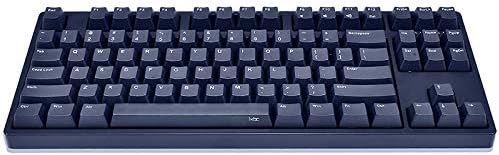
Image 1: The iKBC CD87BT 87-key mechanical keyboard in navy blue. This image displays the full keyboard layout, highlighting its compact tenkeyless design and the dark blue PBT keycaps.
3. การตั้งค่า
3.1 การแกะกล่องและเนื้อหา
Carefully remove all items from the packaging. The package should contain:
- iKBC CD87BT Mechanical Keyboard
- สาย USB Type-A ถึง C
- ผ้าคลุมป้องกันฝุ่น
- ตัวดึงกุญแจ
- แบตเตอรี่ AAA 2 ก้อน (มีมาให้แล้วหรือต้องซื้อแยกต่างหาก)
3.2 การติดตั้งแบตเตอรี่
The keyboard requires 2 AAA batteries for wireless operation. If not pre-installed, locate the battery compartment on the underside of the keyboard, open it, and insert the batteries according to the polarity indicators. Close the compartment securely.
3.3 การเชื่อมต่อแบบมีสาย
หากต้องการใช้แป้นพิมพ์ในโหมดใช้สาย:
- Connect the USB Type-C end of the provided cable to the port on the keyboard.
- เสียบปลายสาย USB Type-A เข้ากับพอร์ต USB ที่ว่างอยู่บนคอมพิวเตอร์ของคุณ
- แป้นพิมพ์จะถูกตรวจจับโดยอัตโนมัติและพร้อมใช้งาน
3.4 การเชื่อมต่อแบบไร้สาย (บลูทูธ)
The iKBC CD87BT can connect to up to four Bluetooth devices. Follow these steps to pair your keyboard:
- Ensure the keyboard is powered on and in Bluetooth mode (if there's a physical switch, refer to the keyboard's underside).
- บนอุปกรณ์ของคุณ (คอมพิวเตอร์ แท็บเล็ต สมาร์ทโฟน) เปิดใช้งาน Bluetooth และค้นหาอุปกรณ์ใหม่
- On the iKBC CD87BT, press and hold the FN key and one of the F1, F2, F3, หรือ F4 keys for approximately 3 seconds. The indicator light above the corresponding F key will flash, indicating pairing mode.
- Select "iKBC CD87BT" from the list of available Bluetooth devices on your computer or mobile device.
- If prompted, enter the pairing code displayed on your screen using the iKBC CD87BT keyboard and press เข้า.
- Once paired, the indicator light will stop flashing and remain solid for a few seconds, then turn off. The keyboard is now connected.
หากต้องการสลับระหว่างอุปกรณ์ที่จับคู่แล้ว ให้กด FN + F1, F2, F3, หรือ F4 ตรงกับอุปกรณ์ที่ต้องการ
4. คู่มือการใช้งาน
4.1 การพิมพ์ขั้นพื้นฐาน
The iKBC CD87BT functions as a standard 87-key keyboard. Simply type as you would on any other keyboard.
4.2 ฟังก์ชั่นมัลติมีเดีย
Access multimedia controls by holding the FN key and pressing the corresponding function key:
- FN + F9: ปิดเสียง
- FN + เอฟ10: ลดเสียงลง
- FN + เอฟ11: ปรับระดับเสียงขึ้น
- FN + เอฟ12: เครื่องคิดเลข
4.3 การล็อกปุ่ม Windows
To prevent accidental presses of the Windows key during gaming or other activities, the Windows key can be locked. Refer to the keyboard's specific key combination for this function, typically FN + วินคีย์ or a dedicated switch.
4.4 สวิตช์ DIP
The keyboard features 4 DIP switches on its underside for advanced customization of key functions or layout. Consult the detailed manual provided with the product or the manufacturer's website for specific DIP switch configurations and their effects.
4.5 เท้าปรับระดับได้
The keyboard is equipped with three levels of adjustable feet on the underside. Adjust them to find your preferred typing angle for comfort and ergonomics.
5. การบำรุงรักษา
5.1 การทำความสะอาดแป้นพิมพ์
เพื่อรักษาประสิทธิภาพและรูปลักษณ์ที่เหมาะสมที่สุด:
- Disconnect the keyboard from your computer or turn off Bluetooth before cleaning.
- ใช้ผ้านุ่มไม่เป็นขุยเช็ดเล็กน้อยampened with water or a mild cleaning solution to wipe the keycaps and case. Avoid harsh chemicals.
- สำหรับฝุ่นละอองและเศษต่างๆ ระหว่างคีย์แคป ให้ใช้ลมอัด
- The included key puller can be used to carefully remove keycaps for deeper cleaning. Ensure to re-install them correctly.
5.2 ฝาครอบกันฝุ่น
Utilize the provided dust cover when the keyboard is not in use to protect it from dust and spills, extending its lifespan.
6 การแก้ไขปัญหา
6.1 Keyboard Not Responding (Wired)
- ตรวจสอบให้แน่ใจว่าสาย USB เชื่อมต่อกับคีย์บอร์ดและคอมพิวเตอร์อย่างแน่นหนา
- ลองเสียบสายเคเบิลเข้ากับพอร์ต USB อื่นบนคอมพิวเตอร์ของคุณดู
- ทดสอบแป้นพิมพ์บนคอมพิวเตอร์เครื่องอื่นเพื่อตัดปัญหาเฉพาะคอมพิวเตอร์เครื่องนั้นออกไป
6.2 Keyboard Not Connecting (Bluetooth)
- Verify that the keyboard has fresh batteries and is powered on.
- ตรวจสอบให้แน่ใจว่าได้เปิดใช้งานบลูทูธบนอุปกรณ์ของคุณแล้ว
- ทำซ้ำขั้นตอนการจับคู่ (หัวข้อ 3.4)
- If previously paired, try removing the keyboard from your device's Bluetooth list and re-pairing.
- Ensure the keyboard is within the effective range of your Bluetooth device.
6.3 ปุ่มไม่ทำงานหรือพิมพ์ซ้ำ
- Check for debris under the keycap. Use a key puller to remove the keycap and clean the switch area with compressed air.
- Ensure the keyboard firmware is up to date (check the iKBC official webเว็บไซต์).
7. ข้อมูลจำเพาะ
| ยี่ห้อ | IKBC |
| แบบอย่าง | CD87BT |
| ประเภทสวิตซ์ | Cherry MX Brown (Tactile) |
| วัสดุปุ่มกด | PBT (OEM Profile, Laser Engraved) |
| เค้าโครง | 87-Key (Tenkeyless), ANSI/US |
| การเชื่อมต่อ | Wired (USB Type-C), Wireless (Bluetooth 3.0) |
| การรองรับอุปกรณ์บลูทูธ | รองรับอุปกรณ์สูงสุด 4 เครื่อง |
| ความเข้ากันได้ของระบบปฏิบัติการ | iOS, Android, Windows, แมค |
| ขนาด (กว้าง x ยาว x สูง) | 38.58 x 20.4 x 5.49 cm (14.09" x 8.03" x 2.16" approx.) |
| น้ำหนัก | 1.43 กก. (ประมาณ 2.42 ปอนด์) |
| แหล่งพลังงาน | Wired (USB), 2 AAA Batteries (Wireless) |
| ส่วนประกอบที่รวมอยู่ | USB Cable, Dust Cover, Key Puller |
8. การรับประกันและการสนับสนุน
For warranty information and technical support, please refer to the documentation included with your product or visit the official iKBC webไซต์ เงื่อนไขการรับประกันอาจแตกต่างกันไปตามภูมิภาคและผู้ค้าปลีก