1. บทนำ
Thank you for choosing the Celestron Signature Series Moon by Robert Reeves Telescope. This compact and user-friendly Dobsonian-style reflector telescope is designed for observing celestial objects, particularly the Moon, with ease. Its wide field of view provides bright, sharp images, making it an excellent choice for beginners and casual stargazers. This manual provides essential information for setting up, operating, and maintaining your telescope.
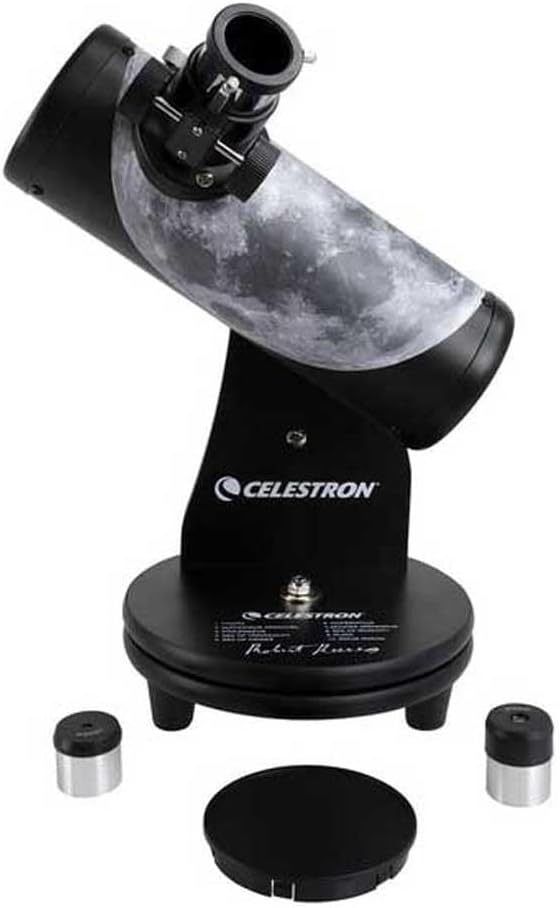
Figure 1: The Celestron Signature Series Moon by Robert Reeves Telescope, fully assembled.
2. สินค้าหมดview
The Celestron Signature Series Moon by Robert Reeves Telescope features a 76mm aperture spherical glass mirror, providing clear views of the Moon's surface, including mountains and craters. Its tabletop Dobsonian design ensures stability and ease of use. The optical tube is adorned with a custom wrap highlighting 10 lunar features, aiding in exploration.
คุณสมบัติหลัก:
- 76mm Reflector Optical Tube: ให้ภาพที่คมชัดและสว่างสดใส
- Tabletop Dobsonian Mount: Simple, stable, and portable design for easy navigation.
- Lunar Feature Wrap: Guides users to 10 prominent lunar landmarks.
- รวมชิ้นเลนส์ตา: Two eyepieces (4mm and 20mm) for varying magnifications.

รูปที่ 2: ระยะใกล้ view of the telescope's focuser with an eyepiece installed.
3. อะไรอยู่ในกล่อง
Upon unpacking your Celestron Signature Series Moon by Robert Reeves Telescope, please ensure all the following components are present:
- การประกอบหลอดออปติคอล
- Dobsonian Mount
- 20mm Eyepiece (H20mm)
- 4mm Eyepiece (SR4mm)
- Lunar Landscape Robert Reeves PDF Download (via provided link/QR code)

Figure 3: The included 20mm and 4mm eyepieces.
4. การตั้งค่า
The Celestron Signature Series Moon Telescope is designed for quick and easy setup. No tools are required.
- แกะส่วนประกอบ: Carefully remove all components from the packaging. Place the Dobsonian mount on a stable, level surface, such as a table or sturdy platform.
- Attach Optical Tube: The optical tube is typically pre-attached to the Dobsonian mount. If not, align the mounting points on the optical tube with those on the mount and secure it according to the visual guides on the product.
- ใส่เลนส์ใกล้ตา: Loosen the thumbscrew on the focuser. Insert the desired eyepiece (e.g., the 20mm eyepiece for wider views) into the focuser barrel. Gently tighten the thumbscrew to secure the eyepiece. Do not overtighten.
- ถอดฝาครอบป้องกันฝุ่น: Remove the dust cap from the front (objective end) of the telescope before observation.

Figure 4: The telescope with an eyepiece installed, ready for observation.
5. การใช้งานกล้องโทรทรรศน์
This telescope is designed for intuitive manual operation.
5.1. Pointing the Telescope
To aim the telescope, simply grasp the optical tube and gently pivot it horizontally (azimuth) and vertically (altitude) on its Dobsonian mount until the desired object is centered in the eyepiece. The friction mount allows for smooth, precise movements.
5.2. การโฟกัส
Once an object is centered in the eyepiece, turn the focus knob located on the side of the focuser until the image appears sharp and clear. You may need to make minor adjustments as objects drift across the field of view or as your eyes adjust.
5.3. Changing Magnification
The telescope comes with two eyepieces: a 20mm eyepiece for lower magnification and a wider field of view, and a 4mm eyepiece for higher magnification and more detailed views. To change magnification:
- Loosen the thumbscrew on the focuser and carefully remove the currently installed eyepiece.
- Insert the other eyepiece into the focuser barrel.
- Gently tighten the thumbscrew to secure the eyepiece.
- Refocus the telescope as needed.
It is generally recommended to start with the 20mm eyepiece to locate and center objects, then switch to the 4mm eyepiece for higher magnification views.

Figure 5: The optical tube features a lunar map with numbered points for easy identification of celestial features.
6. การบำรุงรักษา
Proper care and maintenance will ensure the longevity and optimal performance of your telescope.
- การทำความสะอาดเลนส์: Dust on the mirror or eyepieces should be removed with a soft brush or compressed air. For stubborn smudges, use a specialized optical cleaning solution and a microfiber cloth designed for optics. Avoid touching optical surfaces with bare hands.
- พื้นที่จัดเก็บ: When not in use, always replace the dust caps on the front of the optical tube and on the eyepieces. Store the telescope in a dry, dust-free environment, away from extreme temperatures and humidity.
- การจัดการ: Always handle the telescope by the optical tube or the mount. Avoid sudden impacts or rough handling.
7 การแก้ไขปัญหา
ต่อไปนี้เป็นปัญหาทั่วไปและแนวทางแก้ไข:
| ปัญหา | สาเหตุที่เป็นไปได้ | สารละลาย |
|---|---|---|
| ภาพเบลอหรือไม่โฟกัส | การตั้งค่าโฟกัสไม่ถูกต้อง | Adjust the focus knob until the image is sharp. |
| มองไม่เห็นอะไรเลยผ่านช่องมองภาพ | Dust cap still on the objective lens. Eyepiece not inserted correctly. | Remove the dust cap. Ensure the eyepiece is fully inserted and secured. |
| Object drifts out of view อย่างรวดเร็ว. | Earth's rotation. | This is normal. Gently nudge the telescope to re-center the object. |
| Image appears dim or faint. | Light pollution. Using too high magnification for conditions. | Observe from a darker location. Use the lower magnification (20mm) eyepiece. |
8. ข้อมูลจำเพาะ
Detailed specifications for the Celestron Signature Series Moon by Robert Reeves Telescope (Model 22016-CGL):
- ชื่อรุ่น : Signature Series Moon by Robert Reeves
- หมายเลขรุ่นสินค้า: 22016-CGL
- การออกแบบออปติคัล: แผ่นสะท้อนแสง
- เส้นผ่านศูนย์กลางเลนส์วัตถุ: 76 มิลลิเมตร
- ความยาวท่อแสง: 266 มิลลิเมตร
- เลนส์สายตา: 4mm and 20mm Eyepieces
- กล้องโทรทรรศน์ภูเขาคำอธิบาย: Manual Tabletop Dobsonian
- ประเภทโฟกัส: โฟกัสแบบแมนนวล
- ไฟน์เดอร์สโคป: ไม่รวม
- แหล่งพลังงาน: คู่มือ
- ขนาดสินค้า : 9 x 9 x 18 นิ้ว (22.86 x 22.86 x 45.72 ซม.)
- น้ำหนักสินค้า: 4.3 ปอนด์ (1.95 กก.)
- ผู้ผลิต: Celestron ซื้อกิจการ LLC
- วันที่เข้าใช้งานครั้งแรก: 17 พฤษภาคม 2018
9. ข้อมูลการรับประกัน
Your Celestron telescope is covered by a limited warranty. For detailed information regarding warranty coverage, terms, and conditions, please refer to the official warranty document. A PDF version of the warranty can be accessed via the following link:
โปรดเก็บหลักฐานการซื้อของคุณไว้เพื่อเรียกร้องการรับประกัน
10. การสนับสนุนและแหล่งข้อมูล
For additional support, product registration, or to explore other Celestron products and accessories, please visit the official Celestron webเว็บไซต์.
Visit Celestron Official Webเว็บไซต์
You may also find the Lunar Landscape Robert Reeves eBook helpful for further exploration of the Moon.


