1. บทนำ
Thank you for choosing the ROMOSS 10000mAh 2-in-1 Power Bank and Wall Charger. This device combines the functionality of a portable power bank with a wall charger, offering a versatile solution for charging your electronic devices. With a 10000mAh capacity and dual USB outputs, it is designed for convenience and efficiency, especially for travel.
2. สินค้าหมดview และคุณสมบัติ
The ROMOSS G-USA-UP10 is engineered to provide reliable power on the go or from a wall outlet. Key features include:
- ฟังก์ชั่น 2-in-1: Operates as both a 10000mAh portable power bank and a direct AC wall charger.
- ความจุสูง: 10000mAh internal battery provides multiple charges for smartphones and other USB-powered devices.
- เอาต์พุต USB คู่: ชาร์จอุปกรณ์สองเครื่องพร้อมกัน
- ปลั๊กไฟแบบพับได้: Integrated, foldable wall plug for direct charging from an electrical outlet and compact storage.
- เทคโนโลยีการชาร์จอัจฉริยะ: Prioritizes charging connected devices first when plugged into a wall outlet, then recharges the power bank.
- พร้อมเดินทาง: Supports 100-240V input, making it suitable for international travel with appropriate plug adapters (not included).

Image: The ROMOSS UP10 device demonstrating its dual functionality as a power bank and a wall charger with a foldable plug. The image shows the device in both its compact form and plugged into a wall outlet.

Image: An illustration highlighting the 10000mAh high capacity, showing the approximate number of times it can charge an iPhone 7 (3.9 times), Galaxy S7 (2.6 times), and iPad mini 4 (1.5 times).

Image: The ROMOSS UP10 device superimposed over images of global travel landmarks, emphasizing its design for travelers with 100-240V input compatibility.
3. เนื้อหาบรรจุภัณฑ์
กรุณาตรวจสอบแพ็คเกจสำหรับรายการต่อไปนี้:
- ROMOSS UP10 Product (10000mAh 2-in-1 Power Bank and Wall Charger)
- สายชาร์จ USB
- คู่มือการใช้งาน (เอกสารนี้)
- บัตรรับประกัน

Image: A visual representation of the package contents, including the ROMOSS UP10 device, a USB cable, a manual, and a warranty card, alongside the product packaging.
4. การตั้งค่า
Before first use, it is recommended to fully charge your ROMOSS UP10 power bank.
- Unfold the AC Plug: Gently slide or pull the foldable AC plug out from the device until it locks into position.
- เชื่อมต่อกับพลังงาน: Plug the device directly into a standard wall outlet (100-240V).
- ตัวบ่งชี้การชาร์จ: The LED indicators on the device will illuminate to show the charging status. Allow the device to charge until all indicators are solid, indicating a full charge.
- Fold the AC Plug: Once fully charged or when not in use as a wall charger, gently push the AC plug back into the device for compact storage.
5. คู่มือการใช้งาน
5.1. Charging External Devices (Power Bank Mode)
- Ensure the ROMOSS UP10 is sufficiently charged.
- Connect your device (e.g., smartphone, tablet) to one of the USB output ports on the ROMOSS UP10 using a compatible USB charging cable.
- The ROMOSS UP10 will automatically begin charging your device. The LED indicators will show the remaining power level of the power bank.
- ถอดอุปกรณ์ของคุณออกเมื่อชาร์จเสร็จแล้ว
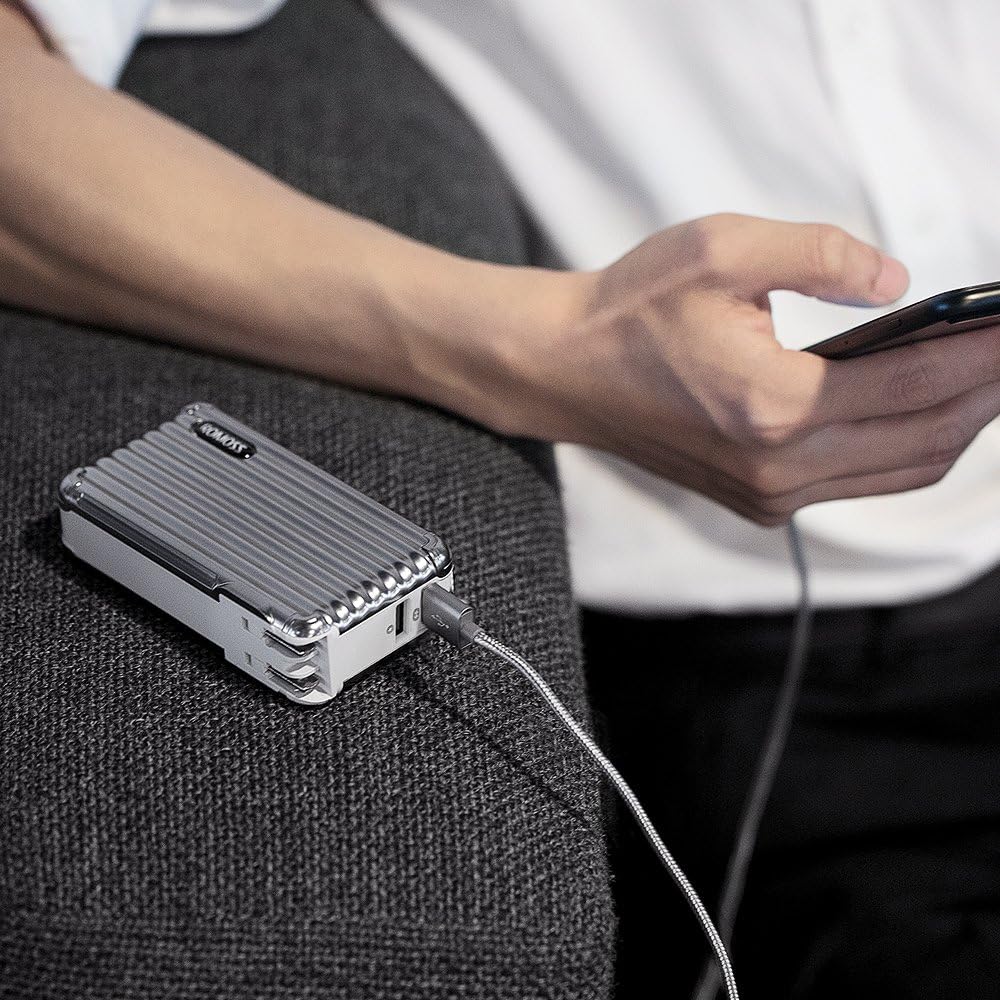
Image: A person using the ROMOSS UP10 power bank to charge a smartphone, demonstrating its portable charging function.
5.2. Recharging the Power Bank (Wall Charger Mode)
- Unfold the AC plug and insert the ROMOSS UP10 directly into a wall outlet.
- ไฟ LED จะกะพริบเพื่อแสดงความคืบหน้าการชาร์จ
- Once fully charged, all LED indicators will remain solid. Remove the device from the wall outlet and fold the AC plug for storage.
5.3. Simultaneous Charging (Smart Charge Technology)
When the ROMOSS UP10 is plugged into a wall outlet and has devices connected to its USB output ports, it will utilize its Smart Charge Technology:
- The device will prioritize charging the connected external devices first.
- Once the external devices are fully charged, the ROMOSS UP10 will then begin recharging its internal 10000mAh battery.
- This allows for efficient charging of both your devices and the power bank with a single wall outlet connection.

Image: The ROMOSS UP10 plugged into a wall outlet, simultaneously charging two smartphones via its dual USB ports, illustrating the Smart Charge Technology.
6. ข้อมูลด้านความปลอดภัย
เพื่อให้มั่นใจถึงความปลอดภัยในการใช้งานและยืดอายุการใช้งานของอุปกรณ์ โปรดปฏิบัติตามคำแนะนำด้านความปลอดภัยต่อไปนี้:
- อย่าวางอุปกรณ์ไว้ในที่ที่มีอุณหภูมิสูงหรือต่ำเกินไป แสงแดดโดยตรง หรือความชื้นสูง
- หลีกเลี่ยงการทำตก ถอดประกอบ หรือพยายามซ่อมแซมอุปกรณ์ด้วยตัวเอง
- เก็บอุปกรณ์ให้ห่างจากน้ำและของเหลวอื่นๆ
- Use only original or certified charging cables for your devices.
- Do not use the device if it is damaged or shows signs of overheating.
- เก็บให้พ้นจากมือเด็ก
7. การบำรุงรักษา
Proper care will help maintain the performance and longevity of your ROMOSS UP10:
- การทำความสะอาด: เช็ดอุปกรณ์ด้วยผ้านุ่มและแห้ง ห้ามใช้น้ำยาทำความสะอาดที่มีฤทธิ์กัดกร่อนหรือตัวทำละลาย
- พื้นที่จัดเก็บ: Store the device in a cool, dry place when not in use. Avoid storing it in areas with extreme temperatures or high humidity.
- การดูแลแบตเตอรี่ เพื่อสุขภาพแบตเตอรี่ที่ดีที่สุด ควรชาร์จและปล่อยประจุแบตเตอรี่พาวเวอร์แบงค์จนหมดอย่างน้อยทุกๆ สามเดือน หากไม่ได้ใช้งานเป็นประจำ
8 การแก้ไขปัญหา
If you encounter issues with your ROMOSS UP10, please refer to the following common solutions:
- อุปกรณ์ไม่ชาร์จจากพาวเวอร์แบงค์:
- ตรวจสอบให้แน่ใจว่าพาวเวอร์แบงค์มีประจุเพียงพอ (ตรวจสอบไฟ LED)
- Verify that the USB cable is securely connected to both the power bank and your device.
- Try a different USB cable or a different USB port on the power bank.
- Power bank not recharging from wall outlet:
- Ensure the foldable AC plug is fully extended and securely inserted into a working wall outlet.
- ตรวจสอบว่าปลั๊กไฟใช้งานได้หรือไม่โดยลองเสียบอุปกรณ์อื่นเข้าไป
- การชาร์จช้า:
- โปรดตรวจสอบให้แน่ใจว่าคุณใช้สาย USB คุณภาพสูง
- Charging multiple devices simultaneously may result in slower charging speeds for each device.
9. ข้อมูลจำเพาะ
| หมายเลขรุ่น | G-USA-UP10 |
| ความจุของแบตเตอรี่ | 10000 มิลลิวินาทีamp ชั่วโมง (มิลลิแอมป์) |
| อินพุต (AC) | 100-240โวลต์ |
| เอาต์พุต (USB) | Dual USB Ports (specific current output not provided, refer to product labeling for details) |
| ขนาด | 4.41 x 2.4 x 1.18 นิ้ว |
| น้ำหนักสินค้า | 8.5 ออนซ์ |
| ประเภทแบตเตอรี่ | ลิเธียมไอออน |
| ประเภทขั้วต่อ | Micro USB (for power bank charging if not using AC plug) |
10. การรับประกันและการสนับสนุน
Your ROMOSS UP10 Power Bank and Wall Charger comes with a limited warranty. Please refer to the included warranty card for specific terms and conditions. For technical support, troubleshooting assistance, or warranty claims, please contact ROMOSS customer service through the contact information provided on the warranty card or the official ROMOSS webเว็บไซต์.


