การแนะนำ
This manual provides detailed instructions for the installation, operation, and maintenance of your LogiLink E20270 Adjustable Under-Desk and Wall PC Mount. Please read this manual thoroughly before installation and use to ensure proper function and safety.

Image: LogiLink E20270 PC mount installed under a wooden desk, holding a black desktop computer tower. This mount helps elevate your PC, protecting it from dust and accidental damage.
ข้อมูลด้านความปลอดภัย
- Ensure the mounting surface (desk or wall) can safely support the weight of the mount and the PC (up to 10 kg).
- Use appropriate tools and follow all installation steps carefully to prevent injury or damage.
- ห้ามเกินขีดจำกัดการรับน้ำหนักสูงสุดที่ 10 กก. (22 ปอนด์)
- ให้เด็กและสัตว์เลี้ยงอยู่ห่างจากบริเวณการติดตั้ง
- ตรวจสอบสกรูและจุดเชื่อมต่อทั้งหมดอย่างสม่ำเสมอ เพื่อให้แน่ใจว่ายังคงแน่นหนาดีอยู่
เนื้อหาแพ็คเกจ
โปรดตรวจสอบว่าส่วนประกอบทั้งหมดมีอยู่ก่อนเริ่มการติดตั้ง:
- LogiLink E20270 PC Mount Assembly
- Mounting Hardware (screws, anchors, washers, drill attachment if applicable)
- คู่มือการใช้งาน (เอกสารนี้)
Note: Specific mounting hardware may vary. Ensure you have the correct tools for your chosen installation surface.
ข้อมูลจำเพาะ
| คุณสมบัติ | ข้อมูลจำเพาะ |
|---|---|
| ยี่ห้อ | โลจิลิงค์ |
| ชื่อรุ่น | E20270 |
| วัสดุ | โลหะ |
| สี | สีดำ |
| ประเภทการติดตั้ง | Under-desk, Wall Mount |
| ความจุน้ำหนักสูงสุด | 10 กก. (22 ปอนด์) |
| ช่วงความสูงที่สามารถปรับได้ | 300 - 533 มม. |
| ช่วงความกว้างที่ปรับได้ | 88 - 203 มม. |
| การหมุน | 360 องศา |
| Sliding Mechanism | Up to 325 mm for accessibility |
| ขนาดสินค้า (โดยประมาณ) | 17.5 x 10.5 x 59.2 ซม. (กว้าง x ยาว x สูง) |
บันทึก: The product weight listed in some specifications (9.07g) appears to be a typographical error. The mount is constructed from metal and designed to hold up to 10 kg, indicating a substantial build.
การติดตั้งและการตั้งค่า
The LogiLink E20270 PC mount offers versatile installation options: under a desk or on a wall. Choose the method that best suits your workspace.
1. Prepare the Mount
- แกะส่วนประกอบทั้งหมดออกและตรวจสอบกับรายการเนื้อหาในแพ็คเกจ
- Adjust the mount's width to fit your PC tower. Loosen the adjustment screws, slide the sides to the desired width (88-203 mm), and tighten securely.
- Adjust the mount's height to fit your PC tower. Loosen the adjustment screws, slide the bottom support to the desired height (300-533 mm), and tighten securely.

Image: Close-up of the mount's adjustable components. Ensure all adjustments are securely fastened before mounting.
2. เลือกวิธีการติดตั้ง
Refer to the diagram below for visual guidance on under-desk and wall mounting options, including key dimensions.
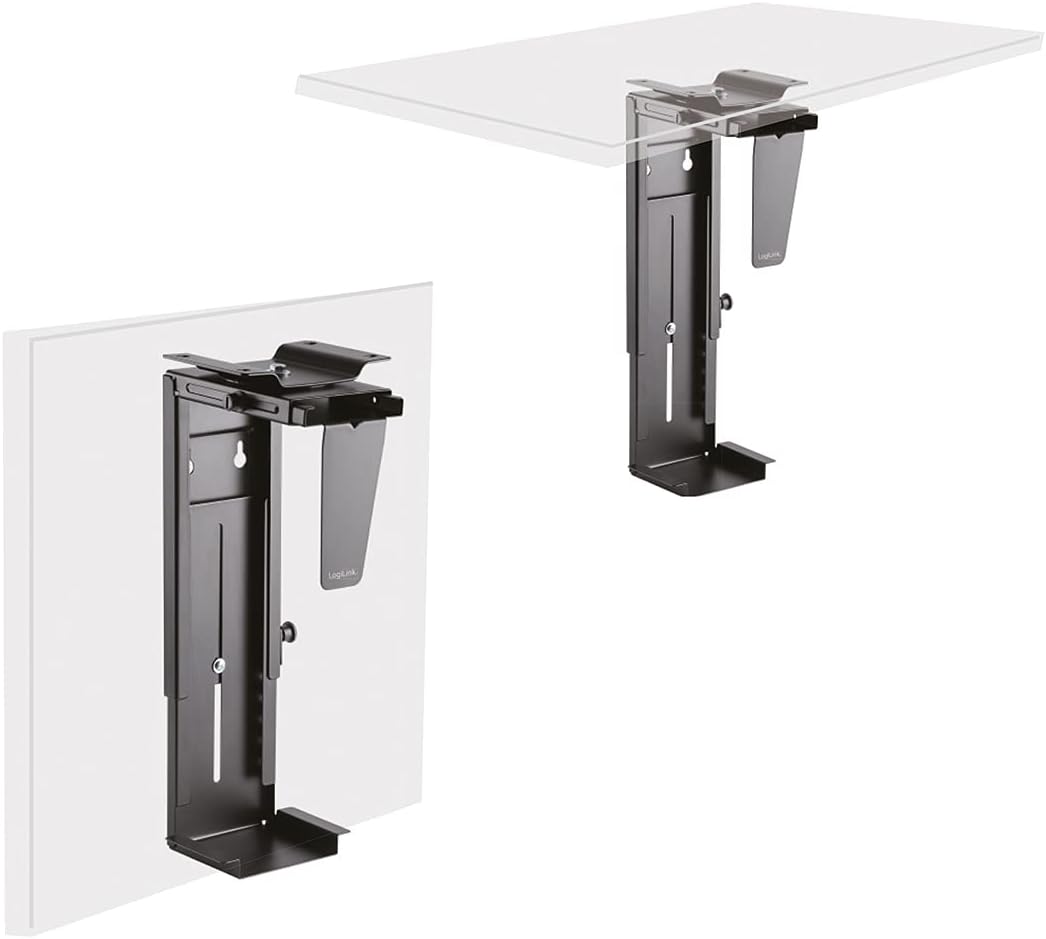
Image: Illustration of the LogiLink E20270 mount configured for under-desk and wall installation.
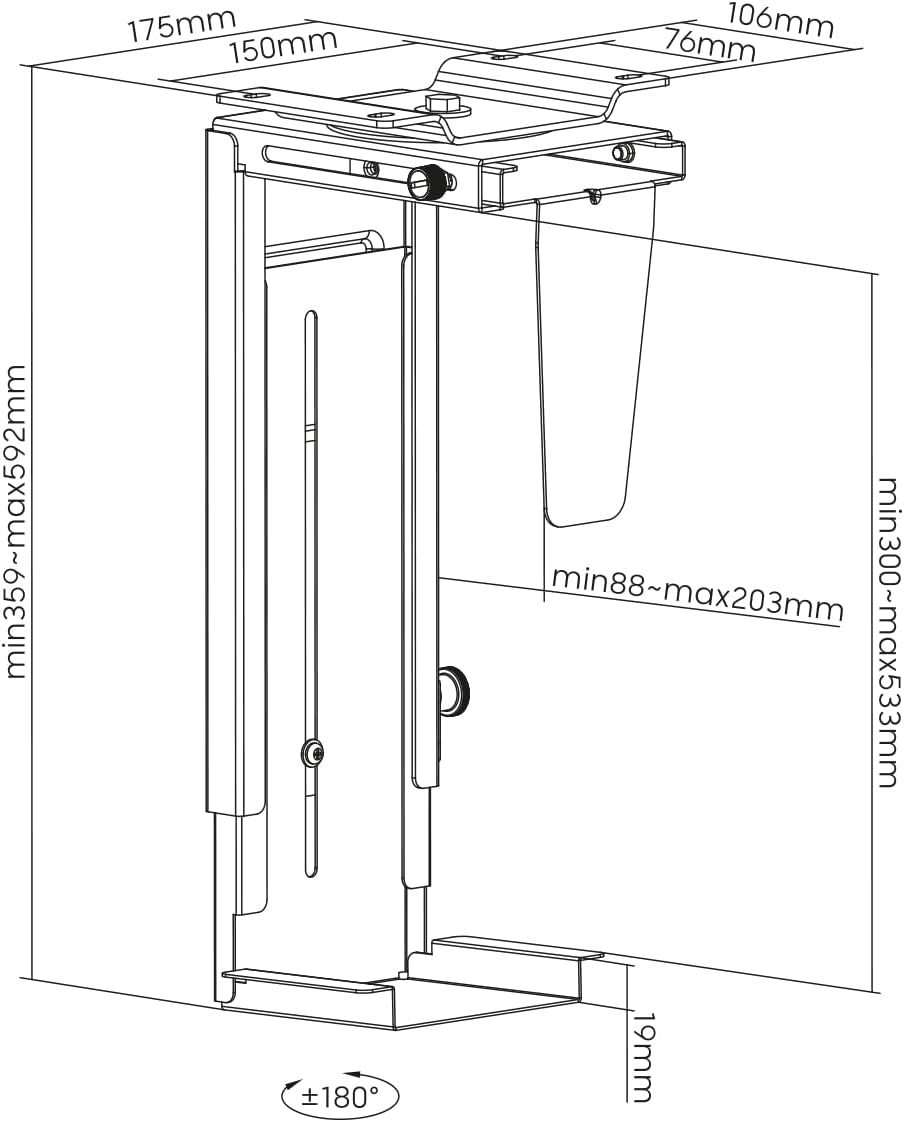
Image: Dimensional diagram of the LogiLink E20270 PC mount, showing adjustable ranges and mounting points.
Under-Desk Installation:
- Position the mount under your desk in the desired location. Ensure there is enough clearance for PC ventilation and rotation.
- Mark the drilling points through the mounting holes on the top plate of the mount.
- Drill pilot holes into the underside of the desk using an appropriate drill bit (refer to the drill attachment if provided, or use a bit suitable for your screws and desk material).
- Secure the mount to the desk using the provided screws. Ensure all screws are tightened firmly.
การติดตั้งแบบติดผนัง:
- Select a sturdy wall location that can support the weight of the mount and your PC. Avoid areas with electrical wires or plumbing.
- Hold the mount against the wall in the desired position and mark the drilling points. Use a level to ensure it is straight.
- Drill holes at the marked points. Insert wall anchors if necessary (for drywall or masonry).
- Secure the mount to the wall using the provided screws. Ensure all screws are tightened firmly.
3. Install Your PC
- Carefully slide your PC tower into the adjusted mount.
- Ensure the PC is seated firmly and evenly within the mount.
- Connect all necessary cables (power, display, USB, etc.) to your PC. The sliding mechanism allows for easier access to ports.
การดำเนินการ
The LogiLink E20270 PC mount is designed for ease of use and accessibility.
- การหมุน 360 องศา: The mount allows your PC to rotate 360 degrees, providing easy access to the front and rear ports without needing to remove the PC from the mount. Gently rotate the PC to the desired position.
- กลไกการเลื่อน: For enhanced accessibility, the mount features a sliding mechanism that allows the PC to extend up to 325 mm from its mounted position. This is particularly useful for connecting cables or performing maintenance.
การซ่อมบำรุง
To ensure the longevity and proper function of your PC mount, follow these simple maintenance guidelines:
- การทำความสะอาด: เช็ดบริเวณที่ยึดด้วยผ้านุ่มๆamp ใช้ผ้าเช็ดทำความสะอาดเพื่อขจัดฝุ่นและสิ่งสกปรก หลีกเลี่ยงน้ำยาทำความสะอาดที่มีฤทธิ์กัดกร่อนหรือตัวทำละลายที่อาจทำให้พื้นผิวเสียหายได้
- การตรวจสอบตัวยึด: Periodically check all mounting screws and adjustment screws to ensure they are tight and secure. Re-tighten if necessary.
- น้ำหนักจำกัด: Do not overload the mount beyond its 10 kg (22 lbs) capacity.
การแก้ไขปัญหา
If you encounter any issues with your LogiLink E20270 PC mount, refer to the following common solutions:
- ฐานยึดดูไม่มั่นคง:
- Ensure all mounting screws are securely tightened to the desk or wall.
- Verify that the adjustment screws for height and width are firmly tightened around your PC.
- Check that the mounting surface is sturdy enough to support the weight.
- PC does not fit:
- Re-check the adjustable height (300-533 mm) and width (88-203 mm) ranges against your PC's dimensions.
- Ensure the adjustment screws are fully loosened before attempting to adjust.
- Difficulty rotating or sliding:
- Ensure no cables are snagged or obstructing the movement.
- Check for any debris in the sliding mechanism.
If problems persist, please contact LogiLink customer support for further assistance.
การรับประกันและการสนับสนุน
For information regarding warranty coverage, technical support, or replacement parts, please refer to the official LogiLink webหรือติดต่อฝ่ายบริการลูกค้าโดยตรง โปรดเก็บใบเสร็จรับเงินไว้เป็นหลักฐานการซื้อ
Official LogiLink Webเว็บไซต์: www.logilink.eu


