1. บทนำ
POWERTECH MP3752 เป็นตัวควบคุมการชาร์จพลังงานแสงอาทิตย์อัจฉริยะและน้ำหนักเบา ออกแบบมาเพื่อจัดการการไหลของพลังงานจากแผงโซลาร์เซลล์ไปยังแบตเตอรี่ของคุณ โดยใช้เทคโนโลยี Pulse Width Modulation (PWM) ทำให้มั่นใจได้ว่าการชาร์จแบตเตอรี่มีประสิทธิภาพและปลอดภัย ตัวควบคุมนี้ใช้งานง่าย เพียงแค่ตั้งค่าแล้วก็ไม่ต้องดูแลอีกต่อไป ช่วยให้แบตเตอรี่ได้รับการชาร์จสูงสุดโดยไม่ต้องคอยตรวจสอบตลอดเวลา มีคุณสมบัติความปลอดภัยที่สำคัญ เช่น การป้องกันการโอเวอร์โหลด การลัดวงจร การคายประจุมากเกินไป และการกลับขั้ว นอกจากนี้ พอร์ต USB ที่ด้านหน้ายังช่วยให้ชาร์จได้สูงสุด 1.2A ซึ่งมีประโยชน์สำหรับอุปกรณ์พกพาในระหว่างที่ไฟดับtagเช่น แบตเตอรี่รุ่นนี้รองรับแบตเตอรี่หลายประเภท ได้แก่ แบตเตอรี่ตะกั่วกรดแบบปิดผนึก แบตเตอรี่เจล และแบตเตอรี่แบบเติมน้ำ และจะเลือกโหมดการชาร์จที่เหมาะสมที่สุดโดยอัตโนมัติ (ชาร์จเร็ว, ปรับสมดุล, ชาร์จคงที่)
2. ข้อมูลด้านความปลอดภัย
โปรดอ่านคำแนะนำทั้งหมดอย่างละเอียดก่อนการติดตั้งและการใช้งาน การไม่ปฏิบัติตามคำแนะนำเหล่านี้อาจส่งผลให้ตัวเครื่อง แบตเตอรี่ หรืออุปกรณ์เสียหาย หรืออาจก่อให้เกิดอันตรายต่อบุคคลได้
- ตรวจสอบให้แน่ใจว่าการเชื่อมต่อทั้งหมดถูกต้องและแน่นหนาดีแล้วก่อนที่จะจ่ายไฟ
- ห้ามเชื่อมต่อตัวควบคุมพลังงานแสงอาทิตย์เข้ากับแหล่งจ่ายไฟ AC
- ติดตั้งตัวควบคุมในบริเวณที่มีอากาศถ่ายเทสะดวก ห่างจากวัสดุไวไฟและแสงแดดโดยตรง
- หลีกเลี่ยงการลัดวงจรขั้วแบตเตอรี่หรือขั้วแผงโซลาร์เซลล์
- ควรต่อแบตเตอรี่ก่อนเสมอ จากนั้นจึงต่อแผงโซลาร์เซลล์ และสุดท้ายจึงต่ออุปกรณ์ไฟฟ้าที่ต้องการใช้งาน และควรถอดออกในลำดับย้อนกลับ
- อุปกรณ์นี้ไม่กันน้ำ โปรดเก็บรักษาให้ห่างจากความชื้นและน้ำ
- บุคลากรที่มีคุณสมบัติเหมาะสมเท่านั้นที่ควรทำการติดตั้งและบำรุงรักษา
3. คุณสมบัติของผลิตภัณฑ์
- การเลือกโหมดการชาร์จอัตโนมัติ (Bulk, Equalise, Float)
- เหมาะสำหรับแบตเตอรี่ทั้งแบบ 12V และ 24V
- มีพอร์ตชาร์จ USB ในตัว (5V, สูงสุด 1.2A) ที่แผงด้านหน้า
- รองรับแบตเตอรี่แบบตะกั่วกรดปิดผนึก แบตเตอรี่เจล และแบตเตอรี่แบบเติมน้ำ
- คุณสมบัติการป้องกันที่ครอบคลุม: การโอเวอร์โหลด, การลัดวงจร, การคายประจุเกิน, การกลับขั้ว
- เทคโนโลยีการชาร์จแบบ Pulse Width Modulation (PWM)
4. เนื้อหาบรรจุภัณฑ์
โปรดตรวจสอบสิ่งของในกล่องเมื่อได้รับสินค้า:
- 1 x ตัวควบคุมพลังงานแสงอาทิตย์ POWERTECH MP3752
- 1 x คู่มือผู้ใช้ (เอกสารนี้)
5. สินค้าหมดview และการเชื่อมต่อ
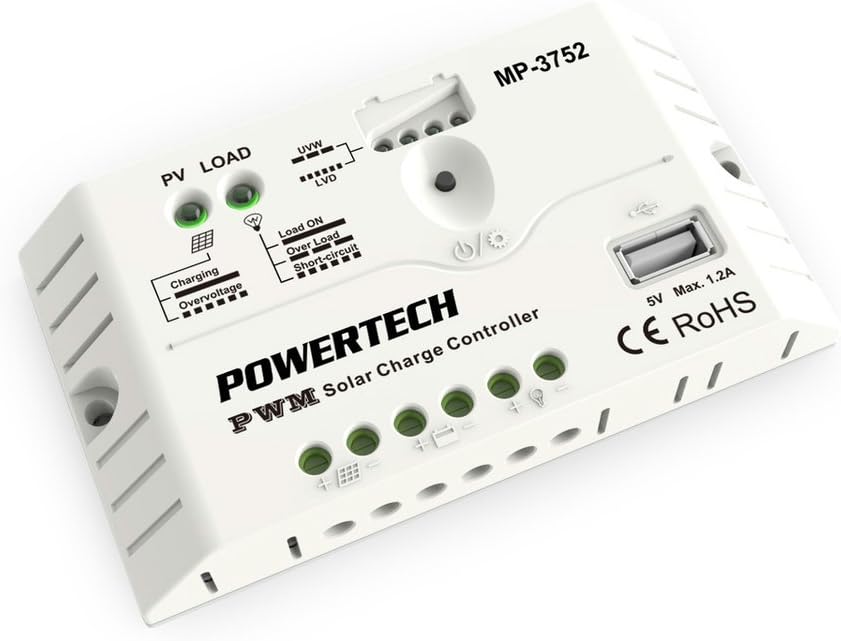
รูปที่ 1 : ด้านหน้า view ภาพนี้แสดงไฟแสดงสถานะ PV LOAD, UVW, LVD, Load ON, Over Load, Short-Circuit ของตัวควบคุมพลังงานแสงอาทิตย์ POWERTECH MP3752 รวมถึงพอร์ต USB และขั้วต่อสำหรับแผงโซลาร์เซลล์ แบตเตอรี่ และโหลด
ตัวควบคุม MP3752 มีขั้วต่อที่ระบุไว้อย่างชัดเจนเพื่อให้เชื่อมต่อได้ง่าย โปรดดูรูปที่ 1 สำหรับภาพประกอบแสดงเค้าโครงและตัวบ่งชี้ของตัวควบคุม
ขั้วต่อการเชื่อมต่อ:
- อินพุตแผงโซลาร์เซลล์ (PV): เชื่อมต่อแผงโซลาร์เซลล์ของคุณที่นี่ ตรวจสอบให้แน่ใจว่าขั้วถูกต้อง (+ และ -)
- การเชื่อมต่อแบตเตอรี่: เชื่อมต่อแบตเตอรี่ 12V หรือ 24V ของคุณที่นี่ โปรดสังเกตขั้วที่ถูกต้อง (+ และ -)
- โหลดเอาต์พุต: เชื่อมต่ออุปกรณ์ไฟฟ้ากระแสตรง (เช่น ไฟ พัดลม) ที่นี่ โปรดสังเกตขั้วที่ถูกต้อง (+ และ -)
- พอร์ต USB: เอาต์พุต 5V, 1.2A สูงสุด สำหรับชาร์จอุปกรณ์อิเล็กทรอนิกส์ขนาดเล็ก
6. การตั้งค่าและการติดตั้ง
โปรดทำตามขั้นตอนเหล่านี้เพื่อติดตั้งตัวควบคุมการชาร์จพลังงานแสงอาทิตย์อย่างถูกต้อง:
- การติดตั้ง: เลือกสถานที่แห้ง มีอากาศถ่ายเทสะดวกภายในอาคาร หลีกเลี่ยงแสงแดดโดยตรง อุณหภูมิสูง และความชื้น ตรวจสอบให้แน่ใจว่ามีการไหลเวียนของอากาศรอบๆ ตัวควบคุมอย่างเพียงพอ
- การเชื่อมต่อแบตเตอรี่:
- เชื่อมต่อขั้วบวก (+) ของแบตเตอรี่เข้ากับขั้วบวก (+) ของแบตเตอรี่บนตัวควบคุม
- เชื่อมต่อขั้วลบ (-) ของแบตเตอรี่เข้ากับขั้วลบ (-) ของแบตเตอรี่บนตัวควบคุม
- ตัวควบคุมจะตรวจจับโดยอัตโนมัติว่าเป็นระบบ 12V หรือ 24V
- การเชื่อมต่อแผงโซลาร์เซลล์:
- เชื่อมต่อขั้วบวก (+) ของแผงโซลาร์เซลล์เข้ากับขั้วบวก (+) ของแผงโซลาร์เซลล์บนตัวควบคุม
- เชื่อมต่อขั้วลบ (-) ของแผงโซลาร์เซลล์เข้ากับขั้วลบ (-) ของแผงโซลาร์เซลล์บนตัวควบคุม
- ตรวจสอบให้แน่ใจว่าแรงดันไฟฟ้าวงจรเปิดtagแรงดันไฟฟ้าของแผงโซลาร์เซลล์ต้องไม่เกินแรงดันไฟฟ้าขาเข้าสูงสุดtage ของตัวควบคุม (โดยทั่วไปคือ 50V สำหรับระบบ 12/24V)
- โหลดการเชื่อมต่อ:
- เชื่อมต่อขั้วบวก (+) ของอุปกรณ์ DC เข้ากับขั้วบวก (+) ของตัวควบคุม
- เชื่อมต่อขั้วลบ (-) ของอุปกรณ์ DC เข้ากับขั้วลบ (-) ของตัวควบคุม
- ห้ามใช้กระแสไฟเกินพิกัดสูงสุดที่กำหนดสำหรับเอาต์พุตโหลด (20A)
- ตรวจสอบการเชื่อมต่อ: ตรวจสอบการเชื่อมต่อทั้งหมดอีกครั้งเพื่อให้แน่ใจว่าขั้วถูกต้องและแน่นสนิทก่อนดำเนินการต่อ

รูปที่ 2: ตัวควบคุมพลังงานแสงอาทิตย์ POWERTECH MP3752 ที่แสดงอยู่ในบรรจุภัณฑ์ แสดงให้เห็นถึงการใช้งานร่วมกับแผงโซลาร์เซลล์ ภาพนี้ให้บริบทเพิ่มเติม view ของผลิตภัณฑ์ตามวัตถุประสงค์การใช้งาน
7. คู่มือการใช้งาน
7.1. ระบบปรับระดับเสียงอัตโนมัติtagอี การรับรู้
ตัวควบคุมจะตรวจจับโดยอัตโนมัติว่าแบตเตอรี่ที่เชื่อมต่อเป็น 12V หรือ 24V เมื่อเชื่อมต่อครั้งแรก โปรดตรวจสอบให้แน่ใจว่าได้เชื่อมต่อแบตเตอรี่ก่อนเพื่อให้ได้แรงดันไฟฟ้าที่ถูกต้องtagการตรวจจับอี
7.2. โหมดการชาร์จ
MP3752 ใช้เทคโนโลยีการชาร์จแบบ PWM อัจฉริยะ โดยจะสลับไปมาระหว่างโหมดการชาร์จต่างๆ โดยอัตโนมัติtagเพื่อเพิ่มประสิทธิภาพด้านสุขภาพและอายุการใช้งานของแบตเตอรี่:
- การเรียกเก็บเงินจำนวนมาก: จ่ายกระแสไฟสูงสุดเพื่อชาร์จแบตเตอรี่ให้ได้ประมาณ 80% อย่างรวดเร็ว
- ปรับสมดุลค่าใช้จ่าย: ใช้ปริมาตรที่สูงขึ้นเป็นระยะtagเพื่อปรับสมดุลประจุในเซลล์แบตเตอรี่ ป้องกันการเกิดซัลเฟต และยืดอายุการใช้งานแบตเตอรี่ (สำหรับแบตเตอรี่แบบน้ำกรด)
- ค่าลอย: ช่วยรักษาระดับประจุแบตเตอรี่ให้เต็มอยู่เสมอ โดยการจ่ายกระแสไฟปริมาณน้อยอย่างต่อเนื่องtagเช่น การชดเชยการคายประจุเอง
7.3. การควบคุมโหลด
เอาต์พุตโหลดจะถูกควบคุมโดยตัวควบคุมเพื่อป้องกันการคายประจุแบตเตอรี่มากเกินไป เมื่อปริมาตรแบตเตอรี่tagอีลดลงต่ำกว่าระดับ Low Voltagเมื่อถึงเกณฑ์การตัดการเชื่อมต่อ (LVD) เอาต์พุตโหลดจะถูกตัดการเชื่อมต่อโดยอัตโนมัติ และจะเชื่อมต่อใหม่เมื่อแบตเตอรี่ชาร์จจนถึงระดับแรงดันต่ำ (Low Vol.)tagเกณฑ์การเชื่อมต่อใหม่ (LVR)
กดปุ่มเปิด/ปิดบนตัวควบคุมเพื่อเปิดหรือปิดเอาต์พุตโหลดด้วยตนเอง
7.4. พอร์ตชาร์จ USB
พอร์ต USB 5V, 1.2A สามารถใช้ชาร์จอุปกรณ์อิเล็กทรอนิกส์ขนาดเล็ก เช่น สมาร์ทโฟนหรือแท็บเล็ตได้ พอร์ตนี้จะทำงานได้ตราบใดที่แบตเตอรี่มีประจุเพียงพอ
8. ตัวบ่งชี้
POWERTECH MP3752 มีไฟ LED แสดงสถานะหลายดวง เพื่อแสดงข้อมูลสถานะแบบเรียลไทม์:
- PV LOAD (ตัวบ่งชี้แผงโซลาร์เซลล์):
- สีเขียว: แผงโซลาร์เซลล์เชื่อมต่อแล้วและกำลังผลิตกระแสไฟฟ้า
- ปิด: ไม่มีแสงอาทิตย์ส่องเข้ามา หรือมีแสงสว่างไม่เพียงพอ
- ไฟแสดงสถานะการชาร์จ:
- สีเขียว: กำลังชาร์จแบตเตอรี่
- ปิด: แบตเตอรี่ชาร์จเต็มแล้วหรือไม่ได้กำลังชาร์จ
- โอเวอร์โวลtagอี ตัวบ่งชี้:
- สีแดง: ปริมาณอินพุตtagค่า e จากแผงโซลาร์เซลล์สูงเกินไป หรือค่าแรงดันแบตเตอรี่สูงเกินไปtage คือระดับการป้องกันการชาร์จเกิน
- UVW (ปริมาตรแบตเตอรี่)tagตัวบ่งชี้ e): มีไฟ LED หลายดวงแสดงระดับการชาร์จแบตเตอรี่
- LVD (โวลุ่มต่ำtage ตัวบ่งชี้การตัดการเชื่อมต่อ):
- สีแดง: ปริมาณแบตเตอรี่tagค่า e ต่ำ แสดงว่าเอาต์พุตโหลดถูกตัดการเชื่อมต่อแล้ว
- ไฟแสดงสถานะการโหลดเปิด:
- สีเขียว: เอาต์พุตโหลดทำงานอยู่
- ไฟแสดงสถานะการโอเวอร์โหลด:
- สีแดง: กระแสโหลดเกินกระแสสูงสุดที่กำหนดไว้ อาจมีการตัดการเชื่อมต่อเอาต์พุตของโหลดชั่วคราว
- ตัวบ่งชี้การลัดวงจร:
- สีแดง: ตรวจพบการลัดวงจรที่เอาต์พุตของโหลด เอาต์พุตของโหลดจะถูกตัดการเชื่อมต่อ
9. การบำรุงรักษา
เพื่อให้มั่นใจได้ถึงประสิทธิภาพสูงสุดและอายุการใช้งานที่ยาวนานของตัวควบคุมการชาร์จพลังงานแสงอาทิตย์ ขอแนะนำให้ทำการบำรุงรักษาเป็นประจำ:
- การทำความสะอาด: ควรเช็ดทำความสะอาดภายนอกของตัวควบคุมเป็นระยะด้วยผ้าแห้งเนื้อนุ่ม ห้ามใช้สารละลายหรือน้ำยาทำความสะอาดที่มีฤทธิ์กัดกร่อน
- การเชื่อมต่อ: ควรตรวจสอบความแน่นหนาและการกัดกร่อนของจุดเชื่อมต่อสายไฟทั้งหมดเป็นประจำทุกปี การเชื่อมต่อที่หลวมอาจทำให้เกิดความร้อนสูงเกินไปและประสิทธิภาพการทำงานลดลง
- การระบายอากาศ : ตรวจสอบให้แน่ใจว่าช่องระบายอากาศไม่ถูกปิดกั้น และมีอากาศถ่ายเทเพียงพอรอบๆ ตัวเครื่อง
- การตรวจสอบ: ตรวจสอบตัวควบคุมว่ามีร่องรอยความเสียหายทางกายภาพ การเปลี่ยนสี หรือกลิ่นผิดปกติหรือไม่
10 การแก้ไขปัญหา
| ปัญหา | สาเหตุที่เป็นไปได้ | สารละลาย |
|---|---|---|
| ไม่สามารถชาร์จไฟจากแผงโซลาร์เซลล์ได้ |
|
|
| การโหลดเอาต์พุตไม่ทำงาน |
|
|
| โอเวอร์โวลtagไฟแสดงสถานะ e เปิดอยู่ |
|
|
11. ข้อมูลจำเพาะ
| พารามิเตอร์ | ค่า |
|---|---|
| หมายเลขรุ่น | MP3752 (03617080) |
| เล่มระบบtage | ตรวจจับอัตโนมัติ 12V/24V |
| กระแสไฟชาร์จสูงสุด | 20เอ |
| สูงสุด โหลดปัจจุบัน | 20เอ |
| เอาท์พุต USB | 5V, 1.2A สูงสุด |
| ประเภทการชาร์จ | PWM (Bulk, Equalise, Float) |
| รองรับประเภทแบตเตอรี่ | แบตเตอรี่ตะกั่วกรดแบบปิดผนึก, แบบเจล, แบบเติมน้ำ |
| ขนาดสินค้า | 5.83 x 3.39 x 1.38 นิ้ว |
| น้ำหนักสินค้า | 5.6 ออนซ์ |
| ผู้ผลิต | พาวเวอร์เทค |
| ยี่ห้อ | เจย์คาร์ |
12. การรับประกันและการสนับสนุน
ผลิตภัณฑ์นี้อยู่ภายใต้การรับประกันมาตรฐานของผู้ผลิตสำหรับข้อบกพร่องในวัสดุและฝีมือการผลิต โปรดดูเอกสารการซื้อของคุณสำหรับเงื่อนไขและระยะเวลาการรับประกันที่เฉพาะเจาะจง สำหรับการสนับสนุนทางเทคนิค ความช่วยเหลือในการแก้ไขปัญหา หรือการเรียกร้องการรับประกัน โปรดติดต่อผู้ค้าปลีกหรือผู้ผลิตโดยตรง
หมายเหตุ: การถอดประกอบหรือดัดแปลงผลิตภัณฑ์โดยไม่ได้รับอนุญาตจะทำให้การรับประกันเป็นโมฆะ


