การแนะนำ
This manual provides detailed instructions for the setup, operation, maintenance, and troubleshooting of your Jaycar Composite AV to HDMI Converter (Model AC-1722). Please read this manual thoroughly before using the device to ensure proper functionality and to prevent damage.
คุณสมบัติหลัก
- Converts Composite Video and Stereo Audio (RCA) to HDMI output.
- Supports HDMI 1080p or 720p output resolutions.
- Compatible with NTSC and PAL video systems.
- Plug and play operation.
เนื้อหาแพ็คเกจ
โปรดตรวจสอบว่าสินค้าทั้งหมดมีอยู่ในแพ็คเกจของคุณ:
- Jaycar Composite AV to HDMI Converter (AC-1722)
- อะแดปเตอร์ไฟฟ้า (5V DC)
- คู่มือการใช้งาน (เอกสารนี้)
สินค้าเกินview
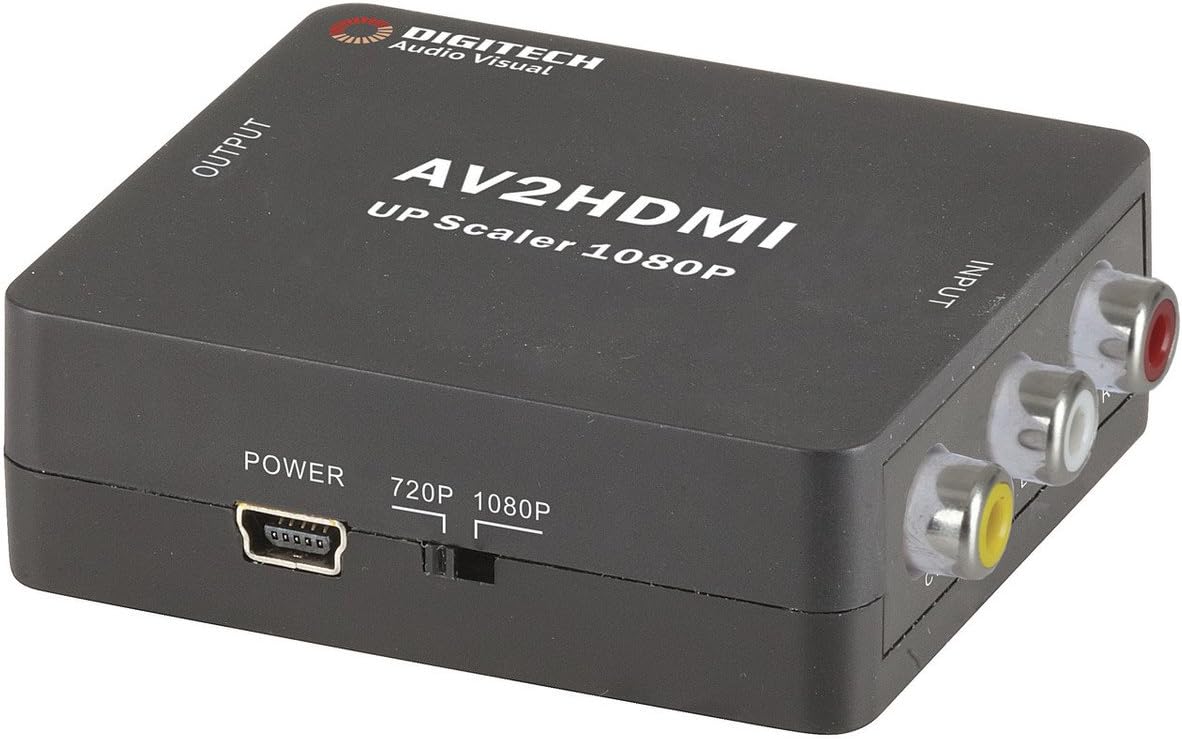
ภาพที่ 1: ด้านหน้า view of the Jaycar Composite AV to HDMI Converter. This image displays the top and front of the converter, showing the "AV2HDMI UP Scaler 1080P" label, "OUTPUT" and "INPUT" indicators, the power input, and the 720p/1080p resolution switch. The Composite AV input ports (yellow, white, red) are visible on the right side.

ภาพที่ 2: ด้านข้าง view of the converter showing the HDMI output port. This port is labeled "HDMI" and is where the HDMI cable connects to your display device.

ภาพที่ 3: ด้านข้าง view of the converter showing the Composite AV input ports. These ports are labeled "CVBS" (yellow for video), "L" (white for left audio), and "R" (red for right audio).

ภาพที่ 4: ด้านข้าง view of the converter showing the power input port and the 720p/1080p resolution switch. The power port is a mini-USB type, and the switch allows selection between 720p and 1080p output resolutions.
คำแนะนำการตั้งค่า
- เชื่อมต่ออุปกรณ์ต้นทาง: Connect your Composite AV source device (e.g., DVD player, VCR, game console) to the converter's input ports. Match the yellow RCA cable to the "CVBS" port, the white RCA cable to the "L" (Left Audio) port, and the red RCA cable to the "R" (Right Audio) port.
- เชื่อมต่ออุปกรณ์แสดงผล: Connect an HDMI cable from the converter's "HDMI" output port to an available HDMI input on your display device (e.g., TV, monitor, projector).
- เลือกความละเอียดของภาพ: Use the 720p/1080p switch on the converter to select your desired output resolution. For most modern displays, 1080p is recommended. If you experience issues, try 720p.
- เชื่อมต่อพลังงาน: Connect the provided 5V DC power adapter to the converter's "POWER" input port, then plug the adapter into a wall outlet. The converter will power on automatically.
- เลือกอินพุตบนหน้าจอ: Turn on your display device and select the corresponding HDMI input channel to view the converted signal.
คำแนะนำการใช้งาน
The Jaycar Composite AV to HDMI Converter is designed for plug-and-play operation. Once all connections are made and power is supplied, the converter will automatically scale the analog AV signal to the selected HDMI output resolution (720p or 1080p).
- Ensure your source device is powered on and outputting a Composite AV signal.
- Verify your display device is set to the correct HDMI input.
- If no image appears, check all cable connections and the power supply.
- Experiment with the 720p/1080p switch if the image is distorted or not displayed correctly.
การซ่อมบำรุง
The converter requires minimal maintenance. Follow these guidelines to ensure longevity:
- ควรเก็บอุปกรณ์ไว้ในที่แห้งและมีอากาศถ่ายเทสะดวก หลีกเลี่ยงแสงแดดโดยตรง อุณหภูมิสูง และความชื้นสูง
- หลีกเลี่ยงการทำอุปกรณ์หล่นหรือกระแทกอย่างรุนแรง
- เช็ดทำความสะอาดภายนอกด้วยผ้าแห้งเนื้อนุ่ม ห้ามใช้น้ำยาทำความสะอาดหรือสารละลายใดๆ
- Ensure all cables are securely connected but do not force them.
การแก้ไขปัญหา
| ปัญหา | สาเหตุที่เป็นไปได้ | สารละลาย |
|---|---|---|
| ไม่มีสัญญาณวิดีโอหรือเสียงออก |
|
|
| Distorted or flickering image. |
|
|
| No audio, but video is present. |
|
|
ข้อมูลจำเพาะ
| ประเภทอินพุต | Composite Video and Audio (3 RCA) |
| ประเภทเอาท์พุต | HDMI ประเภท-A |
| ความละเอียดที่รองรับ | 1080p (1920 x 1080), 720p |
| ระบบวิดีโอ | NTSC, PAL |
| ความต้องการพลังงาน | 5V DC (มีอะแดปเตอร์แปลงไฟให้มาด้วย) |
| ขนาดสินค้า (กว้าง x ยาว x สูง) | 54 มม. x 60 มม. x 20 มม. (ประมาณ 2.13" x 2.36" x 0.79") |
| น้ำหนักผลิตภัณฑ์ | 80กรัม |
ข้อมูลการรับประกัน
This Jaycar product comes with a รับประกัน 1 ปี from the date of purchase. This warranty covers defects in materials and workmanship under normal use. It does not cover damage caused by misuse, accident, unauthorized modification, or improper installation.
For warranty claims, please retain your proof of purchase and contact Jaycar customer support.
การสนับสนุนลูกค้า
If you require further assistance or have questions not covered in this manual, please contact Jaycar customer support through their official webไซต์หรือร้านค้าปลีกที่คุณซื้อผลิตภัณฑ์
For the latest support information, please visit the official Jaycar webเว็บไซต์: www.jaycar.com.au


