Waveshare 7inch HDMI LCD (H)

Waveshare 7-inch HDMI Capacitive Touch Screen LCD User Manual

Model: 7inch HDMI LCD (H)

การแนะนำ

This manual provides detailed instructions for setting up, operating, and maintaining your Waveshare 7-inch HDMI Capacitive Touch Screen LCD. This display features a 1024x600 resolution IPS panel, capacitive touch functionality, and broad compatibility with various single-board computers and PCs.

เนื้อหาแพ็คเกจ

ตรวจสอบว่ารายการทั้งหมดที่ระบุไว้ด้านล่างนี้รวมอยู่ในแพ็คเกจของคุณ:

Waveshare 7-inch HDMI LCD Package Contents

Image: Contents of the Waveshare 7-inch HDMI LCD package, including the display, HDMI cable, USB cable, HDMI adapter, and mounting hardware.

คุณสมบัติผลิตภัณฑ์

Waveshare 7-inch HDMI LCD Features Overview

ภาพ: เหนือview of the 7-inch HDMI Touch Display's key specifications including size, resolution, display interface, panel type, viewing angle, touch type, touch points, touch port, OSD menu, and audio outputs.

คำแนะนำการตั้งค่า

1 การเชื่อมต่อกับ Raspberry Pi

  1. Connect the HDMI port of the Raspberry Pi to the HDMI port of the display using the provided HDMI cable.
  2. Connect the USB port of the Raspberry Pi to the Micro-B USB port labeled "Touch" on the display using the provided USB A to Micro-B cable. This provides power to the display and enables touch functionality.
  3. For Raspberry Pi Zero series, use the included HDMI to Micro HDMI adapter.
  4. Ensure the Raspberry Pi is powered by a suitable 5V/3A (or higher, depending on Pi model) power supply. The display can draw power from the USB connection, but an external power supply for the Pi is essential.

2 การเชื่อมต่อกับพีซี (Windows)

  1. Connect the HDMI output of your PC to the HDMI input of the display.
  2. Connect a USB port on your PC to the Micro-B USB port labeled "Touch" on the display. This provides power and enables 5-point touch functionality.
  3. The display is driver-free for Windows 11/10/8.1/8/7.

3. Connecting to Jetson Nano

  1. Connect the HDMI output of the Jetson Nano to the HDMI input of the display.
  2. Connect a USB port on the Jetson Nano to the Micro-B USB port labeled "Touch" on the display. This provides power and enables single-point touch functionality.
  3. Ensure the Jetson Nano is powered by a suitable 5V/4A power supply.
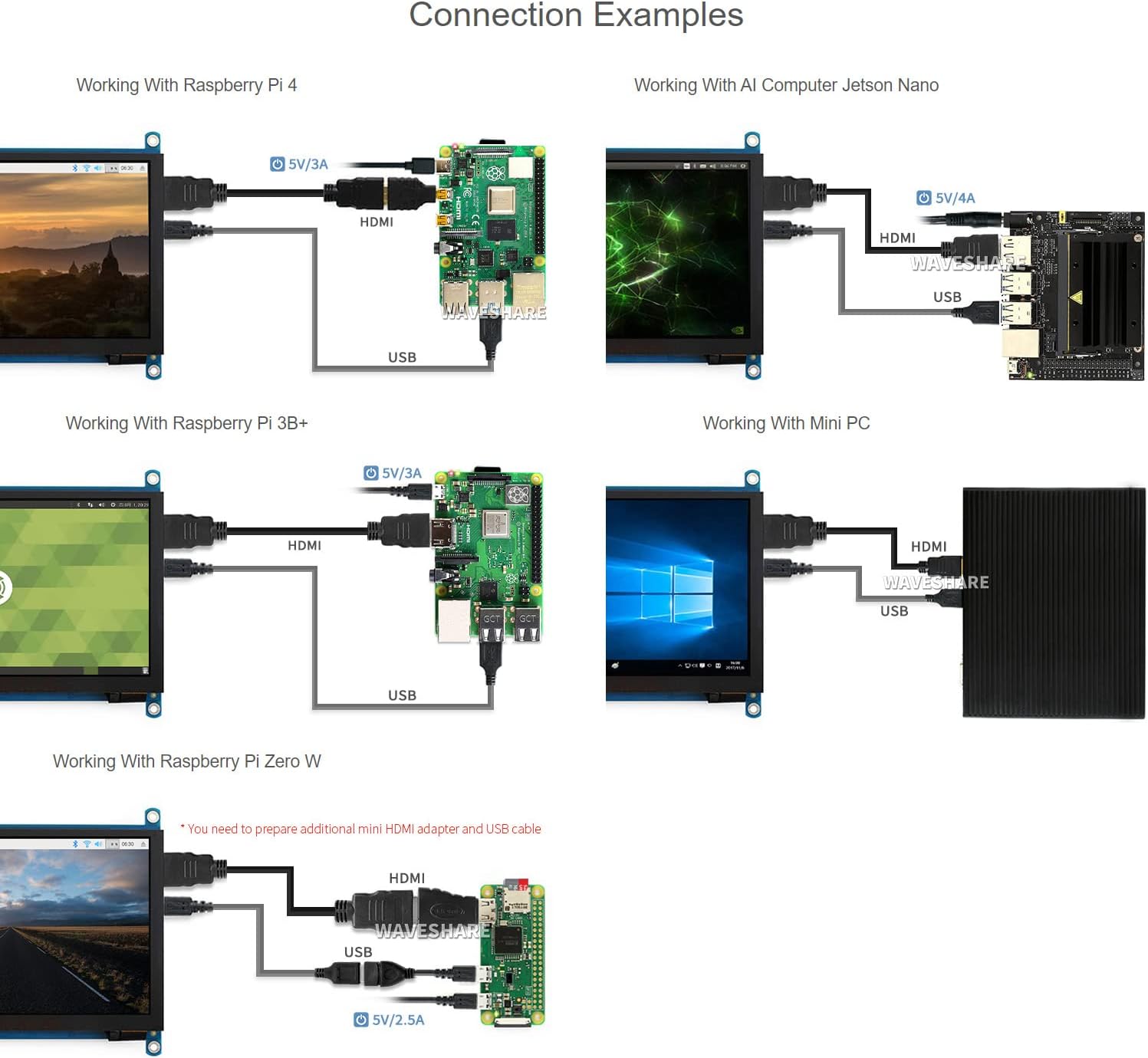
Waveshare 7-inch HDMI LCD Connection Exampเลส

ภาพ: แผนภาพแสดงตัวอย่างการเชื่อมต่อต่างๆamples for the 7-inch HDMI LCD with Raspberry Pi 4, Jetson Nano, Raspberry Pi 3B+, Raspberry Pi Zero W, and a Mini PC, showing HDMI and USB cable connections.

คำแนะนำการใช้งาน

1. การเปิด/ปิดเครื่อง

The display powers on automatically when connected to a powered device via HDMI and USB. To power off, disconnect the power source from the connected device or the display's USB power input.

2. การนำทางเมนู OSD

The display features an On-Screen Display (OSD) menu for various settings. Use the physical buttons on the side of the display to navigate and adjust settings such as brightness, contrast, and power management. Refer to the "Appearance and Dimensions" section for button identification.

3. การควบคุมแบบสัมผัส

The display supports capacitive touch input. When connected via USB to a compatible operating system (Raspberry Pi OS, Ubuntu, Kali, Windows), the touch functionality will be recognized automatically without additional drivers. The number of touch points supported depends on the operating system (e.g., 5-point touch on Windows, single-point on Jetson Nano Ubuntu).

Waveshare 7-inch HDMI LCD Touch Control and Gaming

Image: Demonstrates the capacitive touch control functionality on the 7-inch HDMI LCD, showing a hand interacting with a web browser interface. Also shows the display connected to a game console, indicating support for gaming display.

4. เอาต์พุตเสียง

Audio can be output through the 3.5mm audio jack or the 4PIN header for external speakers. Ensure your connected device is configured to output audio via HDMI.

การซ่อมบำรุง

การแก้ไขปัญหา

ข้อมูลจำเพาะ

ขนาดหน้าจอ7 นิ้ว
ปณิธาน1024 x 600 (Hardware), up to 1920x1080 (Software)
ประเภทแผงไอพีเอส
Viewอิงแองเกิล170°
ประเภทสัมผัสความจุ
จุดสัมผัส5-point (Windows), Single-point (Jetson Nano), 5-point (Raspberry Pi OS)
หน้าจอแสดงผลHDMI, VGA (requires separate cable)
เอาท์พุตเสียง3.5mm Jack, 4PIN Header
กำลังไฟเข้า5V DC (ผ่าน USB)
ขนาดสินค้าขนาด 7.09 x 5.51 x 1.97 นิ้ว (ประมาณ 180 x 140 x 50 มม.)
น้ำหนักสินค้า0.352 ออนซ์ (ประมาณ 10 กรัม)

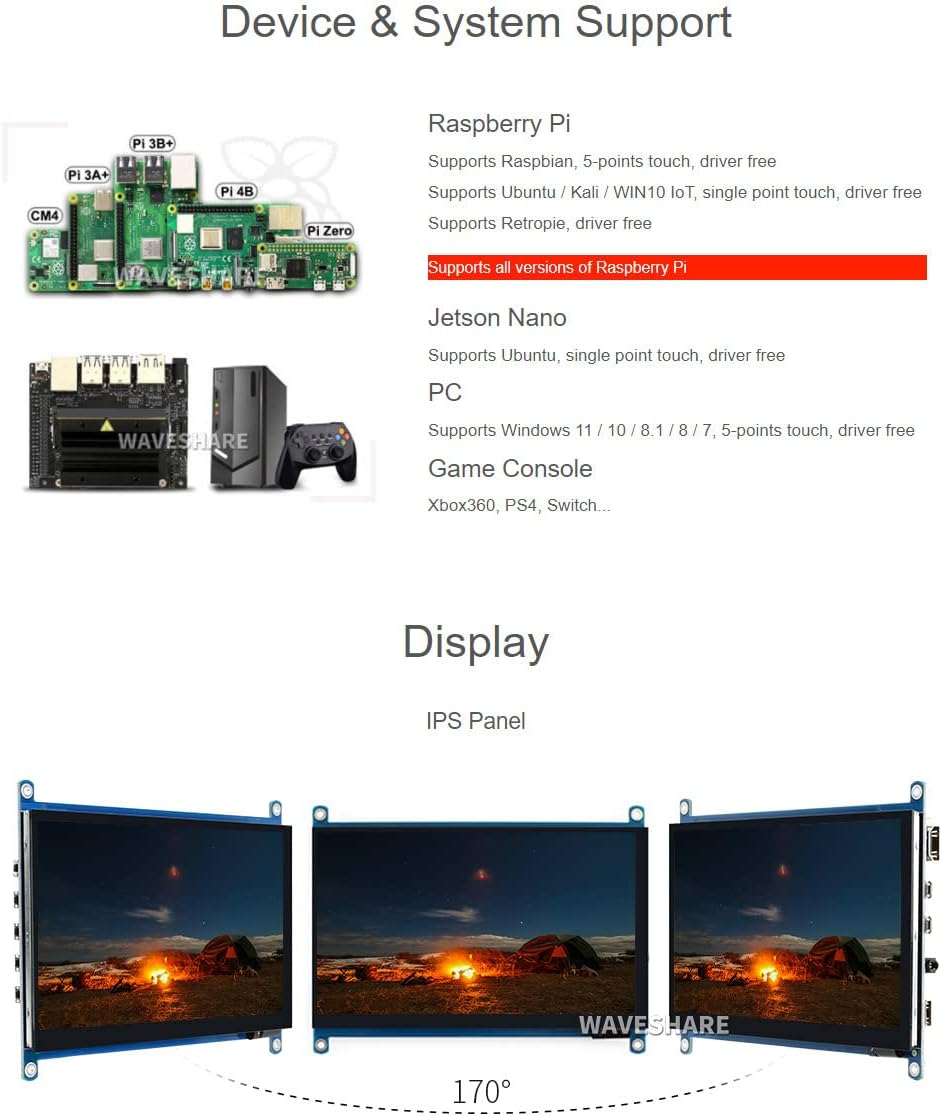
การสนับสนุนอุปกรณ์และระบบ

Waveshare 7-inch HDMI LCD Device and System Support

Image: Illustrates various compatible devices including Raspberry Pi models (Pi 3A+, Pi 3B+, Pi 4B, CM4, Pi Zero), Jetson Nano, and a generic PC setup, along with a list of supported operating systems and touch capabilities.
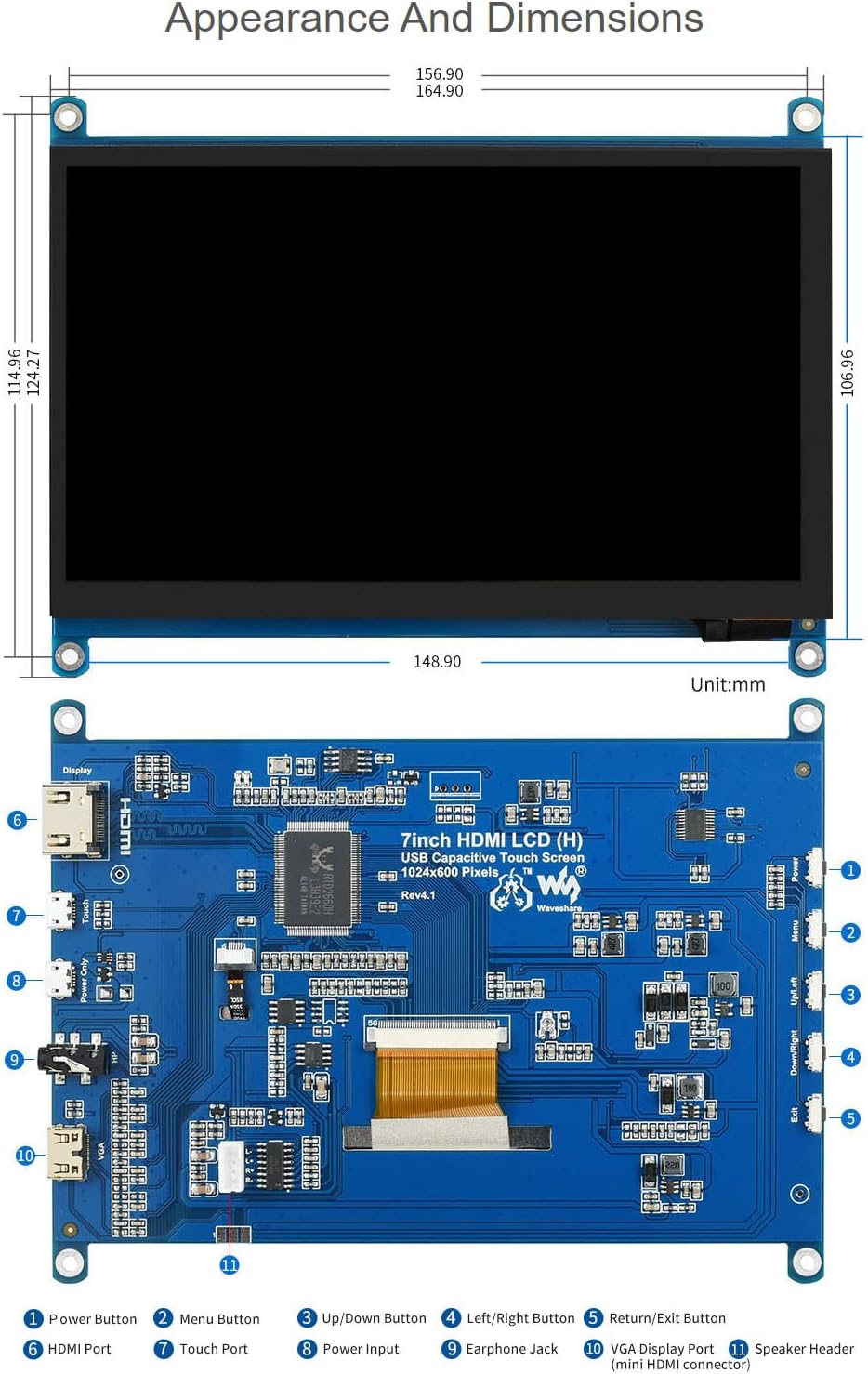
Waveshare 7-inch HDMI LCD Appearance and Dimensions

Image: Technical drawing showing the physical dimensions of the 7-inch HDMI LCD in millimeters, along with a detailed diagram identifying various ports and buttons on the display's circuit board, such as HDMI port, touch port, power input, earphone jack, VGA display port, and OSD menu buttons.

การรับประกันและการสนับสนุน

Waveshare is committed to providing high-quality products and customer service.

For technical assistance or warranty claims, please contact Waveshare customer support through their official channels.

Waveshare Support and Service Information

Image: Details Waveshare's commitment to support and service, including rigorous testing, one-to-one technical service, 24-hour response, 30-day free replacement, 365-day free repair, and lifetime technical service.

การรับรอง

This product holds the following certifications:

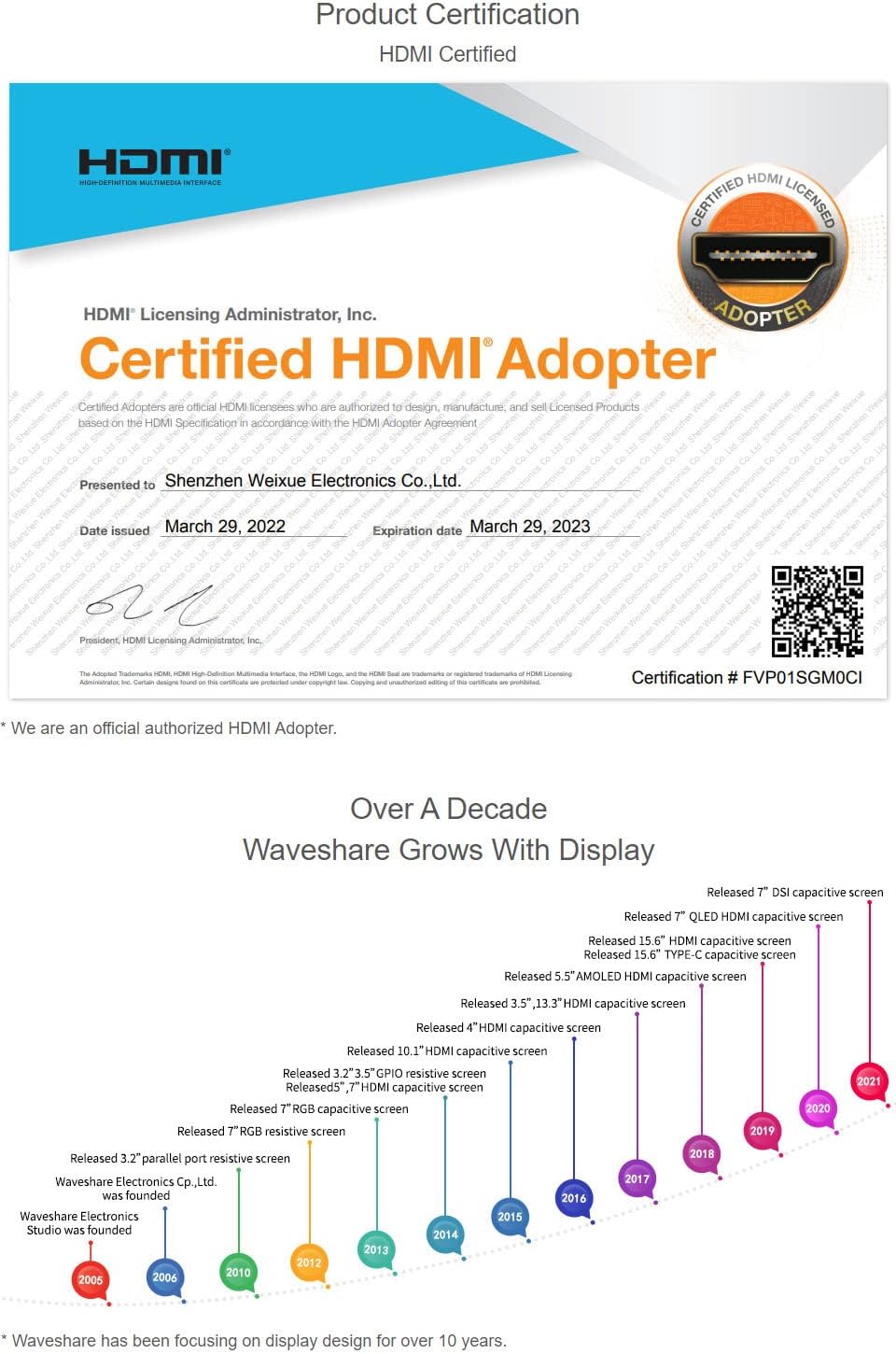
HDMI Certified Adapter Certificate

Image: A certificate indicating that Waveshare is an officially authorized HDMI adopter, ensuring compliance with HDMI standards for quality and reliability.

RoHS and CE Certifications

Image: Displays certificates for RoHS compliance and CE marking, indicating the product meets relevant environmental and safety standards.

เอกสารที่เกี่ยวข้อง - 7inch HDMI LCD (H)

พรีview คู่มือผู้ใช้จอ LCD HDMI ขนาด 7 นิ้ว Waveshare (C): คู่มือการตั้งค่าและการใช้งาน
คู่มือผู้ใช้นี้จะแนะนำผู้ใช้เกี่ยวกับการตั้งค่าและการใช้งานจอแสดงผล LCD HDMI ขนาด 7 นิ้วของ Waveshare (C) โดยให้รายละเอียดเกี่ยวกับคุณสมบัติ วิธีการเชื่อมต่อกับ Raspberry Pi และพีซี และเคล็ดลับการใช้งานที่สำคัญเพื่อให้ได้ประสิทธิภาพสูงสุด
พรีview คู่มือผู้ใช้ Waveshare 10.1-inch HDMI LCD (G): การตั้งค่า ข้อมูลจำเพาะ และการเชื่อมต่อ
สำรวจจอ LCD HDMI ขนาด 10.1 นิ้ว (G) จาก Waveshare พร้อมเคส คู่มือผู้ใช้นี้ครอบคลุมข้อมูลจำเพาะที่สำคัญ คำเตือนด้านความปลอดภัย คำแนะนำในการเชื่อมต่อสำหรับ Raspberry Pi, Jetson Nano และพีซี และตอบคำถามที่พบบ่อย
พรีview จอแสดงผล LCD DSI ขนาด 4 นิ้วของ Waveshare สำหรับ Raspberry Pi: การตั้งค่าและคู่มือ
คำแนะนำโดยละเอียดสำหรับจอ LCD DSI ขนาด 4 นิ้วของ Waveshare ครอบคลุมถึงคุณสมบัติ การเชื่อมต่อฮาร์ดแวร์ การติดตั้งซอฟต์แวร์ การหมุนหน้าจอ การควบคุมไฟแบ็คไลท์ และการแก้ไขปัญหาสำหรับ Raspberry Pi
พรีview Waveshare 7inch HDMI LCD: คู่มือการใช้งานจอแสดงผลแบบสัมผัสสำหรับ Raspberry Pi
คู่มือการใช้งานฉบับสมบูรณ์สำหรับจอ LCD HDMI ขนาด 7 นิ้วของ Waveshare ครอบคลุมการตั้งค่า การติดตั้งไดรเวอร์ การปรับเทียบระบบสัมผัส และการใช้งานร่วมกับ Raspberry Pi
พรีview คู่มือผู้ใช้จอแสดงผล LCD IPS ทรงกลมขนาด 5 นิ้ว ความละเอียด 1080x1080 พิกเซล รุ่น Waveshare
สำรวจจอแสดงผล LCD IPS ทรงกลมขนาด 5 นิ้ว ความละเอียด 1080x1080 พิกเซล จาก Waveshare คู่มือนี้จะอธิบายรายละเอียดคุณสมบัติ ข้อมูลจำเพาะ และวิธีการติดตั้งสำหรับ Raspberry Pi และพีซีระบบ Windows รวมถึงการปรับเทียบระบบสัมผัสและการเชื่อมต่อ
พรีview Waveshare 4.3 นิ้ว DSI LCD: จอแสดงผลสัมผัสแบบ Capacitive สำหรับ Raspberry Pi
สำรวจ Waveshare DSI LCD ขนาด 4.3 นิ้ว หน้าจอสัมผัสแบบ capacitive IPS ความละเอียด 800x480 ที่ออกแบบมาสำหรับ Raspberry Pi มาพร้อมอินเทอร์เฟซ MIPI DSI การตั้งค่าโดยไม่ต้องใช้ไดรเวอร์ และไฟแบ็คไลท์ที่ควบคุมด้วยซอฟต์แวร์