1. บทนำ
Thank you for choosing the TecTake Corner Computer Desk, Model 402405. This L-shaped workstation is designed to provide a practical and spacious area for your computer and work essentials. Its modern design, featuring a refined tabletop and stable steel construction, ensures durability and a timeless aesthetic. This manual provides essential information for the safe assembly, operation, and maintenance of your new desk.
Please read this manual thoroughly before assembly and use, and retain it for future reference.
2. คำแนะนำด้านความปลอดภัย
เพื่อให้ใช้งานได้อย่างปลอดภัยและป้องกันความเสียหาย โปรดปฏิบัติตามคำแนะนำด้านความปลอดภัยดังต่อไปนี้:
- การประกอบ: Assemble the desk on a soft, clean surface to prevent scratches. Ensure all components are correctly aligned and securely fastened according to the provided assembly instructions.
- ความเสถียร: Do not overload the desk. The maximum load capacity is 100 kg (220 lbs). Distribute weight evenly across the surface.
- การจัดวาง: Place the desk on a level and stable floor. Avoid placing it near heat sources, direct sunlight, or in excessively humid environments.
- เด็ก: เก็บชิ้นส่วนขนาดเล็กและวัสดุบรรจุภัณฑ์ให้ห่างจากเด็กเพื่อป้องกันอันตรายจากการสำลัก
- การซ่อมบำรุง: ตรวจสอบสกรูและข้อต่อทั้งหมดอย่างสม่ำเสมอเพื่อให้แน่ใจว่ายังแน่นอยู่ ขันให้แน่นหากจำเป็น
- การย้าย: เมื่อเคลื่อนย้ายโต๊ะ ให้ยกโต๊ะขึ้นแทนการลาก เพื่อป้องกันความเสียหายต่อขาโต๊ะและพื้น
3. เนื้อหาบรรจุภัณฑ์
Before beginning assembly, please verify that all parts are present and undamaged. The package should contain:
- 1x Corner Desk (comprising main tabletop sections and frame components)
- 1x Computer Tower Holder
- 1x Illustrated Assembly Instructions
- All necessary screws, fittings, and tools for assembly (as specified in the assembly instructions)

Figure 1: Assembled TecTake Corner Computer Desk (Dark Wood Finish). This image shows the overall L-shaped design, the spacious work surface, and the integrated keyboard tray.
4. การติดตั้งและการประกอบ
The TecTake Corner Computer Desk requires assembly. Please follow the detailed, illustrated instructions provided in your package. It is recommended to have two people for assembly to ensure ease and safety.
- แกะ: Carefully unpack all components and lay them out on a clean, soft surface to prevent damage.
- ระบุชิ้นส่วน: โปรดดูรายการชิ้นส่วนในคู่มือการประกอบเพื่อระบุส่วนประกอบแต่ละชิ้น
- ทำตามขั้นตอน: Proceed step-by-step according to the illustrated assembly guide. Ensure all screws and connectors are tightened securely but do not overtighten.
- ถาดวางคีย์บอร์ด: Install the sliding keyboard tray as indicated in the instructions. Ensure it slides smoothly.
- Computer Tower Holder: Position the included computer tower holder as desired.
- การตรวจสอบขั้นสุดท้าย: Once assembled, gently test the desk's stability and ensure all parts are firmly connected.

รูปที่ 2: จากบนลงล่าง view of the TecTake Corner Computer Desk (White Finish). This perspective highlights the L-shape and the ample surface area for multiple monitors or work items.
5. คู่มือการใช้งาน
Your TecTake Corner Computer Desk is designed for efficient and comfortable use. Here are some operational aspects:
- พื้นผิวการทำงาน: Utilize the large L-shaped surface for your monitor(s), laptop, documents, and other office supplies. The design provides ampพื้นที่สำหรับการทำงานหลายอย่างพร้อมกัน
- ถาดวางคีย์บอร์ด: The integrated sliding keyboard tray allows you to store your keyboard and mouse neatly under the desk when not in use, freeing up valuable desktop space. Gently pull it out for use and push it back in for storage.
- Computer Tower Holder: The included holder is designed to keep your computer tower off the floor, protecting it from dust and allowing for better airflow. It accommodates towers with a maximum width of 25 cm.
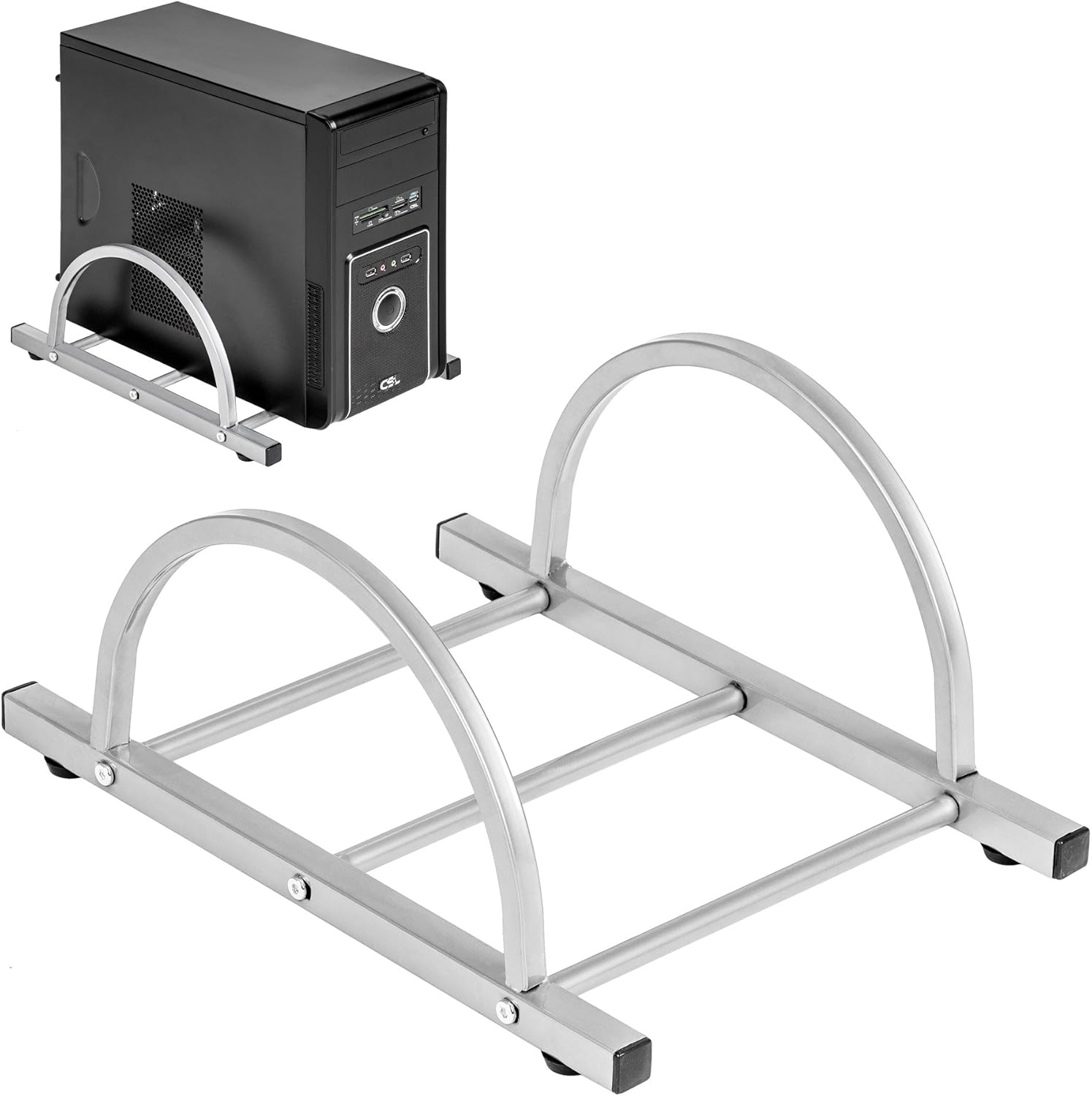
Figure 3: TecTake Computer Tower Holder. This image displays the separate holder designed to keep your PC tower elevated and secure.
6. การบำรุงรักษา
Proper care will extend the life and appearance of your desk:
- การทำความสะอาด: เช็ดพื้นผิวด้วย d . ที่อ่อนนุ่มamp ใช้ผ้าเช็ดทำความสะอาด สำหรับคราบฝังแน่น ให้ใช้สบู่เหลวอ่อนๆ เช็ด แล้วเช็ดให้แห้งทันทีด้วยผ้าสะอาด หลีกเลี่ยงน้ำยาทำความสะอาดที่มีฤทธิ์กัดกร่อนหรือสารเคมีรุนแรง
- การรั่วไหล: Clean up spills immediately to prevent staining or damage to the MDF surface.
- ฮาร์ดแวร์: Periodically check all screws and fittings for tightness. Re-tighten as necessary to maintain stability.
- การป้องกัน: Use coasters for drinks and protective pads under hot items to prevent damage to the tabletop.
7 การแก้ไขปัญหา
หากคุณพบปัญหาเกี่ยวกับโต๊ะทำงาน โปรดพิจารณาแนวทางแก้ไขทั่วไปต่อไปนี้:
- โต๊ะโยกเยก:
- ตรวจสอบให้แน่ใจว่าโต๊ะอยู่บนพื้นผิวเรียบ
- ตรวจสอบสกรูและน็อตประกอบทั้งหมด ขันให้แน่นหากมีส่วนใดหลวม
- Verify that all leg caps are properly installed and making full contact with the floor.
- ถาดวางคีย์บอร์ดเลื่อนไม่ราบรื่น:
- ตรวจสอบดูว่ามีสิ่งกีดขวางใดๆ ในกลไกการเลื่อนหรือไม่
- Ensure the rails are correctly installed and aligned.
- Clean the rails if dust or debris is present.
- ส่วนที่หายไป: If you find any parts missing upon unpacking, please refer to the "Warranty and Support" section to contact customer service.
8. ข้อมูลจำเพาะ
| คุณสมบัติ | รายละเอียด |
|---|---|
| ยี่ห้อ | เทคเทค |
| หมายเลขรุ่น | 402405 |
| ขนาดรวม (ยาว x กว้าง x สูง) | 170 x 135 x 75 ซม. (66.9 x 53.1 x 29.5 นิ้ว) |
| ความสูงของเคาน์เตอร์ | 75 ซม. (29.5 นิ้ว) |
| Large Tabletop Section (L x W) | 115 x 55 ซม. (45.3 x 21.7 นิ้ว) |
| Small Tabletop Section (L x W) | 80 x 55 ซม. (31.5 x 21.7 นิ้ว) |
| Rounded Corner Section (L x W) | 55 x 55 ซม. (21.7 x 21.7 นิ้ว) |
| ความหนาของโต๊ะ | 1.5 ซม. (0.6 นิ้ว) |
| Sliding Keyboard Tray (L x W) | 56.5 x 35 ซม. (22.2 x 13.8 นิ้ว) |
| Steel Tube Dimensions | 3x2 cm; 2x2 cm; 1.5x1.5 cm |
| Computer Tower Holder Width (Max) | 25 ซม. (9.8 นิ้ว) |
| ความจุในการรับน้ำหนักสูงสุด | 100 กก. (220 ปอนด์) |
| วัสดุ | Veneered MDF surface, powder-coated steel tube frame, plastic feet and end caps |
| Color (as per model) | สีขาว |
9. การรับประกันและการสนับสนุน
TecTake products are manufactured with quality and durability in mind. For information regarding warranty coverage, please refer to the warranty card included with your product or visit the official TecTake webเว็บไซต์.
If you have any questions, require assistance with assembly, or need to report missing/damaged parts, please contact TecTake customer service. Contact details can typically be found on the product packaging, the included assembly instructions, or the official TecTake webเว็บไซต์.
การสนับสนุนทางออนไลน์: www.tectake.de (โปรดตรวจสอบข้อมูลสำหรับภูมิภาคของคุณ) webเว็บไซต์สำหรับข้อมูลการติดต่อที่เฉพาะเจาะจง)


