1. บทนำ
The LAUNCH Creader 3001 is a compact and user-friendly OBD2 diagnostic scanner designed to read and clear engine fault codes for most vehicles manufactured since 1996. This device provides essential diagnostic functions, helping users identify and resolve common engine-related issues, turn off the Check Engine Light (MIL), and perform emission-related tests. Its plug-and-play design makes it suitable for both beginners and experienced users.

Figure 1: LAUNCH Creader 3001 OBD2 Scanner device.
2. การตั้งค่า
The LAUNCH Creader 3001 is designed for straightforward setup and operation. No batteries are required as the device powers directly from the vehicle's OBD2 port.
2.1 การเชื่อมต่ออุปกรณ์
- ค้นหาพอร์ต OBD2: The 16-pin OBD2 Data Link Connector (DLC) is typically located under the dashboard on the driver's side of the vehicle. Refer to your vehicle's owner's manual for the exact location.
- เชื่อมต่อเครื่องสแกนเนอร์: With the vehicle's ignition off, firmly plug the LAUNCH Creader 3001's diagnostic cable into the vehicle's OBD2 port.
- เปิดสวิตช์กุญแจ: Turn the vehicle's ignition to the "ON" position (do not start the engine). The scanner will automatically power on and initiate communication with the vehicle's onboard computer.

Figure 2: The LAUNCH Creader 3001 connected to a vehicle's OBD2 port, ready for diagnostics.
3. การดำเนินการ
The LAUNCH Creader 3001 offers a range of diagnostic functions accessible through its intuitive menu system. Use the UP และ ลง ปุ่มลูกศรสำหรับนำทางและ OK ปุ่มเพื่อยืนยันการเลือก กลับ button navigates back to the previous screen.
3.1 การอ่านและการล้างรหัสข้อผิดพลาดในการวินิจฉัย (DTCs)
This function allows you to retrieve and clear engine fault codes, which can turn off the Check Engine Light (MIL).
- จากเมนูหลัก เลือก "วินิจฉัย".
- เลือก "อ่านรหัส" to display current, pending, and permanent DTCs.
- หากต้องการล้างรหัส ให้เลือก "ลบรหัส". Confirm the action when prompted. Note: Clearing codes will also clear freeze frame data and reset monitor status. Ensure the underlying issue is resolved before clearing codes to prevent the light from reappearing.

Figure 3: The scanner displaying options to read and clear codes, and indicating how to turn off the engine lamp.
3.2 I/M Readiness Status Test
This function checks the status of emission-related monitors to determine if the vehicle is ready for an emissions test (Smog Check).
- จากเมนูหลัก เลือก "ความพร้อมด้าน I/M".
- The scanner will display the status of various monitors (e.g., Misfire Monitor, Fuel System Monitor, Catalyst Monitor) as "OK", "INC" (Incomplete), or "N/A" (Not Applicable).

Figure 4: The Creader 3001 displaying I/M Readiness status, indicating vehicle's emission system readiness.
3.3 View ข้อมูลแบบฟรีซเฟรม
When an emission-related fault occurs, the vehicle's computer stores a snapshot of operating conditions at that moment. This data is called Freeze Frame Data.
- เลือก "หยุดภาพ" from the diagnostic menu to view ข้อมูลนี้
3.4 สตรีมข้อมูลสด
This function displays real-time operational parameters from the vehicle's sensors and modules.
- เลือก "สตรีมข้อมูล" ถึง view live sensor data, such as engine RPM, vehicle speed, O2 sensor readings, and more.

Figure 5: The scanner showing live data stream values, useful for diagnosing engine problems.
3.5 การทดสอบเซ็นเซอร์ O2
Retrieves O2 sensor monitoring test results for the most recently completed tests from the vehicle's onboard computer.
- เลือก "O2 Sensor Test" ถึง view ผลลัพธ์
3.6 On-Board Monitor Test (Mode 6)
ดึงผลการทดสอบสำหรับส่วนประกอบและระบบส่งกำลังที่เกี่ยวข้องกับการปล่อยมลพิษที่ไม่ได้รับการตรวจสอบอย่างต่อเนื่อง
- เลือก "On-Board Monitor Test" to access these results. This can help identify intermittent issues or problems not detected by continuous monitoring.

Figure 6: Illustration of the On-Board Monitor Test (Mode 6) function, which helps diagnose driveability and emission faults.
3.7 EVAP System Test (Mode 8)
Initiates a leak test for the vehicle's Evaporative Emission Control (EVAP) system, which prevents fuel vapor from escaping the fuel tank.
- เลือก "Evap System Test" to perform this diagnostic.
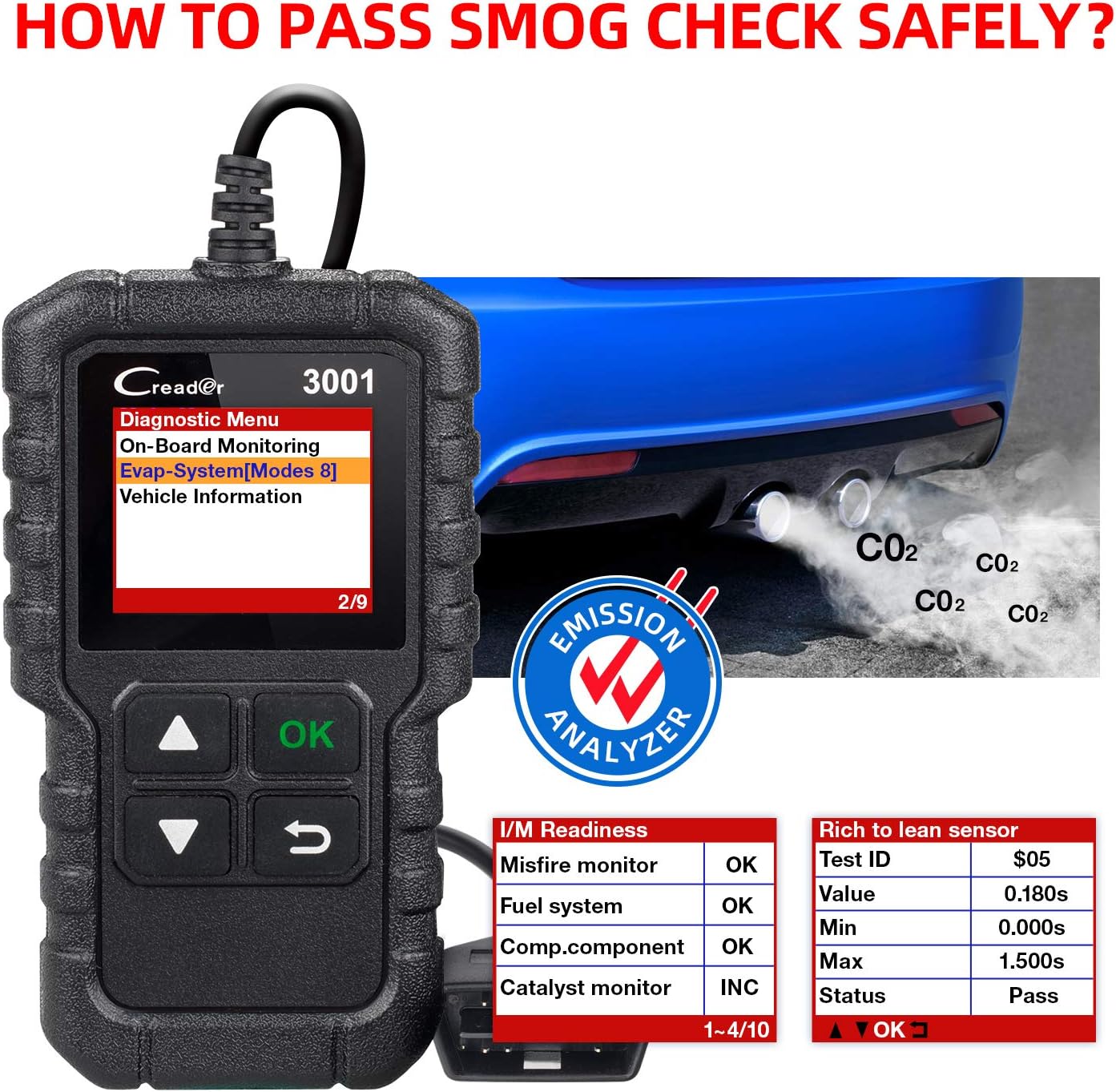
Figure 7: The EVAP System Test (Mode 8) function, used to check for fuel vapor leaks.
3.8 Identify VIN Information
The scanner can retrieve the vehicle's identification information, including VIN (Vehicle Identification Number), CID (Calibration ID), and CVN (Calibration Verification Number).
- เลือก "ข้อมูลยานพาหนะ" ถึง view these details.
3.9 DTC Lookup Library
The Creader 3001 includes a built-in DTC lookup library, allowing you to quickly understand the meaning of diagnostic trouble codes without needing external resources.
- เลือก "DTC Lookup" from the main menu and enter the code to get its description.


Figure 8: Icons representing the OBD2 scanner and code reader functions, including DTC lookup.
3.10 Language Support and Vehicle Coverage
The device supports 7 languages: English, French, German, Spanish, Russian, Italian, and Polish. It is compatible with most OBD2 protocol vehicles sold in the US (since 1996), Europe (since 2000), and Asia (since 2008), supporting CAN, ISO9141, KWP2000, J1850 PWM, and J1850 VPW protocols.

Figure 9: The Creader 3001 supports various vehicle models and multiple languages for global use.
4. การบำรุงรักษา
To ensure optimal performance and longevity of your LAUNCH Creader 3001, follow these maintenance guidelines:
- การอัปเดตซอฟต์แวร์: The device supports lifetime free updates. Regularly check the LAUNCH official website for available software updates to ensure compatibility with newer vehicle models and improved functionality. Connect the device to a computer via USB for updates.
- การทำความสะอาด: ใช้ผ้านุ่มและแห้งทำความสะอาดอุปกรณ์ หลีกเลี่ยงการใช้น้ำยาทำความสะอาดหรือตัวทำละลายที่มีฤทธิ์กัดกร่อน
- พื้นที่จัดเก็บ: เก็บเครื่องสแกนไว้ในที่แห้งและเย็น หลีกเลี่ยงแสงแดดโดยตรงและอุณหภูมิที่สูงหรือต่ำเกินไป
- การดูแลสายเคเบิล: Avoid bending or twisting the diagnostic cable excessively to prevent internal damage.
5 การแก้ไขปัญหา
If you encounter issues with your LAUNCH Creader 3001, refer to the following common troubleshooting steps:
- อุปกรณ์ไม่เปิดใช้งาน:
- ตรวจสอบให้แน่ใจว่าสายเคเบิลวินิจฉัยเชื่อมต่อกับพอร์ต OBD2 ของรถอย่างแน่นหนาแล้ว
- ตรวจสอบว่ากุญแจรถอยู่ในตำแหน่ง "เปิด"
- Check the vehicle's fuse for the OBD2 port (usually labeled "Cigar Lighter" or "Accessory").
- ข้อผิดพลาดในการสื่อสาร:
- Confirm the vehicle is OBD2 compliant (most vehicles since 1996 in the US, 2000 in EU, 2008 in Asia).
- ตรวจสอบให้แน่ใจว่าสวิตช์กุญแจเปิดอยู่ และเครื่องยนต์ดับอยู่
- Try connecting the scanner to a different OBD2 compliant vehicle to rule out a vehicle-specific issue.
- ตรวจสอบดูว่ามีสายเชื่อมต่อหลวมในสายเคเบิลวินิจฉัยหรือไม่
- ไม่สามารถล้างรหัสข้อผิดพลาดได้:
- Ensure the underlying fault that triggered the code has been repaired. Codes cannot be cleared if the fault is still present.
- The ignition must be "ON" and the engine off when attempting to clear codes.
- การแสดงข้อมูลไม่ถูกต้อง:
- Ensure the correct vehicle protocol is automatically detected or manually selected if applicable.
- Perform a software update to ensure the latest firmware is installed.
6. ข้อมูลจำเพาะ
| คุณสมบัติ | รายละเอียด |
|---|---|
| ยี่ห้อ | ปล่อย |
| แบบอย่าง | CR3001 |
| น้ำหนักสินค้า | 3.5 ออนซ์ |
| ขนาดสินค้า | 4.65 x 2.68 x 0.88 นิ้ว |
| แหล่งพลังงาน | Corded Electric (via OBD2 port) |
| ระบบปฏิบัติการ | Windows XP (for update software) |
| ขนาดหน้าจอ | 1.7 นิ้ว |
| โปรโตคอลที่รองรับ | CAN, ISO9141, KWP2000, J1850 PWM, J1850 VPW |
| ภาษาที่รองรับ | อังกฤษ, ฝรั่งเศส, เยอรมัน, สเปน, รัสเซีย, อิตาลี, โปแลนด์ |
7. การรับประกันและการสนับสนุน
LAUNCH provides comprehensive support for the Creader 3001 OBD2 Scanner.
- อัปเดตฟรีตลอดอายุการใช้งาน: The device benefits from lifetime free software updates, ensuring it remains current with new vehicle models and diagnostic capabilities.
- การสนับสนุนด้านเทคนิค: For any technical inquiries or assistance, please refer to the official LAUNCH webเว็บไซต์หรือติดต่อฝ่ายบริการลูกค้าของพวกเขา