1. บทนำ
ขอบคุณสำหรับการซื้อasing the Bytech Massive Bluetooth Long Bar Speaker-BK. This manual provides essential information for the proper setup, operation, and maintenance of your new speaker. Please read this manual thoroughly before using the product to ensure optimal performance and longevity.
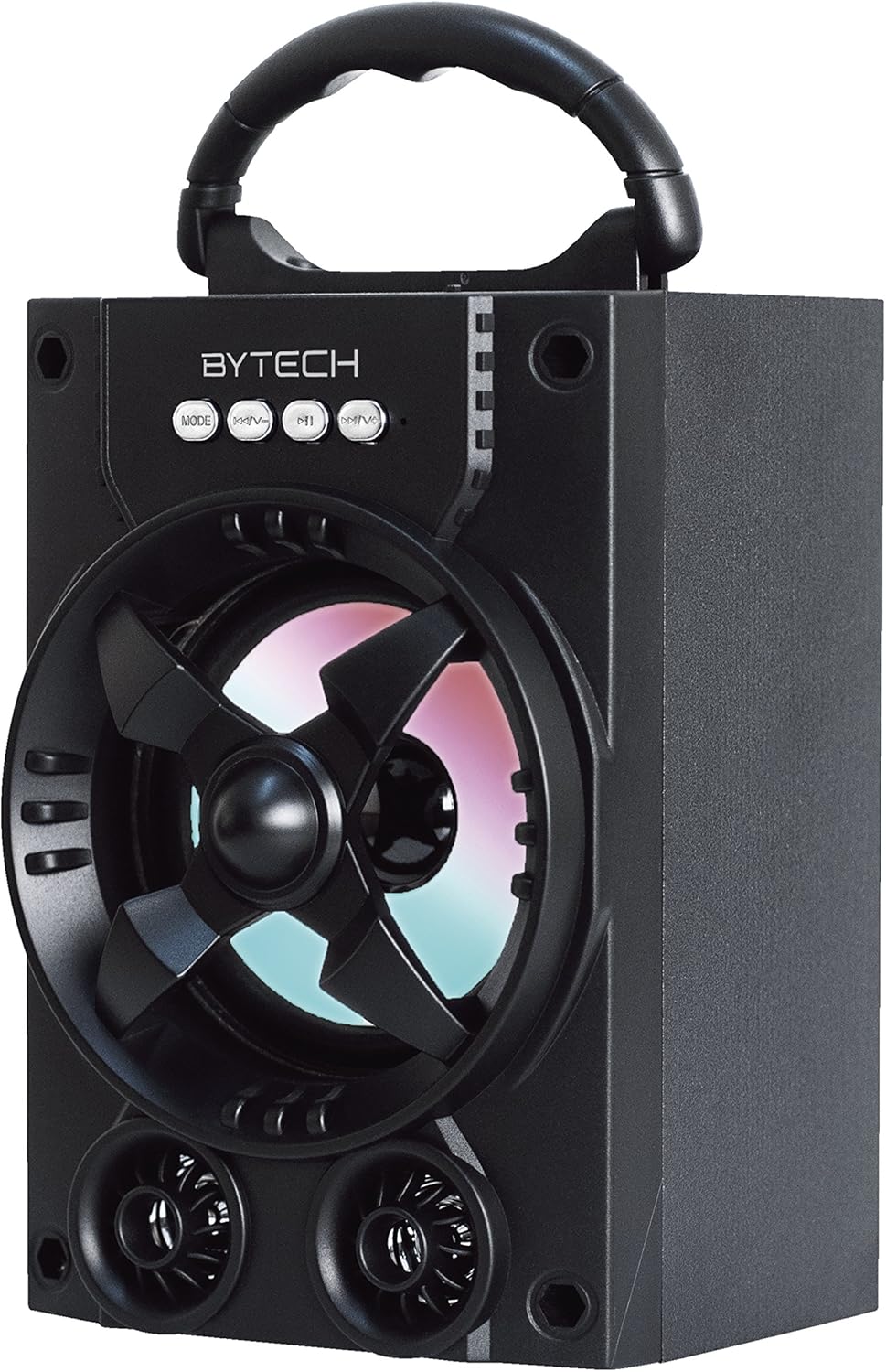
รูปที่ 1.1 : ด้านหน้า view of the Bytech Massive Bluetooth Long Bar Speaker-BK, showcasing its design, handle, and speaker grille with LED lights.
2. เนื้อหาบรรจุภัณฑ์
กรุณาตรวจสอบแพ็คเกจสำหรับรายการต่อไปนี้:
- Bytech Massive Bluetooth Long Bar Speaker-BK
- สายชาร์จ USB
- คู่มือการใช้งาน (เอกสารนี้)
หากมีรายการใดขาดหายหรือเสียหาย โปรดติดต่อฝ่ายสนับสนุนลูกค้า
3. คุณสมบัติของผลิตภัณฑ์
- LED Performance Lights: Dynamic LED lights that synchronize with your music for an enhanced audio-visual experience.
- Convenient Carrying Handle: Integrated handle for easy portability, allowing you to take your music anywhere.
- Universal Bluetooth Connectivity: Seamlessly connect wirelessly to your smartphone, tablet, or other Bluetooth-enabled devices.
- เสียงเซอร์ราวด์: Designed to deliver a high-quality surround sound experience.
- การออกแบบพกพา: Ideal for various settings, including parties, outdoor gatherings, and personal use.

Figure 1.2: The speaker shown with its retail packaging, illustrating its key features such as multi-color LED lights, Bluetooth connectivity, and surround sound capability.
4. การควบคุมและตัวชี้วัด
The speaker features intuitive controls and indicators for easy operation:
- ปุ่มโหมด: Press to switch between available input modes (e.g., Bluetooth).
- ปุ่ม V: Press to decrease volume. Long press to skip to the previous track.
- ปุ่ม V+: Press to increase volume. Long press to skip to the next track.
- ปุ่ม M: (Function not explicitly detailed, typically for mode or mute)
- ไฟ LED: Indicate power status, charging status, and provide dynamic light effects during audio playback.
5. คู่มือการติดตั้ง
5.1 การชาร์จลำโพง
- เสียบปลายสายชาร์จ USB ด้านเล็กเข้ากับพอร์ตชาร์จบนลำโพง
- Connect the large end of the USB charging cable to a USB power adapter (not included) or a computer's USB port.
- The LED indicator will show charging status (e.g., red for charging, off when fully charged).
- ควรชาร์จแบตเตอรี่จนเต็มประมาณ 3-4 ชั่วโมงก่อนใช้งานครั้งแรก
5.2 การเปิด/ปิดเครื่อง
- To power on, press and hold the Power button (location not specified, typically near charging port or on control panel) for a few seconds until you hear an audible prompt or see the LED lights activate.
- หากต้องการปิดเครื่อง ให้กดปุ่มเปิด/ปิดค้างไว้อีกครั้งจนกว่าลำโพงจะปิดลง
5.3 การจับคู่บลูทูธ
- Ensure the speaker is powered on and in Bluetooth pairing mode (indicated by a flashing LED light or audible prompt).
- บนสมาร์ทโฟนหรือแท็บเล็ตของคุณ ไปที่การตั้งค่าบลูทูธ
- ค้นหา available devices. The speaker will appear as "BYTECH" or a similar name.
- เลือกลำโพงจากรายการเพื่อเริ่มการจับคู่
- Once successfully paired, the LED indicator will typically become solid, and you may hear a confirmation tone.
6. คู่มือการใช้งาน
6.1 การเล่นเสียงผ่านบลูทูธ
- After successful Bluetooth pairing, open your preferred music application on your connected device.
- Select and play your desired audio. The sound will be streamed wirelessly to the speaker.
- Use the V+ and V- buttons on the speaker or your connected device to adjust the volume.
- Long press V+ or V- to skip tracks.
6.2 LED Performance Lights
The speaker features integrated LED lights that enhance your listening experience. These lights typically activate automatically when the speaker is powered on and playing audio. Specific controls for light modes are not detailed, but they are designed to provide dynamic visual effects.
6.3 การสลับโหมด
กดปุ่ม โหมด button to cycle through available input modes. While Bluetooth is the primary connectivity, other modes (if available, such as FM radio or AUX input) can be accessed via this button.
7. การบำรุงรักษาและการดูแล
- การทำความสะอาด: ใช้ผ้าแห้งเนื้อนุ่มเช็ดทำความสะอาดภายนอกลำโพง ห้ามใช้สารทำความสะอาดที่มีฤทธิ์กัดกร่อน แว็กซ์ หรือตัวทำละลาย
- พื้นที่จัดเก็บ: เมื่อไม่ได้ใช้งานเป็นเวลานาน ควรเก็บลำโพงไว้ในที่แห้งและเย็น หลีกเลี่ยงแสงแดดโดยตรงและอุณหภูมิที่สูงหรือต่ำเกินไป
- การดูแลแบตเตอรี่ To prolong battery life, avoid fully discharging the battery frequently. Recharge the speaker regularly, even if not in use, to maintain battery health.
- ความต้านทานน้ำ: ผลิตภัณฑ์นี้เป็น ไม่ waterproof. Avoid exposure to water, rain, or excessive moisture to prevent damage.
8 การแก้ไขปัญหา
หากคุณพบปัญหาเกี่ยวกับลำโพงของคุณ โปรดดูปัญหาทั่วไปและวิธีแก้ไขต่อไปนี้:
| ปัญหา | สาเหตุที่เป็นไปได้ | สารละลาย |
|---|---|---|
| ลำโพงไม่เปิดเครื่อง | แบตเตอรี่อ่อน | ชาร์จลำโพงให้เต็ม |
| ไม่มีเสียงจากลำโพง | Volume too low; Not paired; Incorrect mode. | Increase volume on speaker and device; Ensure successful Bluetooth pairing; Press MODE button to select correct input. |
| การเชื่อมต่อบลูทูธไม่เสถียรหรือล้มเหลว | Device too far; Interference; Pairing issue. | Move device closer to speaker (within 33 ft/10m); Avoid obstacles; Forget device on your phone and re-pair. |
| ไฟ LED ไม่ทำงาน | Speaker not powered on or playing audio. | Ensure speaker is on and audio is playing. |
9. ข้อมูลจำเพาะ
| คุณสมบัติ | รายละเอียด |
|---|---|
| ยี่ห้อ | บายเทค |
| ชื่อรุ่น | บายเทค |
| หมายเลขรุ่นสินค้า | BCAUBS134BK |
| ประเภทลำโพง | ระบบเสียงรอบทิศทาง |
| เทคโนโลยีการเชื่อมต่อ | บลูทูธ |
| เทคโนโลยีการสื่อสารไร้สาย | บลูทูธ |
| อุปกรณ์ที่รองรับ | สมาร์ทโฟน |
| กำลังขับสูงสุดของลำโพง | 20 วัตต์ |
| การตอบสนองความถี่ | ความถี่ 20 กิโลเฮิรตซ์ |
| อิมพีแดนซ์ | 1 โอห์ม |
| ขนาดลำโพง | 5 นิ้ว |
| แหล่งพลังงาน | ไฟฟ้าแบบมีสาย (สำหรับชาร์จไฟ) |
| ประเภทแบตเตอรี่ | ต้องใช้แบตเตอรี่ลิเธียมไอออน 1 ก้อน |
| สี | สีดำ |
| ขนาดสินค้า | 4.75 x 5.5 x 8.5 นิ้ว |
| น้ำหนักสินค้า | 1.3 ปอนด์ |
| กันน้ำได้ | เลขที่ |
| ประเทศต้นกำเนิด | จีน |
| ยูพีซี | 805112038121 |
10. ข้อมูลการรับประกัน
Bytech products are manufactured to the highest quality standards. For specific warranty terms and conditions, please refer to the warranty card included with your purchase or visit the official Bytech webไซต์นี้ โปรดเก็บหลักฐานการซื้อไว้เพื่อใช้ยืนยันการรับประกัน
11. การสนับสนุนลูกค้า
For technical assistance, troubleshooting, or general inquiries, please contact Bytech customer support. Contact information can typically be found on the product packaging, the official Bytech webไซต์หรือใบเสร็จรับเงินการซื้อของคุณ
หมายเหตุ: ไม่มีวิดีโอผลิตภัณฑ์อย่างเป็นทางการจากผู้ขายที่สามารถฝังได้ตามข้อมูลที่ให้มา


