1. บทนำ
The Chord Electronics Poly is a revolutionary network streaming module designed to seamlessly integrate with your Chord Mojo portable DAC/headphone amplifier. It transforms your Mojo into a high-resolution wireless streamer, offering versatile connectivity options including Wi-Fi, Bluetooth, DLNA, and an SD card reader. The Poly is fully portable, featuring a LiPo battery that provides approximately nine hours of playback on a single charge.
This manual provides essential information for setting up, operating, maintaining, and troubleshooting your Poly network module to ensure optimal performance and enjoyment.
2. การตั้งค่า
2.1 การแกะกล่องและการตรวจสอบเบื้องต้น
Carefully remove the Poly from its packaging. Inspect the device for any signs of damage. The package should contain one Chord Poly unit.
2.2 Charging the Poly
Before first use, fully charge the Poly. Connect the supplied USB cable to the Poly's charging port and a suitable USB power adapter. A full charge typically takes less than four hours. The P.status LED will indicate charging status.

ภาพ: หลัง view of the Chord Poly. This image highlights the charging port, P.status and M.status LEDs, the Micro SD card slot, and the 'Config' button, which are crucial for setup and operation.
2.3 Connecting Poly to Chord Mojo
The Poly is designed to physically connect to the Chord Mojo. Align the Poly with the Mojo and slide them together until they are securely connected. Ensure the connection is firm to maintain audio integrity and power transfer.

ภาพ: The Chord Poly module securely attached to a Chord Mojo unit, demonstrating the integrated form factor. A Micro SD card is visible in its slot, indicating readiness for local music playback.
2.4 GoFigure App Installation and Initial Configuration
Download the Chord GoFigure app from your device's app store (compatible with iPhones, iPads, Android smartphones and tablets). This app is essential for initial setup and managing your Poly's network settings.
- Install the GoFigure app on your smartphone or tablet.
- Power on your Poly (and Mojo, if connected).
- Open the GoFigure app and follow the on-screen instructions to connect to your Poly. This typically involves connecting to Poly's temporary Wi-Fi hotspot and then configuring it to join your home Wi-Fi network.
- Configure Wi-Fi and Bluetooth settings as prompted by the app.
2.5 การใส่การ์ด Micro SD
The Poly features a Micro SD card slot for local music storage. Insert a formatted Micro SD card into the slot until it clicks into place. Ensure the card is inserted correctly to avoid damage.
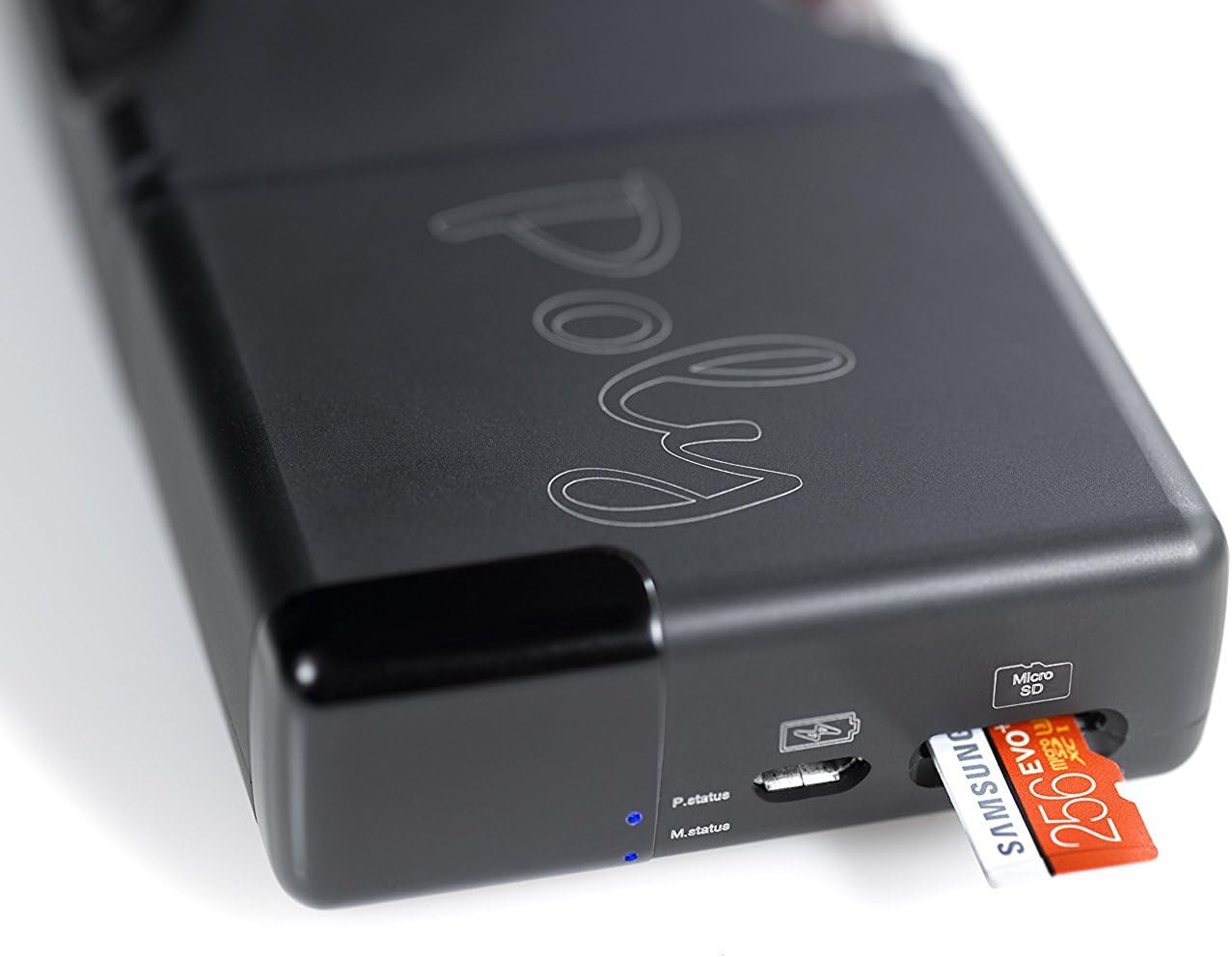
ภาพ: รายละเอียด view of the Chord Poly's Micro SD card slot with a card being inserted. This illustrates the correct orientation for adding local storage to the device.
3. คู่มือการใช้งาน
3.1 การเปิด/ปิดเครื่อง
To power on the Poly, press and hold the power button (often integrated with the Mojo's power button when connected, or a dedicated button on Poly). The status LEDs will illuminate. To power off, press and hold the power button again until the LEDs extinguish.
3.2 Wi-Fi Streaming (DLNA, NAS)
Once configured with your home Wi-Fi network via the GoFigure app, the Poly can stream audio from various sources:
- DLNA: Use a compatible DLNA client app on your smartphone or computer to stream music from your network-attached storage (NAS) or other DLNA servers to the Poly.
- แอร์เพลย์: For Apple devices, use AirPlay to stream audio wirelessly to the Poly.
- Other Streaming Services: Depending on firmware and app compatibility, the Poly can integrate with various streaming services. Refer to the GoFigure app for supported services and configurations.
3.3 การเชื่อมต่อบลูทูธ
The Poly acts as a Bluetooth receiver, allowing you to stream audio wirelessly from any Bluetooth-enabled device (smartphones, tablets, computers). To pair:
- Ensure Bluetooth is enabled on your Poly via the GoFigure app.
- Enable Bluetooth on your source device and search for available devices.
- Select 'Chord Poly' from the list to pair.
3.4 SD Card Playback (MPD)
Music stored on the Micro SD card can be played back directly through the Poly. This typically utilizes a Music Player Daemon (MPD) server running on the Poly. You will need a compatible MPD client app (e.g., 8Player, Flacbox) on your smartphone or tablet to browse and control playback of your SD card music library.

ภาพ: โปรข้างfile of the Chord Poly, showcasing its compact design and black anodized aluminum finish. This view emphasizes its portability and robust construction.
3.5 ฟังก์ชันฮอตสปอต
The Poly can create its own Wi-Fi hotspot, allowing you to stream music wirelessly even when no external Wi-Fi network is available. This is particularly useful for mobile listening, enabling your smartphone to connect directly to the Poly for streaming apps.
4. การบำรุงรักษา
4.1 การทำความสะอาด
To clean the Poly, use a soft, dry, lint-free cloth. Do not use abrasive cleaners, solvents, or aerosol sprays, as these can damage the finish or internal components.
4.2 การดูแลแบตเตอรี่
The Poly uses a Lithium-polymer battery. To prolong battery life:
- หลีกเลี่ยงการปล่อยแบตเตอรี่จนหมดบ่อยครั้ง
- เก็บอุปกรณ์ไว้ในที่แห้งและเย็นเมื่อไม่ได้ใช้งานเป็นเวลานาน
- Charge the device regularly, even if not used, to maintain battery health.
การอัปเดตเฟิร์มแวร์ 4.3 รายการ
Chord Electronics periodically releases firmware updates to improve performance and add new features. Check the GoFigure app or the Chord Electronics website for available updates and follow the instructions provided for installation.
5 การแก้ไขปัญหา
If you encounter issues with your Chord Poly, please refer to the following common troubleshooting steps:
- ปัญหาการเชื่อมต่อ (Wi-Fi/Bluetooth): Ensure the Poly is within range of your Wi-Fi router or Bluetooth source device. Restart both the Poly and your source device. Verify network settings in the GoFigure app.
- GoFigure App Problems: If the app is unresponsive or fails to connect, try restarting the app or reinstalling it. Ensure your Poly's firmware is up to date.
- ไม่มีเอาต์พุตเสียง: Check that the Poly is securely connected to the Mojo. Verify volume levels on both the Poly (if applicable) and your source device. Ensure the correct input/output is selected in your streaming app.
- SD Card Playback Issues: Ensure the Micro SD card is properly inserted and formatted. Use a compatible MPD client app to access the music files.
- แบตเตอรี่ไม่ชาร์จ: ตรวจสอบสาย USB และอะแดปเตอร์ไฟฟ้า ตรวจสอบให้แน่ใจว่าพอร์ตชาร์จสะอาดและไม่มีเศษฝุ่น
For more detailed troubleshooting or persistent issues, consult the Chord Electronics webไซต์หรือติดต่อฝ่ายสนับสนุนลูกค้าของพวกเขา
6. ข้อมูลจำเพาะ
| คุณสมบัติ | ข้อมูลจำเพาะ |
|---|---|
| ยี่ห้อ | คอร์ด อิเล็คทรอนิคส์ |
| แบบอย่าง | CHOPOLYNEW |
| อุปกรณ์ที่รองรับ | Chord Mojo, iPhones, iPads, Android smartphones/tablets, Windows smartphones/tablets, Mac OS X computers, DAPs (e.g., Astell & Kern) |
| คุณสมบัติพิเศษ | พกพาได้ |
| รูปแบบเสียงที่รองรับ | ACC, WAV, FLAC, AIFF, OGG VORBIS, ALAC, WMA, MP3 |
| การเชื่อมต่อลำโพง | ไร้สาย (บลูทูธ, Wi-Fi) |
| ประเภทแบตเตอรี่ | ลิเธียมโพลิเมอร์ |
| อายุการใช้งานแบตเตอรี่ | Approx. 9 hours playback |
| เวลาในการชาร์จ | ไม่เกิน 4 ชั่วโมง |
| ประเภทขั้วต่อ | บลูทู ธ Wi-Fi |
| Casinวัสดุ g | อลูมิเนียมอโนไดซ์สีดำ |
| ขนาดสินค้า (กว้าง x ยาว x สูง) | 5 x 6.2 x 2.2 ซม. |
| น้ำหนัก | 100 กรัม |
7. การรับประกันและการสนับสนุน
For information regarding warranty coverage, please refer to the documentation included with your purchase or visit the official Chord Electronics website. For technical support, product inquiries, or service, please contact Chord Electronics customer support directly through their official channels.