การแนะนำ
This manual provides comprehensive instructions for the setup, operation, maintenance, and troubleshooting of your Behringer XENYX X2222USB Premium 22-Input 2/2-Bus Mixer. Please read this manual thoroughly before operating the device to ensure proper use and to maximize its performance and longevity.
The Behringer XENYX X2222USB is a high-performance audio mixer designed for professional audio applications. It features an integrated USB computer audio interface, allowing for seamless blending and shaping of multiple audio signals and distribution to various outputs. Key features include eight top-tier XENYX microphone preamps, British-style EQs, eight user-friendly one-knob compressors, and a built-in 24-bit dual engine effects processor.
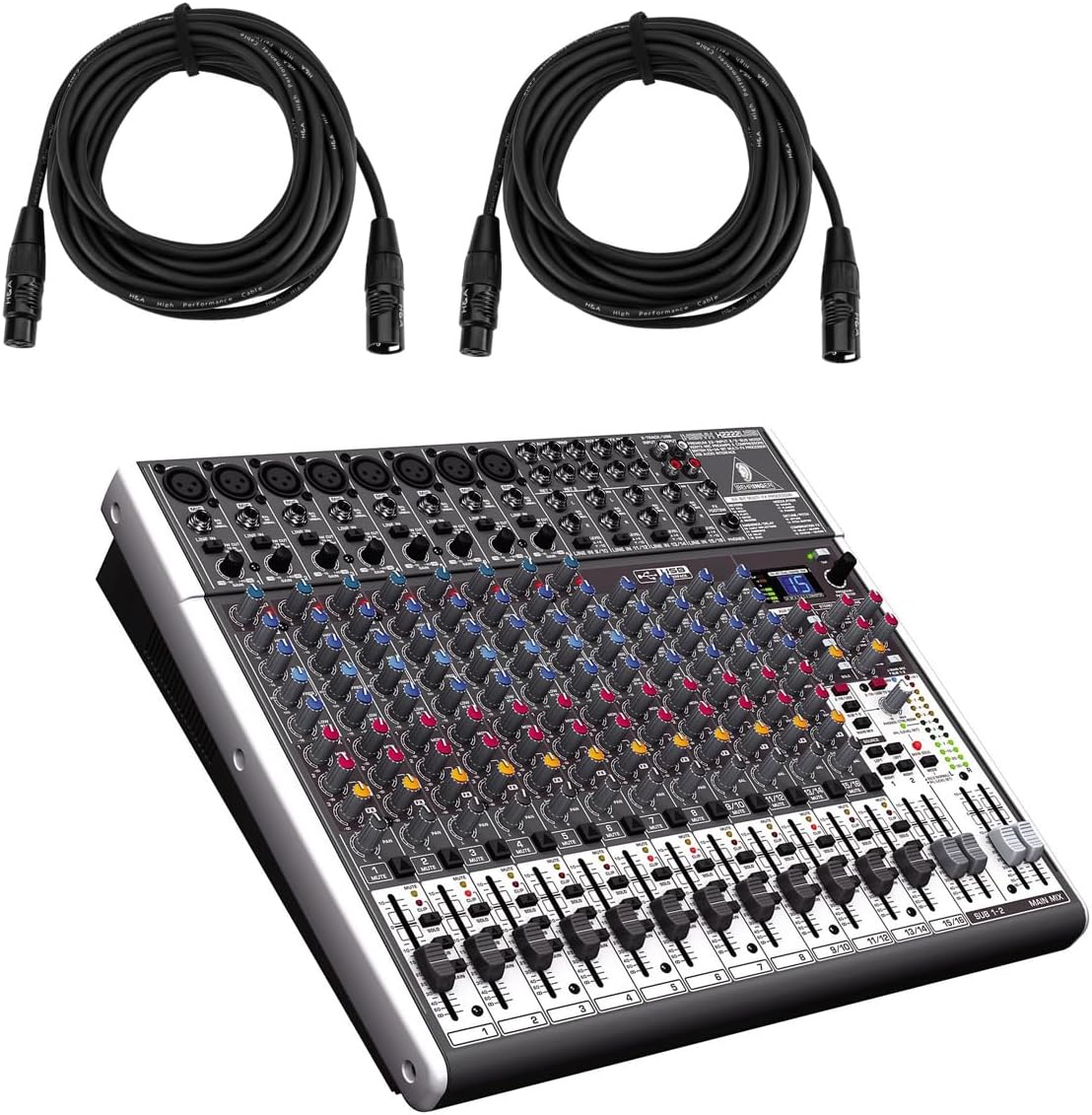
Figure 1: Behringer XENYX X2222USB Mixer with included XLR cables. This image shows the mixer from an angled top-front view, alongside two coiled XLR microphone cables.
คำแนะนำด้านความปลอดภัยที่สำคัญ
- อ่านคำแนะนำเหล่านี้
- เก็บคำแนะนำเหล่านี้ไว้
- จงใส่ใจคำเตือนทั้งหมด
- ปฏิบัติตามคำแนะนำทั้งหมด
- ห้ามใช้อุปกรณ์นี้ใกล้น้ำ
- ทำความสะอาดด้วยผ้าแห้งเท่านั้น
- ห้ามปิดกั้นช่องระบายอากาศ ควรติดตั้งตามคำแนะนำของผู้ผลิต
- ห้ามติดตั้งใกล้แหล่งความร้อน เช่น หม้อน้ำ เครื่องทำความร้อน เตา หรืออุปกรณ์อื่น ๆ (รวมถึง ampเครื่องให้ความร้อน) ที่ผลิตความร้อน
- อย่าละเลยจุดประสงค์ด้านความปลอดภัยของปลั๊กแบบมีขั้วหรือแบบมีสายดิน ปลั๊กแบบมีขั้วจะมีใบมีด 2 ใบ โดยใบหนึ่งจะกว้างกว่าอีกใบ ปลั๊กแบบมีสายดินจะมีใบมีด 2 ใบและขาต่อสายดินที่สาม ขาที่กว้างหรือขาต่อสายดินที่สามนั้นมีไว้เพื่อความปลอดภัยของคุณ หากปลั๊กที่ให้มาไม่พอดีกับเต้ารับของคุณ ให้ปรึกษาช่างไฟฟ้าเพื่อขอเปลี่ยนเต้ารับที่ล้าสมัย
- ปกป้องสายไฟไม่ให้ถูกเหยียบหรือถูกหนีบ โดยเฉพาะที่ปลั๊ก เต้ารับไฟฟ้า และจุดที่สายไฟออกจากเครื่อง
- ใช้เฉพาะอุปกรณ์เสริม/สิ่งที่แนบตามที่ผู้ผลิตกำหนดเท่านั้น
- ใช้ได้เฉพาะกับรถเข็น ขาตั้ง ขาตั้งกล้อง ขายึด หรือโต๊ะที่ผู้ผลิตกำหนด หรือจำหน่ายพร้อมกับอุปกรณ์เท่านั้น เมื่อใช้รถเข็น ควรใช้ความระมัดระวังในการเคลื่อนย้ายรถเข็น/อุปกรณ์รวมกันเพื่อหลีกเลี่ยงการบาดเจ็บจากการล้ม
- ถอดปลั๊กอุปกรณ์นี้ในระหว่างพายุฝนฟ้าคะนองหรือเมื่อไม่ได้ใช้งานเป็นเวลานาน
- แจ้งบริการทั้งหมดให้ช่างที่ผ่านการรับรองทราบ จำเป็นต้องให้บริการเมื่ออุปกรณ์ได้รับความเสียหายในลักษณะใดก็ตาม เช่น สายไฟหรือปลั๊กชำรุด ของเหลวหกหรือมีวัตถุตกลงไปในอุปกรณ์ อุปกรณ์โดนฝนหรือความชื้น ไม่สามารถทำงานได้ตามปกติ หรือตกหล่น
เนื้อหาแพ็คเกจ
โปรดตรวจสอบว่ารายการทั้งหมดที่ระบุไว้ด้านล่างมีอยู่ในแพ็คเกจของคุณหรือไม่:
- Behringer XENYX X2222USB Mixer
- ที่วางแร็ค
- EnergyXT2.5 Software (download/license information)
- 2 x H&A XLR Cables (15' 8mm)
- สายไฟ
- คู่มือการใช้งาน (เอกสารนี้)
การตั้งค่า
Follow these steps to set up your Behringer XENYX X2222USB mixer for initial use.
1. การเชื่อมต่อไฟฟ้า
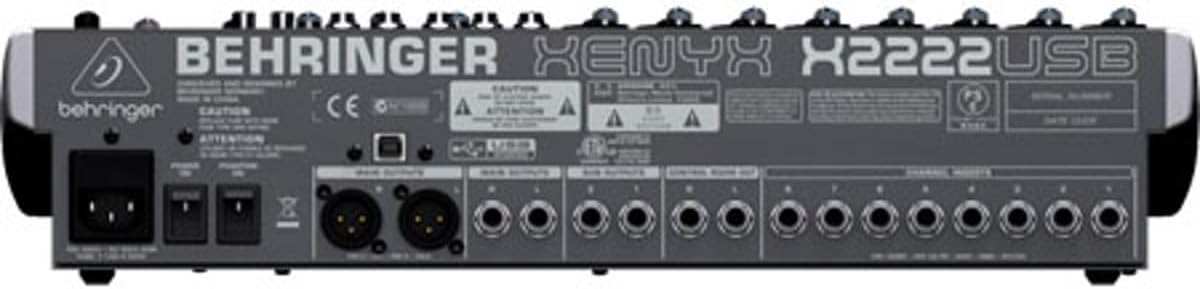
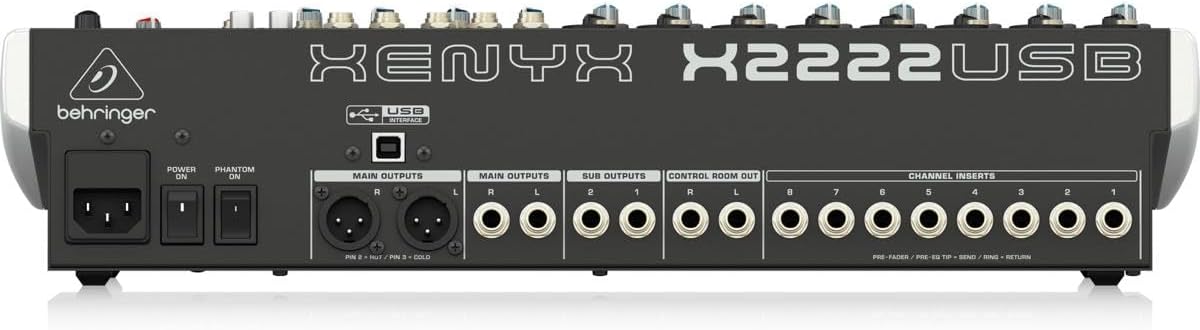
Connect the supplied power cord to the mixer's power input on the rear panel and then to a suitable AC power outlet. Ensure the power switch is in the OFF position before connecting.

Figure 2: Rear panel of the XENYX X2222USB mixer, highlighting power input, main outputs, sub outputs, control room out, and channel inserts.
2. การเชื่อมต่ออินพุตเสียง
The mixer features 8 XLR mic inputs with XENYX preamps and 12 line inputs (8 mono, 4 stereo). Connect your microphones, instruments, and other audio sources to the appropriate input jacks.
- ไมโครโฟน: Use XLR cables (like the included H&A cables) to connect microphones to the XLR inputs (1-8).
- อุปกรณ์ระดับสาย: Use 1/4" TRS or TS cables for line-level instruments or devices to the 1/4" line inputs.
รูปที่ 3: อดีตamples of XLR male (left) and female (right) connectors, commonly used for microphone connections.
3. การเชื่อมต่อเอาต์พุตเสียง
Connect your main speakers, monitors, or recording devices to the mixer's output jacks.
- ผลลัพธ์หลัก: Use XLR or 1/4" TRS cables for your main stereo speakers.
- ห้องควบคุมออก: For connecting studio monitors.
- Sub Outputs: For routing specific groups of channels.
4. USB Connection (for Computer Audio Interface)
Connect the mixer to your computer using a standard USB cable. This enables bi-directional audio transfer for recording and playback.
- Ensure your computer meets the system requirements for the EnergyXT2.5 software.
- Install any necessary drivers (usually automatically detected by modern operating systems, but check Behringer's website if issues arise).
- Install the included EnergyXT2.5 software for advanced recording and production capabilities.
การใช้งานมิกเซอร์
ส่วนนี้ให้ข้อมูลมากกว่าview of the mixer's controls and basic operation.

รูปที่ 4: แผงด้านหน้าด้านบนview of the XENYX X2222USB mixer, displaying all channels, faders, knobs, and the effects section.
Channel Strips (Mono Channels 1-8)
- Gain Control: Adjusts the input sensitivity for microphones and line-level signals. Set this to achieve a healthy signal level without clipping.
- คอมเพรสเซอร์: One-knob compressor for dynamic range control. Turn clockwise to increase compression.
- อีคิว (อีควอไลเซอร์) : 3-band British-style EQ with swept mid.
- สูง: ปรับความถี่เสียงแหลม
- กลาง: Adjusts mid-range frequencies. The ความถี่ knob selects the specific mid-frequency to be adjusted.
- ต่ำ: ปรับความถี่เสียงเบส
- AUX ส่ง: Three auxiliary sends per channel (FX1, MON1, MON2) for routing signals to external effects processors or stagอี มอนิเตอร์
- กระทะ: กำหนดตำแหน่งสัญญาณของช่องสัญญาณในระบบเสียงสเตอริโอ (จากซ้ายไปขวา)
- ใบ้: ปิดเสียงสัญญาณออกของช่องสัญญาณนั้น
- โซโล : แยกช่องสัญญาณเพื่อตรวจสอบ
- ช่องเฟดเดอร์: Controls the output level of the individual channel.
Stereo Channels (9/10, 11/12, 13/14, 15/16)
These channels are designed for stereo line-level inputs and feature simplified controls compared to mono channels.
ตัวประมวลผลเอฟเฟกต์
The built-in 24-bit dual engine effects processor offers 16 editable presets including reverb, chorus, flanger, delay, and pitch shifter. Use the โปรแกรม knob to select an effect and the FX ส่ง controls to apply it to channels.
อินเตอร์เฟสเสียง USB
The integrated USB interface allows for bi-directional audio streaming with your computer. This enables direct recording of your mix and playback of audio from your computer through the mixer.
- การบันทึก: The main stereo mix can be sent to your computer for recording in a DAW (Digital Audio Workstation) like EnergyXT2.5.
- การเล่นซ้ำ: Audio from your computer can be routed back into the mixer for monitoring or integration into your live mix.
ส่วนผสมหลัก
- เฟดเดอร์ปรับระดับเสียงหลัก: ควบคุมระดับเสียงโดยรวมของมิกซ์เสียงหลักแบบสเตอริโอ
- เครื่องวัดระดับ: Provide visual indication of the main mix output level. Aim for levels around 0 dB to avoid clipping.
- พลังปีศาจ (+48V): Activates phantom power for condenser microphones connected to XLR inputs. Ensure microphones requiring phantom power are connected before activating.
การซ่อมบำรุง
การบำรุงรักษาอย่างถูกวิธีจะช่วยให้เครื่องผสมอาหารของคุณมีอายุการใช้งานยาวนานและทำงานได้อย่างมีประสิทธิภาพสูงสุด
- การทำความสะอาด: Use a soft, dry cloth to clean the exterior of the mixer. Avoid using abrasive cleaners, solvents, or waxes. Do not spray liquids directly onto the mixer.
- การระบายอากาศ : Ensure that the ventilation openings are not blocked. Adequate airflow is crucial to prevent overheating.
- พื้นที่จัดเก็บ: When not in use for extended periods, store the mixer in a cool, dry place, away from direct sunlight and extreme temperatures. If possible, use the original packaging or a protective case.
- การจัดการสายเคเบิล: Regularly check all cables for damage. Replace frayed or damaged cables immediately to prevent signal loss or electrical hazards.
การแก้ไขปัญหา
หัวข้อนี้จะกล่าวถึงปัญหาทั่วไปที่คุณอาจพบเจอและเสนอวิธีแก้ไข
| ปัญหา | สาเหตุที่เป็นไปได้ | สารละลาย |
|---|---|---|
| No sound output from main mix. |
|
|
| เสียงเพี้ยน |
|
|
| USB audio not working. |
|
|
ข้อมูลจำเพาะ
| คุณสมบัติ | รายละเอียด |
|---|---|
| ยี่ห้อ | เบห์ริงเกอร์ |
| แบบอย่าง | XENYX X2222USB |
| จำนวนช่องสัญญาณ | 22 (8 โมโน, 4 สเตอริโอ) |
| ไมโครโฟนพรีamps | 8 x XENYX Mic Preamps |
| คอมเพรสเซอร์ | 8 x One-knob Compressors |
| อีควอไลเซอร์ | British-style 3-band EQ with swept mid on mono channels |
| ตัวประมวลผลเอฟเฟกต์ | 24-bit dual engine with 16 presets |
| เทคโนโลยีการเชื่อมต่อ | USB (bi-directional audio interface) |
| ประเภทขั้วต่อเอาท์พุต | XLR, 1/4" TRS |
| แหล่งพลังงาน | สายไฟ |
| ขนาดสินค้า | 20.75 x 15.8 x 6 นิ้ว (52.7 x 40.1 x 15.2 ซม.) |
| น้ำหนักสินค้า | 15.22 ปอนด์ (6.9 กก.) |
ข้อมูลการรับประกัน
The Behringer XENYX X2222USB Mixer bundle includes Adorama's 1-year warranty. For specific terms, conditions, and to register your product, please refer to the warranty documentation provided with your purchase or visit the official Behringer or Adorama support webเว็บไซต์
โปรดเก็บหลักฐานการซื้อของคุณไว้เพื่อเรียกร้องการรับประกัน
สนับสนุน
For further assistance, technical support, or to download the latest drivers and software, please visit the official Behringer webเว็บไซต์:
You may also refer to the Behringer Store on Amazon for product information and related accessories: Behringer Amazon Store


