1. บทนำ
The BESTEK MRJ2001 USB Surge Protector is designed to provide power and charging solutions for electronic devices. It features two AC outlets and two USB charging ports, making it suitable for various environments including home, office, and travel. This manual outlines the product's features, proper usage, safety precautions, and maintenance procedures.

Figure 1: The BESTEK MRJ2001 USB Surge Protector, showcasing its compact design, two standard AC power outlets, two USB charging ports, and the integrated power cord with a cable management strap.
2. สินค้าหมดview
2.1 คุณสมบัติ
- การออกแบบกะทัดรัดและพกพาสะดวก: Measures approximately 6.6 x 2.1 x 1.3 inches, making it easy to transport.
- เต้ารับไฟฟ้าหลายช่อง: Equipped with two standard AC outlets and two smart USB charging ports (2.4A Max total output).
- การป้องกันความปลอดภัยแบบบูรณาการ: Includes safeguards against over-current, overload, overvoltage และไฟฟ้าลัดวงจร
- โครงสร้างทนทาน: Features a fire-retardant PC alloy ABS shell and a ruggedized cord with strain relief.
- การป้องกันฝุ่น: USB ports include protective covers to prevent dust accumulation.
2.2 ส่วนประกอบ
The BESTEK MRJ2001 is designed with both external and internal features for functionality and safety.

Figure 2: An internal diagram of the BESTEK MRJ2001 USB Surge Protector, detailing its construction. Key components visible include the fire-retardant shell, AC sockets, USB ports with dust covers, surge protection components, and the strain relief protective structure for the cord.
- ซ็อกเก็ต AC: Two standard AC outlets for powering devices.
- พอร์ตชาร์จ USB: Two smart USB ports for charging mobile devices.
- USB Dust Cover: Protects USB ports from dust when not in use.
- สายไฟ: Integrated 1.3-foot ruggedized cord.
- Surge Protection Components: Internal circuitry designed to protect against power surges.
- Strain Relief Protective Structure: Reinforces the cord connection for durability.
- Fire-retardant Shell: ด้านนอกคasing made from PC alloy ABS for enhanced safety.
3. การตั้งค่า
To set up your BESTEK MRJ2001 USB Surge Protector:
- Uncoil the power cord from the surge protector.
- Plug the surge protector's power plug into a standard wall outlet.
- The power indicator light (if present) should illuminate, indicating the unit is receiving power.
4. คู่มือการใช้งาน
4.1 การใช้เต้ารับไฟฟ้ากระแสสลับ
Plug your electronic devices directly into the two AC outlets on the surge protector. Ensure that the total power consumption of all connected devices does not exceed the maximum wattage rating of the unit (refer to specifications).
4.2 การใช้งานพอร์ตชาร์จ USB
The two USB ports are designed for charging mobile devices such as smartphones and tablets. These are smart USB ports, which automatically detect your device's charging requirements to deliver optimal current up to 2.4A (total maximum output for both ports).

Figure 3: The BESTEK MRJ2001 USB Surge Protector in use, charging both a tablet and a smartphone via its two smart USB ports, demonstrating its multi-device charging capability.
- เปิดฝาครอบกันฝุ่น USB
- Connect your device's USB charging cable to one of the USB ports.
- เชื่อมต่อปลายสายอีกด้านเข้ากับอุปกรณ์ของคุณ
- อุปกรณ์ควรเริ่มชาร์จโดยอัตโนมัติ
5. ข้อมูลด้านความปลอดภัย
The BESTEK MRJ2001 USB Surge Protector incorporates multiple safety features to protect your connected devices and the unit itself:

Figure 4: This image shows a smartphone actively charging through the surge protector. Below it, four icons visually represent the device's built-in safety features: overload protection, over-current protection, overvoltage การป้องกันและการป้องกันการลัดวงจร
- ระบบป้องกันการโอเวอร์โหลด: ป้องกันความเสียหายจากการดึงพลังงานมากเกินไป
- การป้องกันกระแสเกิน: Safeguards against current exceeding safe limits.
- โอเวอร์โวลtagการป้องกันอี: ปกป้องอุปกรณ์จากแรงดันไฟฟ้าtagอีแหลม
- การป้องกันการลัดวงจร: ตัดไฟอัตโนมัติเมื่อเกิดไฟฟ้าลัดวงจร
ข้อควรระวังเพื่อความปลอดภัยที่สำคัญ:
- Do not exceed the maximum load capacity of the surge protector.
- ห้ามใช้ในสภาพแวดล้อมที่เปียกชื้นหรือใกล้แหล่งน้ำ
- ห้ามถอดประกอบหรือดัดแปลงตัวเครื่อง
- เก็บให้พ้นจากมือเด็ก
- ตรวจสอบให้แน่ใจว่าเสียบปลั๊กเข้ากับเต้ารับติดผนังจนสุดแล้ว
6. การบำรุงรักษา
To ensure the longevity and proper functioning of your surge protector:
- การทำความสะอาด: Disconnect the unit from the power source before cleaning. Use a dry, soft cloth to wipe the exterior. Do not use liquid cleaners or abrasive materials.
- พื้นที่จัดเก็บ: When not in use, store the surge protector in a cool, dry place, away from direct sunlight and extreme temperatures. The integrated cord strap can be used for neat storage.
- การตรวจสอบ: Periodically inspect the power cord and the unit for any signs of damage. If damage is found, discontinue use immediately.
7 การแก้ไขปัญหา
If you encounter issues with your BESTEK MRJ2001 USB Surge Protector, refer to the following common solutions:
- ไม่มีไฟเข้าอุปกรณ์:
- Ensure the surge protector is securely plugged into a functioning wall outlet.
- ตรวจสอบว่าเต้ารับที่ผนังได้รับกระแสไฟฟ้าหรือไม่ โดยลองเสียบอุปกรณ์อื่นเข้าไปทดสอบดู
- Verify that the connected devices are properly plugged into the surge protector's outlets or USB ports.
- อุปกรณ์ USB ชาร์จไม่เข้า:
- Confirm that the USB cable is not damaged and is correctly connected to both the surge protector and the device.
- Test the USB cable with another power source to rule out cable issues.
- Ensure the total current draw for all USB devices does not exceed 2.4A.
- Surge Protector Feels Warm:
- It is normal for the unit to feel slightly warm during operation. However, if it becomes excessively hot, disconnect all devices and unplug the unit immediately. This may indicate an overload or malfunction.
8. ข้อมูลจำเพาะ
Detailed technical specifications for the BESTEK MRJ2001 USB Surge Protector:
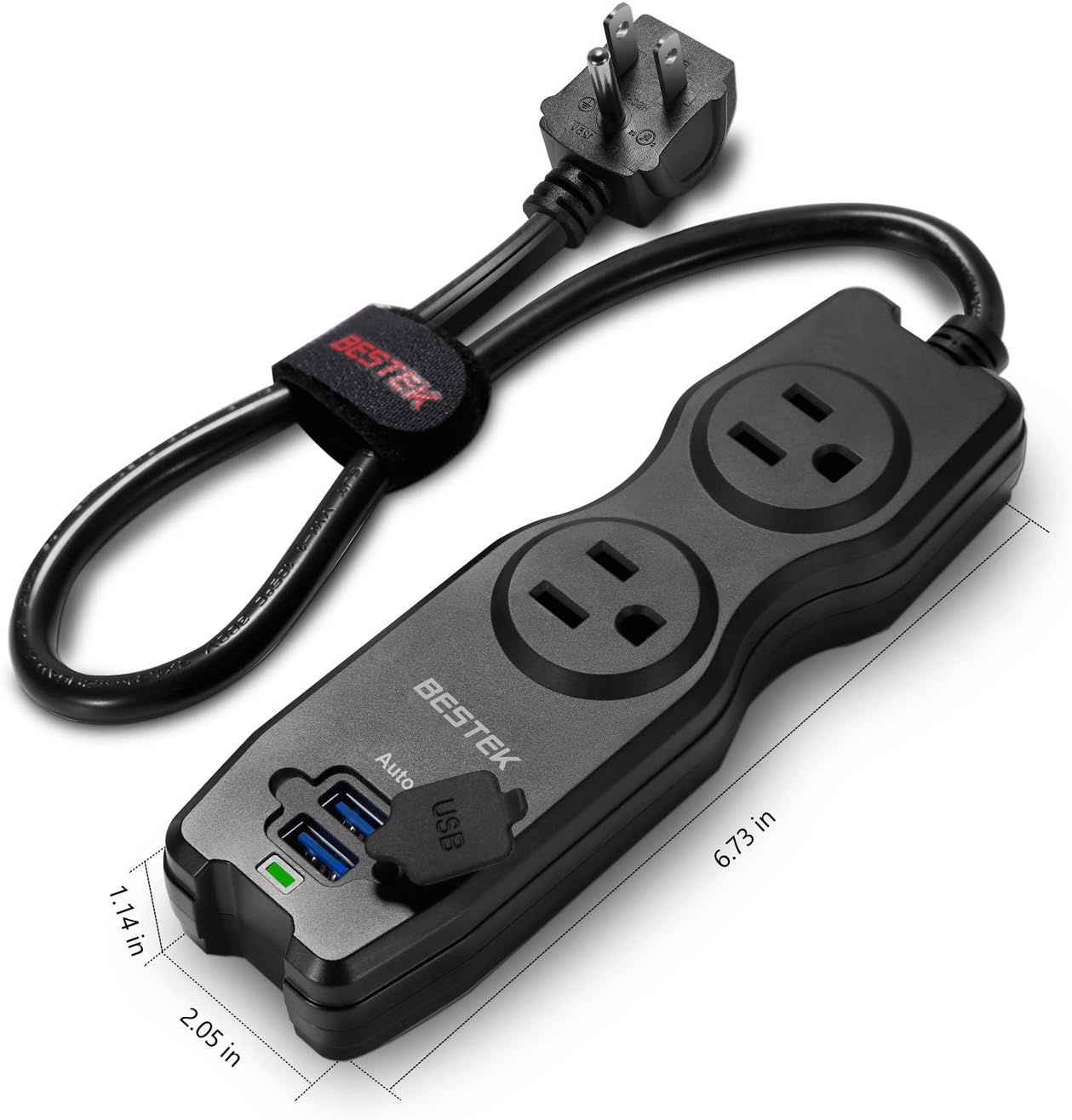
Figure 5: This image provides a visual representation of the BESTEK MRJ2001 USB Surge Protector's physical dimensions, indicating its length as 6.73 inches, width as 2.05 inches, and height as 1.14 inches, emphasizing its compact size.
| ข้อมูลจำเพาะ | ค่า |
|---|---|
| หมายเลขรุ่น | MRJ2001 |
| ขนาดสินค้า | 6.7 x 2 x 1.3 นิ้ว |
| น้ำหนักสินค้า | 12.8 ออนซ์ |
| ปลั๊กไฟทั้งหมด | 2 ร้าน AC |
| พอร์ตชาร์จ USB | 2 Smart USB Ports (2.4A Max Total) |
| เล่มที่tage | 240 โวลต์ (อินพุต) |
| ความยาวสายไฟ | 1.3 ฟุต (ประมาณ 17 นิ้ว) |
| คุณสมบัติพิเศษ | 2-Outlet Travel Power Strip with Dual Smart USB Charging Ports |
| ผู้ผลิต | เบสท์เทค โกลบอล แอลแอลซี |
9. การรับประกันและการสนับสนุน
The BESTEK MRJ2001 USB Surge Protector comes with an รับประกัน 18 เดือน. For warranty claims, technical support, or any inquiries, please contact BESTEK customer service. Refer to the product packaging or the official BESTEK webเว็บไซต์สำหรับข้อมูลการติดต่อ

Figure 6: The BESTEK MRJ2001 USB Surge Protector neatly packed into a backpack compartment alongside other travel essentials like sunglasses and a tablet, illustrating its ease of portability for travel or daily use.


