1. บทนำ
Thank you for choosing the Sceptre 32-inch Class FHD (1080P) LED TV with Built-in DVD, Model E325BD-FSR. This manual provides essential information for the proper setup, operation, and maintenance of your new television. Please read this manual thoroughly before using the product and retain it for future reference.
2. ข้อมูลด้านความปลอดภัย
เพื่อให้มั่นใจถึงการทำงานที่ปลอดภัยและป้องกันความเสียหาย โปรดปฏิบัติตามข้อควรระวังด้านความปลอดภัยต่อไปนี้:
- อ่านคำแนะนำทั้งหมดก่อนใช้งานทีวี
- เก็บคู่มือนี้ไว้เพื่อใช้อ้างอิงในอนาคต
- เอาใจใส่คำเตือนทั้งหมดเกี่ยวกับเครื่องและในคู่มือการใช้งาน
- ปฏิบัติตามคำแนะนำทั้งหมด
- ทำความสะอาดด้วยผ้าแห้งเท่านั้น
- ตรวจสอบให้แน่ใจว่ามีการระบายอากาศที่เหมาะสม อย่าปิดกั้นช่องระบายอากาศใดๆ
- ปกป้องสายไฟจากการถูกเหยียบหรือถูกหนีบ
- ถอดปลั๊กทีวีในระหว่างที่มีพายุฝนฟ้าคะนองหรือเมื่อไม่ได้ใช้งานเป็นเวลานาน
- ส่งต่อการบริการทั้งหมดไปยังบุคลากรบริการที่มีคุณสมบัติเหมาะสม
3. เนื้อหาบรรจุภัณฑ์
กรุณาทำเครื่องหมายในช่องสำหรับรายการต่อไปนี้:
- Sceptre 32-inch Class FHD (1080P) LED TV with Built-in DVD (Model E325BD-FSR)
- แท่นวางทีวี
- รีโมทคอนโทรล
- สายไฟ
- 6ft Indoor 3-Outlet Extension Cord
- คู่มือการใช้งาน (เอกสารนี้)
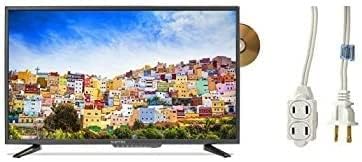
Image: The Sceptre 32-inch Class FHD LED TV with its built-in DVD player visible on the side, accompanied by a 6ft indoor 3-outlet extension cord.
4. การตั้งค่า
4.1 การติดตั้งขาตั้ง
- วางหน้าจอทีวีลงบนพื้นผิวที่นุ่มและสะอาดอย่างระมัดระวังเพื่อป้องกันรอยขีดข่วน
- จัดวางขาตั้งทีวีให้ตรงกับรูสำหรับติดตั้งที่ด้านล่างของทีวี
- ยึดขาตั้งด้วยสกรูที่ให้มา อย่าขันแน่นเกินไป
4.2 การต่อสายไฟ
Plug the power cord into the TV's power input, then connect the other end to a standard electrical outlet. Use the included 6ft indoor 3-outlet extension cord if additional outlets are needed.
4.3 การเชื่อมต่ออุปกรณ์ภายนอก
Your TV features various input ports for connecting external devices:
- ช่องต่อ HDMI: For high-definition video and audio from devices like Blu-ray players, game consoles, or cable/satellite boxes.
- เสาอากาศ/สายเคเบิล (RF): สำหรับการเชื่อมต่อเสาอากาศสำหรับการออกอากาศทางอากาศหรือการเชื่อมต่อเคเบิลทีวี
- ยูเอสบี: สำหรับการเล่นสื่อจากอุปกรณ์จัดเก็บข้อมูล USB
เชื่อมต่ออุปกรณ์ของคุณเข้ากับพอร์ตที่เหมาะสมที่ด้านหลังหรือด้านข้างของทีวี
5. คู่มือการใช้งาน
5.1 เปิด/ปิดเครื่อง
กดปุ่ม พลัง button on the remote control or on the TV itself to turn the TV on or off.
5.2 การเลือกแหล่งที่มาของอินพุต
กดปุ่ม ป้อนข้อมูล or แหล่งที่มา button on the remote control to cycle through available input sources (e.g., TV, HDMI1, HDMI2, DVD, USB).
5.3 Channel Scan (TV Input)
If using an antenna or cable connection, select the 'TV' input source. Navigate to the TV's menu, find the 'Channel' or 'Setup' section, and initiate an 'Auto Scan' or 'Auto Program' to find available channels.
5.4 การใช้งานเครื่องเล่นดีวีดีในตัว
- Ensure the TV is powered on and the input source is set to 'DVD'.
- Gently insert a DVD disc into the disc slot on the side of the TV, label side facing up. The TV will automatically detect the disc and begin playback.
- Use the DVD control buttons on your remote control (Play, Pause, Stop, Fast Forward, Rewind, Skip) to manage playback.
- หากต้องการนำแผ่นดิสก์ออก ให้กดปุ่ม ดีดออก บนรีโมทคอนโทรลหรือทีวี
5.5 การนำทางเมนู
กดปุ่ม เมนู button on the remote control to access the TV's settings. Use the arrow buttons to navigate and the เข้า or OK กดปุ่มเพื่อเลือกตัวเลือก กด EXIT or เมนู อีกครั้งเพื่อปิดเมนู
6. การบำรุงรักษา
6.1 การทำความสะอาดหน้าจอ
เช็ดหน้าจอเบาๆ ด้วยผ้านุ่ม แห้ง และไม่เป็นขุย สำหรับรอยฝังแน่น ให้เช็ดเบาๆampชุบผ้าด้วยน้ำหรือน้ำยาทำความสะอาดหน้าจอโดยเฉพาะ ห้ามฉีดน้ำยาลงบนหน้าจอโดยตรง
6.2 การทำความสะอาดภายนอก
Wipe the TV's exterior with a soft, slightly damp ใช้ผ้าเช็ดทำความสะอาด หลีกเลี่ยงการใช้สารเคมีรุนแรง น้ำยาทำความสะอาดที่มีฤทธิ์กัดกร่อน หรือตัวทำละลาย เพราะอาจทำให้พื้นผิวเสียหายได้
6.3 พื้นที่จัดเก็บ
If storing the TV for an extended period, unplug it from the power outlet and store it in a cool, dry place, preferably in its original packaging.
7 การแก้ไขปัญหา
ก่อนติดต่อฝ่ายสนับสนุนลูกค้า ให้ลองใช้วิธีแก้ปัญหาทั่วไปดังต่อไปนี้:
- ไม่มีไฟฟ้า: Ensure the power cord is securely plugged into both the TV and a working electrical outlet. Check if the outlet has power.
- ไม่มีรูปภาพ: Verify the correct input source is selected. Check all cable connections (HDMI, antenna) are secure.
- ไม่มีเสียง: Check the volume level and ensure the TV is not muted. Verify audio settings in the menu.
- รีโมทคอนโทรลไม่ทำงาน: เปลี่ยนแบตเตอรี่ ตรวจสอบให้แน่ใจว่าไม่มีสิ่งกีดขวางระหว่างรีโมทและเซ็นเซอร์อินฟราเรดของทีวี
- ปัญหาในการเล่น DVD: Ensure the disc is clean and free of scratches. Verify the disc is inserted correctly. Confirm the input source is set to 'DVD'.
8. ข้อมูลจำเพาะ
| แบบอย่าง | E325BD-FSR |
| ขนาดหน้าจอ | 31.5 นิ้ว |
| ปณิธาน | 1080p (ฟูลเอชดี) |
| คุณสมบัติพิเศษ | Flat Screen, Built-in DVD Player |
| เทคโนโลยีจูนเนอร์ | เอทีเอสซี |
| วิธีการควบคุม | ระยะไกล |
| พื้นผิวหน้าจอ | มันเงา |
| Year (Manufacturing) | 2017 |
| บริการอินเทอร์เน็ตที่รองรับ | Blockbuster |
9. การรับประกันและการสนับสนุน
Your Sceptre TV is covered by a manufacturer's warranty. For specific warranty details, please refer to the warranty card included with your product or visit the official Sceptre website. For technical assistance, troubleshooting beyond this manual, or warranty claims, please contact Sceptre customer support.


