Sharp PNB501 50-Inch Monitor User Manual
Model: PN-B501
การแนะนำ
Thank you for choosing the Sharp PNB501 50-inch monitor. This display is designed for high-quality visual performance, featuring a 1920x1080 resolution, a 5000:1 contrast ratio, and a built-in System-on-Chip (SoC) for enhanced functionality. This manual provides essential information for the proper installation, operation, and maintenance of your monitor. Please read it thoroughly before use and keep it for future reference.

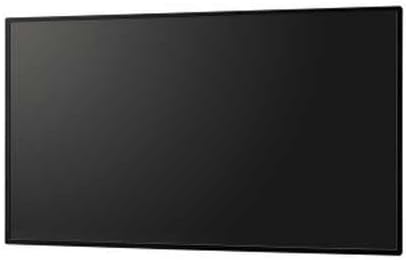
รูปที่ 1 : ด้านหน้า view of the Sharp PNB501 50-inch monitor, showcasing การออกแบบที่เพรียวบาง
การตั้งค่า
Follow these steps to set up your Sharp PNB501 monitor. Ensure all components are present and undamaged before proceeding.
1. การแกะกล่องและการจัดวาง
- นำจอภาพออกจากบรรจุภัณฑ์อย่างระมัดระวัง เก็บวัสดุบรรจุภัณฑ์ทั้งหมดไว้สำหรับการขนส่งหรือจัดเก็บในอนาคต
- Place the monitor on a stable, flat surface or mount it securely using a compatible VESA mount (sold separately). Ensure adequate ventilation around the display.
2. การเชื่อมต่อสายเคเบิล
The PNB501 features various input ports for versatile connectivity.
รูปที่ 2: ด้านหลัง view ของจอภาพ โดยเน้นพอร์ตอินพุตและเอาต์พุตต่างๆ
- การเชื่อมต่อไฟฟ้า: Connect the power cord to the monitor's AC inlet and then to a grounded electrical outlet.
- อินพุตวิดีโอ: Connect your video source (e.g., PC, media player) to the monitor using a DisplayPort cable (Display Port x 1 Mini) or other available video inputs.
- การเชื่อมต่อเสียง: If your video source does not transmit audio via the video cable, connect an audio cable from your source to the monitor's audio input.
- การเชื่อมต่อเครือข่าย: For network features or SoC functionality, connect an Ethernet cable to the LAN port.
3. การเปิดเครื่องครั้งแรก
- กดปุ่มเปิด/ปิดบนจอภาพหรือรีโมทคอนโทรล
- The monitor will display the Sharp logo and then search for an active input signal.
- If no signal is detected, ensure your source device is powered on and the correct input is selected on the monitor.
คำแนะนำการใช้งาน
This section covers the basic operation of your Sharp PNB501 monitor.
1. เปิด/ปิดเครื่อง
- หากต้องการเปิดจอภาพ ให้กดปุ่ม พลัง button on the monitor's control panel or the remote control.
- To turn off the monitor, press the พลัง button again. The monitor will enter standby mode.
2. การเลือกอินพุต
ในการสลับระหว่างแหล่งวิดีโอที่แตกต่างกัน:
- กดปุ่ม ป้อนข้อมูล or แหล่งที่มา button on the remote control or monitor.
- Use the navigation buttons to select the desired input (e.g., DisplayPort, HDMI).
- กด เข้า or OK เพื่อยืนยันการเลือกของคุณ
3. การนำทางเมนู
Access and adjust monitor settings using the On-Screen Display (OSD) menu:
- กดปุ่ม เมนู ปุ่มสำหรับเปิดเมนู OSD
- ใช้ ขึ้น/ลง or ซ้าย/ขวา navigation buttons to browse through menu options (e.g., Picture, Audio, System).
- กด เข้า or OK to select a sub-menu or adjust a setting.
- Use the navigation buttons to change values or select options.
- กด เมนู อีกครั้งหรือ ทางออก เพื่อปิด OSD
การซ่อมบำรุง
Proper maintenance ensures the longevity and optimal performance of your Sharp PNB501 monitor.
1. การทำความสะอาดหน้าจอ
- ปิดและถอดปลั๊กจอภาพทุกครั้งก่อนทำความสะอาด
- ใช้ผ้านุ่มไม่เป็นขุยเช็ดเล็กน้อยampเคลือบด้วยน้ำหรือสารทำความสะอาดหน้าจอโดยเฉพาะ
- Gently wipe the screen surface. Avoid applying excessive pressure.
- ห้ามใช้สารทำความสะอาดที่มีฤทธิ์กัดกร่อน แอลกอฮอล์ เบนซีน หรือทินเนอร์ เนื่องจากสารเหล่านี้อาจทำให้พื้นผิวหน้าจอเสียหายได้
2. การทำความสะอาดตู้
- Wipe the monitor cabinet with a soft, dry cloth.
- สำหรับคราบฝังแน่น ให้ใช้ผ้าชุบน้ำหมาดๆ เช็ดเบาๆampened with a mild, non-abrasive detergent solution, then wipe dry.
3. การจัดเก็บ
- If storing the monitor for an extended period, place it in its original packaging to protect it from dust and physical damage.
- เก็บในที่เย็นและแห้ง ห่างจากแสงแดดโดยตรงและอุณหภูมิที่สูงเกินไป
การแก้ไขปัญหา
This section provides solutions to common issues you might encounter with your Sharp PNB501 monitor. If the problem persists, please contact customer support.
ไม่มีไฟฟ้า
- ตรวจสอบให้แน่ใจว่าสายไฟเชื่อมต่อกับจอภาพและเต้ารับไฟฟ้าที่ใช้งานได้แน่นหนาดีแล้ว
- ตรวจสอบว่าเต้ารับไฟฟ้าใช้งานได้หรือไม่โดยเสียบอุปกรณ์อื่น
- Press the power button firmly on the monitor or remote control.
ไม่มีสัญญาณ / หน้าจอว่างเปล่า
- Verify that the video cable (e.g., DisplayPort) is securely connected to both the monitor and the source device.
- Ensure the source device (e.g., computer) is powered on and outputting a signal.
- Use the monitor's input selection feature to ensure the correct input source is chosen.
- Try connecting a different video source or cable to rule out a faulty component.
คุณภาพของภาพไม่ดี
- Check the resolution settings on your source device. Ensure it is set to the monitor's native resolution (1920x1080).
- Adjust picture settings (brightness, contrast, sharpness) via the OSD menu.
- Ensure the video cable is not damaged or excessively long.
ไม่มีเสียง
- Increase the volume on the monitor and the source device.
- Check if the audio cable is properly connected (if not using audio over DisplayPort).
- Ensure the audio output on your source device is not muted or set to an incorrect output.
ข้อมูลจำเพาะ
Detailed technical specifications for the Sharp PNB501 monitor:
| คุณสมบัติ | ข้อมูลจำเพาะ |
|---|---|
| ยี่ห้อ | คม |
| หมายเลขรุ่น | PN-B501 |
| ขนาดหน้าจอแสดงผล | 49.5 นิ้ว |
| ความละเอียดหน้าจอ | 1920x1080 (FHD1080p) |
| อัตราส่วนภาพ | 16:9 น. |
| คำอธิบายพื้นผิวหน้าจอ | มันเงา |
| น้ำหนักสินค้า | 49 ปอนด์ |
| ขนาดสินค้า (กxยxส) | 44.21 x 2.76 x 25.47 นิ้ว |
| จำนวนโปรเซสเซอร์ | 4 (Built-in SoC) |
| ผู้ผลิต | ชาร์ป อิเล็กทรอนิกส์ คอร์ปอเรชั่น |
| วันที่พร้อมใช้งานครั้งแรก | 2 มีนาคม 2018 |
การรับประกันและการสนับสนุน
Sharp stands behind the quality of its products. For specific warranty terms and conditions, please refer to the warranty card included with your product or visit the official Sharp website. General support information is provided below.
การสนับสนุนลูกค้า
If you require technical assistance, have questions about your product, or need to arrange for service, please contact Sharp customer support. You can often find contact information on the official Sharp webเว็บไซต์หรือผ่านทางร้านค้าปลีกที่คุณซื้อผลิตภัณฑ์
For additional resources and product information, you may visit the official Sharp store page:
Visit the Sharp Store on Amazon
Please note that return policies, such as the 30-day easy returns, are typically handled by the retailer.


