1. บทนำ
The MEE audio EarBoost EB1 earphones are designed to provide a personalized audio experience through adaptive sound enhancement. Utilizing a dedicated companion application, these earphones tailor sound output to your unique hearing profile, aiming to restore detail and improve clarity for music and media playback.
2. เนื้อหาบรรจุภัณฑ์
ตรวจสอบว่ารายการทั้งหมดที่ระบุไว้ด้านล่างนี้รวมอยู่ในแพ็คเกจของคุณ:
- EarBoost EB1 earphones
- กระเป๋าใส่อุปกรณ์ป้องกัน
- สายชาร์จไมโคร USB
- Eartips (3 sizes: small, medium, large)
- เอียร์ฟิน
- คู่มือการใช้งาน (เอกสารนี้)

Image: The EarBoost EB1 earphones, protective carrying case, Micro-USB charging cable, three sizes of eartips, and earfins are displayed.
3. การตั้งค่า
3.1 การชาร์จหูฟัง
Before initial use, fully charge your EarBoost EB1 earphones. Connect the supplied Micro-USB charging cable to the charging port on the earphones and to a USB power source. The LED indicator will show charging status and turn off when fully charged. A full charge typically takes approximately 2 hours.
3.2 Selecting Eartips and Earfins
For optimal sound quality and comfort, select the eartips and earfins that best fit your ears. Experiment with the three provided sizes to find a secure and comfortable seal. A proper seal is crucial for bass response and noise isolation.

Image: A person wearing the EarBoost EB1 earphones, demonstrating the ergonomic earpiece design with flexible earfins for a secure fit.
3.3 การจับคู่บลูทูธ
- ตรวจสอบให้แน่ใจว่าหูฟังปิดอยู่
- Press and hold the multifunction button on the inline remote until the LED indicator flashes red and blue, indicating pairing mode.
- บนอุปกรณ์เสียงของคุณ (สมาร์ทโฟน แท็บเล็ต ฯลฯ) ให้เปิดใช้งานบลูทูธและค้นหาอุปกรณ์ใหม่
- Select 'MEE audio EB1' from the list of available devices.
- เมื่อเชื่อมต่อแล้ว ไฟ LED จะกะพริบเป็นสีน้ำเงินเป็นระยะ
3.4 Companion App Installation
To utilize the adaptive audio enhancement features, download the MEE audio companion app from the iOS App Store or Google Play Store. ค้นหา 'MEE audio EarBoost' or 'MEE audio' to find the correct application.

Image: A smartphone displaying the MEE audio EarBoost app, which allows users to test their hearing and create a personalized audio profile.
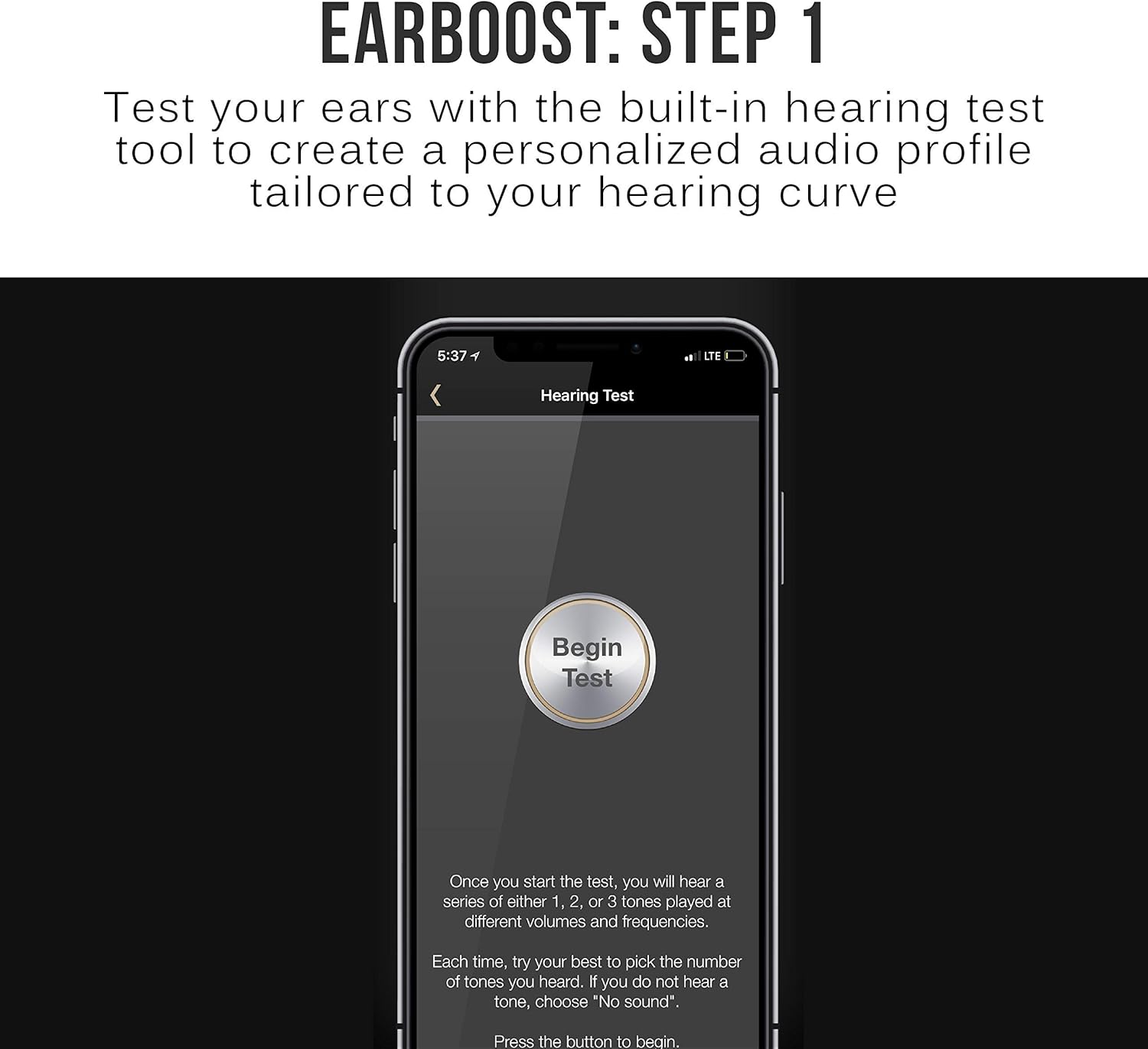
Image: The EarBoost app's 'Hearing Test' screen, prompting the user to begin the test to create a personalized audio profile.
4. การใช้งานหูฟัง
4.1 การควบคุมขั้นพื้นฐาน
The inline remote provides control over media playback and calls:
- Multifunction Button (Center): Press once to play/pause music or answer/end calls. Press and hold to power on/off or enter pairing mode.
- เพิ่มระดับเสียง (+): กดเพื่อเพิ่มระดับเสียง กดค้างไว้เพื่อเล่นเพลงถัดไป
- ลดเสียงลง (-): กดเพื่อลดระดับเสียง กดค้างไว้เพื่อเล่นเพลงก่อนหน้า

Image: A person wearing the EarBoost EB1 earphones, demonstrating the use of the integrated microphone and inline controls for calls and music playback.
4.2 Adaptive Audio Enhancement
The core feature of the EarBoost EB1 is its adaptive audio enhancement, managed through the companion app:
- การทดสอบการได้ยิน: Open the MEE audio app and follow the on-screen instructions to perform a hearing test. This test measures your hearing sensitivity across various frequencies.
- โปรfile การสร้าง: Based on your hearing test results, the app generates a personalized audio profile. โปรนี้file is then uploaded to the EarBoost EB1 earphones.
- Enhanced Listening: เมื่อมืออาชีพfile is active, the earphones will apply the personalized enhancement to all audio played through them, regardless of the connected Bluetooth device.
- โปรfile การปรับแต่ง: The app allows for further fine-tuning of your audio profile if desired. You can also switch between different profiles or disable the enhancement.

Image: The EarBoost app's 'Hearing Test Results' screen, displaying a graph of the user's hearing curve and indicating that a personalized audio enhancement profile has been calculated.

Image: A hand adjusting the equalizer settings within the MEE audio EarBoost app, demonstrating the ability to customize the audio profile.
4.3 HD Wireless Sound
The EarBoost EB1 supports Qualcomm aptX Low Latency technology, which helps to minimize audio delay and improve lip-sync when watching videos or playing games with compatible Bluetooth devices. This contributes to clear, distortion-free digital sound.

Image: A person wearing the EarBoost EB1 earphones, illustrating their use for enjoying HD wireless sound from a smartphone.
5. การบำรุงรักษา
To ensure the longevity and optimal performance of your EarBoost EB1 earphones:
- การทำความสะอาด: Regularly clean the eartips and earphone nozzles with a soft, dry cloth. Remove eartips for thorough cleaning if necessary. Avoid using harsh chemicals or abrasive materials.
- พื้นที่จัดเก็บ: When not in use, store the earphones in the provided protective carrying case to prevent damage from dust, moisture, and physical impact.
- หลีกเลี่ยงเงื่อนไขที่รุนแรง: Do not expose the earphones to extreme temperatures, direct sunlight for extended periods, or liquids.
6 การแก้ไขปัญหา
If you encounter issues with your EarBoost EB1 earphones, refer to the following common solutions:
- ไม่มีเสียง: Ensure the earphones are charged, powered on, and correctly paired with your device. Check the volume levels on both the earphones and your audio source.
- ปัญหาการจับคู่: Make sure the earphones are in pairing mode (flashing red and blue LED). Turn off and on your device's Bluetooth, then try pairing again. Clear previous pairings from your device's Bluetooth list if necessary.
- Poor Sound Quality / Skipping: Ensure the earphones are within the Bluetooth operating range (up to 10 meters) of your device. Avoid physical obstructions between the earphones and the device. Check for interference from other wireless devices.
- App Not Working / License Not Detected: Ensure your smartphone's operating system is up to date. Try reinstalling the MEE audio app. Contact MEE audio support if the issue persists.
- แบตเตอรี่ไม่ชาร์จ: Verify that the Micro-USB cable is securely connected to both the earphones and the power source. Try a different charging cable or USB port.
7. ข้อมูลจำเพาะ
| คุณสมบัติ | ข้อมูลจำเพาะ |
|---|---|
| ชื่อรุ่น | EB1-GM |
| เทคโนโลยีการเชื่อมต่อ | บลูทูธ |
| เทคโนโลยีการสื่อสารไร้สาย | บลูทูธ 4.1 |
| ช่วงการใช้งานบลูทูธ | 30ฟุต (10ม.) |
| บลูทูธ โปรfileรองรับ | A2DP, HSP, HFP, AVRCP |
| Additional Audio Codecs Supported | SBC, Qualcomm aptX, Qualcomm aptX Low Latency |
| ขนาดไดร์เวอร์ | 6 มม. |
| การตอบสนองต่อความถี่ของลำโพง | 20 เฮิรตซ์ ถึง 20 กิโลเฮิรตซ์ |
| ความต้านทานของลำโพง | 16 โอห์มที่ 1 กิโลเฮิรตซ์ |
| ความไวของลำโพง | 99+/-3 dB (1 mW at 1 kHz) |
| ประเภทแบตเตอรี่ | Built-In Rechargeable Lithium Ion |
| เวลาเล่นเพลง | 6 ชั่วโมง |
| เวลาสนทนา | 7 ชั่วโมง |
| เวลาสแตนด์บาย | 180 ชั่วโมง |
| เวลาในการชาร์จ | 2 ชั่วโมง |
| ประเภทขั้วต่อการชาร์จ | ไมโคร USB |
| ทิศทางไมค์ | รอบทิศทาง |
| การตอบสนองความถี่ของไมโครโฟน | 100 เฮิรตซ์ ถึง 10 กิโลเฮิรตซ์ |
| ความไวของไมโครโฟน | -42+/-3 dB |
| ข้อต่อหู | Intraaural (In-Ear) |
| ความยาวสายเคเบิล | 21.5 นิ้ว (55 ซม.) |
| น้ำหนัก | 0.5 ออนซ์ (16 กรัม) |
| วัสดุ | พลาสติก |
8. การรับประกันและการสนับสนุน
The MEE audio EarBoost EB1 earphones come with a การรับประกันจากผู้ผลิต 1 ปี. For warranty claims, technical support, or further assistance, please refer to the contact information provided in your product packaging or visit the official MEE audio webเว็บไซต์.


