1. บทนำ
ขอบคุณสำหรับการซื้อasing the Sharp HT-SB140MT 2.0 150W Soundbar. This soundbar is designed to enhance your audio experience, providing clear and powerful sound for your television, music, and other media. With its sleek design and versatile connectivity options, including Bluetooth, HDMI ARC/CEC, Optical, and Auxiliary inputs, it integrates seamlessly into any home entertainment setup. This manual provides essential information for safe and effective use, including setup, operation, maintenance, and troubleshooting.
2. ข้อมูลด้านความปลอดภัย
- แหล่งพลังงาน: ตรวจสอบแหล่งจ่ายไฟ voltage matches the requirements specified on the soundbar. Use only the provided power cable.
- การระบายอากาศ : Do not block any ventilation openings. Maintain adequate space around the soundbar for proper airflow.
- น้ำและความชื้น: อย่าให้ซาวด์บาร์โดนน้ำหยดหรือน้ำกระเซ็น อย่าวางวัตถุที่บรรจุของเหลว เช่น แจกัน ไว้บนตัวเครื่อง
- ความร้อน: Do not place the soundbar near heat sources such as radiators, heat registers, stoves, or other apparatus (including ampเครื่องให้ความร้อน) ที่ผลิตความร้อน
- การทำความสะอาด: Unplug the soundbar from the power outlet before cleaning. Use a dry, soft cloth for cleaning. Do not use liquid cleaners or aerosol cleaners.
- การบริการ: อย่าพยายามให้บริการผลิตภัณฑ์นี้ด้วยตนเอง ส่งต่อการบริการทั้งหมดไปยังช่างบริการที่ผ่านการรับรอง
- แบตเตอรี่: The remote control uses a CR2 battery. Ensure correct polarity when inserting batteries. Do not mix old and new batteries.
3. เนื้อหาบรรจุภัณฑ์
กรุณาตรวจสอบว่าสินค้าทั้งหมดมีอยู่ในแพ็คเกจ:
- Sharp HT-SB140MT Soundbar
- รีโมทคอนโทรล
- สายไฟ
- คู่มือการใช้งาน (เอกสารนี้)
4. สินค้าหมดview

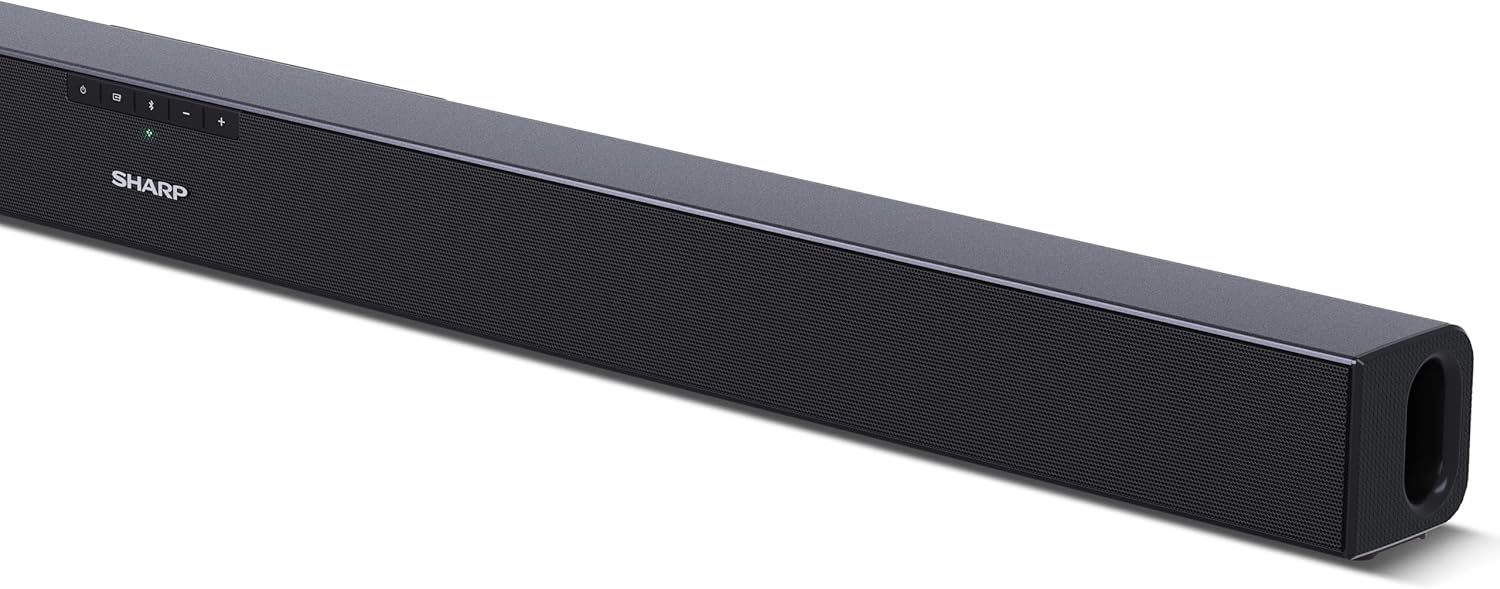
รูปที่ 4.1 : ด้านหน้า View
The front of the soundbar features the Sharp logo and LED indicators for source selection and status. Control buttons for power, input, and volume are located on the top panel.
รูปที่ 4.2: ด้านหลัง View (การเชื่อมต่อ)
The rear panel provides all necessary connection ports: HDMI ARC, Optical (S/PDIF), and Auxiliary (3.5mm) input, along with the power input.

รูปที่ 4.3: รีโมทคอนโทรล
The included remote control allows for convenient operation of the soundbar, including power, input selection, volume, bass, and treble adjustments.
5. การตั้งค่า
5.1 การจัดวาง
The Sharp HT-SB140MT Soundbar can be placed on a flat surface, such as a TV stand, or wall-mounted. Its slim profile of 6 cm allows it to fit easily under most TV screens without obstructing the view.

Figure 5.1: Soundbar Placement
The soundbar is ideally positioned directly in front of your television for optimal sound projection.
5.2 การเชื่อมต่อกับทีวีของคุณ
เลือกวิธีการเชื่อมต่อวิธีใดวิธีหนึ่งต่อไปนี้:
- HDMI ARC/CEC (แนะนำ): Connect an HDMI cable (not included) from the HDMI ARC port on your TV to the HDMI ARC port on the soundbar. This allows your TV remote to control the soundbar's volume and power. Ensure HDMI ARC/CEC is enabled in your TV's settings.
- Digital Optical Audio (S/PDIF): Connect an optical cable (not included) from the Optical Out port on your TV to the OPTICAL IN port on the soundbar. Select the Optical input on the soundbar.
- ช่องเสียบเสริม (AUX): Connect a 3.5mm audio cable (not included) from the headphone jack or AUX Out port on your TV to the AUX IN port on the soundbar. Select the AUX input on the soundbar.
5.3 การเชื่อมต่อสายไฟ
After connecting the audio cable, plug the power cable into the soundbar's power input and then into a wall outlet (220-240V / 50Hz).
6. คู่มือการใช้งาน
6.1 เปิด/ปิดเครื่อง
กดปุ่มเปิด/ปิดบนซาวด์บาร์หรือรีโมทคอนโทรลเพื่อเปิดหรือปิดเครื่อง
6.2 การเลือกแหล่งที่มา
Press the Input button on the soundbar or the remote control repeatedly to cycle through the available input sources: HDMI ARC, Optical, AUX, and Bluetooth. The LED indicator on the soundbar will change to reflect the selected source.
6.3 การปรับระดับเสียง
Use the Volume Up (+) and Volume Down (-) buttons on the soundbar or the remote control to adjust the sound level.
6.4 การจับคู่บลูทูธ
ในการเชื่อมต่ออุปกรณ์บลูทูธ:
- Select Bluetooth input on the soundbar. The Bluetooth LED indicator will flash, indicating pairing mode.
- On your smart device (smartphone, tablet, etc.), enable Bluetooth and search for available devices.
- Select "SHARP HT-SB140MT" from the list of devices.
- Once connected, the Bluetooth LED indicator will stop flashing and remain solid. You can now stream audio wirelessly to the soundbar.
6.5 โหมดเสียง (อีควอไลเซอร์)
The soundbar features an equalizer with different sound modes to optimize audio for various content types. Use the EQ button on the remote control to cycle through these modes (e.g., Movie, Music, News). You can also adjust Bass and Treble levels using dedicated buttons on the remote.
7. การบำรุงรักษา
7.1 การทำความสะอาด
To clean the soundbar, unplug it from the power outlet. Use a soft, dry, lint-free cloth to wipe down the surfaces. Do not use abrasive cleaners, waxes, or solvents as they may damage the finish.
7.2 พื้นที่จัดเก็บ
If you plan to store the soundbar for an extended period, disconnect it from the power supply and store it in a cool, dry place, away from direct sunlight and extreme temperatures.
8 การแก้ไขปัญหา
หากคุณพบปัญหาเกี่ยวกับซาวด์บาร์ โปรดดูปัญหาทั่วไปและวิธีแก้ไขต่อไปนี้:
| ปัญหา | สาเหตุที่เป็นไปได้ | สารละลาย |
|---|---|---|
| ไม่มีเสียงออกจากซาวด์บาร์ | ซาวด์บาร์ปิดอยู่หรือปิดเสียงอยู่ เลือกแหล่งข้อมูลอินพุตไม่ถูกต้อง สายเคเบิลไม่ได้เชื่อมต่ออย่างถูกต้อง การตั้งค่าเอาต์พุตเสียงทีวีไม่ถูกต้อง | Ensure the soundbar is powered on and not muted. Select the correct input source (HDMI ARC, Optical, AUX). Check all cable connections (HDMI, Optical, AUX). Verify your TV's audio output settings are set to external speakers or the correct digital output. |
| อุปกรณ์บลูทูธไม่สามารถเชื่อมต่อได้ | Soundbar is not in pairing mode. อุปกรณ์อยู่นอกช่วง การรบกวนจากอุปกรณ์อื่น ๆ | Ensure the soundbar is in Bluetooth input mode and the LED is flashing. ย้ายอุปกรณ์บลูทูธของคุณให้ใกล้กับซาวด์บาร์มากขึ้น (ภายในระยะ 10 เมตร) Turn off other Bluetooth devices nearby. Try unpairing and re-pairing. |
| รีโมทคอนโทรลไม่ทำงาน. | Battery is low or inserted incorrectly. สิ่งกีดขวางระหว่างรีโมทและซาวด์บาร์ รีโมทคอนโทรลมีปัญหา | Replace the CR2 battery and ensure correct polarity. Remove any obstructions between the remote and the soundbar's sensor. หากปัญหายังคงมีอยู่ โปรดติดต่อฝ่ายสนับสนุนลูกค้า |
9. ข้อมูลจำเพาะ
| ชื่อรุ่น | HT-SB140(มอนแทนา) |
| ประเภทลำโพง | ซาวด์บาร์ |
| การกำหนดค่าช่องเสียงรอบทิศทาง | 2.0 |
| กำลังขับสูงสุดของลำโพง | 150 วัตต์ |
| การตอบสนองความถี่ | 60 เฮิรตซ์ |
| เทคโนโลยีการเชื่อมต่อ | Bluetooth, HDMI ARC/CEC, Digital Optical Audio (S/PDIF), 3.5mm Auxiliary (AUX) |
| เทคโนโลยีการสื่อสารไร้สาย | บลูทูธ |
| ระยะการใช้งานสูงสุด (บลูทูธ) | 10 เมตร |
| วิธีการควบคุม | รีโมทคอนโทรล |
| แหล่งพลังงาน | AC (Mains) |
| อินพุต Voltage | 220-240 โวลต์ |
| สี | สีดำ |
| วัสดุ | พลาสติก, โลหะ |
| ประเภทการติดตั้ง | ติดผนัง, โต๊ะ |
| ขนาดสินค้า (กว้าง x ยาว x สูง) | 95 x 6 x 6 ซม. |
| น้ำหนักสินค้า | 1.5 กิโลกรัม |
| ส่วนประกอบที่รวมอยู่ | รีโมทคอนโทรล |
| ต้องใช้แบตเตอรี่ | แบตเตอรี่ CR1 2 ก้อน |
| กันน้ำ | เลขที่ |
| ความพร้อมของอะไหล่ | 5 ปี |
| รับประกันการอัปเดตซอฟต์แวร์จนถึง | ไม่มีข้อมูล |
10. การรับประกันและการสนับสนุน
The Sharp HT-SB140MT Soundbar comes with a Limited Warranty. Please refer to the warranty card included in your package for specific terms and conditions. Spare parts are available for up to 5 years from the date of purchase.
For technical support, service, or warranty claims, please contact Sharp customer service through their official website or the contact information provided in your product documentation. When contacting support, please have your product model number (HT-SB140(MT)) and purchase details ready.


