1. สินค้าหมดview
The Sharp EL-531TG-GY is a scientific calculator designed for students and professionals requiring advanced mathematical functions. It features a 2-line display and Multi-Line Playback, facilitating the input and review of complex equations. This model is suitable for general math, algebra, geometry, trigonometry, statistics, biology, chemistry, and general science applications.
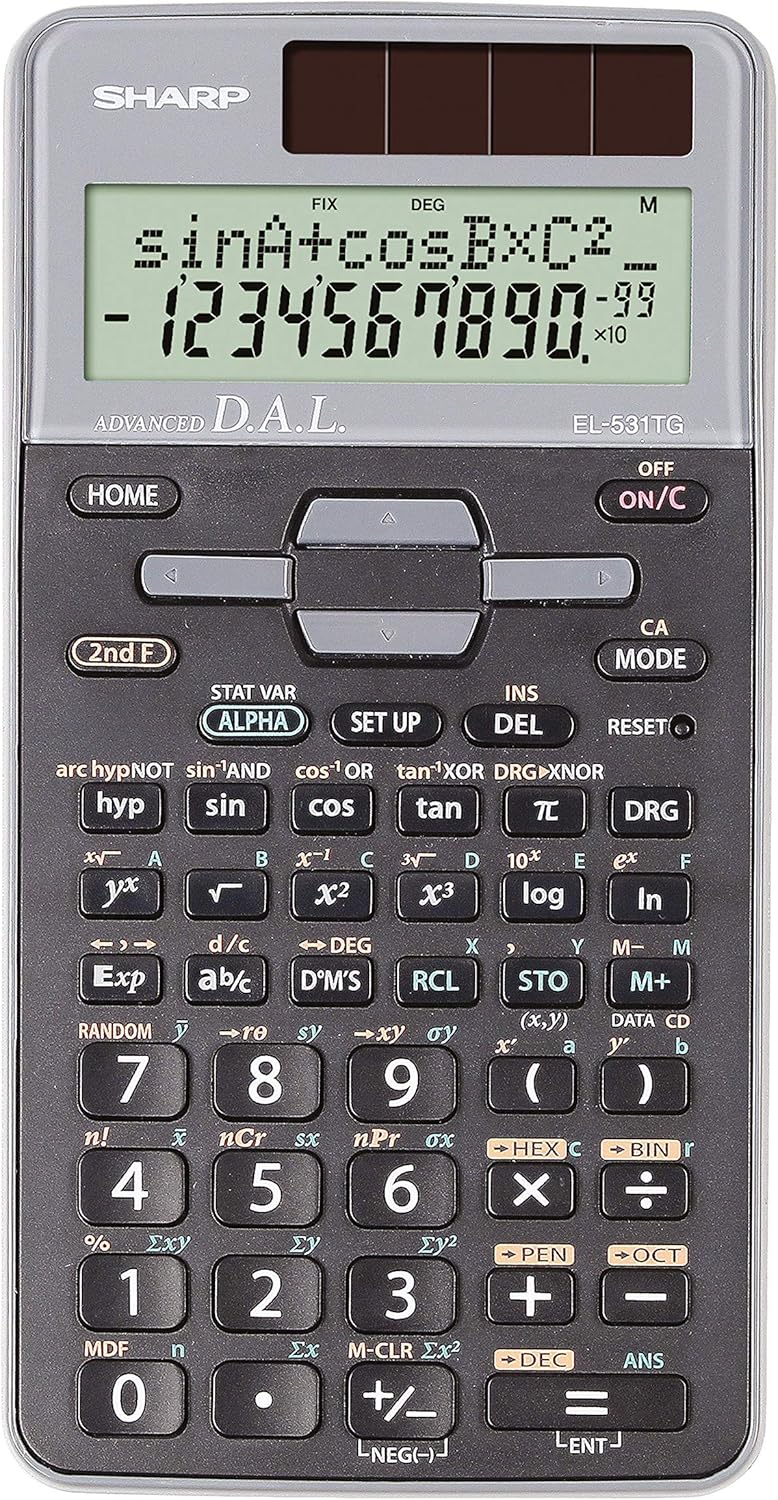
รูปที่ 1 : ด้านหน้า view of the Sharp EL-531TG-GY Scientific Calculator, showing the display, keypad, and solar panel.
2. การตั้งค่าและการใช้งานเบื้องต้น
2.1 แหล่งพลังงาน
The EL-531TG-GY calculator operates using both solar power and a single LR44 button cell battery. The solar panel provides power in well-lit environments, while the battery ensures operation in low-light conditions or when solar power is insufficient. An LR44 battery is included with the calculator.
2.2 การเปิด/ปิด
- เพื่อเปิดใช้งานเครื่องคิดเลข ON, กดปุ่ม เปิด/ปิด สำคัญ.
- เพื่อเปิดใช้งานเครื่องคิดเลข ปิด, กดปุ่ม ชั้น 2 เอฟ ตามด้วย ปิด key (which is typically the same as เปิด/ปิด).
2.3 Initial Display Settings
Upon first use or after a reset, the calculator will typically default to certain settings (e.g., DEG for angle units). Refer to Section 3.3 for details on changing mode settings.
3. คู่มือการใช้งาน
3.1 การดำเนินการทางคณิตศาสตร์พื้นฐาน
ป้อนตัวเลขโดยใช้แป้นพิมพ์ตัวเลข ใช้ +, -, ×, และ ÷ keys for addition, subtraction, multiplication, and division, respectively. Press = เพื่อให้ได้ผลลัพธ์
3.2 Scientific Functions
The calculator performs over 273 advanced scientific functions. Many functions are accessed by pressing the ชั้น 2 เอฟ กดปุ่มก่อนปุ่มฟังก์ชันที่ต้องการ
- ฟังก์ชันตรีโกณมิติ: ใช้ บาป, คอส, สีแทน. Inverse functions (sin⁻¹, cos⁻¹, tan⁻¹สามารถเข้าถึงได้ผ่านทาง ชั้น 2 เอฟ.
- ฟังก์ชันลอการิทึม: ใช้ บันทึก (ฐาน 10) และ ln (ลอการิทึมธรรมชาติ)
- พลังและรากเหง้า: ใช้ x², √, x³, ³√.
- เศษส่วน: ใช้ d/c key for fraction input and conversion.
3.3 Mode Settings (DEG/RAD/GRAD)
To change the angle unit mode (Degrees, Radians, Gradians):
- กดปุ่ม ดีอาร์จี สำคัญ.
- กดซ้ำๆ ดีอาร์จี to cycle through DEG (Degrees), RAD (Radians), and GRAD (Gradians). The current mode is indicated on the display.
3.4 ฟังก์ชันหน่วยความจำ
The calculator includes memory functions for storing and recalling values.
- STO (ร้านค้า): กด ส.ทีโอ followed by a variable key (e.g., A, B) to store the displayed value.
- RCL (การเรียกคืน): กด อาร์ซีแอล followed by the variable key to recall the stored value.
- M+ (เมมโมรี่พลัส): Adds the displayed value to the independent memory.
- M- (หน่วยความจำลบ): Subtracts the displayed value from the independent memory.
3.5 Multi-Line Playback
The 2-line display allows for Multi-Line Playback, enabling users to review previous calculations and expressions. Use the directional arrow keys (up/down) to scroll through past entries and results. This feature is useful for checking work or re-using parts of previous calculations.
4. การบำรุงรักษา
4.1 การทำความสะอาด
To clean the calculator, wipe the surface gently with a soft, dry cloth. Do not use abrasive cleaners, solvents, or excessive moisture, as these can damage the display or internal components.
4.2 การเปลี่ยนแบตเตอรี่
The calculator uses one LR44 button cell battery. If the display becomes dim or erratic in low-light conditions, the battery may need replacement. To replace the battery:
- ตรวจสอบให้แน่ใจว่าเครื่องคิดเลขปิดอยู่
- ค้นหาช่องใส่แบตเตอรี่ที่ด้านหลังของเครื่องคิดเลข
- เปิดฝาช่องเก็บของอย่างระมัดระวัง
- ถอดแบตเตอรี่ LR44 เก่าออกและใส่แบตเตอรี่ใหม่เข้าไป โดยตรวจสอบให้แน่ใจว่าขั้วถูกต้อง (+/-)
- ปิดฝาช่องใส่แบตเตอรี่ให้แน่น
4.3 พื้นที่จัดเก็บ
When not in use, store the calculator in a cool, dry place away from direct sunlight and extreme temperatures. The hard cover included with the calculator provides protection from scratches and minor impacts.
5 การแก้ไขปัญหา
5.1 ปัญหาการแสดงผล
- จอแสดงผลว่างหรือหรี่แสง: Ensure sufficient light for the solar panel. If the issue persists, replace the LR44 battery.
- Erratic Display: This may indicate a low battery. Replace the LR44 battery.
5.2 Incorrect Results
- Check Mode Settings: Verify that the angle unit (DEG, RAD, GRAD) is set correctly for trigonometric calculations.
- Input Error: Review your input using the Multi-Line Playback feature to ensure the expression was entered correctly.
- Memory Contents: If using memory functions, ensure the stored values are correct.
5.3 เครื่องคิดเลขไม่ตอบสนอง
หากเครื่องคิดเลขไม่ตอบสนอง ให้ลองทำการรีเซ็ต ค้นหา... รีเซ็ต button (often a small recessed button requiring a thin object like a paperclip to press). Pressing this button will clear all memory and return the calculator to its factory default settings.
6. ข้อมูลจำเพาะ

รูปที่ 2 : ด้านหน้า view of the Sharp EL-531TG-GY Scientific Calculator, illustrating its dimensions.
| คุณสมบัติ | คำอธิบาย |
|---|---|
| หมายเลขรุ่น | SH-EL531TGGY |
| ประเภทจอภาพ | 2-line LCD with Multi-Line Playback |
| ฟังก์ชั่น | ฟังก์ชันทางวิทยาศาสตร์ขั้นสูงกว่า 273 ฟังก์ชัน |
| แหล่งพลังงาน | Solar and 1 x LR44 battery (included) |
| วัสดุ | พลาสติก |
| ขนาด (กว้าง x ยาว x สูง) | 16.1 x 8 x 1.5 ซม. (โดยประมาณ) |
| น้ำหนัก | 100 ก. (โดยประมาณ) |

รูปที่ 3: ด้านข้าง view of the Sharp EL-531TG-GY Scientific Calculator, showing its slim profile.
7. การรับประกันและการสนับสนุน
7.1 ข้อมูลการรับประกัน
This product is covered by a manufacturer's warranty. Please refer to the warranty card included with your purchase or visit the official Sharp webเว็บไซต์สำหรับข้อกำหนดและเงื่อนไขการรับประกันโดยละเอียดที่เฉพาะเจาะจงกับภูมิภาคของคุณ
7.2 การสนับสนุนลูกค้า
For technical assistance, troubleshooting not covered in this manual, or service inquiries, please contact Sharp customer support. Contact information can typically be found on the Sharp official webไซต์หรือบนบรรจุภัณฑ์ผลิตภัณฑ์


