1. บทนำและเรื่องอื่นๆview
This manual provides essential information for the proper setup, operation, and maintenance of your LG OLED55E8PUA 55-Inch 4K Ultra HD Smart OLED TV. The LG OLED55E8PUA features a unique glass design, AI ThinQ with Intelligent Voice control, and is powered by the α9 (Alpha9) Intelligent Processor for enhanced picture quality. It supports major 4K high dynamic range formats including Dolby Vision, HDR10, and HLG, and delivers immersive Dolby Atmos audio.
For optimal performance and longevity, please read these instructions carefully before using your television.
2. อะไรอยู่ในกล่อง
เมื่อแกะกล่องแล้ว โปรดตรวจสอบให้แน่ใจว่ามีส่วนประกอบทั้งหมดดังต่อไปนี้:
- LG OLED55E8PUA 55-Inch 4K Ultra HD Smart OLED TV
- รีโมทคอนโทรลเมจิก
- ส่วนประกอบขาตั้งทีวี
- สายไฟ
- เอกสารประกอบ (คู่มือเริ่มต้นใช้งานฉบับย่อ, ข้อมูลด้านกฎระเบียบ)
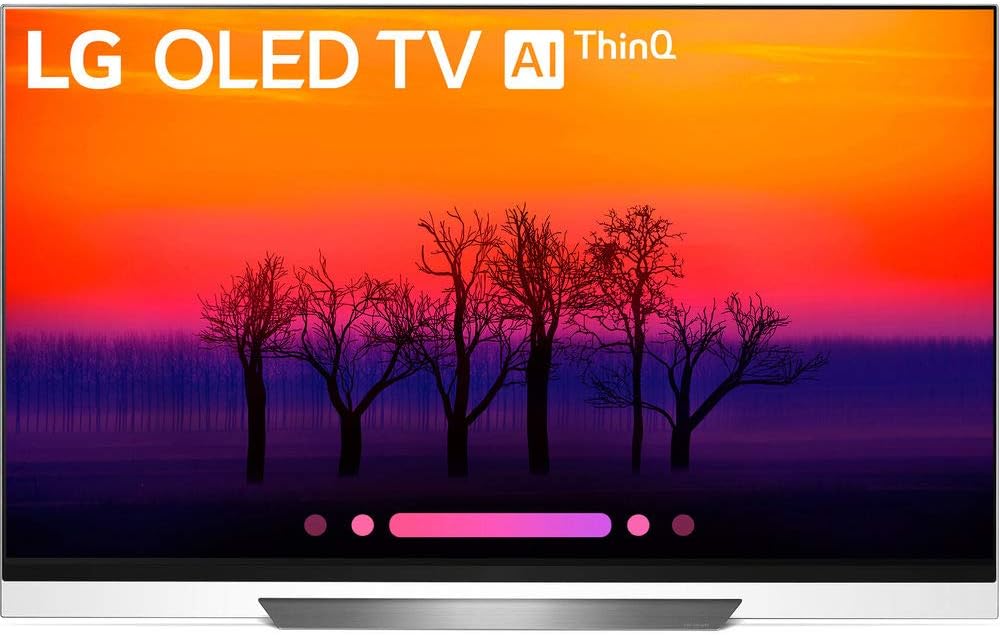
ภาพ: ด้านหน้า view of the LG OLED55E8PUA 55-inch TV, showcasing its sleek design and the 'LG OLED TV AI ThinQ' branding on the screen.
3. คำแนะนำในการตั้งค่า
3.1 TV Placement and Stand Assembly
Choose a stable, level surface for your TV. Ensure adequate ventilation around the unit. If using the included stand, carefully follow the assembly instructions provided in the separate Quick Start Guide. For wall mounting, consult a professional installer and use a VESA-compliant mount.

Image: Technical diagram illustrating the dimensions of the LG OLED55E8PUA TV, including width, height, and depth, both with and without the stand.
3.2 การเชื่อมต่อสายไฟ
Connect the power cable securely to the TV's power input and then to a grounded electrical outlet.
3.3 การตั้งค่าเริ่มต้นและการเชื่อมต่อ
- เปิดทีวีโดยใช้รีโมทคอนโทรล
- Follow the on-screen prompts to select your language, country, and time zone.
- Connect to your home network via Wi-Fi or Ethernet. The TV supports Wi-Fi and has an Ethernet port.
- หากคุณกำลังเชื่อมต่อเสาอากาศหรือสายเคเบิล ให้ทำการสแกนหาช่องสัญญาณก่อน
- Pair the LG Magic Remote as instructed on screen to enable voice control and pointer functions.
3.4 การเชื่อมต่ออุปกรณ์ภายนอก
Your TV is equipped with multiple input ports:
- ช่องต่อ HDMI: 4 ports for devices like Blu-ray players, game consoles, and set-top boxes.
- ยูเอสบี: 3 ports for connecting USB storage devices.
- RF: 1 port for antenna/cable connection.
- Composite In: 1 port for older video devices.
- อีเธอร์เน็ต: พอร์ต 1 พอร์ตสำหรับการเชื่อมต่อเครือข่ายแบบใช้สาย
- ออปติคอล: 1 พอร์ตสำหรับเอาต์พุตเสียงดิจิทัล
- RS232C (Mini Jack): 1 port for service or control systems.
Ensure Audio Return Channel (ARC) is supported via HDMI for compatible sound systems.
4. คู่มือการใช้งาน
4.1 Using the LG Magic Remote
The Magic Remote allows for intuitive control with its pointer, scroll wheel, and voice recognition features. Point the remote at the screen to move the cursor, use the scroll wheel to navigate menus, and press the microphone button to activate voice commands for searching content or controlling smart home devices.
Image: The LG Magic Remote, highlighting its ergonomic design and key buttons for navigation and voice control.
4.2 Smart TV Features (AI ThinQ)
Your LG OLED TV with AI ThinQ integrates the Google Assistant and is compatible with Amazon Alexa devices. Use voice commands through the Magic Remote to:
- ค้นหา ภาพยนตร์ รายการโทรทัศน์ หรือข้อมูลต่างๆ
- Control compatible smart home devices (e.g., lights, thermostats).
- Check weather, calendar, and other personal information.
4.3 การตั้งค่าภาพและเสียง
Access the TV's settings menu to customize your viewประสบการณ์การเรียนรู้และการฟัง:
- โหมดภาพ: Select from various presets (e.g., Standard, Cinema, Game) or customize settings like brightness, contrast, and color. The α9 Intelligent Processor optimizes sharpness, depth, and color accuracy.
- การตั้งค่า HDR: The TV supports 4K Cinema HDR, including Dolby Vision, HDR10, and HLG, with advanced tone-mapping for scene-by-scene optimization.
- โหมดเสียง: Choose audio presets or adjust equalizer settings. Experience immersive sound with built-in Dolby Atmos technology.
4.4 Accessing Apps and LG Channels
From the home screen, you can access a wide range of streaming applications and LG Channels, which offers free live and on-demand content. Navigate using the Magic Remote to browse and select your desired content.
5. คุณสมบัติหลัก
- เอไอ ธิงคิว: Integrated Google Assistant and Amazon Alexa compatibility for voice control of the TV and smart home devices.
- α9 Intelligent Processor: LG's most powerful processor, designed exclusively for OLED TVs, enhancing sharpness, depth, and color accuracy.
- Pixel Level Dimming: Each of the 8.3 million self-illuminating pixels can brighten, dim, or turn off completely, achieving perfect black and exceptional detail.
- 4K Cinema HDR: Comprehensive support for Dolby Vision, HDR10, and HLG, with LG's advanced tone-mapping for optimized picture quality.
- ระบบเสียง Dolby Atmos: Immersive audio technology that creates a three-dimensional sound experience.
- LG OLED Display: Features the latest panels with brighter, self-illuminating pixels for perfect black and intense color, bringing content to life.
- การเชื่อมต่อ: Equipped with 4 HDMI ports, 3 USB ports, 1 RF input, 1 Composite input, 1 Ethernet port, 1 Optical output, 1 RS232C (Mini Jack), and Bluetooth 4.2.
6. การบำรุงรักษา
6.1 การทำความสะอาดหน้าจอ
เช็ดหน้าจอเบาๆ ด้วยผ้าไมโครไฟเบอร์ที่นุ่มและแห้ง สำหรับรอยฝังแน่น ให้เช็ดเบาๆampชุบผ้าด้วยน้ำกลั่น หลีกเลี่ยงการใช้สารเคมีรุนแรง น้ำยาทำความสะอาดที่มีฤทธิ์กัดกร่อน หรือการฉีดน้ำยาลงบนหน้าจอโดยตรง
6.2 การดูแลทั่วไป
Keep the TV free from dust by regularly wiping the cabinet and vents with a soft, dry cloth. Ensure the ventilation openings are not blocked to prevent overheating. Avoid placing the TV in direct sunlight or near heat sources.
7 การแก้ไขปัญหา
หากคุณประสบปัญหาเกี่ยวกับทีวี โปรดดูวิธีแก้ไขทั่วไปต่อไปนี้:
- ไม่มีไฟฟ้า: Check if the power cable is securely connected to both the TV and the electrical outlet. Ensure the outlet is functioning.
- ไม่มีภาพ/เสียง: Verify that the correct input source is selected. Check all cable connections to external devices. Try restarting the TV and connected devices.
- ระยะไกลไม่ทำงาน: Replace the batteries in the Magic Remote. Ensure there are no obstructions between the remote and the TV. Re-pair the remote if necessary.
- ปัญหาการเชื่อมต่อเครือข่าย: Check your router and modem. Restart network equipment. Ensure Wi-Fi password is correct. Try connecting via Ethernet if Wi-Fi is unstable.
- การเก็บรักษาภาพ/การเบิร์นอิน: While LG OLED TVs have features to mitigate image retention, prolonged display of static images can cause temporary or permanent effects. Use screen saver functions and avoid leaving static images on screen for extended periods.
สำหรับรายละเอียดการแก้ไขปัญหาเพิ่มเติม โปรดศึกษาคู่มืออิเล็กทรอนิกส์ฉบับเต็มที่มีอยู่ในเว็บไซต์สนับสนุนของ LG webเว็บไซต์.
8. ข้อมูลจำเพาะ
| คุณสมบัติ | ข้อมูลจำเพาะ |
|---|---|
| ยี่ห้อ | LG |
| หมายเลขรุ่น | OLED55E8PUA |
| ขนาดหน้าจอ | 55 นิ้ว |
| เทคโนโลยีการแสดงผล | โอแอลอีดี |
| ปณิธาน | 4K Ultra HD (3840 x 2160) |
| อัตราการรีเฟรช | 120 เฮิรตซ์ |
| คุณสมบัติพิเศษ | จอแบน |
| เทคโนโลยีการเชื่อมต่อ | HDMI, Wi-Fi, Bluetooth (4.2) |
| อินพุต HDMI | 4 |
| พอร์ต USB | 3 |
| ขนาดสินค้า (รวมขาตั้ง) | ลึก 8.7 นิ้ว x กว้าง 48.3 นิ้ว x สูง 30.9 นิ้ว |
| น้ำหนักสินค้า | 64.6 ปอนด์ |
9. การรับประกันและการสนับสนุน
9.1 ข้อมูลการรับประกัน
Warranty terms and conditions for your LG OLED55E8PUA TV are typically provided with the product documentation or can be found on the official LG webไซต์ โปรดเก็บหลักฐานการซื้อไว้เพื่อใช้ในการเรียกร้องการรับประกัน
9.2 การสนับสนุนลูกค้า
For technical assistance, service requests, or further inquiries, please visit the official LG support website or contact LG customer service directly. Contact information can usually be found in your product documentation or on the LG webเว็บไซต์.