1. บทนำ
ขอบคุณสำหรับการซื้อasing the Sharp HT-SBW110 2.1 Bluetooth Soundbar System. This manual provides essential information for setting up, operating, and maintaining your soundbar system. Please read it thoroughly before use to ensure proper functionality and safety.
The HT-SBW110 is a powerful 2.1 channel soundbar system designed to enhance your audio experience, featuring 180W total RMS power, a dedicated wireless subwoofer, and versatile connectivity options including Bluetooth, HDMI ARC, Optical, and AUX inputs.

Figure 1.1: Sharp HT-SBW110 Soundbar and Subwoofer
This image displays the Sharp HT-SBW110 soundbar and its accompanying separate subwoofer, showcasinด้วยการออกแบบสีดำอันโฉบเฉี่ยว
2. เนื้อหาบรรจุภัณฑ์
กรุณาตรวจสอบว่าสินค้าทั้งหมดมีอยู่ในแพ็คเกจ:
- Sharp HT-SBW110 Soundbar
- ซับวูฟเฟอร์ไร้สาย
- รีโมทคอนโทรล
- สายไฟสำหรับซาวด์บาร์
- สายไฟสำหรับซับวูฟเฟอร์
- คู่มือการใช้งาน (เอกสารนี้)
- Batteries for Remote Control (1 x CR2)
3. ข้อมูลด้านความปลอดภัย
Always follow basic safety precautions when using this product to reduce the risk of fire, electric shock, or injury:
- อย่าให้เครื่องใช้ไฟฟ้านี้โดนน้ำหยดหรือน้ำกระเด็น
- ห้ามวางวัตถุที่บรรจุของเหลว เช่น แจกัน บนเครื่อง
- ตรวจสอบให้แน่ใจว่ามีการระบายอากาศที่เพียงพอ อย่าปิดกั้นช่องระบายอากาศใดๆ
- Do not place the soundbar or subwoofer near heat sources such as radiators, heat registers, stoves, or other apparatus (including ampเครื่องให้ความร้อน) ที่ผลิตความร้อน
- ใช้เฉพาะอุปกรณ์เสริม/สิ่งที่แนบที่ผู้ผลิตกำหนดเท่านั้น
- ถอดปลั๊กอุปกรณ์นี้ในระหว่างพายุฝนฟ้าคะนองหรือเมื่อไม่ได้ใช้งานเป็นเวลานาน
- ส่งต่อการบริการทั้งหมดไปยังบุคลากรบริการที่มีคุณสมบัติเหมาะสม
4. การตั้งค่า
4.1 การจัดวาง
ซาวด์บาร์: Place the soundbar on a flat, stable surface directly in front of your TV, centered for optimal sound dispersion. Ensure there are no obstructions in front of the soundbar's speakers.
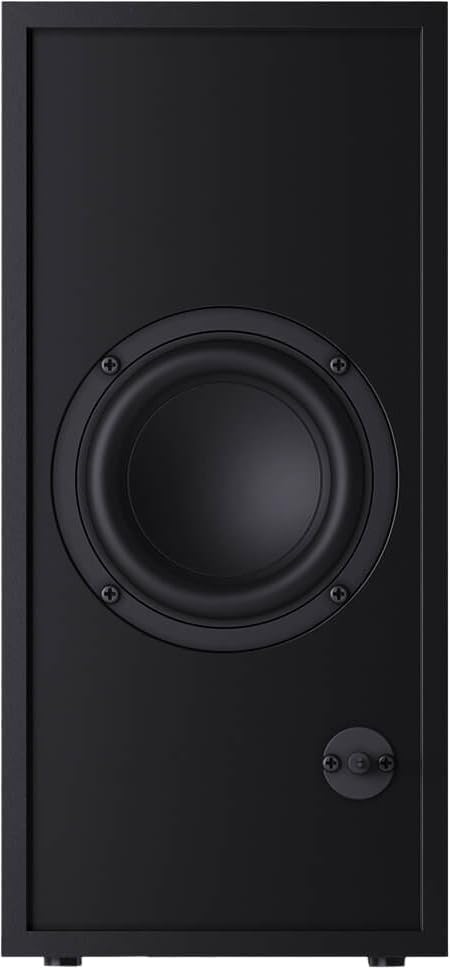
ซับวูฟเฟอร์: The wireless subwoofer can be placed anywhere in the room, ideally within 5-10 meters of the soundbar, for best bass response. Avoid placing it in enclosed spaces that might muffle the sound.
The soundbar is also wall-mountable. Refer to the included wall-mounting template (if provided) for proper installation.
4.2 การเชื่อมต่อ
Connect your soundbar to your TV or other audio sources using one of the following methods:

Figure 4.1: Soundbar Rear Panel Connections
This image shows the rear panel of the Sharp HT-SBW110 soundbar, highlighting the various input ports including HDMI ARC, Optical, and AUX.
- HDMI ARC (แนะนำ):
Connect an HDMI cable from the HDMI ARC port on your soundbar to the HDMI ARC port on your TV. This allows audio from your TV to be sent to the soundbar and enables control of the soundbar volume using your TV remote (if your TV supports HDMI CEC).
- ออปติคอล:
Connect an optical audio cable from the OPTICAL input on your soundbar to the optical digital audio output on your TV or other audio source.
- ช่องเสริม:
Connect a 3.5mm audio cable from the AUX input on your soundbar to the headphone jack or audio output of your device (e.g., smartphone, MP3 player).
- การเชื่อมต่อไฟฟ้า:
Connect the power cables to the soundbar and subwoofer, then plug them into a wall outlet (AC 220-240V, 50Hz).
The subwoofer will automatically pair with the soundbar once both are powered on. A blue indicator light on the subwoofer will confirm a successful connection.
5. คู่มือการใช้งาน
5.1 การควบคุมระยะไกลจบลงview
รูปที่ 5.1: รีโมทคอนโทรล
This image displays the sleek, minimalist remote control for the Sharp HT-SBW110 soundbar, showing its various buttons for power, input selection, volume, bass, treble, and EQ modes.
The remote control allows you to manage all functions of your soundbar system. Insert the provided CR2 battery into the remote control before first use.
- ปุ่มเพาเวอร์ (⏷): เปิด/ปิดซาวด์บาร์
- ปุ่มป้อนข้อมูล/แหล่งที่มา (↵): Switches between HDMI ARC, Optical, AUX, and Bluetooth inputs.
- เพิ่ม/ลดระดับเสียง (+/-): ปรับระดับเสียงหลัก
- ปุ่มปิดเสียง (🔇): ปิดเสียงหรือเปิดเสียง
- เบส +/-: Adjusts the bass level of the subwoofer.
- เสียงแหลม +/-: ปรับระดับเสียงแหลม
- ปุ่ม EQ: Cycles through preset equalizer modes: Music, Film, Talk.
- ปุ่มบลูทูธ (Ⓘ): เข้าสู่โหมดจับคู่บลูทูธ
5.2 การทำงานพื้นฐาน
- เปิด/ปิดเครื่อง: Press the Power button on the remote or on the soundbar's top panel.
- เลือกอินพุต: Press the Input/Source button repeatedly to cycle through available inputs (HDMI ARC, Optical, AUX, Bluetooth). The LED indicator on the soundbar will change color to indicate the selected input.
- ปรับระดับเสียง: Use the Volume +/- buttons on the remote or the soundbar to adjust the listening level.
- เปลี่ยนโหมด EQ: Press the EQ button to select between Music, Film, or Talk sound modes.
5.3 การจับคู่บลูทูธ
- Press the Input/Source button on the soundbar or remote until the Bluetooth input is selected (usually indicated by a blue LED).
- The soundbar will automatically enter pairing mode, and the Bluetooth LED will flash.
- บนอุปกรณ์บลูทูธของคุณ (สมาร์ทโฟน แท็บเล็ต ฯลฯ) เปิดใช้งานบลูทูธและค้นหาอุปกรณ์ที่มีอยู่
- Select "SHARP HT-SBW110" from the list of devices.
- Once paired, the Bluetooth LED on the soundbar will stop flashing and remain solid blue. You can now play audio from your device through the soundbar.
6. การบำรุงรักษา
- การทำความสะอาด: Use a soft, dry cloth to clean the surfaces of the soundbar and subwoofer. Do not use liquid cleaners or aerosol sprays.
- การระบายอากาศ : Ensure that the ventilation openings on the soundbar and subwoofer are not blocked by dust or debris.
- พื้นที่จัดเก็บ: หากจะเก็บเครื่องไว้เป็นเวลานาน ควรถอดปลั๊กออกจากเต้ารับไฟฟ้าและเก็บไว้ในที่แห้งและเย็น
7 การแก้ไขปัญหา
| ปัญหา | สาเหตุที่เป็นไปได้ | สารละลาย |
|---|---|---|
| ไม่มีไฟฟ้า | สายไฟไม่ได้เชื่อมต่อ เต้าเสียบไฟฟ้าไม่ทำงาน | Ensure power cables are securely connected to the soundbar, subwoofer, and wall outlet. Try a different outlet. |
| ไม่มีเสียง | เลือกอินพุตไม่ถูกต้อง ระดับเสียงต่ำเกินไป สายเคเบิลไม่ได้เชื่อมต่ออย่างถูกต้อง | Select the correct input source. Increase volume. Check all audio cable connections. Ensure TV audio output is set to external speakers. |
| การจับคู่บลูทูธล้มเหลว | ซาวด์บาร์ไม่ได้อยู่ในโหมดจับคู่ อุปกรณ์อยู่ไกลเกินไป มีสัญญาณรบกวน | Ensure soundbar is in Bluetooth pairing mode (flashing blue LED). Move device closer to soundbar. Avoid strong electromagnetic interference. Try unpairing and re-pairing. |
| รีโมตคอนโทรลไม่ทำงาน | แบตเตอรี่หมด; มีสิ่งกีดขวางระหว่างรีโมทและซาวด์บาร์ | Replace batteries. Ensure clear line of sight between remote and soundbar's IR receiver. |
If the problem persists, please refer to the Warranty and Support section for further assistance.
8. ข้อมูลจำเพาะ
| ช่องสัญญาณเสียง | 2.1 ช่อง |
| กำลัง RMS ทั้งหมด | 180 วัตต์ |
| Soundbar RMS Power | 30 วัตต์ |
| กำลังขับ RMS ของซับวูฟเฟอร์ | 30 วัตต์ |
| ช่วงความถี่ | 60 - 20000 เฮิรตซ์ |
| เทคโนโลยีการเชื่อมต่อ | มีสายและไร้สาย |
| เวอร์ชันบลูทูธ | 4.2 |
| พอร์ต HDMI | 1 (อาร์ค) |
| อินพุตเสียงออปติคัล | 1 |
| อินพุต AUX | ใช่ |
| อินพุต AC Voltage | 220 – 240 โวลต์ |
| ความถี่อินพุตไฟฟ้ากระแสสลับ | 50 เฮิรตซ์ |
| การใช้พลังงานโดยทั่วไป | 30 วัตต์ |
| การใช้พลังงานขณะสแตนด์บาย | 0.5 วัตต์ |
| Soundbar Dimensions (W x D x H) | 800 x 60 x 60 มม. (31.5 x 2.4 x 2.4 นิ้ว) |
| น้ำหนักซาวด์บาร์ | 1.3 กก. (2.9 ปอนด์) |
| Subwoofer Dimensions (W x D x H) | 150 x 320 x 220 มม. (5.9 x 12.6 x 8.7 นิ้ว) |
| น้ำหนักซับวูฟเฟอร์ | 2.7 กก. (6 ปอนด์) |
| สี | สีดำ |
| ติดผนังได้ | ใช่ |
| รีโมทคอนโทรล | รวมอยู่ด้วย |
| การรับรอง | CE (EMC), CB (Safety), ErP (Energy) |
9. การรับประกันและการสนับสนุน
This Sharp HT-SBW110 Soundbar System comes with a limited warranty. Please refer to the warranty card included in your package for specific terms and conditions.
Spare parts availability is guaranteed for 1 year from the date of purchase.
For technical support, troubleshooting beyond this manual, or warranty claims, please contact Sharp customer service or visit the official Sharp website for your region. Contact information can typically be found on the product packaging or Sharp's official webเว็บไซต์.


