การแนะนำ
This manual provides essential information for the safe and efficient operation of your Vonyx ST180 Portable Sound System. Please read these instructions carefully before use and retain them for future reference.
The Vonyx ST180 is a versatile, self-contained portable sound system featuring a 12-inch woofer, 450 Watts of power, Bluetooth connectivity, CD/MP3 player (USB/SD), and multiple microphone inputs. Its integrated battery, telescopic handle, and wheels make it suitable for various mobile applications.
คำแนะนำเพื่อความปลอดภัย
- แหล่งพลังงาน: ตรวจสอบให้แน่ใจว่าแหล่งจ่ายไฟตรงกับปริมาตรtage ที่ระบุไว้บนตัวเครื่อง ให้ใช้เฉพาะสายไฟที่ให้มาเท่านั้น
- น้ำและความชื้น: Do not expose the unit to rain or moisture to prevent electric shock or fire.
- การระบายอากาศ : ตรวจสอบให้แน่ใจว่ามีการระบายอากาศที่เพียงพอ อย่าปิดกั้นช่องระบายอากาศ
- ความร้อน: เก็บเครื่องให้ห่างจากแหล่งความร้อน เช่น หม้อน้ำ เครื่องทำความร้อน เตา หรืออุปกรณ์อื่นๆ ที่ผลิตความร้อน
- การทำความสะอาด: ถอดปลั๊กไฟออกก่อนทำความสะอาด ใช้ผ้าแห้งเท่านั้น
- การบริการ: อย่าพยายามซ่อมบำรุงเครื่องด้วยตนเอง แนะนำให้ช่างผู้ชำนาญการเป็นผู้ซ่อมบำรุงทุกครั้ง
- การดูแลแบตเตอรี่ For optimal battery life, fully charge the unit before first use and recharge regularly. Avoid complete discharge.
การตั้งค่า
1. การแกะกล่องและการตรวจสอบเบื้องต้น
Carefully remove the sound system and all accessories from the packaging. Inspect the unit for any signs of damage during transit. Retain the packaging for future transport or storage.
2. Power Connection and Battery Charging
Connect the provided power cable to the AC inlet on the rear panel of the unit and then to a suitable wall outlet. The internal battery will begin charging automatically. The "CHARGE" indicator light will illuminate during charging.

ภาพที่ 1: The Vonyx ST180 Portable Sound System with its telescopic handle extended, ready for transport. This image shows the overall design and portability features.

ภาพที่ 2: Rear panel connections of the Vonyx ST180, including the AC power inlet, external battery terminals, and RCA Line Out ports.
A full charge is recommended before the first use to maximize battery life. The unit can operate while charging.
3. การตั้งค่าไมโครโฟน
- ไมโครโฟนไร้สาย: Insert batteries into the two UHF wireless microphones. The system operates on 863.000 MHz and 865.000 MHz. Ensure the microphones are switched on. The "RF" indicator on the control panel will light up when a wireless microphone is connected.
- ไมโครโฟนแบบมีสาย: Connect the wired microphone to the 6.35mm MIC input jack on the control panel.
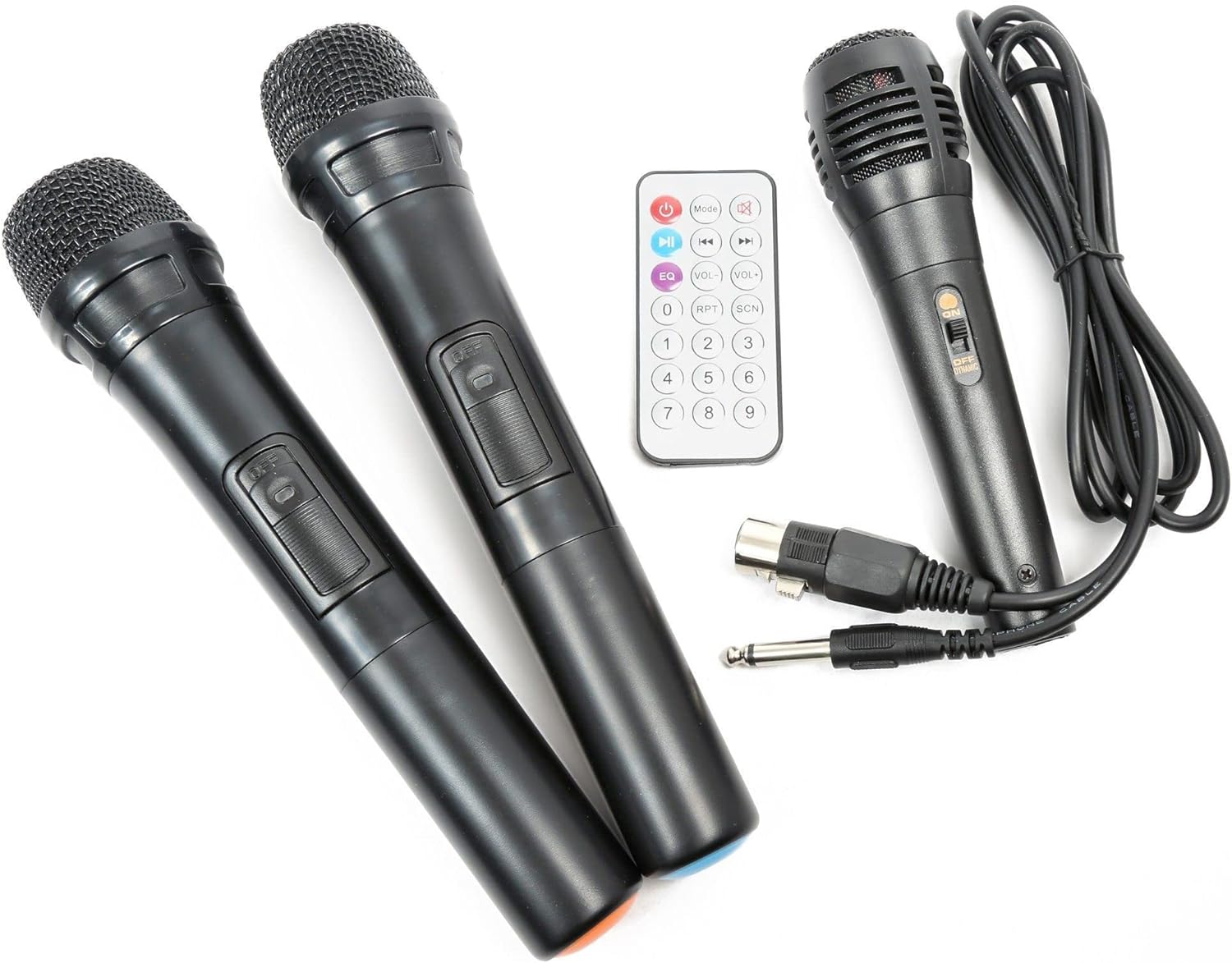
ภาพที่ 3: Included accessories: two UHF wireless microphones, one wired microphone, and the infrared remote control.
คำแนะนำการใช้งาน
1. การเปิด/ปิดเครื่อง
Locate the "POWER" switch on the control panel. Flip it to the "ON" position to power on the unit. Flip it to "OFF" to power down.

ภาพที่ 4: เกินview of the Vonyx ST180 control panel, featuring master volume, EQ controls, microphone inputs, and the integrated media player.
2. การเลือกแหล่งกำเนิดเสียง
The ST180 supports multiple audio sources:
- บลูทูธ:
- Press the "MODE" button on the media player or remote control until "BT" appears on the display.
- On your smartphone, tablet, or computer, enable Bluetooth and search for "VONYX".
- Select "VONYX" to pair. A confirmation tone will sound upon successful pairing.
- ตอนนี้คุณสามารถสตรีมเสียงแบบไร้สายจากอุปกรณ์ของคุณได้แล้ว
- CD/MP3 Player (USB/SD):
- Insert a CD into the CD slot, a USB drive into the USB port, or an SD card into the SD card slot.
- The unit will automatically detect the media and begin playback, or you may need to press the "MODE" button to select the correct source (USB or SD).
- Use the playback controls (Play/Pause, Next, Previous, Folder, Repeat, Shuffle) on the unit or remote control.
- Line Input (3.5mm Jack): Connect an external audio device (e.g., laptop, MP3 player) using a 3.5mm audio cable to the "LINE INPUT" jack. Select "LINE" mode if available, or ensure no other media is playing.
- External Audio Input (RCA): Connect devices with RCA outputs to the "LINE IN" RCA ports on the control panel.
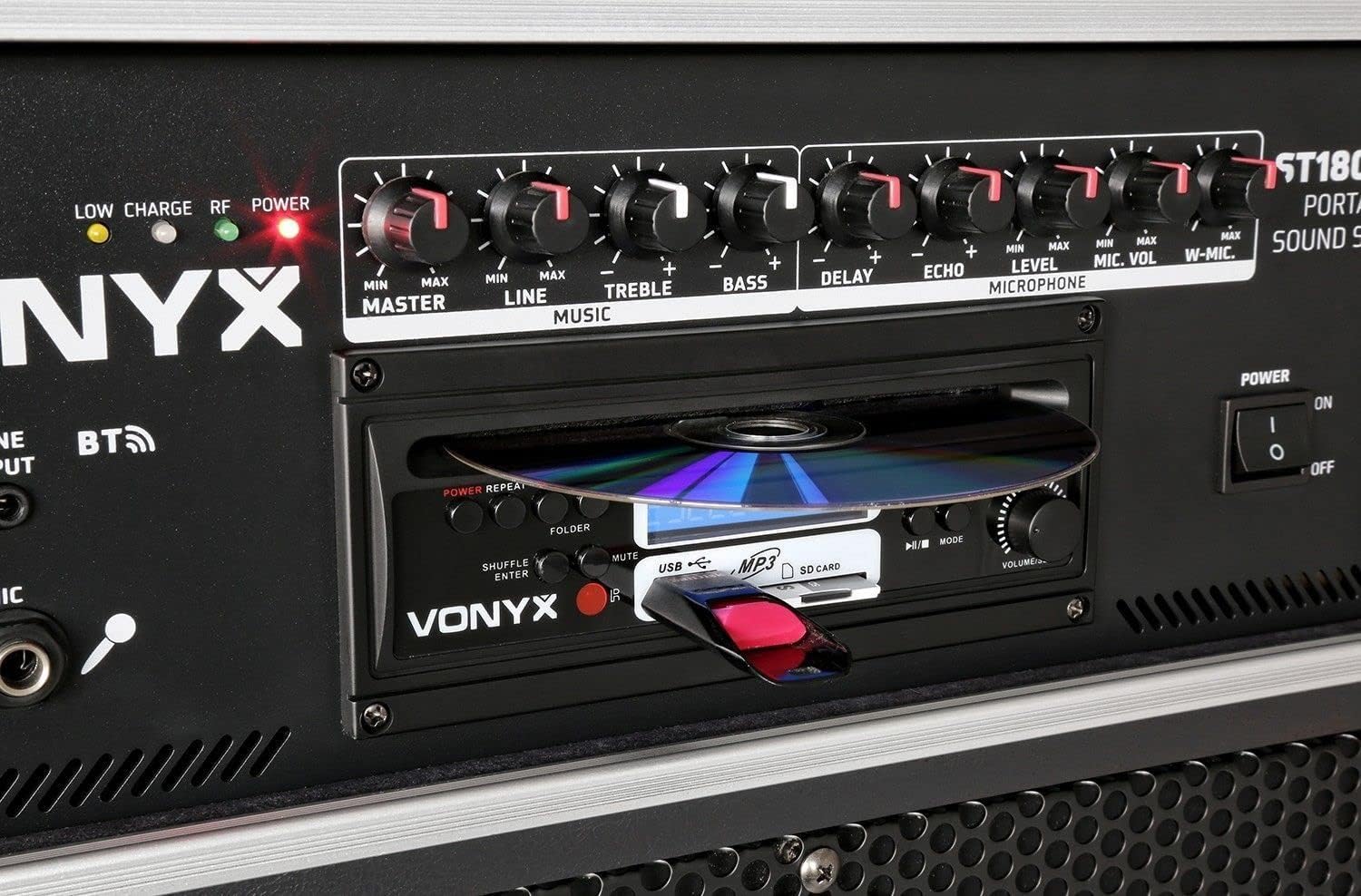
ภาพที่ 5: รายละเอียด view of the integrated media player, showing the CD tray, USB port, and SD card slot. A USB drive is inserted.
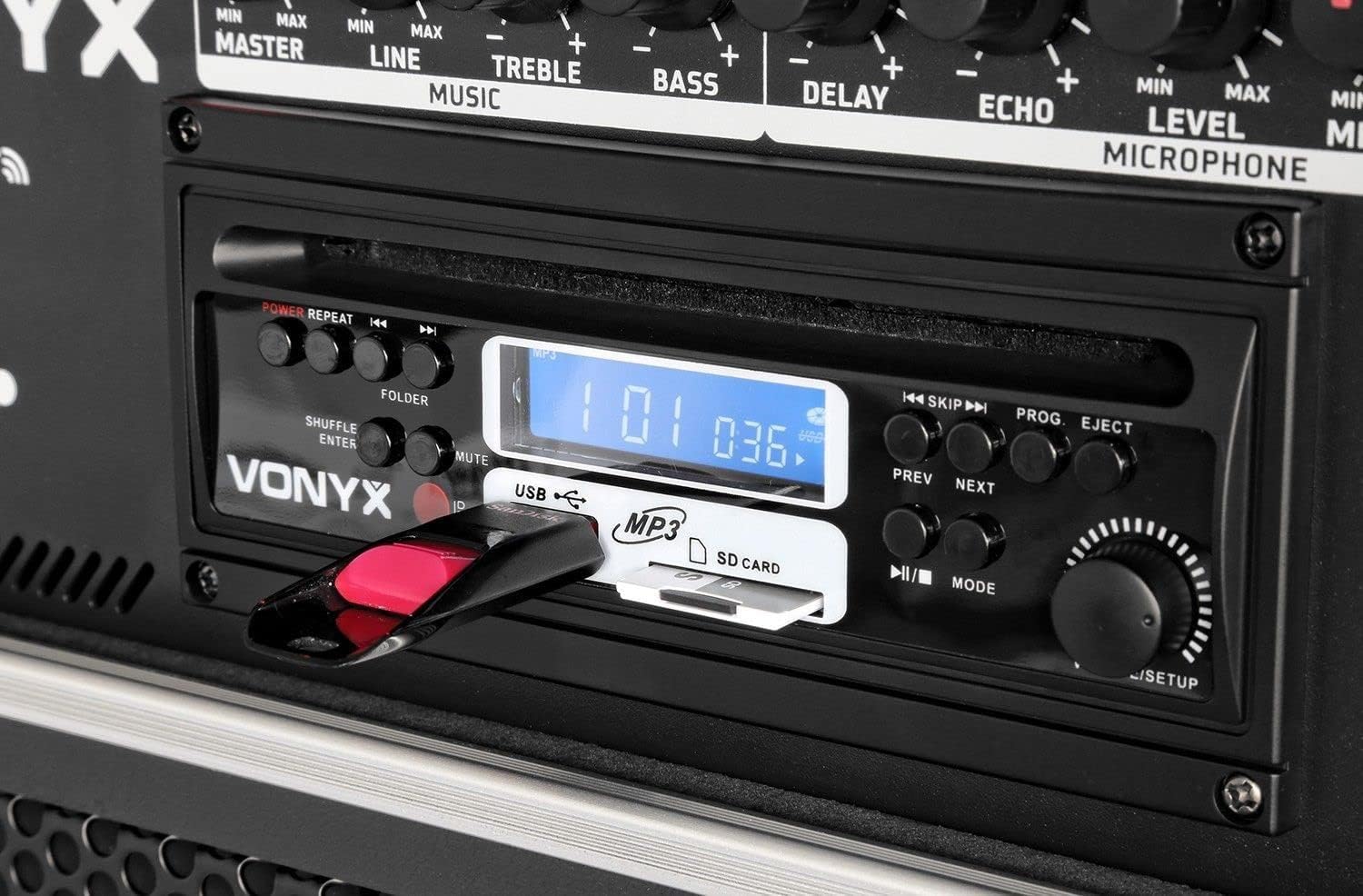
ภาพที่ 6: Close-up of the media player's control buttons and digital display, indicating playback status and selected source.
3. การใช้ไมโครโฟน
Adjust the microphone volume using the "MIC VOL" knob for wired microphones and "W-MIC" knob for wireless microphones. Use the "LEVEL" knob to fine-tune the microphone input sensitivity. Apply "DELAY" and "ECHO" effects as desired.
4. การควบคุมเสียง
- MASTER: Controls the overall output volume of the system.
- แอดไลน์ Adjusts the volume of the line input sources.
- เสียงแหลม: ปรับการตอบสนองความถี่สูง
- เบส: ปรับการตอบสนองความถี่ต่ำ
5. รีโมทคอนโทรล
The included infrared remote control allows for convenient operation of the media player functions (play, pause, track skip, mode selection) and volume adjustments from a distance.
การซ่อมบำรุง
- การทำความสะอาด: ใช้ผ้านุ่มและแห้งเช็ดทำความสะอาดภายนอกตัวเครื่อง ห้ามใช้น้ำยาทำความสะอาดที่มีฤทธิ์กัดกร่อนหรือตัวทำละลาย
- การจัดเก็บแบตเตอรี่: If storing the unit for an extended period, ensure the battery is partially charged (around 50%) and recharge it every few months to prevent deep discharge.
- การขนส่ง: When moving the unit, utilize the telescopic handle and wheels. Exercise caution on uneven surfaces.
การแก้ไขปัญหา
| ปัญหา | สาเหตุที่เป็นไปได้ | สารละลาย |
|---|---|---|
| ไม่มีไฟฟ้า | Power cable disconnected; unit switched off; battery depleted. | Check power cable connection; ensure power switch is ON; charge the battery. |
| ไม่มีเสียงออก | Master volume too low; incorrect input selected; audio source not playing. | Increase MASTER volume; select correct input mode; ensure audio source is playing and its volume is up. |
| ไมโครโฟนไม่ทำงาน | Microphone switched off; batteries depleted (wireless); MIC/W-MIC volume too low; incorrect frequency (wireless). | Switch microphone ON; replace batteries; increase MIC/W-MIC volume; ensure wireless microphones are on correct frequencies (863.000 MHz / 865.000 MHz). |
| บลูทูธไม่จับคู่ | Unit not in Bluetooth mode; device too far; previously paired with another device. | Select "BT" mode; ensure device is within range; disconnect from other Bluetooth devices and try pairing again. |
| CD/USB/SD not playing | Incorrect media format; media not inserted correctly; media player mode not selected. | Ensure media is in supported format (MP3); re-insert media; select correct mode (CD, USB, or SD). |
ข้อมูลจำเพาะ
| ยี่ห้อ | วอนิกซ์ |
| หมายเลขรุ่น | 170.013 |
| กำลังขับ | 450 วัตต์ |
| ขนาดวูฟเฟอร์ | 12 นิ้ว |
| จำนวนช่องสัญญาณ | 2 |
| อินพุตเสียง | USB, SD/MMC, Bluetooth, 6.3mm Jack (Microphone), 3.5mm Jack (External Audio), RCA Line In |
| เอาท์พุตเสียง | RCA Stereo Line Out |
| ความถี่ไมโครโฟนไร้สาย | 863.000 เมกะเฮิรตซ์, 865.000 เมกะเฮิรตซ์ |
| การตอบสนองความถี่ | สูงถึง 20,000 เฮิรตซ์ |
| แบตเตอรี่แบบชาร์จไฟได้ | 12V/4.5Ah (Integrated) |
| เทคโนโลยีการเชื่อมต่อ | บลูทูธ, ยูเอสบี |
| คุณสมบัติพิเศษ | Bluetooth, USB Port, Portable, CD Player, SD Card Slot, Telescopic Handle, Wheels |
| ขนาด (กว้าง x ยาว x สูง) | 32 x 43 x 76 ซม. |
| น้ำหนักสินค้า | 32.7 กิโลกรัม |
| วัสดุ | ไนลอน |
| แหล่งพลังงาน | AC and Battery Combination |
| ประเภทการติดตั้ง | ขั้วโลกเมา |
การรับประกันและการสนับสนุน
For warranty information and technical support, please refer to the documentation provided with your purchase or visit the official Vonyx webไซต์ เก็บหลักฐานการซื้อของคุณไว้เพื่อใช้ในกรณีเรียกร้องการรับประกัน
ผู้ผลิต: วอนนิกซ์
ข้อมูลติดต่อ: Please refer to the Vonyx official website or your retailer for the most up-to-date support contact details.


