การแนะนำ
ขอบคุณสำหรับการซื้อasinคู่มือนี้ให้ข้อมูลสำคัญสำหรับการใช้งานระบบเสียงพกพา VONYX SPX-PA9210 อย่างปลอดภัยและมีประสิทธิภาพ โปรดอ่านอย่างละเอียดก่อนใช้งานและเก็บรักษาไว้เพื่อใช้อ้างอิงในอนาคต
คำแนะนำเพื่อความปลอดภัย
- อ่านคำแนะนำทั้งหมดอย่างละเอียดก่อนใช้งานอุปกรณ์
- เก็บเครื่องให้ห่างจากน้ำ ความชื้น และอุณหภูมิที่สูงหรือต่ำมาก
- อย่าเปิดcasinง. ส่งต่อการบริการทั้งหมดให้กับบุคลากรที่มีคุณสมบัติ
- ใช้เฉพาะอะแดปเตอร์แปลงไฟที่ระบุไว้สำหรับการชาร์จเท่านั้น
- ตรวจสอบให้แน่ใจว่ามีการระบายอากาศที่เหมาะสมเพื่อป้องกันภาวะความร้อนมากเกินไป
- หลีกเลี่ยงการสัมผัสกับระดับเสียงสูงเป็นเวลานานเพื่อป้องกันความเสียหายต่อการได้ยิน
เนื้อหาแพ็คเกจ
ตรวจสอบว่ามีรายการทั้งหมดอยู่ในแพ็คเกจ:
- ชุดเครื่องเสียงพกพา VONYX SPX-PA9210
- ไมโครโฟนไร้สาย UHF 2 ตัว
- อะแดปเตอร์ไฟ/สายชาร์จ
- คู่มือการใช้งาน (เอกสารนี้)
สินค้าเกินview
VONYX SPX-PA9210 เป็นระบบเสียงพกพาที่ออกแบบมาสำหรับการใช้งานด้านเสียงหลากหลายรูปแบบ มีลำโพงในตัว ตัวเลือกการเล่นสื่อ และไมโครโฟนไร้สายเพื่อการใช้งานที่หลากหลาย
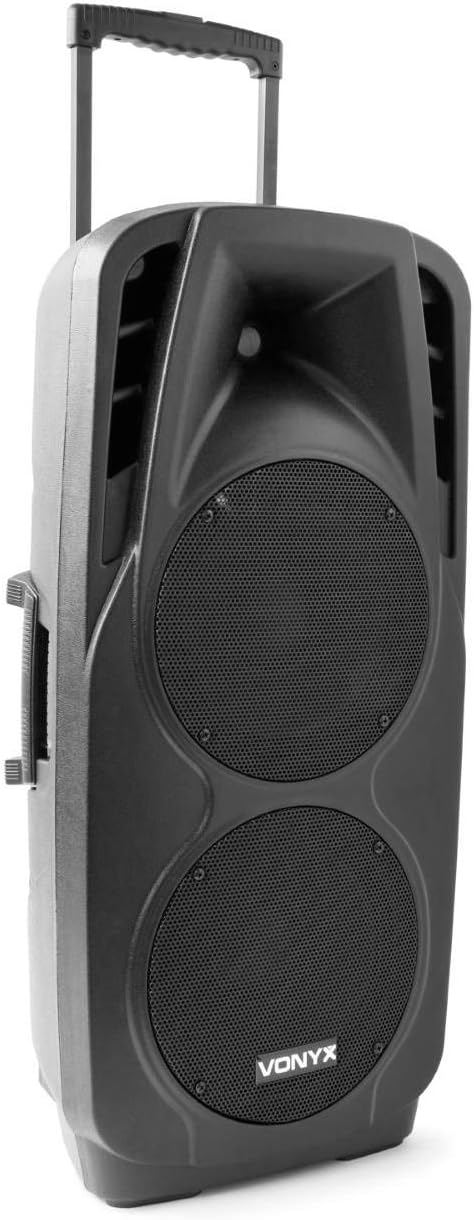
ภาพแสดงระบบเสียงพกพา VONYX SPX-PA9210 มีตัวเครื่องสีดำasinมีช่องลำโพงขนาดใหญ่สองช่องอยู่ด้านหน้า และด้ามจับแบบพับเก็บได้ที่ด้านบนเพื่อความสะดวกในการพกพา นอกจากนี้ยังมีด้ามจับด้านข้างให้เห็นอีกด้วย
คุณสมบัติหลัก:
- ลำโพงขนาด 10 นิ้ว 2 ตัว พร้อมตัวควบคุมทวีตเตอร์ไทเทเนียมในตัว
- เครื่องเล่นมีเดียในตัว พร้อมช่องเสียบ USB และการ์ด SD/MMC
- การเชื่อมต่อบลูทูธสำหรับการสตรีมเสียงแบบไร้สาย
- แบตเตอรี่แบบชาร์จไฟได้ประสิทธิภาพสูง 12V/7A ใช้งานได้ต่อเนื่อง 4-6 ชั่วโมง
- ไมโครโฟนไร้สาย UHF สองตัว ระยะการใช้งานสูงสุด 50 เมตร
- รถเข็นแบบพับได้พร้อมด้ามจับแบบยืดหดได้และล้อเพื่อความสะดวกในการเคลื่อนย้าย
- หน้าจอ LCD สำหรับแสดงข้อมูลสื่อ
การตั้งค่า
1. การชาร์จครั้งแรก
ก่อนใช้งานครั้งแรก โปรดชาร์จแบตเตอรี่ภายใน 12V/7A ให้เต็ม เชื่อมต่ออะแดปเตอร์แปลงไฟที่ให้มากับพอร์ตชาร์จบนระบบ PA แล้วเสียบเข้ากับเต้ารับไฟฟ้าที่เหมาะสม ตัวแสดงสถานะการชาร์จจะแสดงสถานะการชาร์จ การชาร์จเต็มหนึ่งครั้งโดยทั่วไปจะใช้งานได้ 4-6 ชั่วโมง
2. การเปิด/ปิดเครื่อง
- ในการเปิดเครื่อง ให้หาปุ่มเปิด/ปิด (โดยปกติจะอยู่ด้านหลังหรือแผงควบคุม) และเลื่อนไปที่ตำแหน่ง "เปิด"
- หากต้องการปิดเครื่อง ให้เลื่อนสวิตช์ไปที่ตำแหน่ง "ปิด"
3. การตั้งค่าไมโครโฟน
- ใส่แบตเตอรี่ใหม่ลงในไมโครโฟนไร้สาย UHF ทั้งสองตัว
- เปิดไมโครโฟน ไมโครโฟนจะเชื่อมต่อกับระบบเสียงประกาศอัตโนมัติ
- ปรับระดับเสียงไมโครโฟนบนแผงควบคุมของระบบ PA ระยะการใช้งานไร้สายสูงสุด 50 เมตร
คำแนะนำการใช้งาน
1. การเล่นสื่อ (USB/SD/MMC)
- เสียบแฟลชไดรฟ์ USB หรือการ์ด SD/MMC ลงในช่องเสียบที่ตรงกันบนแผงควบคุม
- ระบบจะตรวจจับสื่อและเริ่มเล่นโดยอัตโนมัติ หรือคุณอาจต้องเลือกแหล่งสัญญาณเข้าโดยใช้ปุ่ม "โหมด"
- ใช้ปุ่มควบคุมการเล่น (เล่น/หยุดชั่วคราว, ถัดไป, ก่อนหน้า) บนแผงควบคุมเพื่อจัดการเพลงของคุณ
- หน้าจอ LCD จะแสดงข้อมูลเส้นทาง
2. การจับคู่บลูทู ธ
- กดปุ่ม "Mode" บนระบบ PA จนกระทั่งเลือก "Bluetooth"
- บนสมาร์ทโฟน แท็บเล็ต หรืออุปกรณ์อื่นๆ ที่เปิดใช้งาน Bluetooth ของคุณ ให้เปิดใช้งาน Bluetooth และค้นหาอุปกรณ์ที่มีอยู่
- เลือก "VONYX SPX-PA9210" (หรือชื่อที่คล้ายกัน) จากรายการเพื่อจับคู่
- เมื่อจับคู่แล้ว คุณสามารถสตรีมเสียงแบบไร้สายจากอุปกรณ์ของคุณไปยังระบบ PA ได้
3. การควบคุมระดับเสียงและโทนเสียง
- ปรับปุ่มปรับระดับเสียงหลักเพื่อควบคุมระดับเสียงโดยรวม
- มีปุ่มปรับระดับเสียงแยกต่างหากสำหรับไมโครโฟนและการเล่นสื่อ
- ใช้ปุ่มควบคุมเสียงเบสและเสียงแหลม (ถ้ามี) เพื่อปรับโทนเสียง
การซ่อมบำรุง
1. การทำความสะอาด
เช็ดทำความสะอาดภายนอกตัวเครื่องด้วยผ้าแห้งเนื้อนุ่ม ห้ามใช้สารทำความสะอาดที่มีฤทธิ์กัดกร่อนหรือตัวทำละลาย ตรวจสอบให้แน่ใจว่าไม่มีของเหลวเข้าไปในตัวเครื่อง
2. การดูแลแบตเตอรี่
- เพื่อยืดอายุการใช้งานแบตเตอรี่ ควรหลีกเลี่ยงการปล่อยแบตเตอรี่จนหมดบ่อยครั้ง
- ควรชาร์จเครื่องเป็นประจำ แม้ว่าจะไม่ได้ใช้งาน เพื่อรักษาอายุการใช้งานของแบตเตอรี่
- ควรเก็บเครื่องไว้ในที่แห้งและเย็นเมื่อไม่ได้ใช้งานเป็นเวลานาน
การแก้ไขปัญหา
- ไม่มีไฟฟ้า: ตรวจสอบให้แน่ใจว่าได้ชาร์จแบตเตอรี่หรือเชื่อมต่อกับแหล่งจ่ายไฟแล้ว และสวิตช์เปิด/ปิดอยู่ในตำแหน่ง "เปิด"
- ไม่มีเสียง: ตรวจสอบการควบคุมระดับเสียงทั้งหมด (หลัก, ไมโครโฟน, เครื่องเล่นมีเดีย) ตรวจสอบให้แน่ใจว่าได้เลือกแหล่งสัญญาณเข้าที่ถูกต้องแล้ว ตรวจสอบแบตเตอรี่ไมโครโฟน
- บลูทูธไม่เชื่อมต่อ: ตรวจสอบให้แน่ใจว่าระบบ PA อยู่ในโหมด Bluetooth และสามารถค้นหาได้ ปิดและเปิด Bluetooth บนอุปกรณ์ของคุณ แล้วลองจับคู่ใหม่อีกครั้ง ขยับเข้าไปใกล้ระบบ PA มากขึ้น
- เสียงผิดเพี้ยน: ลดระดับเสียงลง ตรวจสอบสายสัญญาณเสียงหากใช้สายเชื่อมต่อ ตรวจสอบให้แน่ใจว่าไมโครโฟนไม่ได้อยู่ใกล้ลำโพงมากเกินไป (เพื่อป้องกันเสียงสะท้อน)
ข้อมูลจำเพาะ
| ยี่ห้อ | วอนิกซ์ |
| หมายเลขรุ่น | Sky-170.082 (SPX-PA9210) |
| ขนาด (กว้าง x ยาว x สูง) | 27 x 38.5 x 81 ซม. |
| น้ำหนัก | 16.25 กก. |
| เทคโนโลยีการเชื่อมต่อ | บลูทูธ, ยูเอสบี |
| คำแนะนำการใช้งานผลิตภัณฑ์ | สมาร์ทโฟนหรือแท็บเล็ต |
| คุณสมบัติพิเศษ | บลูทูธ, พอร์ต USB, พกพาได้, หน้าจอ LCD |
| แหล่งพลังงาน | ไร้สาย (แบตเตอรี่ภายใน) |
| แบตเตอรี่ | 12V/7A, ใช้งานได้นาน 4-6 ชั่วโมง |
| วัสดุ | อะคริโลไนไตรล์ บิวทาไดอีน สไตรีน (ABS) |
| จำนวนช่องสัญญาณ | 5 |
| ลำโพง | ลำโพงวูฟเฟอร์ขนาด 10 นิ้ว 2 ตัว, ตัวควบคุมทวีตเตอร์ไทเทเนียม |
| ไมโครโฟน | ไมโครโฟนไร้สาย UHF 2 ตัว (ระยะการใช้งานสูงสุด 50 เมตร) |
การรับประกันและการสนับสนุน
สำหรับข้อมูลการรับประกันและการสนับสนุนทางเทคนิค โปรดดูเอกสารที่แนบมาพร้อมกับสินค้าที่ซื้อ หรือติดต่อฝ่ายบริการลูกค้าของ VONYX โดยตรง
ความพร้อมของอะไหล่: ข้อมูลเกี่ยวกับความพร้อมจำหน่ายของชิ้นส่วนอะไหล่สำหรับผลิตภัณฑ์นี้ยังไม่พร้อมให้บริการในขณะนี้
การอัปเดตซอฟต์แวร์: ขณะนี้ยังไม่มีข้อมูลเกี่ยวกับการรับประกันการอัปเดตซอฟต์แวร์สำหรับผลิตภัณฑ์นี้


